
 Worksheets
Setting Character Position
Total questions: 10
Worksheet time: 5mins
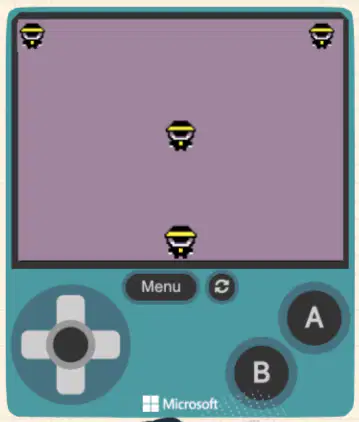
What is the default position of a character when it is first created?
At the bottom left of the screen
At the top right of the screen
In the middle of the screen
At coordinates (0, 0)
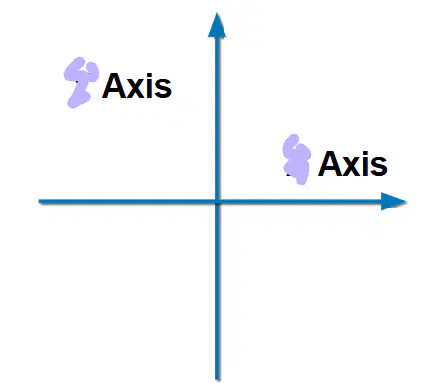
What system is used to define the position of a character on the screen?
Polar coordinates
X & Y coordinate system
Color coordinate system
3D grid system
In the X & Y coordinate system, which axis represents the vertical position?
X-Axis
Y-Axis
Z-Axis
None of the above
Which coordinate comes first when setting a character’s position?
Y then X
Vertical then Horizontal
It doesn’t matter
X then Y
What happens if a character’s position is set to (0, 0)?
The character is centered on the screen
The character moves to the top right corner
The character is placed outside the screen
The character becomes invisible
What is the effect of setting the character's position to (10, 10)?
The character will disappear
The character will move to the center
The character will be displayed completely
The character will move to the top left
Which of the following is a step in setting a character's position in Scratch or a similar program?
Look for the "Stage" category
Look for the "Sprite" category
Look for the "Background" category
Look for the "Sound" category
What does the coordinate (80, 60) represent?
X = 80, Y = 60
X = 60, Y = 80
X = 0, Y = 0
X = 100, Y = 100
What is the importance of the coordinate system in setting a character’s position?
It helps control the color of the character
It allows precise positioning of the character on the screen
It is used for setting the character's size
It helps set the character's animation
When adjusting a character’s position, which section should you look under for the “Set position to X & Y” block?
Control
Motion
Physics
Looks

