
 Worksheets
Fundamentals of Computing
Total questions: 50
Worksheet time: 32mins

Name this component
Central Processing Unit
Power Supply Unit
Video Card
Computer Case
Name this component
Central Processing Unit
Power Supply Unit
Video Card
Computer Case

What computer part is this?
Motherboard
Central Processing Unit
Power Supply Unit
Video Card

What computer part is this?
Motherboard
Central Processing Unit
Power Supply Unit
Video Card
True or False: The CPU is located outside the computer.
True
False

What computer component goes inside the square in the middle?
Motherboard
Central Processing Unit
Power Supply Unit
Video Card

This component is described as the Brain of the Computer.
Motherboard
Central Processing Unit
Power Supply Unit
Video Card

What computer part is this?
Computer Case
Central Processing Unit
Power Supply Unit
Video Card
This is a high capacity, data storage device. Information is NOT erased when the computer is turned off
Hard drive
RAM
Operating system
Modem
This device converts analog audio signals into audible sounds.
Sound card
Speakers
Hard drive
Memory
This is an electronic device that shows the display/picture for a computer.
Video card
Optical drive
Monitor
Hard drive
What are the physical components of a computer system called?
Hardware
Software

What is this component called?
Hard Drive
Graphics Card
Motherboard
Power Supply Unit (PSU)

What is this component called?
Fidget Spinner
Fan
Heat Sink
Cooler
What does PSU stand for?
Power Standard Units
Power Supply Unit
Power Station Unit
Processor Supply Unit
What does RAM stand for?
Read And Merge
Read Always Memory
Recent Accessed Memory
Random Access Memory
This storage device stores data permanently.
RAM Chip
ROM Chip
Hard Disk Drive
CPU
What does RAM stand for?
Read And Merge
Read Always Memory
Recent Accessed Memory
Random Access Memory

What type of device is this? (Printer)
Input
Output
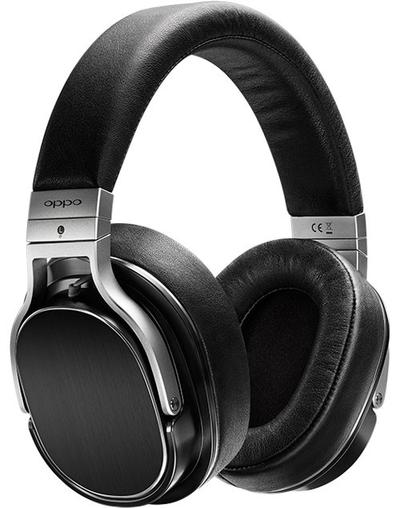
What type of device is this? (Headphones)
Input
Output

What type of device is this? (Microphone)
Input
Output

What type of device is this? (Mouse)
Input
Output

What type of device is this? (Smartphone screen)
Input
Output
Input and Output
___________ is the information computers give to users, devices or other computers.
Processing
Output
Input
Storage
What is the piece of computer hardware used to input text, characters, and other commands into a computer or similar device
Letter Keys
Numeric Keypad
Keyboard
Key

Keyboards and a mouse are both examples of
input devices
output devices
storage devices
processing devices
True or False: External hardware includes: monitors, keyboards, mouse, printers, and scanners.
True
False
_______ is information that is saved on the app to use in the future.
Processing
Output
Input
Storage
What can a "file" contain?
pictures
documents
executable programs
A file can contain all of these.
Which of the following file extensions indicates a picture file?
mp3
mp4
jpg
html
What file management command would you use in order to make a duplicate version of a file in a different diractory?
Move
Delete
Copy
Rename
An unwanted program running on a computer is called a ___________.
Pain
Sickness
Virus
Encryption
Can a WORD file can be attached to an e-mail message?
Yes
No
Depends on what type of Word File
Only to select email adresses
Fingers in the keying position are best described as
curved
straight
smi rigid
straight

