
 Worksheets
Canon T6/7 Camera Test #1
Total questions: 25
Worksheet time: 18mins

#2 is named this....
Focal Point
Monitor
Viewfinder
Eye Cup

The purpose of this is to cover the eyepiece on your camera
1
14
2
15

You can view ISO, white balance, exposure, and others with #3.
CLD Monitor
DLC Monitor
LDC Monitor
LCD Monitor

To access your settings, you must push this button.
4
5
10
11

Allows you to view your photos
3
5
7
2
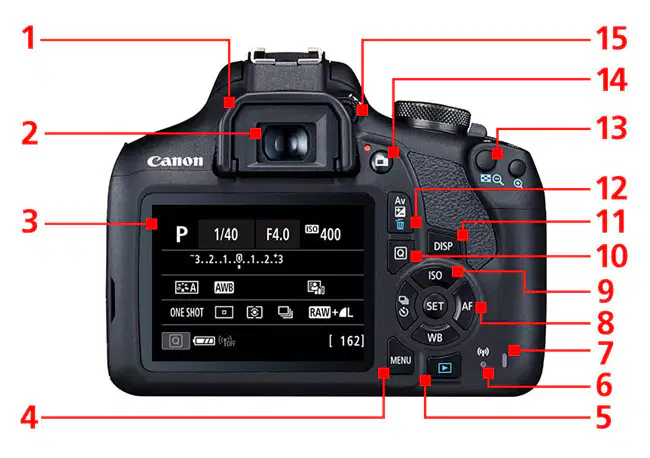
If you were connected to WiFi, you would know it due to this #.
7
6
5
14
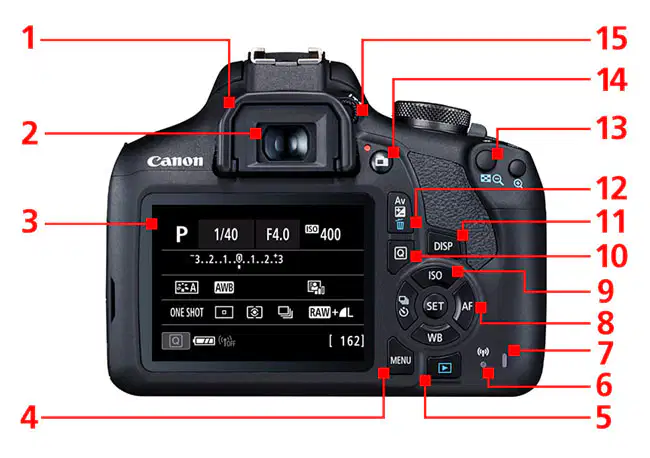
You should NEVER open the door to change a battery or remove an SD card while this is RED!
6
7
8
9
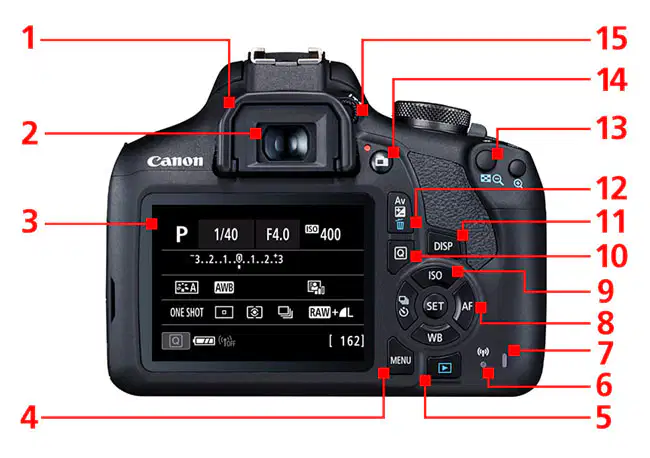
Choose this button to select AI Servo or AI Focus.
11
12
4
8

International Organization for Standardization, or how sensitive your "film" is.
3
9
10
11
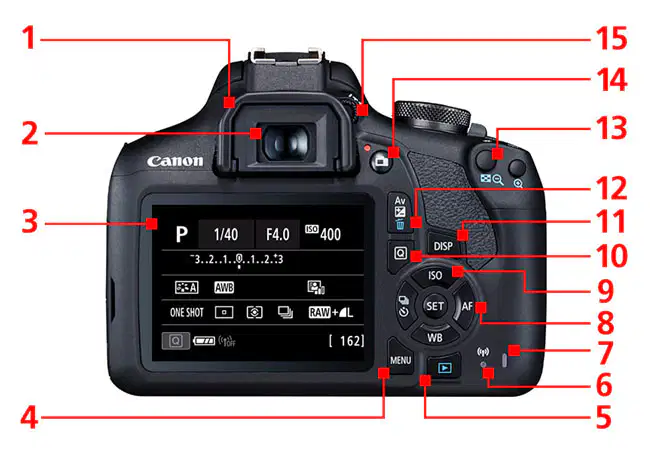
After pressing the Quick Control button, you can change/adjust the following...
T(v)
Exposure
AF Mode
Light Metering
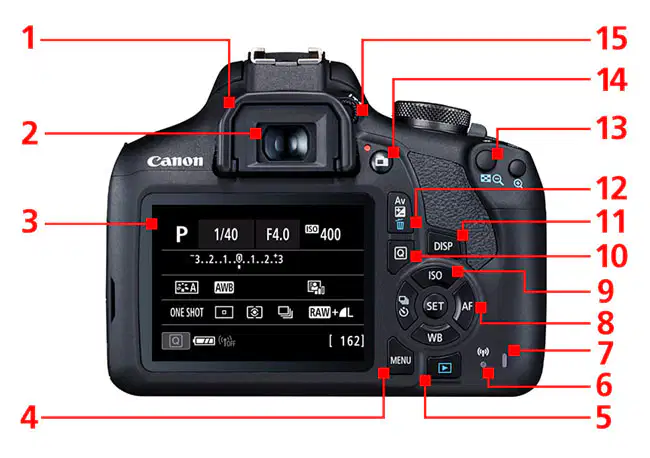
#11, DISP is short for display. What happens when this button is pushed?
The display shows Live View
The display mirrors the viewfinder
The display goes into dark mode for low light shooting
The display turns on/off
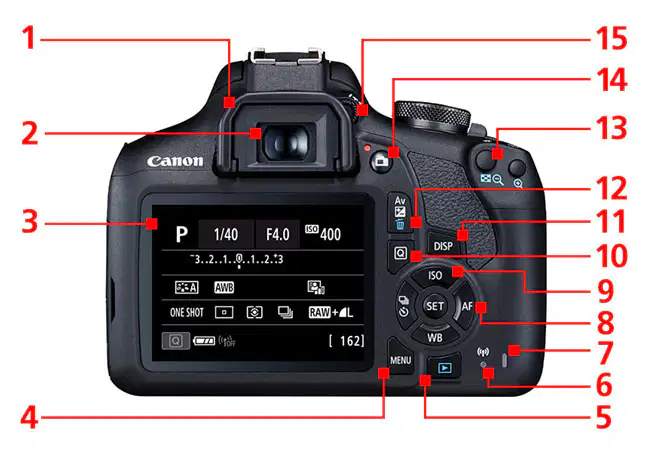
What must you do with this button, #11, to adjust your aperture when shooting in Manual?
Hold until you hear a beep
Double tap
Press while scrolling
Press once, then scroll

This is the Live View button
15
14
11
10

Using this could help eliminate blurriness for some photographers when looking through the viewfinder.
8
2
15
1

Where will you find your Focus Mode Switch?
On the camera
On the lens

Which describes zone A?
Creative Zone
Basic Zone

Which describes zone B?
Basic Zone
Creative Zone

Name the part.
Mode Dial
Main Dial
Scrolly Wheel

This button...(check all that apply)
snaps a photo
sets your auto focus
lets light in
increases shutter speed

Are Tripod socket sizes universal (all the same) when dealing with DSLR cameras?
Yes
No

When this light flashes, what do you do?
Take out SD Card
Have a dance party
Ready yourself for the self timer
Leave it alone so the camera can process its own information

If you press this button in movie mode, what does it do?
Turns off camera
Starts to record footage
Engages autofocus
Creates a self timer

If you press this button in camera mode, what does it do?
Shows you a live screen of what you are shooting
Changes the mode to Movie Mode
Records ambient noise
Gives a strobe effect with the built in flash

Name the part
Metal Circle
Lens Mount
Autofocus Points

By pressing this button, what does it release?
SD Card
Lens Cap
Battery
Camera Lens

