
Font size
 Worksheets
Parts of Computer
Total questions: 40
Worksheet time: 30mins

What part of the computer is this?
Mouse
Monitor
Keyboard
CPU

What do we use this part of the computer for?
squeaking
clicking & moving
typing
squeezing

What part of the computer is this?
mouse
monitor
keyboard
CPU

What do we use that part of the computer for?
drumming
clicking
typing
tapping

What part of the computer is this?
mouse
monitor
keyboard
CPU

What is this part of the computer for?
seeing
clicking
typing
watching tv

What is the name for this screen?
iPad
Keyboard
Desktop / Home Screen
Mouse

What is the name for the little pictures on the desktop?
Pictures
Icons
Coupons
Contacts

What is this part of the computer called?
speaker
headphone
keyboard
mouse

What part of the computer is this?
mouse
monitor
keyboard
computer tower

What part of the computer is this?
earmuffs
hat
earrings
headphones

What part of the computer is this?
mouse
printer
monitor
keyboard

Computers that stay in one place on a desk or table are called ___________.
desktop computer
laptop computer
heavy computer
light computer

Computers that can fold up and go with you anywhere are called ____________.
desktop computer
laptop computer
heavy computer
light computer

Which is correct in taking care of the computer?
Shut down the computer after using it.
Press the keyboard as hard as you can.
Clean the computer with any cloth.

This is the most important part of a computer, it is called ...
Screen
Keyboard
CPU
1. These refer to the physical equipment that makes up a computer system.
Software
Peopleware
Hardware
CPU
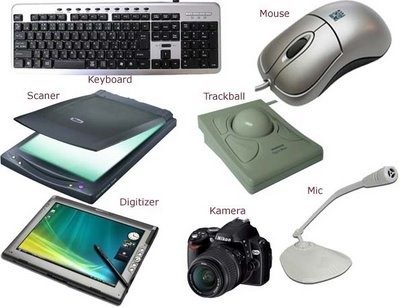
The pictures shown are example of
Output
Input
Software
Peopleware
What does CPU stand for?
Computer Processing Unit
Central Peripheral Unit
Central Processing Unit
Computer Processing User
Which is known as brain of computer?


This provides energy to the main internal parts of the computer. What part is this?
Power Supply
Network Interface Card
Central Processing Unit
Motherboard
Hard Disk Drive
This connects all the inside components of the computer together, including the CPU and any input and output devices. What part is this?
Power Supply
Network Interface Card
Central Processing Unit
Motherboard
Hard Disk Drive

What part is this?
Power Supply
Cooling Fan
Central Processing Unit
Motherboard
Hard Disk Drive

What part is this?
Power Supply
Cooling Fan
Central Processing Unit
Motherboard
Hard Disk Drive

What part is this?
Motherboard
RAM Chip
Central Processing Unit
Network Interface Card
Hard Disk Drive
The brain of the computer that carries out instructions that the computer is told to do, by fetching, decoding, and executing. What part is this?
Power Supply
Heat Sink
Central Processing Unit
Motherboard
Hard Disk Drive

What part is this?
Power Supply
Cooling Fan
Central Processing Unit
Motherboard
Hard Disk Drive

This port is used to connect.....
The mouse
The keyboard
The Monitor
The printer

This cord connects the....
monitor to the computer
computer to the internet
printer to the computer
mouse to the computer

A ________ is your system's short-term memory.
Motherboard
CPU/Processor
RAM
Power supply unit

The ______ is where your software documents, and other files are stored. Is the long-term storage.
Video card
Sound card
Network card
Hard drive

Which parts of a computer are circled?
keyboard
CPU/processor
hard drive
motherboard

Which parts of a computer are circled?
Computer case
RAM
hard drive
motherboard

Hard Drive
Floppy Drive
CD/DVD Drive
Power Supply
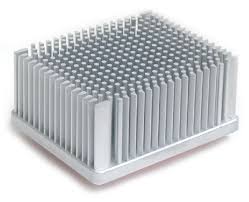
Power Supply
CPU
Heat Sink
Motherboard

This is where you'll connect the power cord to the computer.
USB Port
Audio In/ Audio Out
Power Socket
Serial Port

These can be used to connect almost any type of device, including mice, keyboards, printers, and digital cameras.
Audio In
Audio Out
USB Port
Monitor Port

