
 Worksheets
Gr 6 - Chap 2, 4 and 12 Review
Total questions: 93
Worksheet time: 55mins
CUI stands for?
Central User Interface
Character User Interface
Character Upper Interface
Central Unit Interface
GUI stands for?
Graph User Interface
Graphical Unit Interface
Graphical User Interface
Geographic User Interface
Example of a multi-user operating system.
DOS
Mac OS
Windows
Linux
A function of an operating system that coordinates and controls the various input and output devices attached to the system.
Device management
Process management
Memory management
File management
Housekeeping
The process that starts the operating system when the user turns on a computer system.
booting
operating system
CUI
Hibernate
POST stands for
(a)
MBR stands for
(a)
The process of pressing the Restart button while the computer is already on.
Cold boot
Warm boot
The process of pressing the Power button when the computer is shut down.
Cold boot
Warm boot
An operating system controls and schedules the processes for execution by the CPU. It is responsible for allocating the CPU's time to each process.
Device management
File management
Memory management
Process management
It is the job of an operating system to read the data from different tracks and sectors when required, and to store it in the available space.
File management
Memory management
Device management
Housekeeping
What is an operating system?
An operating system is software that manages computer hardware and software resources.
An operating system is a type of hardware component.
An operating system is a programming language.
An operating system is a type of computer virus.
On which tab can we insert the mail merge ?
Mailings Tab
Insert Tab
View
There are _________steps to a mail merge?
Five
Six
Seven
Mail Merge is a feature provided by ?
MS Excel
MS PPT
MS Word
To create a list of recipients ,we select________
Use an existing list
Select from Outlook contact
Type a new list
Which of the following options place the steps in the correct order based on the step by step wizard?
A. Write Letter
B. Perform Mail Merge
C. Create Database
D. Link Letter and Database
B,C,D,A
A,B,C,D
C,A,D,B
_____________ contains a list of recipients
Main Document
Data Source
Merge field
______________ contains the text that is to be sent to the recipients.
Main Document
Data Source
Merge field
The information in data source is stored in ______________ form
Tabular
Paragraph
Chart
Why is a mail merge important to use
It saves lots of time
It helps merge two letters into one super letter
It can be personalised with personal comments
In WORD, to complete a Mail Merge you :
Click Finish and Merge
Click Merge to PDF
Click Merge to Recipients
You click 'Start' not 'Merge'
Which of the following equations is correct?
Main Document + Data Source = Merged Letter
Main Document + Merged Letters = Data Source
Data Source + Merged Letters = Main Document
Which of the following displays information about all the received emails?
Compose box
Cc Field
Bcc Field
Inbox
What does "Subject" mean in an Email?
A person or thing that is being discussed, described.
A branch of knowledge studied or taught in a school.
A short summary of its content.
All of these
Which one of the following is an example of an Email Address?
www.example.com
example@com
example@gmail.com
example.co.in
The _____ is the main part of the email message that contains text and images/attachments.
Body
Subject
Both of these
None of these
Files sent with e-mails are referred to as
Attachments
Letters
Folders
Paperclips
The recipient of an email is...
The person or receives the email
The person who sends the email
The person who writes the email
The attachment included in the email
Bcc stands for_____
Blind Carbon Copy
Bind Carbon Copper
Blender Carbon Carter

This image represents a (an)_______
Picture
Paper clip
Attachment
To start a new email. What do you click on?
Send
Compose
Enter
Why is email better than letter writing?
Email is delivered by a postman in a day.
We can send emails to multiple people at the same time.
Email lets us video chat with our family and friends.
Email delivers messages instantly and is free of cost.
What is the process called when a computer starts up and loads the operating system?
Rebooting
Booting
Shutdown
Login
What is the process called when a computer starts up and loads the operating system?
Rebooting
Booting
Shutdown
Login
Which of the following is an example of a GUI-based system?
Command Line Interface
Windows Desktop
Terminal Window
BIOS
What does CUI stand for in computing?
Computer User Interface
Character User Interface
Command Utility Interface
Command Unified Interface
Why is it important to shut down a computer properly?
To ensure programs are closed and data is saved
To reset system settings
To delete temporary files
To speed up the boot-up process
Henry is using his computer when he decides to reboot his computer to resolve a minor issue. What kind of booting is he performing?
Cold Boot
Warm Boot
Full Boot
Power Cycle
When several programs run on Tommy's computer, and the operating system allocates the necessary resources, which OS function is being utilized?
File Management
Memory Management
Process Management
User Interface Management
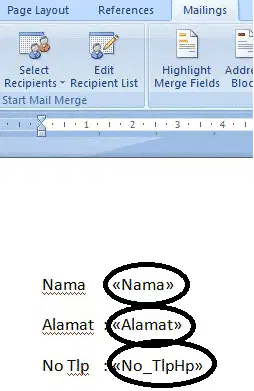
In a mail merge, what does the highlighted area represent?
Personalized data fields
Template settings
Footer settings
Address block
What is the purpose of DNS?
It converts IP addresses to domain names
It stores email messages
It manages file systems
It sends data packets across the network
Which option is best for sending an email to multiple people while keeping their addresses confidential?
Use the 'To' field
Use the 'BCC' field
Use the 'CC' field
Send individual emails
What does BCC stand for in emails?
Blind Carbon Copy
Base Copy Content
Back Copy Communication
Blind Carbon Cut
What is the purpose of the 'CC' field in an email?
To send the email to the sender
To send a copy to one or more recipients
To hide recipients' addresses
To attach files to the email
Sarah is drafting the main content of her email. Where should she type the message?
Header
Body
Footer
Subject
Emily needs to enter the recipient's email address. Which section should she fill out?
Subject
Body
Header
Recipient Fields
Which of the following is the odd one out?
.org
.mil
.doc
.edu
Which of the following is the odd one out?
MBR
DNS
POST
BIOS
Alex wants to attach a document to his email. Which section should he use?
Body
Header
Footer
Attachment
Where are the 'To' and 'CC' fields located in an email?
In the body
In the subject
In the header
In the footer
What is a major benefit of using email over physical mail?
It delivers physical copies instantly
It allows attachments to be sent with messages
It is faster and more efficient
It is more secure than postal mail
What makes email environmentally friendly?
It generates no waste
It reduces the need for paper
It only allows text communication
It uses very little power
What makes email a convenient form of communication?
It requires physical mail
It can only be accessed on desktop computers
It allows communication from anywhere with an internet connection
It requires hours of processing time to deliver
What is a significant privacy concern with email?
Emails are always secure
Sensitive data can be exposed if not encrypted
Emails cannot be forwarded
All emails are automatically encrypted
Why is email considered prone to identity fraud?
It is easy to falsify the sender's address
All email addresses are verified before sending
You need to register in person to use email
Email is always verified through a physical signature
Sarah has been receiving too many spam emails. Which problem does this represent?
Difficulty in sending attachments
Lack of privacy in the email system
Overcrowding of inbox with unwanted emails
Difficulty in accessing email from mobile devices
In Microsoft Word, which tab is used to start a mail merge?
Home
View
Insert
Mailings
When Mark restarts his computer, it goes through the booting process again. What kind of booting is this?
Cold Boot
Warm Boot
Hard Boot
Power Cycle
What is the primary purpose of DNS in networking?
To store web pages
To translate domain names to IP addresses
To assign IP addresses to websites
To manage network traffic
Which of these components is part of the URL?
DNS
Hostname
Network
Bandwidth
What part of an email contains the subject matter or main topic?
Header
Body
Subject Line
Footer
In an email system, what does the 'To' field specify?
Recipients who will see each other’s email addresses
The main content of the email
People who should remain hidden from other recipients
The server that manages the email
When using email, which is the most secure method to hide recipients' email addresses?
BCC
CC
To
Subject Line
In an email, the 'CC' field is used to:
Send the email to multiple recipients while hiding their addresses
Send a copy to additional recipients openly
Create a backup of the email
Attach a file to the email
What section of the email template holds the message content?
Header
Footer
Body
Subject
Which of these would be considered an advantage of email communication?
Slow delivery times
It can be easily forwarded to others
It doesn’t allow file attachments
It always involves a face-to-face interaction
When sending an email, what part contains the message's title or heading?
Header
Body
Subject
Footer
Which of the following is typically found in the body of an email?
List of attachments
Recipient's email address
The main content or message
Subject line
Which email feature allows you to add extra details without cluttering the main message?
BCC
Subject Line
Attachments
Header
When sending a formal email, the 'Subject' field should contain:
The sender’s name
The main point or purpose of the email
A greeting to the recipient
Contact information for follow-up
What is the meaning of an IP address?
Internet Protocol
Internet Package
Information Package
Identifiable Path
In a domain name, what is the top-level domain (TLD)?
.org
www
.com
The server’s IP
The 'Reply All' feature in email should be used when:
You want to respond only to the sender
You want to include all recipients in the reply
You want to hide your response from others
You need to add additional recipients
What does the 'BCC' field prevent in an email?
It prevents forwarding
It hides the recipients’ addresses from each other
It prevents the sender from seeing the replies
It stores attachments securely
What does the 'Spam' folder in an email account typically contain?
Important messages
Unwanted or unsolicited emails
Sent messages
Draft emails
What is the purpose of the 'Reply All' function in email communication?
To respond only to the sender
To send a response to all recipients of the email
To forward the email to another person
To delete the email from the inbox
Which of the following is a common method to protect sensitive information in emails?
Using a strong password
Sending emails without encryption
Sharing passwords in the email body
Using public Wi-Fi for sending emails

Which email address is the main recipient of this email?
(a)
Which email address is not the main recipient but will receive a copy of the email and is able to see the other recipients?
(a)
Which email address is will receive a copy the email but won’t be able to see other recipients?
(a)
If you are the sender of this email, what would be an appropriate Subject line given the content?
(a)
What is the email of the sender?
(a)
Which of the following is a common email etiquette practice?
Using all capital letters
Including a clear subject line
Sending emails without a greeting
Using slang and informal language
The correct format for URL
Protocol- host name-upper level domain-lower level domain
host name-upper level domain-lower level domain-Protocol
Protocol- upper level domain-host name-lower level domain
Protocol- host name-lower level domain-upper level domain
Is not a proper upper level domain
.come
.org
.in
.uk
The DNS is translated into a numeric address
True
False
File sent along with an email
file
folder
attachment
Email address is a combination of ...
username and password
username and host name
Name the advantage of email
privacy concern
data transferred
unwanted emails
inexpensive
Sending an email
compose
trash
sent
starred

