
 Worksheets
REVISION 1 CLASS VI A
Total questions: 83
Worksheet time: 2hrs 10mins
Which is the default alignment in word?
Left
Right
Centre
Justify
Following is used for creating presentations.
MS-Word
MS-Excel
MS-Power Point
MS- Access
File extension of word document is
.xls
.docx
.jpg
.bmp
The shortcut command of ‘save’ in word:
Ctrl+A
Ctrl+V
Ctrl+S
Ctrl+P
Following font size is not supported by word:
72
125.2
48.5
20
What is gutter margin?
Margin added to the left margin when printing
Margin added to right margin when printing
Margin added to the binding side of page when printing
Margin added to the outside of the page when printing
Portrait and Landscape are ________ .
Paper size
Page layout
Page orientation
Page margin
By default, tab stops move ___ space.
0.01
0.05
0.10
0.50
In drop cap option maximum lines can be set up is:
3
5
10
8
Which is the function button for spelling and grammar?
F2
F7
F5
F1
Ctrl + Y is the short cut key for:
Undo the last action
Paste the selected text
Cut the selected text
Redo the last action
For vertical arrangement of the contents of a table cell ____ option is used.
Change case
Justify
Replace
Text Direction
What is the short cut key to open dialog box?
Shift + F12
Alt + F12
Ctrl + F12
Ctrl + Shift + F12
Auto correct is the option to replace ___ words.
Abbreviated
Misspelled
Lengthy
Raised
______ is used to reduce or enlarge the print.
Landscape
Portrait
Superscript
Scaling
Which command is used to restore a sentence erased just now?
Undo
Redo
Add
Insert
Which is the short cut of ‘replace’?
Ctrl+F
Ctrl+H
Ctrl+R
Ctrl+V
Ctrl + left arrow results:
One character to the left
One sentence to the left
One word to the left
None of the above
For addition of a row at the end of a table, move the cursor at the end and use:
Alt
Tab
Insert
Home
What is the maximum number of columns in a table in word?
43
53
63
73
----------------------is a word processing software
Ms Excel
Ms Word
Ms Power point
Ms Access
Which of the following displays the name of the document?
Staus bar
Ribbon
Quick access toolbar
Title bar
Ribbon contains Tabs and -------
Menus
styles
Games
Groups
Ctrl+B is used to make text --------------------
underline
Italic
Bold
Strike
Ctrl+N is used to ----
Open a new file
Save a new file
Open an existing file
--------------- displays the number of words written in a document.
Title bar
Status bar
Ribbon
Quick access toolbar
There is only one Scroll bar in MS Word
True
False
You can easily see the number of words written and page number in MS Word.
True
False
Ctrl+I is used to make the text -------
Bold
Underline
Strike
Italic
Ctrl+S is used to open an existing document.
True
False
----------- means changing font size, style, and color.
Editing
Formatting
Creating
styling
--------------- is used to undeline the text.
Shift+U
Ctrl+U
Tab+U
Ctrl+N
The size of letters in a text is called the ----
Font size
Font style
Page margin
Rulers
Font style of the text is ----
The size of letters in the text
The color of letters in the text
The appearance of the letters in the text
Quick access toolbar contains the following
Save
Export
Redo
Ribbon
What special symbol is in an email address?
%
&
@
*
What goes in the subject line of an email?
Topic of the email
Email Address
Signature
a long paragraph
Person or people you are sending the email to
subject
recipient
reply
compose pane
What is an appropriate GREETING when sending an email to your teacher?
Dear Mr. Summerfield,
Hey Mr. Schulze,
What's up Athena,
Varela,
Which is the best SUBJECT when asking for homework help?
I was wondering if you could answer a question about our homework assignment
HELP
How are you?
Homework question
How would you phrase the question to your teacher?
You must answer my questions!
Would you please explain number 5 again?
I don't understand any of this assignment!
What's up with number 5! It is so confusing.
What do you click to write a new email?
Compose
Chat
Drafts
Sent
Why should you avoid using all capitals in an email?
It is too easy to read.
People might think you are being silly.
People might think you are shouting and angry.
YOU SHOULD ALWAYS TYPE USING ALL CAPS!!!
Which of the following is the correct format for WISD teacher email addresses?
first.last@wallerisd.net
first.last@wallerbulldogs.net
firstinitiallastname@wallerisd.net
firstinitiallastname@wallerbulldogs.net
How should you sign your email? Pay attention to capitalization
First name only
First and Last Name
first and last name
firstname.lastname
Make sure to use correct ______________ when writing an email to your teachers or in any other professional situation. Choose the best answer.
Emojis
Grammar
Spelling
Grammar, spelling, and capitalization
Use a greeting. The best example below of an appropriate greeting when writing a school email is:
Sup homie,
hey,
Hi Mrs. Thompson,
I am mad about my grade,
hey,
y is my grade on Thursday's quiz a 0? i know i did it. plz help.
Sam
This is an example of a well written email
This is an example of a poorly written email
Dear Mrs. Elfie,
I am concerned about my grade in your class. I have a zero for Thursday's quiz but I'm sure I did it. Can you help me?
Thank you,
Sam
This is an example of a well written email
This is an example of an email that is not well written
True or False: having "none" as a subject is okay.
True
False
True or False: it's important to write professionally when using your school email
True
False
Google Docs
In the body of your email message, you should put your greeting, message, closing, and signatures on separate lines.
True
False
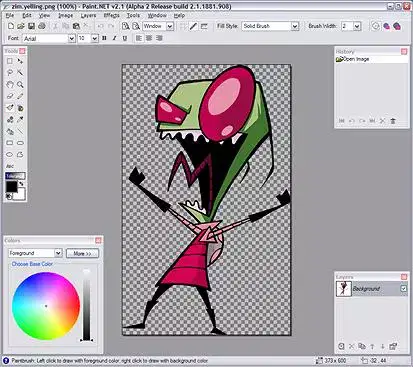
What is the primary use of Paint.Net?
Editing Audio Recordings
Recording Video
Editing and Creating Images
Making Webpages
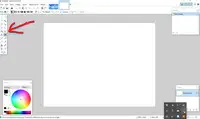
What is this rectangular window called?
Layers
Colors
Menus
Tools
What is one way to add a layer?
Layer Menu
Edit Menu
Adjustments Menu
Effects Menu
How would you change the color of text on Paint.Net
With the paint bucket and color wheel.
With the magic wand tool.
With the eraser tool.
With the lasso tool.
What keys do you use to paste an image?
Ctrl + C
Ctrl + B
Ctrl + V
Ctrl + X
What keys are used to copy an image?
Ctrl + C
Ctrl + X
Ctrl + A
Ctrl + V
What keys are used to select ALL of something?
Ctrl + X
Ctrl + S
Ctrl + A
Ctrl + V
What paid software is Paint.Net most like?
iMovie
Microsoft Paint
Photoshop
MS Word
What is the primary purpose of the Lasso Tool in Paint.NET?
To draw lines
To create geometric shapes
To freehand select an area
To type text
How can you apply a Gaussian Blur to an image in Paint.NET?
Use the Layers panel
Use the Effects menu
Use the Tools panel
Use the Adjustments menu
How do you undo an action in Paint.NET?
Press Ctrl + Y
Press Ctrl + U
Press Ctrl + Z
Press Ctrl + S
Which file format is not supported by Paint.NET for saving images?
PNG
JPEG
GIF
PSD
Which feature allows you to adjust the brightness and contrast of an image in Paint.NET?
Layers
Effects
Adjustments
Tools
What is the purpose of the Clone Stamp tool in Paint.NET?
To create text layers
To erase parts of an image
To duplicate parts of an image
To rotate an image
How do you merge layers in Paint.NET?
Right-click on a layer and select Merge Layer Down
Use the Layers menu
Use the Effects menu
Use the Adjustments menu
How do you rotate an image in Paint.NET?
Use the Layers menu
Use the Adjustments menu
Use the Rotate/Zoom dialog under the Image menu
Use the Effects menu
What is the primary function of Paint.NET?
Photo editing and manipulation
Video editing
Web development
3D modeling
What does the Magic Wand tool select?
Linear gradients
Contiguous regions of similar color
Rotated areas
New layers
What function does the Move Tool serve in Paint.NET?
To draw lines
To move and resize selected areas or layers
To rotate images
To adjust brightness
What is the purpose of the Paintbrush tool in Paint.NET?
To draw freehand lines and shapes
To select areas of similar color
To adjust hue and saturation
To crop images
How can you desaturate an image in Paint.NET?
Use the Effects menu
Use the Adjustments menu and choose Hue/Saturation
Use the Layers menu
Use the Tools menu
What function can you find under the Adjustments menu in Paint.NET?
Image cropping
Brightness/Contrast adjustment
Gaussian Blur
Text addition
What does the Text tool allow you to do in Paint.NET?
Add text to an image
Adjust the hue of an image
Apply a Gaussian Blur
Rotate an image
How do you zoom in on an image in Paint.NET?
Press Ctrl and scroll up the mouse wheel
Press Ctrl + Shift
Use the Layers menu
Use the Effects menu
What is the purpose of the Color Picker tool in Paint.NET?
To select a color from the image
To adjust image brightness
To apply filters to the image
To create new layers
What is the purpose of layers in Paint.NET?
To adjust the color of an image
To create 3D models
To separate different elements of an image for editing
To animate images
How can you crop an image in Paint.NET?
Use the Select tool and then choose Crop to Selection
Use the Effects menu
Use the Magic Wand tool
Use the Color Picker tool
What does the Magic Wand tool do in Paint.NET?
Draws straight lines
Creates new layers
Selects contiguous regions of similar color
Rotates the image

