
 Worksheets
Exploring Microbit Components
Total questions: 10
Worksheet time: 6mins
What is the main function of the On button 'A' pressed block in Makecode editor?
To upload programs to the Microbit.
To connect to Bluetooth devices.
To accept input from the button 'A' on the Micro:bit.
To reset the Microbit.
Name one hardware component visible on the front side of the Microbit.
Power button
Battery compartment
5x5 LED matrix
USB port
How many buttons does the Microbit have on its front side?
4
2
1
3
What does LED stand for?
Light Emitting Device
Light Emerging Diode
OLED display
Light Emitting Diode
Which component on the Microbit is an input device?
LED display
Touch Logo
USB Cable
speaker
___________________ is a sensor used to measure sound levels on a scale from 0–255.
Touch Logo
Speaker
LEDs
Microphone
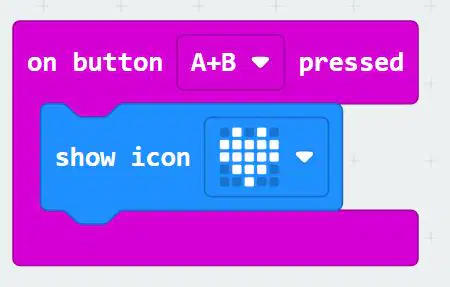
What will this block of code do?
Show heart icon when button 'A' and button 'B' is pressed togerther.
Show heart icon when button 'A' is pressed.
Show heart icon when button 'B' is pressed.
Will show an error.
What is the purpose of the LED display on the Microbit?
To store data permanently.
To display text, images and numbers.
To connect to Wi-Fi networks.
To power the Microbit.
Which of the following is an output device on the Micro:bit?
LED display
Microphone
Buttons
Touch Logo
The LED display also has a sensor below it. What is the name of that sensor?
sound sensor
Light sensor
Touch sensor
Temperature sensor

