
 Worksheets
Clipping Masks and Non-Destructive Layers Quiz
Total questions: 20
Worksheet time: 17mins
In Adobe Photoshop, what is a clipping mask?
A feature that allows you to lock layers together, so they move as a group.
A tool used to crop an image into a specific shape without affecting the layer's properties.
A method to apply transparency effects to the lower layer based on the content of the layer above.
A function that changes the perspective of an image by stretching and warping its edges.
What is the purpose of the 'Layer Mask' in Adobe Photoshop?
To permanently delete parts of a layer.
To hide or reveal parts of a layer without deleting them.
To merge multiple layers into one.
To duplicate a layer with all its effects.
Which tool in Adobe Photoshop is used to select and move parts of an image?
The Brush Tool.
The Move Tool.
The Crop Tool.
The Eraser Tool.
In Adobe Photoshop, what does the 'Magic Wand Tool' do?
It paints with a pattern.
It selects pixels based on color similarity.
It creates a new layer from the selection.
It adjusts the brightness of an image.
What is the primary purpose of using a Layer Mask in Adobe Photoshop?
To permanently erase parts of a layer
To nondestructively hide parts of a layer
To change the color of the entire layer
To lock the layer from editing
Choose the all the options involved in creating a non-destructive layer mask.
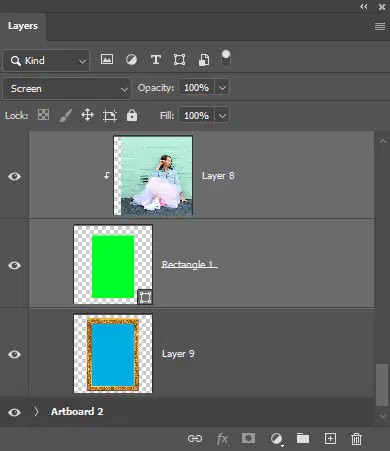
Identify the BASE LAYER.
Identify the Linked layer
Where in the Layers Panel do you click to add effects such as a stroke?
What key on your keyboard do you click and hold to select multiple layers?
Ctrl
Shift + C
Identify the layer style for Dropshadow effect.
Identify the layer style for Bevel and Emboss effect.
Where would you click to add a Threshold adjustment layer?

"Chisel Hard" describes what part of the Bevel and Emboss effect?
Style
Technique
Depth
Size
Which of the following is true about Adjustment Layers?
They can only be applied to one layer at a time.
They reduce the file size of the Photoshop document.
They offer a way to apply color and tonal adjustments without permanently changing pixel values.
They automatically merge with the layer below when saved.
Which tool in Adobe Photoshop is used to select and move parts of an image?
Brush Tool
Move Tool
Magic Wand Tool
Clone Stamp Tool
Which tool in Adobe Photoshop is used to fill an area with a solid color or pattern?
The Lasso Tool.
The Clone Stamp Tool.
The Paint Bucket Tool.
The Gradient Tool.
What is the shortcut key for duplicating a layer in Adobe Photoshop?
Ctrl + T
Ctrl + J
Ctrl + D
Ctrl + L
In Adobe Photoshop, which panel allows you to adjust the opacity of a layer?
The History Panel.
The Layers Panel.
The Adjustments Panel.
The Tools Panel.
Explain the concept of non-destructive editing using layer masks.
Non-destructive editing using layer masks permanently alters the original image data.
Non-destructive editing using layer masks can only be applied to black and white images.
Non-destructive editing using layer masks allows you to make changes to an image without permanently altering the original image data.
Non-destructive editing using layer masks only works on text layers.

