
 Worksheets
final exam year 3
Total questions: 85
Worksheet time: 3hrs 29mins
What does the term file management mean?
How your manager is able to find your file.
The way in which we organize our files and documents on the computer.
How you organize the rough edges of your nails

process of organizing folders in a structure that makes it easy to store and retrieve information.
File management
Drive
Folder
File extension
You can put different types of files in one folder.
True
False
What is a folder inside another folder called?
Infolder
Super folder
Sub folder
Small folder
What is a folder?
an object that contains data or information
a container that can store food
a container that can store hardware components
a container that can store files or folders
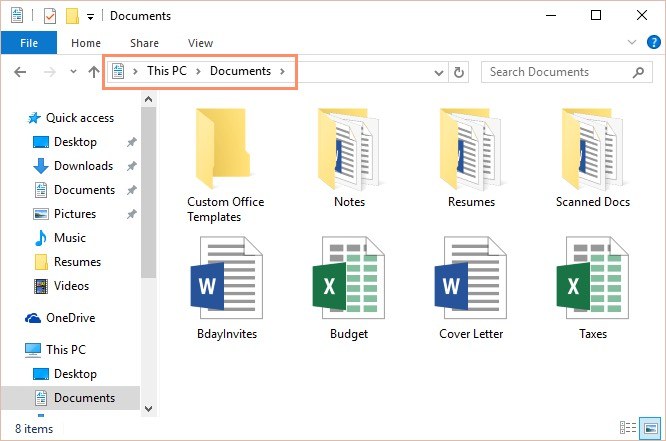
What is the difference between a file and a folder?
A folder is a document and a file where the documents are stored
A folder is where the documents are stored and a file is a document
Any content created using a computer, such as a picture or a text is
File
Folder
Sub folder
Directory structure
What are the three storage systems we have learned about?
1 ) Standalone storage
2) local network storage
3) cloud storage.
4) public storage
5) Solid state drives
Which of the storage systems allows you to access your files most easily?
Cloud storage
Standalone storage
local network storage
Which of the storage systems do we use to save our files at school?
Standalone storage
local network storage
Cloud network
Which of the storage systems is most at risk if your device breaks?
Standalone storage
local network storage
Cloud network
Which of the storage systems is the most secure?
local network storage
Standalone storage
Cloud storage.
Which of the storage systems is most at risk if the Internet fails?
local network storage
Standalone storage
Cloud storage.

What does the button that is being pointed to let you do?
Change the font
Add a new slide
Insert a picture
What do we call one page of MS PowerPoint?
Slide
Page
Display
To insert picture from internet click on ____________________________
Word art
Picture
Online picture
Presentations should use a mix of words, pictures, themes and other design elements.
True
False
Which one would you click to change the background color or schemes?
Home
Design
View
PowerPoint allows you to search for online images within the software.
True
False
The Internet is a worldwide network of computers connected together to share information.
True
False
Internet Explorer, FireFox, Google Chrome, and Safari are examples of what?
Websites
Address Bar
Browsers
Internet
Using someone else's work to help you without their permission is:
Plagiarism
Periodical
Research
Sight
To make a NEW LINE, we press...


What does the number represent?
Font size
Font color
Date
Home, Insert, Design, Animations, Slide Show, Review and View are called ...
a. tabs
b. ribbons
c. menus
d. windows
________bar shows the name of the presentation.
Quick access toolbar
Title
Status
Name
MS-PowerPoint is a ____________software.
Documentation
Word Processor
Presentation
Spreadsheet
A slide can only contain text and not images,audio,video,etc.
False
True
An _______________ is a precise,step by step set of instructions to perform a specific task.
task
sequence
sub-tasks
algorithm
The steps of an algorithm can be followed in any order to produce the same result.
True
False
What is an Algorithm?
a) A computer program that follows a chart
b) A chart showing the flow of a series of events
c) A decision arrived at by following instructions
d) Step-by-step instructions used to solve a problem
To do steps in a specific order is called
algorithm
sequence
loop
The application we use to convert the algorithm to program on computer
Paint
Scratch
Excel
Which block is used for starting an algorithm?


What dose this red shape do in Scratch?
Start program
Stop program
Delay program

We can increase and decrease the size of the sprite from the size button.
true
false
Characters in Scratch Program are known as ------------------
cartoons
animation
clipart
sprites
Which block I use to repeat forever


This code will run when
Spacebar is clicked
Green Flag is clicked
What are the two axis in scratch?
x and y
k and l

Choose the right output?
The sprite moves 10 steps and pauses for 1 s
The sprite moves 10 steps and turns for 1s
Which group of blocks include the “Say Hello” block?
Sound
Looks
Control

The code blocks below are an example of what type of action?
Pen
.
Events
Looks
Control

What is this?
Blocks
Script Area
Background

Can you skip a step while making an algorithm?
Yes
No
What is Debugging?
A problem in the program.
A way to find the bug.
A way to find the problem and fix it.
What is a bug?
A problem in the algorithm.
A way to fix the problem.
A list of steps.

WHAT IS THE OUTPUT OF THE PROGRAM?


A block that programs a sprite to hide or show; also used to change a sprite's costume is called what?
Looks
Event
Motion
Control
If I want to move the sprite to the right, which set of blocks would I need?


If I wanted to start a character at a particular place on the screen, which block would I use?


To change the appearance of a sprite we can give it a different...
Costume
Look
Style
Stage

Which of these would move the sprite down on the stage?
Change x by 10
Change x by -10
Change y by 10
Change y by -10

Which category does the following blocks belong to?


What name of block is this?
condition
move
custume
go to
What is the 1st block we need to start our code?
move block
event block
repeat block
Which activity should you NOT do while listening to a podcast?
watch TV
do the dishes
go for a walk
ride in a car
What makes podcasts different from radio programs?
Podcasts shows can only be listened to at certain times
Podcasts can be download and listened to them whenever you want
Radio programs require an internet connection
Before you start a podcast you need to...
decide on a topic
write a script or outline of what you plan to talk about
some way to record your podcast
all of the above
True or False:
You can record a podcast with just your iPad or smart phone.
True
False
What is the name of the software used to record and edit the podcasts?
Media player
Pivot Animator
Audacity
You just got a message from an App!! saying you have won a new phone.
Should you click on the link in the message?
Block Sender
Click Link
Choosing your name as a password.
Safe
Unsafe
Who should you share your personal information ?
Your Family
Your Friends
Unknown person
Should not share and keep as private

What is E-Safety?
Knowing how to be safe online
Knowing how to be safe in a public place
Knowing how to cross a road
Knowing how to be safe in school

You receive an email from a friend's email address but you suspect it's a scam. what do you do?
reply to the e-mail
contact your friend, telling them about the e-mail
click on the link in the e-mail to check if it's genuine
phone the police

If you see something harmful or bad online, you immediately tell ...
your friend
your parents
your teacher
noone
What is a strong password?
A strong password should be exactly 8 characters long.
A strong password is a simple combination of letters only.
A strong password is a single word with no numbers or symbols.
A strong password is a complex combination of at least 12 characters, including letters, numbers, and symbols.
Why should you not share your password?
Sharing passwords helps build trust with friends.
Sharing passwords can improve account security.
You should not share your password to protect your accounts and personal information.
It's safe to share passwords with family members.
What should you do if you receive a suspicious email?
Do not open links or attachments, verify the sender, report it, and delete the email.
Forward the email to all your contacts
Reply to the email asking for clarification
Click on the links to see more information
Why is it important to update your software?
To make your software look more modern
To increase the size of the software
To change the color scheme of the interface
It is important to update your software to enhance security, improve functionality, and fix bugs.
Why should you be careful with public Wi-Fi?
Public Wi-Fi is only dangerous for mobile devices.
Using public Wi-Fi can improve your internet speed.
Public Wi-Fi is always secure and safe to use.
You should be careful with public Wi-Fi because it is often unsecured and can expose your data to hackers.

