
 Worksheets
Year 8 End of Autumn Term 1 Assessment
Total questions: 75
Worksheet time: 54mins
The programs of a computer system are called ________.
Software
Hardware
The physical components of a computer system are called ________
Hardware
Software
_________ helps run and maintain the computer.
System Software
Application Software
Teams is a type of _______.
Application Software
System Software
Anti-Virus is a type of _________.
Application Software
System Software
What is an Input device?
Any piece of computer hardware that is used to communicate the rules of data that has been processed by a computer system.
Any piece of computer hardware used to provide data to a computer system
Any piece of computer equipment on which data can be stored
What is an output device?
Any piece of computer hardware used to provide data to a computer system.
A piece of computer equipment on which data can be store.
Any piece of computer hardware that is used to communicate the results of data that has been processed by a computer system.
Which component of a computer processes all of the data?
CPU
RAM
Harddrive
What does RAM stand for in computer terminology?
Random Access Memory
Readily Available Memory
Read Access Memory
Which component of a computer is responsible for storing data long-term?
Harddrive
RAM
CPU
Antivirus software is designed to protect computers from an assortment of viruses and unauthorized intrusions
True
False
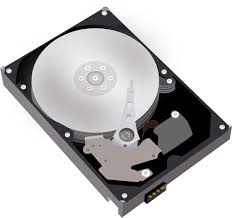
What is Hardware?
Computer Instructions or Data
Physicals parts of a computer that you can touch

What is Software?
Programs and applications, it tells the hardware what to do and how to do it
Physicals parts of a Computer
The physical objects that make up the computer system:
Software
Storage
Input
Hardware
Hardware and Software do not have to work together.
True
False
You can touch software
True
False
Examples of hardware are:
Keyboard
Microsoft word
Mouse
hard drive
Grand theft Auto
Lets you explore the Internet where you can find lots of information.
antivirus software
presentation programs
Internet Browser
application programs
Which are 2 examples of word processing programs?
Microsoft Word
Microsoft PowerPoint
Google Slides
Google Docs
Computers can't work just using hardware, to be able to do all the fun things you want to do on a computer you need software.
true
false
Which of the following is not a processing component?
CPU
Mainboard
RAM
Hard disk
What is the order in the CPU operation cycle?
Fetch
Decode
Execute
The CPU is often described as...
The muscle of the computer
The brains of the computer
The head of the computer
The eyes of the computer

The main circuit board in the system unit is also called the
Busboard
Chipboard
RAM
Motherboard


Where does the CPU fetch instructions from?
The Hard Drive
ROM
The CPU
RAM

What three things happen in the CPU?
Get, Calculate, Output
Fetch, Decode, Execute
Input, Process, Send
Input, Calculate, Implement
Ajay's smartphone has a 1.8 GHZ processor. How many instructions can the CPU process each second?
1.8
1.8 million
18 million
1.8 billion
3 GHz means approximately how many instructions per second?
0.3 million instructions
3 million instructions
0.3 billion instructions
3 billion instructions

The main circuit board in the system unit is also called the
Busboard
Chipboard
RAM
Motherboard
The way the CPU operates is called the........ cycle
Fetch Execute
Fetch Operate
Fetch Code
Speed Execute
What does ROM stand for?
Random Order Memory
Read Only Memory
Ready Ordered Memory
Read Output Memory
Which of the following would NOT be stored in RAM?
Programs currently being used by the computer
Data being used by the computer
Programs not being used by the computer
What is the order of the stages involved when the CPU processes instructions?
DECODE - FETCH EXECUTE
EXECUTE - DECODE - FETCH
FETCH - DECODE - EXECUTE
FETCH - EXECUTE - DECODE
Which of these is NOT a Storage Device?
USB Flash Drive
CD-R
Digital Camera
Floppy Disk

What type of device is a Hard disk?
Output Device
Storage Device
Input and Output Device
Input Device


The _____, also called a processor, is located inside the computer case on the motherboard. It is sometimes called the brain of the computer, and its job is to carry out commands.
CPU (Central Processing Unit)
PUC (Processing Unit Central)
CUP (Central Unit Processing)
Center Process Unification
Raw facts and figures are known as _______________.
Data
Information
Memory
Facts which are refined, processed and organized are known as _____________.
Data
Information
Memory
____________ is a permanent memory.
RAM
ROM
Hard Disk
CD
Data gets erased when the computer is switched off.
ROM
Memory Card
RAM
Blu - Ray
Backup memory or secondary storage memory is used to :
store data temporarily.
store large amount of data permanently.
(a) is a storage device fixed inside CPU.
A storage device used inside digital camera.
Blu ray disk
Pen drive
DVD
Memory Card
A graphics card is added to a computer when we want:
To display anything on screen
To have better graphics to play games
To be able to use a graphics tablet to draw
To add a different type of graphics port
Which of these is RAM?


Which of these is a Hard Disk Drive (HDD)?

Which type of storage is directly accessible to the CPU?
Primary
Secondary
Offline
Volatile storage keeps data when power is removed
True
False
Primary memory is also known as (a) memory.

What is the name of this storage?
USB flash drive
CD ROM
Hard disc drive
ROM stands for _____.
Rare Only Memory
Read Only Memory
Random Optical Memory

Information stored in ROM is permanent.
TRUE
FALSE

