
 Worksheets
BTEC DIT EOU test
Total questions: 68
Worksheet time: 50mins
What is a user interface?
A way that you navigate around the computer
A piece of software that allows users to interact with their devices
Lots of different graphics on a screen
A combination of keystrokes which commands the software
Humans are the individuals that use a device. A device can be used by small groups of individuals or by millions of people around the world. Users may have different needs - what do we call these needs?
Form controls
Software
Accessibility
GUI
Which of the following are accessibility features that can be found on user interfaces? (tick all that apply)
Zoom function
Text read aloud
Background music
Dyslexia friendly font style
(a) is the word used to describe that users may be different ages and therefore have different experiences of using digital devices.
Novice, Intermediate and Expert are types of:
Skill levels
Accessibility
User Interface style
Human interaction
Washing machines and Microwaves have user interfaces build into them to help you operate them. What type of device are these?
Handheld devices
Computers or laptops
Domestic appliances
Entertainment systems
Software features are part of the user interface that allows the user to enter commands into a device. What ways can you enter commands into a device? (select all that apply)
Menu
Form
Voice
Microsoft

What type of user interface is this?
Text based interface
Graphical user interface
Menu interface
Speech interface

What type of interface is this?
Text based interface
GUI
Speech interface
Touch screen interface

What type of user interface is this?
Speech interface
Form interface
Touch screen interface
Menu interface

What type of user interface is this?
Menu based interface
Graphical user interface (GUI)
Text based interface
Form interface

What type of interface is this?
Text based interface
GUI
Form interface
Speech interface

What type of interface is this?
Menu interface
GUI
Speech interface
Sensor interface
Intuitive means 'easy to understand'. In this context a user should be able to understand and interact with an interface instinctively. What type of device could a child aged between 5-10 intuitively interact with? Name the device and explain your answer.

What is your favourite type of electronic device to use and why?

What is your favourite/most used app and why?
The user can type on this hardware or on an online version to enter commands or use short cuts - what am I?
Keyboard
Mouse
Monitor
Printer
(a) is the name given to the computer (hardware) and operating system (software) on which applications can be run. What am I?
These are a combination of keystrokes or a sequence of keystrokes which commands the software to do something. What am I?
GUI
Speaker
Operating system
Shortcuts

Name as many accessibility features that you can think of.
Which type of user interface does not need a screen at all?
Form Interface
Text Interface
Speech Interface
Menu Interface
A text based user interface is usually easy to use but requires a lot of storage space and memory.
True
False
In which type of user interface is the user restricted to the specific options given?
Menu user interface.
Sensor user interface.
Graphical user interface.
Text based user interface.

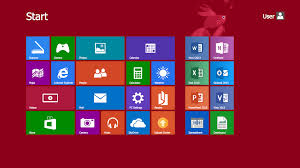
Which Interface is this an example of?
Text based user interface
Graphical user interface
Speech based user interface
Sensor based user interface
Which user interface requires the least user input.
Menu user interface
Graphical user interface
Sensor user interface
Speech user interface

Choose the disadvantage
Which of these is the purpose of the Operating System?
It is software that controls the whole operation of the computer system
It is hardware that is central to every PC and is the "brain" of the computer
It stores the files that the device has open.
It is a collection of numbers or text that is stored and processed by computer systems.
Below are 2 advantages and 1 disadvantage for Speech User Interfaces.
Choose the disadvantage
Suitable for disabled users
Requires very little training
May have difficulty understanding accents
Which of these describes the Central Processing Unit?
It is software that controls the whole operation of the computer system
It is hardware that is central to every PC and is the "brain" of the computer
It stores the files that the device has open.
It is a collection of numbers or text that is stored and processed by computer systems.
Which interface only works through keyboard input
text based user interface
speech based user interface
menu based user interface
graphical user interface
What is a user interface?
It’s the computer’s brain and without it a PC cannot function.
It is the name given to the computer (hardware) and operating system (software) on which applications can be run.
It is software that allows users to interact with their devices
It's an application or program that allows users to complete tasks or create something.

What interface is this?
Menu
GUI
Forms
Speech
People could only communicate with computers in the early days via
Morse code
Learning complicated computer programming languages
Semaphore
Binary
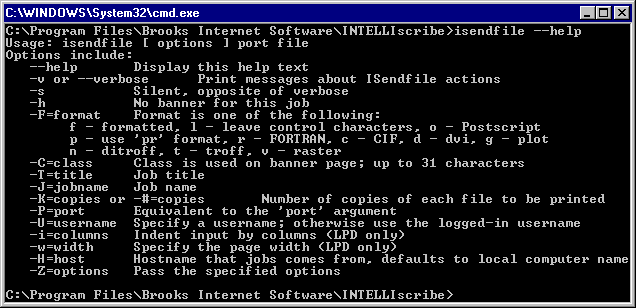
Which Interface is this an example of?
Text interface
Graphical Interface
Speech interface
Form interface
Which Interface uses spoken instructions?
Text based interface
Graphical interface
Speech interface
Form interface
Which type of user interface uses labels on each part.
Form Interface
Text Interface
Menu Interface
Sensor Interface
Which type of user interface responds to environmental phenomena?
Form Interface
Text Interface
Menu Interface
Sensor Interface
A graphical user interface is usually easy to use but requires a lot of storage space and memory.
True
False
Which of the following describes Form controls?
It is central to every PC and device. It’s the computer’s brain and without it a PC cannot function.
It includes buttons, tick boxes and option boxes to enable the user the enter information
They detect and respond to the environment around them. They can be responsive to heat, light, sound, movement or patterns
It stores the files that the device has open and stores the information from any applications in use.
Which of the following describes a sensor?
It is central to every PC and device. It’s the computer’s brain and without it a PC cannot function.
It includes buttons, tick boxes and option boxes to enable the user the enter information
They detect and respond to the environment around them. They can be responsive to heat, light, sound, movement or patterns
It stores the files that the device has open and stores the information from any applications in use.
What word describes the smallest dots that make up the screen on our devices.
form controls
pixels
bugs
distributed data
A user interface is the means by which a user can i (a) with a system.
The W in WIMPs stands for
(a)
"Requires the most processing power" - for which UI is this a negative?
Menu
Sensor
Text-based
GUI
A controlling device would most commonly use which interface?
Menu / Forms
GUI
Sensor
Text-based
Speech / Natural Language
"Does not rely on sight" - for which UI is this a benefit?
GUI
Menu / Form
Text-based
Speech / Natural Language
The amount of time a user has spent using different interfaces is known as 'User E (a) '
The amount of information a device can hold is called the 'S (a) space'
Another way of saying an interface is easy to use is, "The interface is i (a) "
The software that manages the hardware, software and devices is known as an 'O (a) system'
'Target A (a) ' - the term that refers to the users that an interface has been designed for
'P (a) of the interface' - the reason an interface has been designed
'Tasks can require navigating through several windows which can be slow' - for which UI is this a negative?
GUI
Menu / Form
Speech / Natural Language
Sensor
"No human interaction means that this UI is less prone to human error" - for which UI is this a positive?
GUI
Menu / Form
Sensor
Text-based

What type of UI is this an example of?
GUI
Menu / Form
Sensor
Text-based
Speech / Natural Language
A modern smartphone often makes use of how many of the following interfaces?
Tick all that apply
GUI
Menu / Form
Sensor
Speech / Natural Language

This is a...
Text based interface
Graphical User Interface
Sensor Interface
Menu based interface

This is a...
Text based interface
Graphical User Interface
Sensor Interface
Menu based interface
A text based interface does not contain...
Images
Text
Written commands
Letters

This device has a...
Text based interface
Graphical User Interface
Sensor Interface
Speech and language Interface

What is a User Interface?
Hardware that the software is being run on .
The individual interacting with the device
Software that sits between the user and the device
The reason that the device is being used for.

What do all interfaces need to make them functionally successful?
Select all that apply
Human to device interaction
Human Features
Software Features
Voice Capture Features

A UI should ensure that all of the following are able to interact with the device. Select all that apply.
Users with different accessibility needs
Users with different skill levels
Users of different demographics
Users with programming knowledge

A UI will allow commands to be entered into a device. How could a user do this?
Select the three most common methods.
Menus
Forms
Voice Commands
Visual Tracking

A text based interface...
Uses a series of menus
Only uses written characters
Can allow sound based interactions
Uses images and other graphics

Select all of the features of a text based interface.
UI is made up of text and does not contain graphics
Commands are entered with a keyboard
UI will respond instantly with an output
Do not require powerful hardware as they do not contain graphics
Can be very fast to use IF you know the commands.

