
 Worksheets
HTML AND CSS
Total questions: 75
Worksheet time: 1hrs 3mins
The markup or formatting language used to create pages on the web.
(a)
What does HTML mean?
(a)
It is a type of communications protocol.
It is used to send and receive web pages on the Internet and the foundation of data communications for the World Wide Web.
(a)
What does HTTP mean?
(a)
What does WWW mean?
(a)
A kind of web address that is unique and is used to identify resources on the web.
Can be found in the address bar at the top of the web pages.
https://www.microsoft.com
(a)
What does URL mean?
(a)
What are the 3 Basic Parts of URL?
Source, Domain Name, Protocol
Resource, Name, Protocol
Protocol, Domain, Path
Protocol, Domain Name, Resource Path
Instruct how a web browser should communicate when sending and receiving web pages and other files with a web server.
http://www.example.com/index.html
(a)
Identifies the organization that is directly responsible for the information.
It is the web page that you are searching.
http://www.example.com/index.html
(a)
This is the name of the file of the web page and any directories under which it is stored on a specified server or computer.
http://www.example.com/index.html
(a)
Can also be a series of numbers or also known as IP address, that works the same way as the standard (a) .
A series of numbers that works the same was as a standard URL.
(a)
<!doctype>
Structural Tag
Formatting Tag
Entity
<blockquote>
</blockquote>
Structural Tag
Formatting Tag
Entity
<font color = "_____">
</font>
Structural Tag
Formatting Tag
Entity
<font face = "_____">
</font>
Structural Tag
Formatting Tag
Entity
<font size = "_____">
</font>
Structural Tag
Formatting Tag
Entity
<mark>
</mark>
Structural Tag
Formatting Tag
Entity
<pre>
</pre>
Structural Tag
Formatting Tag
Entity
<small>
</small>
Structural Tag
Formatting Tag
Entity
<strike>
</strike>
Structural Tag
Formatting Tag
Entity
<sub>
</sup>
Structural Tag
Formatting Tag
Entity
<tt>
</tt>
Structural Tag
Formatting Tag
Entity
<br/>
Structural Tag
Formatting Tag
Entity
©
Structural Tag
Formatting Tag
Entity
°
Structural Tag
Formatting Tag
Entity
&percent;
Structural Tag
Formatting Tag
Entity
®
Structural Tag
Formatting Tag
Entity
Give the code asked:
(without <> or /)
Used to indicate that a section of text is a quotation from another source.
(a)
Give the code asked:
(without <> or /)
Tells a web browser what version of HTML a page is written in.
(a)
Give the code asked:
(without <> or /)
Changes the color of your text.
(a)
Give the code asked:
(without <> or /)
Changes the font or face of your text.
(a)
Give the code asked:
(without <> or /)
Changes the size of your text.
(a)
Give the code asked:
(without <> or /)
Used to emphasize text that was not emphasized in the original content.
(a)
Give the code asked:
(without <> or /)
Displays preformatted text, preserving spaces, line breaks, and tabs exactly as written in the HTML code.
(a)
Give the code asked:
(without <> or /)
Makes text smaller than the default text size on a page.
(a)
Give the code asked:
(without <> or /)
Creates a line through text in HTML.
Example
(a)
Give the code asked:
(without <> or /)
Defines a subscript text.
Appears half a character below the normal line, and is sometimes rendered in smaller font.
H2o
(a)
Give the code asked:
(without <> or /)
Defines superscript text.
Superscript text appears half a character above the normal line, and is sometimes rendered in a smaller font.
x2 - y3
(a)
Give the code asked:
(without <> or /)
Typewriter font.
(a)
Give the code asked:
(without <>)
Inserts a single line break.
(a)
Give the code asked:
(without <>)
Inserts a single line break.
(a)
Give the code asked:
(without <>)
Copyright
(a)
Give the code asked:
(without <>)
Percent
(a)
Give the code asked:
(without <>)
Registered Mark
(a)
Used to define the visual presentation of web pages.
Used to used to style and make the website visually appealing.
(a)
Builds the structure of a website.
(a)
What does CSS mean?
(a)
What is the anatomy of CSS?
Selector
Property
Value
Class
Price
It is what you want to style in CSS.
.logo .body .card
(a)
The style you want to change in CSS.
color, font-size, margin
(a)
What you want to set for that property in CSS.
blue, #fff, 15px
(a)
What are the 3 ways to apply CSS?
Inline CSS
Internal CSS
External CSS
Outline CSS
Adding CSS directly to the HTML element using the style attribute.
(a)
Placing CSS rules inside the <style> tag in the head of the HTML file.
(a)
Using an external stylesheet file with a .css extension.
This is the best way to organize your CSS when you work on larger projects.
(a)
What are the Types of CSS Selectors?
Class Selector
ID Selector
Type Selector
Value Selector
A kind of selector that targets all instances of an element.
(a)
A kind of selector that targets elements with a specific class.
(a)
A kind of selector that targets a specific element with an ID.
(a)
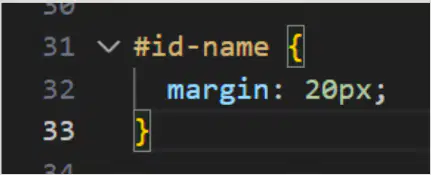
Identify what type of selector it is:
ID Selector
Class Selector
Type Selector

Identify what type of selector it is:
ID Selector
Class Selector
Type Selector

Identify what type of selector it is:
ID Selector
Class Selector
Type Selector

What way of applying CSS is this?
Inline CSS
Internal CSS
External CSS
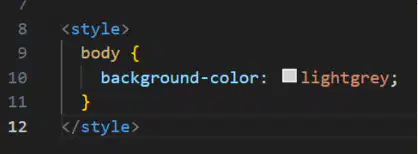
What way of applying CSS is this?
Inline CSS
Internal CSS
External CSS

What way of applying CSS is this?
Inline CSS
Internal CSS
External CSS
Every element in HTML is treated as a (a) which consists of 4 main parts.
What are the parts of a Box Model?
Content
Padding
Border
Margin
Radius
A part of a box model that is the actual text or images in the website.
(a)
A part of a box model that is the space around the content in the website.
(a)
A part of a box model that is the line that surrounds the padding in the website.
(a)
A part of a box model that is the space around the border in the website.
(a)
A layout model that helps you align and distribute space among items in a container.
It's great for responsive designs.
(a)
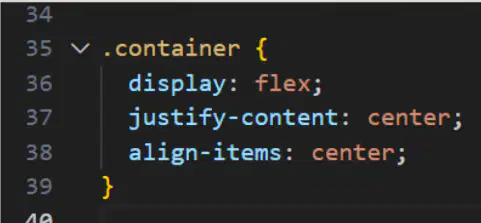
What is this?
(a)

