
 Worksheets
Graphic Design Semester Exam Review
Total questions: 54
Worksheet time: 27mins
What is the best definition of graphic design?
The visual art of communicating
The process of designing buildings and structures
The study of past events, particularly in human affairs
The practice of farming, including cultivation of the soil for growing crops
Which of the following is a true analogy about the elements of art and principles of design?
Elements of art are like the ingredients, while principles of design are like the recipe.
Elements of art are like a recipe, while principles of design are like the ingredients.
What are the 7 elements of art?
Line, Shape, Form, Space, Color, Value, Texture
Line, Shape, Form, Space, Color, Value, Pattern
Line, Shape, Form, Space, Color, Value, Balance
Line, Shape, Form, Space, Color, Value, Contrast
What are the 7 principles of design that we've studied in class?
Contrast, Repetition, Alignment, Proportion, Hierarchy, Emphasis, Balance
Harmony, Proportion, Scale, Variety, Space, Texture, Form
Alignment, Repetition, Proximity, White Space, Typography, Color, Grid
Symmetry, Asymmetry, Radial, Proportion, Scale, Texture, Form
Which element refers to 2d objects?
texture
shape
form
value
Which element refers to 3d objects?
texture
shape
form
value
Hue refers to:
The brightness of a color
The saturation of a color
The shade of a color
The color itself
If you want a word to stand out in a design, which principle of design would you apply?
Emphasis
Repetition
Proximity
If all the objects were lined up at the top of a design, which type of design principle was applied?
Alignment
Contrast
Repetition
Proximity
What is Gestalt theory?
A theory about how the whole is perceived as more than the sum of its parts.
A theory about the evolution of species
A mathematical theory about numbers
A theory about the structure of atoms
What are three types of balance?
Symmetrical, Asymmetrical, Radial
Static, Dynamic, and Asymmetrical
What is hierarchy?
It defines the importance and sequence of elements within a composition.
It states that an organized whole that is perceived as more than the sum of its parts..
Raster images are made of:
Pixels
Vectors
Paths
Layers
If you were taking a photo with a digital camera, which resolution would capture more details?
Low resolution (smaller numbers)
Medium resolution
High resolution (bigger numbers)
Which print resolution is best for print documents?
72 DPI
150 DPI
300 DPI
What happens to a raster image when it is resized to larger than its original size?
The image becomes clearer and more detailed.
The image remains the same in quality.
The image becomes pixelated and loses quality.
The image automatically adjusts to maintain quality.
Why do raster images take up a lot of digital storage space?
Because they are made up of pixels, each storing color information.
Because they are vector-based and require complex calculations.
Because they are compressed using lossless algorithms.
Because they use a limited color palette.
What is display resolution?
The number of distinct pixels in each dimension that can be displayed
The size of the display screen
The refresh rate of the display
The color depth of the display
Which are commonly used raster file types?
JPEG
PNG
GIF
AI
Which of the following are vector file types?
JPEG
AI
SVG
GIF
Which of the following is a characteristic of a vector image?
Made up of lines and shapes using mathematical equations
typically take up less storage space compared to raster images
scalable
Limited scalability
Can vector files be created and edited in raster image apps in the same exact way?
Yes
No
Adobe Illustrator is used to create what type of graphic?
Raster graphics
Vector graphics
3D graphics
Bitmap graphics
What is a workspace in Illustrator?
A tool for drawing shapes
A set of panels and menus
A color palette
A file format
To create a new document or save your work in Adobe Illustrator, which menu would you select?
File
Edit
View
Window
To change workspaces or show/hide panels, which menu should you click on?
File menu
Edit menu
Window menu
Help menu
What file type should you save your work in progress in Adobe Illustrator if you want to continue editing it later?
JPEG
PNG
AI
Where can the shape tools, like the rectangle tool and ellipse tool, be found in Illustrator?
In the Toolbar
Layers panel
Properties panel
Color panel
What is the difference between the selection tool and the direct selection tool?
The selection tool selects entire objects, while the direct selection tool selects individual points or paths within objects.
The selection tool is used for creating objects, while the direct selection tool is used for deleting objects.
What is the difference between the stroke color and fill color in Illustrator?
Stroke color is the color of the outline, while fill color is the color inside the shape.
Stroke color is the color inside the shape, while fill color is the color of the outline.
Stroke color and fill color are the same in Illustrator.
Stroke color is used for text, while fill color is used for shapes.
You change the fill and stroke of an object in the toolbar, but where else can you change it?
In the properties panel
In the layers panel
In the history panel
In the export settings
What is a typography?
The art and technique of arranging type
A type of photography
A style of painting
A form of sculpture
What is a serif font?
A type of font style with corners at the ends of the letters
A type of font style with NO corners at the ends of the letters
What does a sans serif font look like?
A font with decorative strokes
A font without decorative strokes
A font with cursive letters
A font with bold letters
Which font is better for digital apps and websites?
Serif
Sans Serif
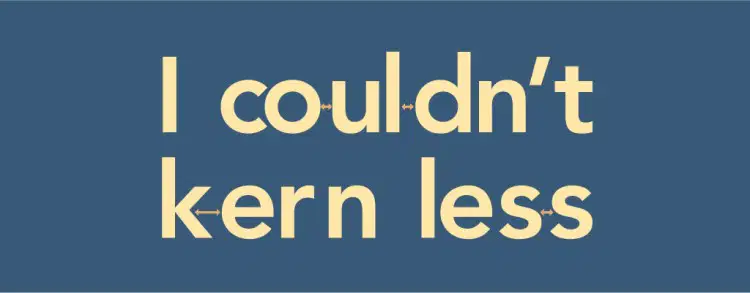
Kerning refers to:
The spacing between two letters
The spacing between all letters
The spacing between lines of text
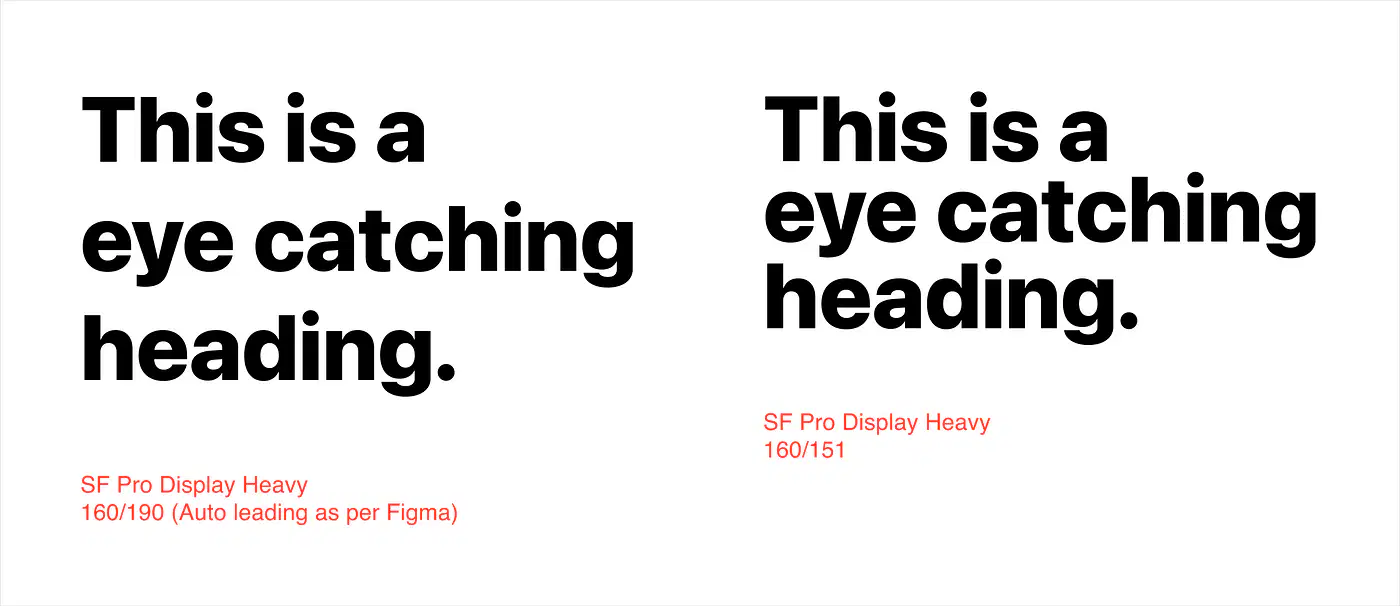
Leading refers to:
The spacing between two letters
The spacing of lines in a paragraph
The spacing between all letters
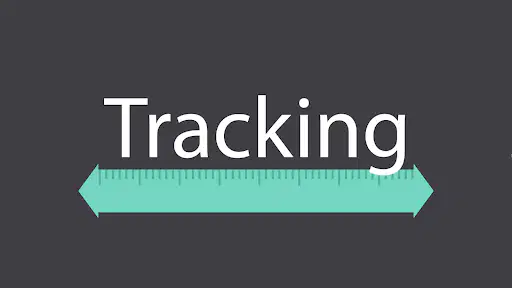
Leading refers to:
The spacing between two letters
The spacing of lines in a paragraph
The spacing between all letters
Which unit of measurement are used with fonts?
inches (in)
Which tool allows you to type on the outline of a shape?
Type tool
Vertical type tool
When you create a path in Illustrator, how many anchor points are made?
One
None
What happens if you click and drag with the pen tool?
It creates a straight path.
What happens if you click and don't drag with the pen tool?
It creates a curved path.
Which tool allows you to convert a curved anchor point into a corner anchor point (and vice versa)?
add anchor point tool
delete anchor point tool
When is the best time to draw with the Pencil tool?
Never!
If you want to erase an entire object in Adobe Illustrator, which is the best method?
select every single anchor point, one at a time, then delete
cry a little and start completely over
What is the marketing practice of actively shaping your brand to create a cohesive look?
napping
Which of the following clearly outlines the goals and boundaries of a project?
project creep
budget
In project management, which of the following options accurately describes scope creep?
unauthorized changes to a project plan
when someone is standing over your shoulder... watching
everything going perfectly as planned
What is the name of the industry-based certification (IBC) we will be preparing for in this course?
Graphic Design & Illustration Using Adobe Illustrator
Print & Digital Media Publication Using Adobe InDesign
Visual Design Using Adobe Photoshop
Some tools in the toolbar have a small white triangle that indicates there are multiple tools in that group. What can you do to look at all the tools in the group? (multiple answers)
left-click and hold down on the tool
right-click on the tool
stare at it
If you want to remove the stroke color of an object, you will need to click on the None icon. What does the None icon look like?
white box with red diagonal stripe
black box with red diagonal stripe
red box
What kind of reaction do you want from people who see your branding?
emotional
negative
crying, weeping, sobbing
What are the stylistic elements of your branding, including your color palette, fonts, and an outline of your brand voice, referred to?
brand guidelines
mission statement
style selection
logo

