
 Worksheets
DCN - Midterm Module 1
Total questions: 76
Worksheet time: 1hrs 9mins
Networking Components:
Every computer on a network is called a host or an end device.
(a)
Network Components (Host Roles):
computers that send requests to the servers to retrieve information.
(a)
Network Components (Host Roles):
computers that provide information to end devices
(a)
Server types are:
Email, Web, File
Email, Windows, Microsoft
Email, Internet, File
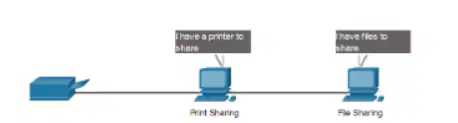
A type of network design for very small networks.
(a)
Network Component:
A device where a message originated from or where it is received. Data originates in an _ _, flows through the network, and arrives at an _ _.
(a)
Network Components:
These are devices that interconnect end devices.
(a)
examples of intermediary network devices:
routers
switches
cables
firewalls
computer
Network Components:
Communication across a network is carried through a medium which allows a message to travel from source to destination.
(a)
Network Components (Network Media):
A type of medium that uses electrical impulses.
(a)
Network Components (Network Media):
A type of medium that uses pulses of light.
(a)
Network Components (Network Media):
A type of medium that uses modulation of specific frequencies of
electromagnetic waves.
(a)
NETWORKING REPRESENTATIONS AND TOPOLOGIES
diagrams make it easy for us to understand how devices connect in a large network. The ability to recognize the logical representations of the physical networking components is critical to being able to visualize the organization and operation of a network.
(a)
NETWORKING REPRESENTATIONS AND TOPOLOGIES
_ _ use symbols to represent devices within the work.
(a)
NETWORKING REPRESENTATIONS AND TOPOLOGIES
Network Representations:
Physically connects the end device to the network.
(a)
NETWORKING REPRESENTATIONS AND TOPOLOGIES
Network Representations:
A connector or outlet on a networking device where the media connects to an end device or another networking device.
(a)
NETWORKING REPRESENTATIONS AND TOPOLOGIES
Network Representations:
Specialized ports on a networking device that connect to individual networks. Because routers connect networks, the ports on a router are referred to as network (a) .
NETWORKING REPRESENTATIONS AND TOPOLOGIES
Illustrates the physical location of intermediary devices and cable installations.
(a)
NETWORKING REPRESENTATIONS AND TOPOLOGIES
Illustrates devices, ports, and the addressing scheme of the network.
(a)
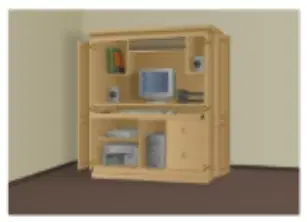
COMMON TYPES OF NETWORKS
Networks of Many Sizes:
Connect a few computers to each other to the internet.
(a)
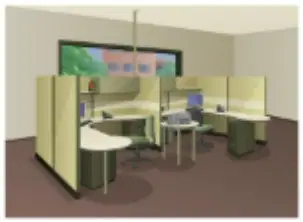
COMMON TYPES OF NETWORKS
Networks of Many Sizes:
Allows computers in a home office or a remote office to connect to a corporate network, or access centralized, shared resources. (known as SOHO).
(a)
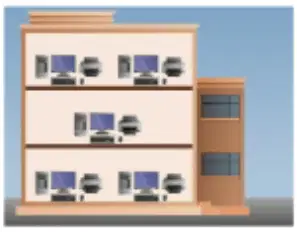
COMMON TYPES OF NETWORKS
Networks of Many Sizes:
Many locations with hundreds or thousands of interconnected hosts.
(a)
COMMON TYPES OF NETWORKS
Networks of Many Sizes:
A network of networks that connects hundreds of millions of computers world-wide.
(a)
COMMON TYPES OF NETWORKS
A network infrastructure that spans a small geographical area.
(a)
COMMON TYPES OF NETWORKS
A network infrastructure that spans a wide geographical area. Typically managed by service providers (SPs) or Internet Service Provides (ISPs).
(a)
COMMON TYPES OF NETWORKS
A worldwide collection of interconnected networks
(a)
COMMON TYPES OF NETWORKS
organizations that were developed to help maintain the structure and standardization of internet protocols and processes
(a)
COMMON TYPES OF NETWORKS
A private connection of LANs and WANs internal to an organization that is meant to be accessible only to the organizations members. (company only)
(a)
COMMON TYPES OF NETWORKS
Used by an organization to provide secure and safe access to individuals who work for a different organization but require access to the organization’s data. (suppliers, customers, collaborators)
(a)
INTERNET CONNECTIONS
Home users, remote workers, and small offices typically require a connection to an ISP to access the Internet.
(a)
INTERNET CONNECTIONS (Internet Access Technologies)
Home and Small Office Internet Connections
High bandwidth, high availability, and always-on connection to the Internet, offered by cable
television service providers.
(a)
INTERNET CONNECTIONS (Internet Access Technologies)
Home and Small Office Internet Connections
High bandwidth, high availability, always-on connection to the Internet, and runs over a telephone line.
(a)
INTERNET CONNECTIONS (Internet Access Technologies)
Home and Small Office Internet Connections
Uses a cell phone network to connect. Performance is limited by the capabilities of the phone and the cell tower to which it is connected.
(a)
INTERNET CONNECTIONS (Internet Access Technologies)
Home and Small Office Internet Connections
major benefit to rural areas without Internet Service Providers.
(a)
INTERNET CONNECTIONS (Internet Access Technologies)
Home and Small Office Internet Connections
An inexpensive and low bandwidth option that uses any phone line and a modem.
(a)
INTERNET CONNECTIONS (Internet Access Technologies)
Business Internet Connections
These are reserved circuits within the service provider’s network that connect distant offices with private voice and/or data networking.
(a)
INTERNET CONNECTIONS (Internet Access Technologies)
Business Internet Connections
Extends LAN access technology into the WAN.
(a)
INTERNET CONNECTIONS (Internet Access Technologies)
Business Internet Connections
Available in various formats like Symmetric Digital Subscriber Line (SDSL).
(a)
INTERNET CONNECTIONS (Internet Access Technologies)
Business Internet Connections
This can provide a connection when a wired solution is not available.
(a)
INTERNET CONNECTIONS
Capable of delivering data, voice, and video between many different types of devices over the same network infrastructure.
(a)
RELIABLE NETWORKS
refers to the technologies that support the infrastructure that moves data across the network.
(a)
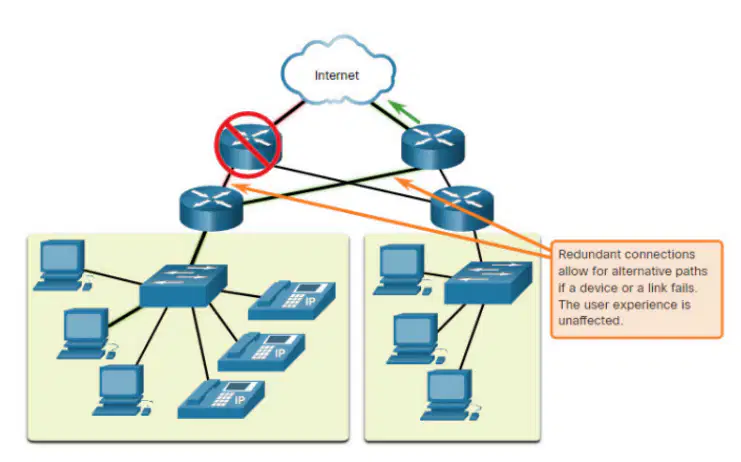
RELIABLE NETWORKS
a basic characteristic that limits the number of affected devices during a failure.
(a)
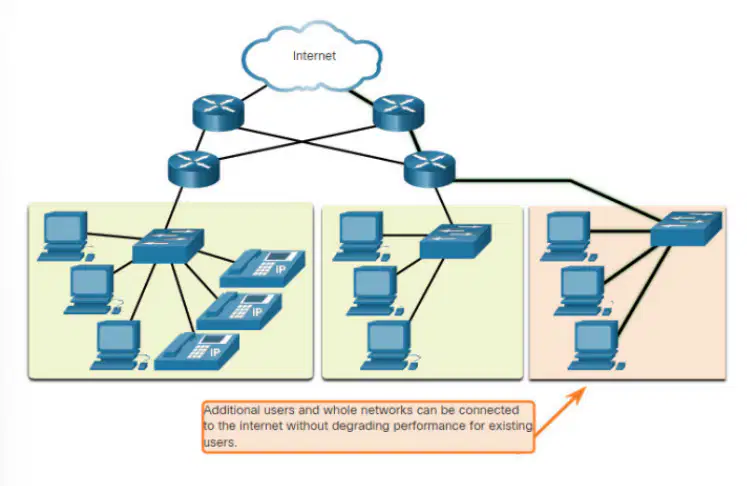
RELIABLE NETWORKS
A characteristic that expands quickly to support new users and applications. It does this without degrading the performance of services that are being accessed by existing users.
(a)
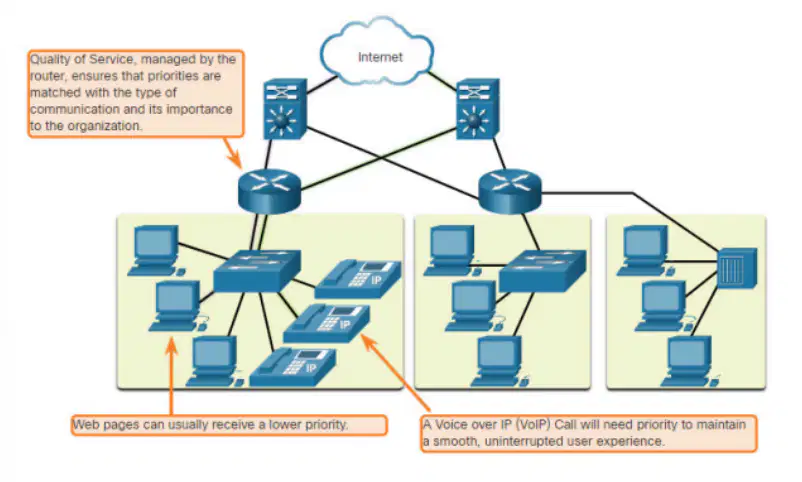
RELIABLE NETWORKS
a characteristic that manages congestion and ensures
reliable delivery of content to all users as data, voice, and video content continue to converge onto the same network.
(a)
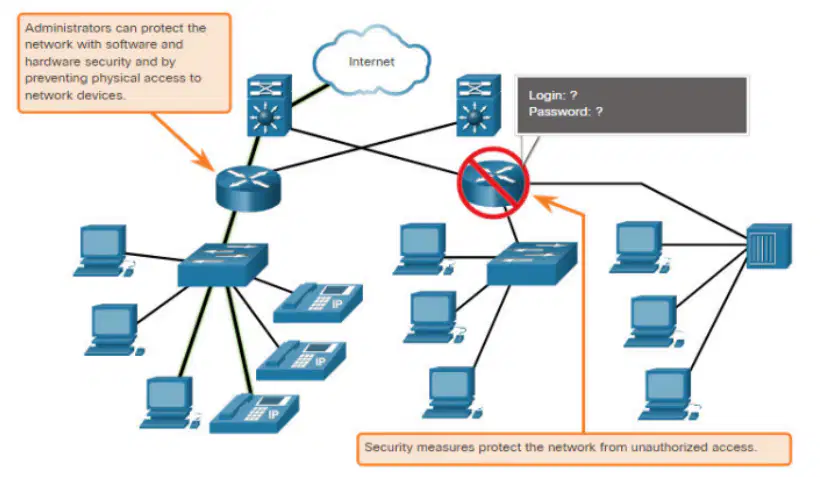
RELIABLE NETWORKS
a characteristic that includes Network infrastructure security and Information Security
(a)
RELIABLE NETWORKS
Network Security:
Physical security of network devices and Preventing unauthorized access to the devices
(a)
RELIABLE NETWORKS
Network Security:
Protection of the information or data transmitted over the network
(a)
RELIABLE NETWORKS
Network Security (three goals):
Only the intended and authorized recipients can access and read data.
(a)
RELIABLE NETWORKS
Network Security (three goals):
Assures users that the information has not been altered in transmission, from origin to destination.
(a)
RELIABLE NETWORKS
Network Security (three goals):
Assures users of timely and reliable access to data services for authorized users.
(a)
NETWORK TRENDS
Enables end users the freedom to use personal tools, such as laptops, notebooks, tables, smart phones, and e-readers, to access information and communicate across a business or campus network.
(a)
NETWORK TRENDS
Collaborate and work with others over the network on joint projects.
(a)
NETWORK TRENDS
Video conferencing is a powerful tool for communicating with others, both locally and globally.
(a)
NETWORK TRENDS
Allows us to store personal files, even backup an entire drive on servers over the internet.
(a)
NETWORK TRENDS
Cloud Computing (types of cloud):
Available to the general population; free or are offered on a pay-per-use model.
(a)
NETWORK TRENDS
Cloud Computing (types of cloud):
Intended for a specific organization or entity, such as a government.
(a)
NETWORK TRENDS
Cloud Computing (types of cloud):
Made up of two or more clouds, where each part remains a distinct object, but both are connected using a single architecture.
(a)
NETWORK TRENDS
Cloud Computing (types of cloud):
Created for exclusive use by specific entities or organizations.
(a)
NETWORK TRENDS
Technology Trends in the Home
A growing trend that allows technology to be integrated into everyday appliances which allows them to interconnect with other devices.
(a)
NETWORK TRENDS
Allows devices to connect to a LAN where data network cables or wireless communications are not a viable option.
(a)
NETWORK TRENDS
An ISP that connects subscribers to a designated access point or hotspot using similar wireless technologies found in home wireless local area networks (WLANs).
(a)
NETWORK TRENDS
Another wireless solution for the home and small businesses. An antenna is installed outside the house providing either wireless or wired connectivity for devices in the home.
(a)
NETWORK SECURITY
Security Threats (external):
contain malicious software or code running on a user device.
Viruses, worms, and Trojan horses
Spyware and adware
Threat actor attacks
Zero-day attacks
Denial of Service attacks
NETWORK SECURITY
Security Threats (external):
secretly collects information about the user.
Viruses, worms, and Trojan horses
Spyware and adware
Identity Theft
Data Interception and Theft
Threat actor attacks
NETWORK SECURITY
Security Threats (external):
also called zero-hour attacks, these occur on the first day that a vulnerability becomes known.
Zero-day attacks
Threat actor attacks
Denial of Service attacks
Data Interception and Theft
NETWORK SECURITY
Security Threats (external):
a malicious person attacks user devices or network resources.
Threat actor attacks
Zero-day attacks
Data Interception and Theft
Denial of Service attacks
NETWORK SECURITY
Security Threats (external):
slows down or crashes applications and processes on a network device.
Denial of Service attacks
Data Interception and Theft
Viruses, worms, and Trojan horses
Zero-day attacks
NETWORK SECURITY
Security Threats (external):
captures private information from an organization's network.
Data Interception and Theft
Identity Theft
Viruses, worms, and Trojan horses
Zero-day attacks
Denial of Service attacks
NETWORK SECURITY
Security Threats (external):
steals the login credentials of a user in order to access private data.
Identity Theft
Data Interception and Theft
Threat actor attacks
Zero-day attacks
NETWORK SECURITY
Security Solutions
For a home or small office networks:
helps to protect end devices from becoming infected with malicious software.
Firewall filtering
Dedicated firewall systems
Access control lists (ACL)
NETWORK SECURITY
Security Solutions
For larger and corporate networks:
further filters access and traffic forwarding based on IP addresses and applications.
Access control lists (ACL)
Firewall filtering
○Dedicated firewall systems
Intrusion prevention systems (IPS)
NETWORK SECURITY
Security Solutions
For a home or small office networks:
blocks unauthorized access into and out of the network.
Firewall filtering
Antivirus and antispyware
Dedicated firewall systems
Virtual private networks (VPN)
NETWORK SECURITY
Security Solutions
For larger and corporate networks:
provides more advanced firewall capabilities that can filter large amounts of traffic with more granularity.
Dedicated firewall systems
Access control lists (ACL) -
Virtual private networks (VPN)
Intrusion prevention systems (IPS)
NETWORK SECURITY
Security Solutions
For larger and corporate networks:
identifies fast-spreading threats, such as zero-day or zero-hour attacks.
Intrusion prevention systems (IPS)
Virtual private networks (VPN)
Antivirus and antispyware
Access control lists (ACL)
NETWORK SECURITY
Security Solutions
For larger and corporate networks:
provides secure access into an organization for remote workers.
Virtual private networks (VPN)
Intrusion prevention systems (IPS)
Access control lists (ACL)
Dedicated firewall systems
THE IT PROFESSIONAL
The CCNA certification demonstrates that you have a knowledge of foundational technologies and ensures you stay relevant with skill sets needed for the adoption of next-generation technologies. What does CCNA stands for?
(a)

