wayground logo

Free Printable Worksheets

Font size

S
M
L
XL
Worksheets

Tech First Semester Exam Review 2025

Total questions: 40

Worksheet time: 20mins

Name
Class
Date
1.
Which computer peripheral is often called the "Screen"?
a)
Scanner
b)
Mouse
c)
Monitor
d)
Keyboard
2.
Which computer peripheral is used when you woul like to use a DVD or CD
a)
Monidor
b)
CD/DVD tray
c)
Printer
d)
Scanner
3.
Which computer Peripheral uses left clicks and right clicks?
a)
Mouse
b)
Printer
c)
Scanner
d)
Monitor
4.
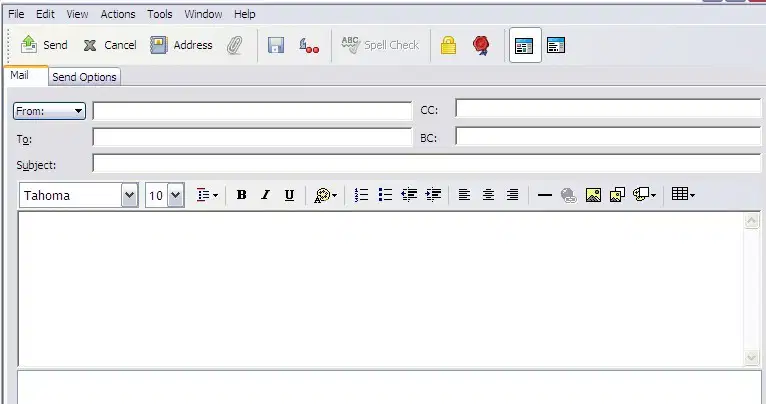
Which of the icons would you use to boldface highlighted text?
a)
The "B"
b)
The "U"
c)
The "I"
d)
None of these answers
5.
Which of the icons would you use to underline highlighted text?
a)
The "B"
b)
The "U"
c)
The "I"
d)
None of these answers
6.
Which of the icons would you use to italicize highlighted text?
a)
The "B"
b)
The "U"
c)
The "I"
d)
None of these answers
7.
What is the row of keys that we set our fingers on as we prepare to type?
a)
Skid Row
b)
Home Row
c)
Finger Row
d)
Key Row
8.
Which 2 keys are the "anchor keys" on the keyboard
a)
A and K
b)
E and O
c)
F and J
d)
T and ;
9.
What does the "shift key" do on the keyboard?
a)
When held down, it capitalizes the letter being typed
b)
Causes Each key to go back one space
c)
When held down, it causes a beeping sound
d)
Helps choose a different color of font
10.
What is "GWAM" the abbreviation for while typing?
a)
Great Words Per Minute
b)
Gross Words Per Minute
c)
Grand Words Per Millenium
d)
Gross Words Per Monitor
11.
Which is the most important typing skill to develop
a)
Fonts
b)
Time
c)
Speed
d)
Accuracy
12.
Which of the following is a way to create margins?
a)
Home Ribbon Tab > Font
b)
Insert Ribbon Tab > Picture
c)
Page Layout Ribbon > Margins
d)
Reference Ribbon Tab > Insert Citation
13.
Which of the following will allow you to print a document using Microsoft Word or Google Docs?
a)
CNTRL > P
b)
CNTRL > S
c)
CNTRL > PDF
d)
CNTRL > Developer
14.
While Typing, Your eyes should be looking at what?
a)
The keyboard
b)
Your fingers
c)
The monitor or page being typed from
d)
The printer
15.
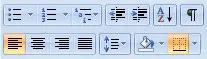
Which icon would you click to "Left Align" you selected text?
a)
the icon on the right
b)
The icon in the middle
c)
the icon on the left
d)
None of these answers
16.
Which icon do you select to change the line spacing?
a)
The icon with the up and down arrow
b)
The icon with the AZ arrow
c)
The icon with the 123
d)
the icone with the dots
17.
If you wanted to move a paragraph of text from one place in your document to another, which of the following would be the best option?
a)
Highlight text > right click > copy > click where you want text > right click > delete
b)
Highlight text > right click > cut > click where you want text > right click > paste
c)
Highlight text > right click > move > click where you want text > right click > paste
d)
Highlight text > right click > cut > click where you want text > right click > delete
18.
If you have a sentence in your document that you do not need any longer, how can you "get rid of" the text?
a)
Highlight Text > delete
b)
Highlight Text > move
c)
Highlight Text > copy
d)
None of the answers
19.
How do you enter text in Google Docs?
a)
Use cut and paste most of the time
b)
Type only when the computer tells you to
c)
Type anywhere you would like
d)
Type where the cursor is flashing
20.
How do you insert special symbols into your document?
a)
Home Ribbon Tab > Paragraph options
b)
Insert Ribbon Tab > Symbols
c)
Reference Ribbon Tab > Signs
d)
None of these answers
21.
You have saved a document. Now, you want to save it BUT WITH A DIFFERENT NAME. How would you do this?
a)
Office Button > Save As
b)
Office Button > Print As
c)
Office Button > Reference As
d)
Office Button > Developer
22.
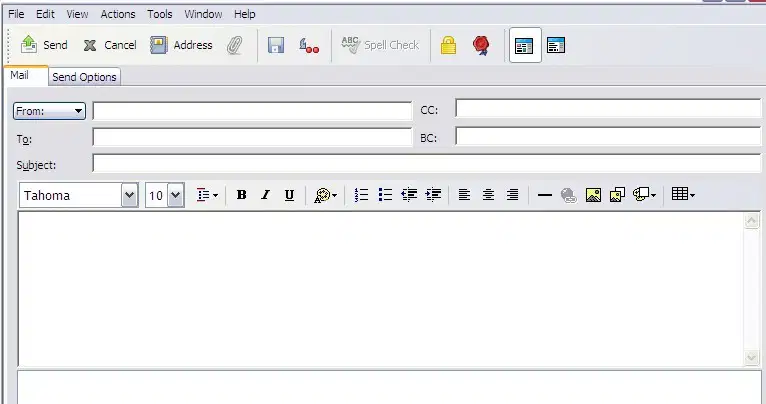
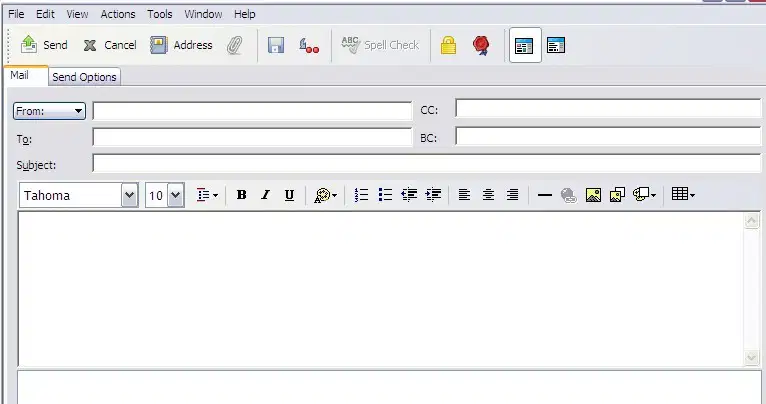
Using the graphic shown, where do you type the email address of a person you want to send an email to?
a)
In the "To" box
b)
In the "Subject" Box
c)
In the "Message" Box
d)
In the "CC" Box
23.
How do you attach a message to an email file?
a)
Click on the "Paper Clip" icon then click on the file you want to attach
b)
Click on the "book" icon the click on the file you want to attach
c)
Click on the "envelope" icon then click on the file you want to attach
d)
Click on the "scissors" icon then click on the file you want to attach
24.
How do you send an email message?
a)
Enter "To:", Enter "Subject:", Enter "Message:", Click "Attach"
b)
Enter "To:", Enter "Subject:", Enter "Message:", Click "Cancel"
c)
Enter "To:", Enter "Subject:", Enter "Message:", Click "Address"
d)
Enter "To:", Enter "Subject:", Enter "Message:", Click "Send"
25.
Which icon is pictured here?
a)
Google Docs
b)
Google Slides
c)
Google Classroom
d)
Google Sheets
26.
Which icon would you click to "Center Align" your selected text?
a)
The icon on the right
b)
the icon in the middle
c)
the icon on the left
d)
None of the answers
27.
How do you insert clip art onto a slide in Google Slides
a)
Insert Ribbon Tab > Image
b)
Home Ribbon Tab > Insert
c)
Reference Ribbon Tab > Graphic
d)
None of the answers
28.
How do you change the size of a GRAPHIC in Google Slides?
a)
Highlight the graphic, change the font size
b)
Click and drag the entire slide
c)
Click and drag the middle of the graphic
d)
Click and drag one of the resizing handles on the image
29.

What is the shortcut key to save a document in most word processors?

a)

CTRL + V

b)

CTRL + C

c)

CTRL + P

d)

CTRL + S

30.

Which tab would you use to change the font style in a document?

a)

Home

b)

Insert

c)

Layout

d)

Design

31.

What is the shortcut key to copy selected text in most word processors?

a)

CTRL + X

b)

CTRL + C

c)

CTRL + V

d)

CTRL + P

32.

How do you change the page orientation in a document?

a)

Layout Tab > Orientation

b)

Design Tab > Orientation

c)

Insert Tab > Orientation

d)

Home Tab > Orientation

33.

Which icon would you use to bold highlighted text?

a)

The 'B'

b)

The 'I'

c)

The 'U'

d)

None of these answers

34.

How do you create a bulleted list in a document?

a)

Insert Tab > Bullets

b)

Home Tab > Bullets

c)

Design Tab > Bullets

d)

Layout Tab > Bullets

35.

What is the shortcut key to copy text in most word processors?

a)

CTRL + X

b)

CTRL + C

c)

CTRL + V

d)

CTRL + Z

36.

Which tab would you use to add a header to your document?

a)

Home

b)

Insert

c)

Layout

d)

Design

37.

How do you underline text in a document?

a)

Select text > Click 'U'

b)

Select text > Click 'I'

c)

Select text > Click 'S'

d)

Select text > Click 'B'

38.

What is the shortcut key to paste text in most word processors?

a)

CTRL + X

b)

CTRL + C

c)

CTRL + V

d)

CTRL + Z

39.

What is the shortcut key to undo an action in most word processors?

a)

CTRL + A

b)

CTRL + U

c)

CTRL + Z

d)

CTRL + Y

40.

Which tab would you use to change the font style in a document?

a)

Layout

b)

Insert

c)

Home

d)

Review