
 Worksheets
Vector Illustration and the Clockwork Method Quiz
Total questions: 40
Worksheet time: 19mins
What is the main purpose of The Clockwork Method?
To improve drawing skills on paper
To teach advanced digital illustration techniques
To help determine where to place anchor points in shapes
To create complex vector graphics automatically
Why is proper anchor point placement important in vector graphics?
It saves time, improves precision and makes edits easier
It allows for automatic shape creation
It enhances the color quality of the design
It simplifies the use of vector programs
What does The Clockwork Method use as a guide for placing points?
A mathematical formula
A grid system
A color wheel
The image of a clock face
What challenge does The Clockwork Method aim to address?
Figuring out where to place anchor points
Learning to use new vector software
Improving hand-drawing skills
Creating 3D models
Which positions on the clock are used for the placement of anchor points to produce clean curves?
1, 4, 7, 10 o'clock
12, 3, 6, 9 o'clock
2, 5, 8, 11 o'clock
3, 6, 9, 12 o'clock
What is the purpose of using an imaginary clock face in this illustration method?
To add color to the shapes.
To make the shapes larger.
To help remove guesswork when placing anchor points.
To create a 3D effect.
What should you remember when placing anchor points in your art?
Always use a ruler
Place a
"point" or "hinge" wherever your art comes to a point (changes direction)
Use only primary colors
Avoid using any guidelines
What is the first step in applying The Clockwork Method to a shape?
Identifying the color of the shape
Counting the number of shapes
Measuring the size of the shape
Analyzing the curves in the art
What is essential for achieving precise Bézier curves in complex shapes?
Correct anchor point locations
Using a compass
Freehand drawing
Random point placement
What should you do when a shape within your design is angled?
Ignore the angle and proceed
Angle/rotate your clock face to match it
Use a different design
Change the color scheme
What is the next step after locating anchor points in their correct positions?
Pulling out Bézier curve handles
Printing the design
Adding text
Changing the background color
What are the two types of anchor points?
corner point and smooth curve
handles
flat and curved
bold and italic
What is a characteristic of a corner anchor point?
It is only used in text design.
It always uses Bézier curve handles.
It is used for coloring.
It has an apex that comes to a point.
What is a characteristic of a smooth anchor point?
It always uses Bézier curve handles.
It is used for creating sharp angles.
It is only used in 3D design.
It is used for adding text.
What is the primary benefit of using The Clockwork Method in vector design?
It reduces the time needed for rendering
It provides a structured approach to placing anchor points
It simplifies the color selection process
It enhances the overall aesthetic of the design
How does The Clockwork Method help in maintaining symmetry in vector graphics?
By applying color gradients
By reducing the number of anchor points
By aligning anchor points at consistent intervals
By using a grid system
What is a common mistake when placing anchor points in vector graphics?
Placing too few anchor points
Placing anchor points too close together
Using only horizontal and vertical lines
Ignoring the color palette
What is the advantage of using fewer anchor points in vector graphics?
It allows for more complex designs
It enhances color accuracy
It makes the design easier to edit and smoother
It increases the file size
How can The Clockwork Method improve the efficiency of vector graphic design?
By increasing the number of layers
By providing a clear guideline for anchor point placement
By automating the color selection process
By reducing the need for manual adjustments
What is a potential drawback of placing anchor points too far apart in vector graphics?
It can lead to less precise curves
It makes the design more vibrant
It reduces the overall file size
It simplifies the editing process
What is a key consideration when adjusting anchor points for curves in vector graphics?
Using only straight lines
Ensuring anchor points are evenly spaced
Ignoring the curve's smoothness
Maximizing the number of anchor points
How does reducing the number of anchor points affect the file size of vector graphics?
It increases the file size
It makes the file size unpredictable
It has no effect on the file size
It reduces the file size
What is the role of control handles on Bezier curves when creating vector art?
They simplify the design process
They are used to add more anchor points
They adjust the curve's direction and length
They determine the color of the vector
What is a common benefit of using The Clockwork Method in vector graphics?
It allows for more vibrant colors
It simplifies the placement of anchor points
It increases the number of layers
It automates the design process
How does proper spacing of anchor points affect the smoothness of curves in vector graphics?
It makes curves more jagged
It has no effect on smoothness
It enhances the smoothness of curves
It complicates the editing process
What is a potential issue when using too many anchor points in a vector design?
It simplifies the design process
It can make the design harder to edit
It reduces the file size
It improves the precision of curves
The Hand Tool
Used to erase any area, object, path, etc
Used to create shapes with multiple straight sides.
Used to pan to different areas of the document
A multipurpose tool used to distort an object, combining functions such as moving, scaling, shearing, rotating, and distorting
In digital illustration, what does the term "layer" refer to?
A filter applied to the image
A level of brightness or contrast
A separate level of the artwork that can be edited, locked or viewed independently
The background of the image

In Adobe Illustrator, what is the primary function of the Direct Selection Tool (bottom/right position in the toolbox)?
To select entire objects
To select and move anchor points or paths
To group objects together
To select similar objects based on color

In Adobe Illustrator, what is the primary function of the Selection Tool (top/left position in the toolbox)?
To select entire objects
To select and move anchor points or paths
To group objects together
To select similar objects based on color

In Adobe Illustrator, the Eraser Tool is used to
Precisely cut a shape or path into separate geometric clean paths
Remove a shape or path, or split a shape into separate closed organic shapes
Zoom in or zoom out
Create both free-form and more precise artwork

TRUE OR FALSE: You create a straight line by clicking once with the pen tool.
TRUE
FALSE
How do you make a curved line with the pen tool?
Click and drag
Click once
How do you change direction of a curved path (converting it to a corner point anchor), using the pen tool?
Drag the handle with the SHIFT key pressed
Drag the handle with the ALT key pressed
Drag the handle with the CTRL key pressed
How do you change the path from curved to straight with the pen tool?
Press
CTRL + Z
Hover over the last anchor point and drag it
Hover over the last anchor point and click it once
How do you change the path from straight to curved with the pen tool?
Press
CTRL + Z
Hover over the last anchor point and drag it
Hover over the last anchor point and click it once
How do you UNDO your last action?
Press
CTRL + Z
Hover over the last anchor point and drag it
Hover over the last anchor point and click it once
How do you RE-DO an UNDO (you went too far)?
Hover over the last anchor point and drag it
Press
SHIFT + CTRL + Z
Hover over the last anchor point and click it once
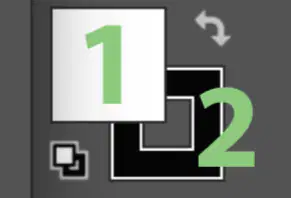
What is #2 called?
Stroke
Fill
Outline
Rectangle Tool
What is #1 called?
Stroke
Fill
Outline
Rectangle Tool

