
 Worksheets
Vexcode Midterm Test Review
Total questions: 37
Worksheet time: 19mins

What will the robot do if it detects an object close by?
It will turn right for 90 degrees and then drive forward
It will turn right 90 degrees
It will drive forward
It will stop driving

What will the robot do if it detects blue with its FrontEye sensor?
It will do nothing, and keep driving forward.
It will turn right 90 degrees
It will turn left 90 degrees
It will turn right 180 degrees
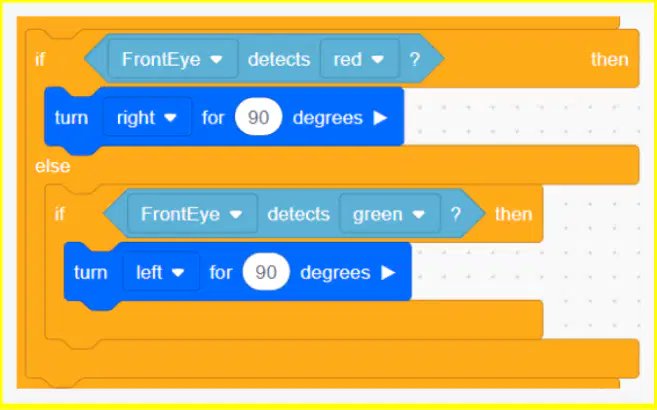
What will the robot do if it detects a green object close by?
It will turn right 90 degrees
It will turn left 90 degrees
It will drive forward
It will turn left 90 degrees, then drive forward

What will the robot do if it detects blue with its FrontEye sensor?
It will turn right 90 degrees
It will turn left 90 degrees
It will turn right then left
It will not do anything
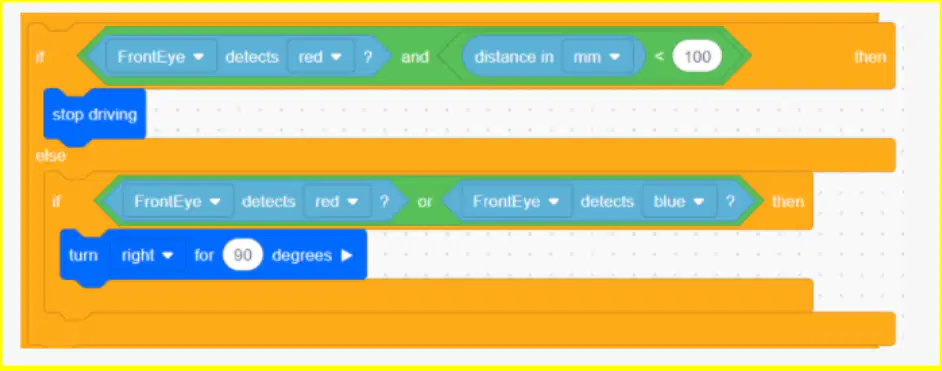
What will the robot do if it detects red at a distance of 300 mm?
It will stop driving
It will turn right 90 degrees
It will stop driving, then turn right 90 degrees
It will not do anything
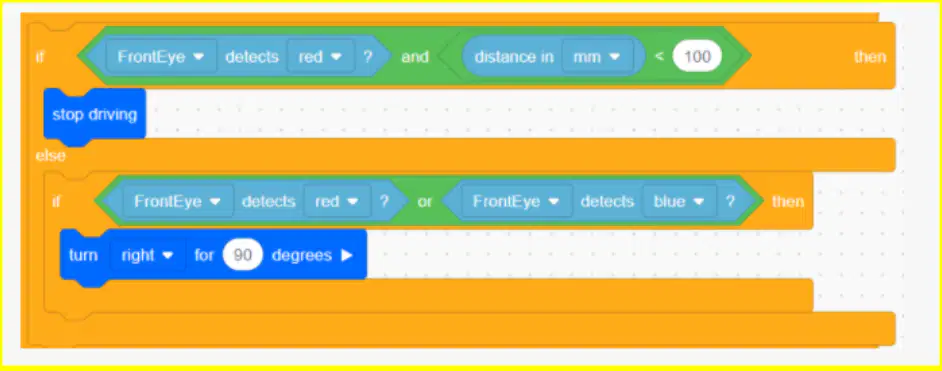
What will the robot do if it detects red at a distance of 50 mm?
It will stop driving
It will turn right 90 degrees
It will stop driving, then turn right 90 degrees
It will not do anything
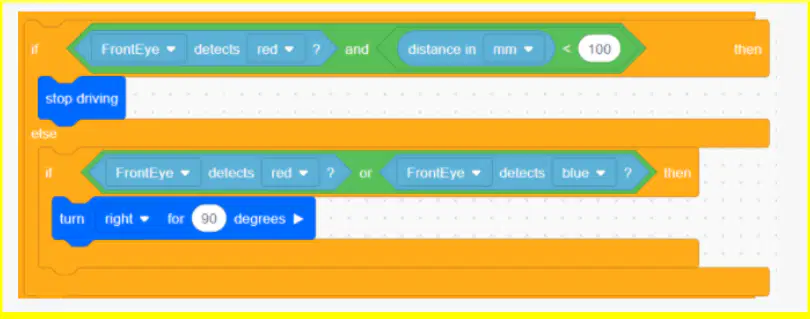
What will the robot do if it detects blue?
It will stop driving
It will turn right 90 degrees
It will stop driving, then turn right 90 degrees
It will not do anything
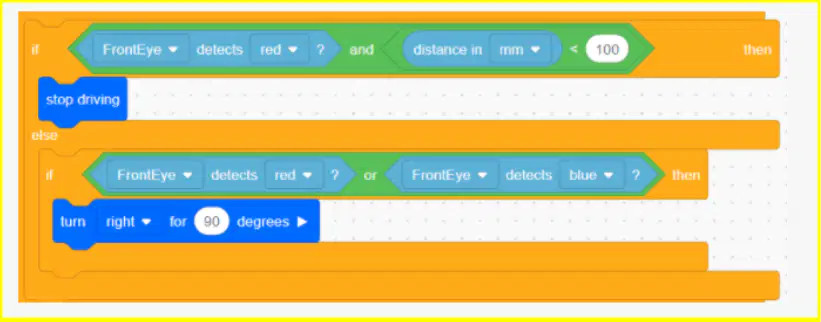
What will the robot do if it detects green?
It will stop driving
It will turn right 90 degrees
It will stop driving, then turn right 90 degrees
It will not do anything

What will the program print?
It will print the word “myVariable”
It will print the number “10”
It will print the number “8”
It will print the number “0”
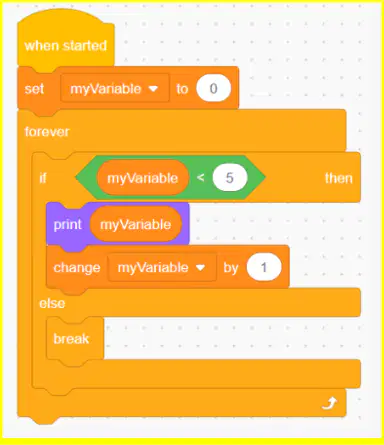
What will the program print?
It will print 0 1 2 3 4 5
It will print 0 1 2 3 4
It will print 0 0 0 0 0
It will print 1 1 1 1 1
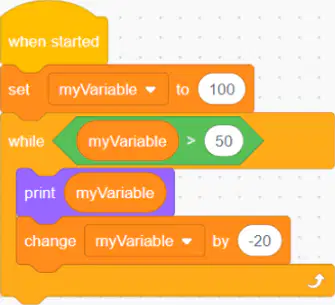
What will the program print?
100 80 60 40
100
100 50 30
100 80 60

In this project, what will happen if the Down Eye Sensor detects an object?
The VR Robot will stop driving, then set the Electromagnet to 'boost'.
The VR Robot will drive forward, then set the Electromagnet to 'boost'.
The VR Robot will check the condition of the
The VR Robot will use the Eye Sensor to check the color of the object.
Which block can be used to determine if the Eye Sensor (Down Eye and Front Eye) is close enough to an object to detect a color?
<Distance near object> block.
(Color brightness) block.
<Near Object> block.
<Color Sensing> block.
Which of the following describes one reason to use a [Turn to heading] block versus a [Turn] or [Turn for] block?
[Turn to heading] makes projects repeatable from one run to another because the VR Robot will move to the specified heading regardless of the previous position of the VR Robot.
[Turn to heading] will orient the VR Robot to the left every time.
[Turn to heading] will fix any turning errors in your project.
[Turn to heading] is based on the readings from the Distance Sensor, so it is more accurate than other turn commands.
What is an electromagnet?
A magnet that is attracted to plastic.
A magnet where the magnetic field is produced by an electric current.
A magnet that needs to be plugged into a wall outlet to work.
A magnet used to find hidden electrical sockets.
What feature of the disks enables the Electromagnet to pick up each disk in VEXcode VR?
The disks have plastic cores.
The disks are covered in tape.
The disks are entirely made of metal.
The disks have metal cores.
Which of the following best describes the 'boost' mode of the [Energize Electromagnet]?
Instructs the Electromagnet to pick up disks with metal cores.
De-energizes the Electromagnet to pick up disks with metal cores.
Energizes the Electromagnet to drop disks with metal cores.
Instructs the Electromagnet to drop disks with metal cores.
What happens when the [Energize Electromagnet] is set to drop while the Electromagnetic sensor is holding a disk?
Nothing happens.
The Dashboard reports the disk being released.
The Electromagnet releases the disk.
The Electromagnet picks up the disk.
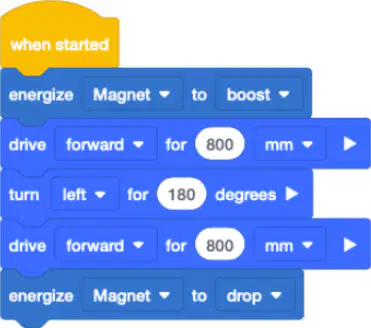
Describe what the VR Robot will do in this project.
The VR Robot will energize the magnet, drive forward 800 millimeters (mm), turn left 180 degrees, drive forward 800 millimeters (mm) and drop any disks that were picked up.
The VR Robot will drive forward 800 millimeters (mm), turn left 180 degrees, drive forward 800 millimeters (mm) and drop any disks that were picked up.
The VR Robot will energize the magnet, drive forward 800 millimeters (mm), turn left 180 degrees, and drive forward 800 millimeters (mm).
The VR Robot will energize the magnet, drive forward 200 millimeters (mm), turn left 90 degrees, drive forward 200 millimeters (mm) and drop any disks that were picked up.
True or False: Loops can be nested by dragging the loop you want to nest inside of another existing loop in the workspace.
True
False
What is one reason to use nested loops?
Creating a larger, more complex project.
Creating a smaller, more condensed project.
Repeating an action fewer times than needed.
To use as many blocks as possible in one project.
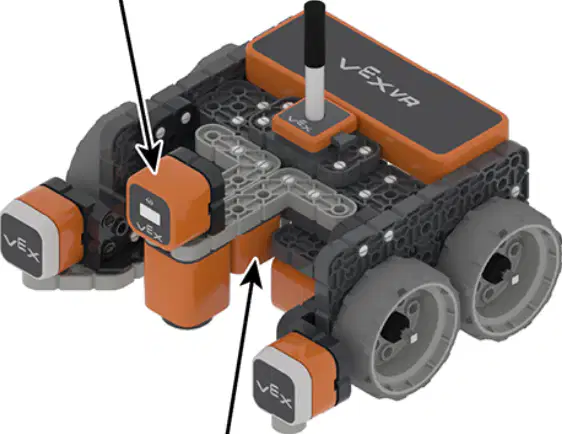
Which two sensors are being pointed to on the VR Robot?
The Left and Right Bumper Sensors.
The Front Eye and Down Eye Sensors.
The Electromagnet and Location Sensors.
The Distance and Front Eye Sensors.
What value will the
It will report TRUE.
It will report FALSE.
It will report how far in millimeters (mm) or inches the Eye Sensor is from the object.
It will report the location angle of the VR Robot in degrees.
What value will the
It will report the time elapsed of the project in seconds.
It will report the current heading in degrees of the VR Robot.
It will report FALSE.
It will report TRUE.

Describe how the VR Robot is using the Down Eye Sensor in this project.
To draw on the Playground.
To measure the distance to the blue disk.
To solve a maze.
To identify when the VR Robot is above a blue disk.
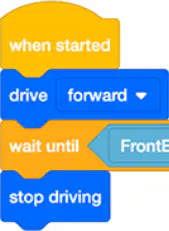
What will happen when the Front Eye Sensor detects red in this project?
The VR Robot will stop driving.
The VR Robot will turn left for 90 degrees.
The VR Robot will drive forward.
The VR Robot will check the Front Eye Sensor repeatedly.

What is the purpose of having multiple [If then] blocks in this project?
To have the Electromagnet Sensor pick up and place disks.
To be able to have the Down Eye Sensor check for the color red.
To have the Distance Sensor report how far the VR Robot is from an object.
To have the Front Eye Sensor check for each color and have the VR Robot perform a discrete behavior depending on the color detected.

In this project, if the condition of the Down Eye detecting red is TRUE, how will the VR Robot move?
It will turn right for 115 degrees.
It will drive forward forever.
It will turn left for 115 degrees.
It will stop driving.

In this project, how many times will the [Drive] block be repeated?
It will be repeated forever.
It will repeat 100 times.
It will repeat 90 times.
It will repeat once.

Describe why a [Forever] block is used in this project.
To continuously check if the VR Robot Pen is up or down.
To continuously check if the VR Robot is near an object with detectable colors.
To draw the color blue with the VR Robot Pen.
To report if the Bumper Sensors are being pressed.

What condition will be checked next if the condition of the Front Eye Sensor detecting blue is FALSE?
The condition of the Front Eye Sensor detecting green will be checked.
The condition of the Down Eye Sensor detecting red will be checked.
The condition of the Front Eye Sensor detecting none will be checked.
The condition of the Front Eye Sensor detecting red will be checked.

Why is the [If then] block nested inside the [Forever] block for this project?
Conditions of the [If then] block will be checked continually if nested in a [Forever] block. The VR Robot will use the Down Eye Sensor to continually check for an object.
The [Forever] block is not needed.
If the [Forever] block was not used, the [If then] block would only be executed and checked four times.
To turn right for 90 degrees when an object is detected.

The goal of this challenge is to navigate the VR Robot through the Disk Maze and stop at the red Disk. Which of the following could be added to this project in order to solve the Disk Maze challenge?
If the Front Eye Sensor detects blue then stop.
If the Down Eye Sensor detects purple then stop.
Wait until the Front Eye Sensor detects red.
If FrontEye detects red then Stop.
Which of these best describes a programming language?
A set of rules where symbols represent actions.
A set of spoken commands for a robot.
An action performed by a robot.
A list of behaviors the robot already completed.
What is the name for an action performed by the VR Robot?
Command
Behavior
Parameter
Programming Language
How do you change the behavior of the VR Robot?
Change the programming language.
Name and save your project.
Change the programming blocks called commands.
Change the Playground.

How far will the VR Robot move based off of this command?
200 millimeters (mm)
400 millimeters (mm)
500 millimeters (mm)
300 millimeters (mm)

