
NEW
Font size
 Worksheets
ACP - 3D Mod & Ani/Vid Game Prog - End of 2nd 9 Weeks
Total questions: 20
Worksheet time: 35mins
Juan is new to PS but wants to set it so that his work saves automatically every 5 mins. How would he accomplish this?
Edit - Preferences - File Handling - Automatically save recovery information every...
Edit - Preferences - General - Automatically save recovery information every...
Edit - Preferences - Interface - Automatically save recovery information every...
Edit - Preferences - Workspace - Automatically save recovery information every...
If Camilla wants to adjust the size of the Spot Healing Brush tool. How would she change her brush size see in the photo.
She would use the square brackets on the keyboard.
She would use the parenthesis keys on the keyboard.
She would use the left and righ arrow keys on the keyboard.
She would use the up and down arrow keys on the keyboard.
Lilo is having probems after installing PS correctly on a new laptop. He is experiencing freezing and his cursor acting weird. He suspects it might be his video driver. What is one thing that he could try to eliminate the problem?
Edit - Preferences - Performance - and unselect: Use Graphics Processor
Edit - Preferences - Performance - and unselect: Web/UI Design
Edit - Preferences - Performance - and unselect: Cache Level
Edit - Preferences - Performance - and unselect: Cache Tile Size
Camilla wants to edit videos in PS. Will she be able to?
Yes
No

Maria wants to draw with the pencil tool. What would she select from the toolbar? See graphic...
She would long hold on the Marquee tool and choose the Pencil tool.
She would long hold on the Crop tool and choose the Pencil tool.
She would long hold on the Brush tool and choose the Pencil tool.
She would long hold on the Eraser tool and choose the Pencil tool.
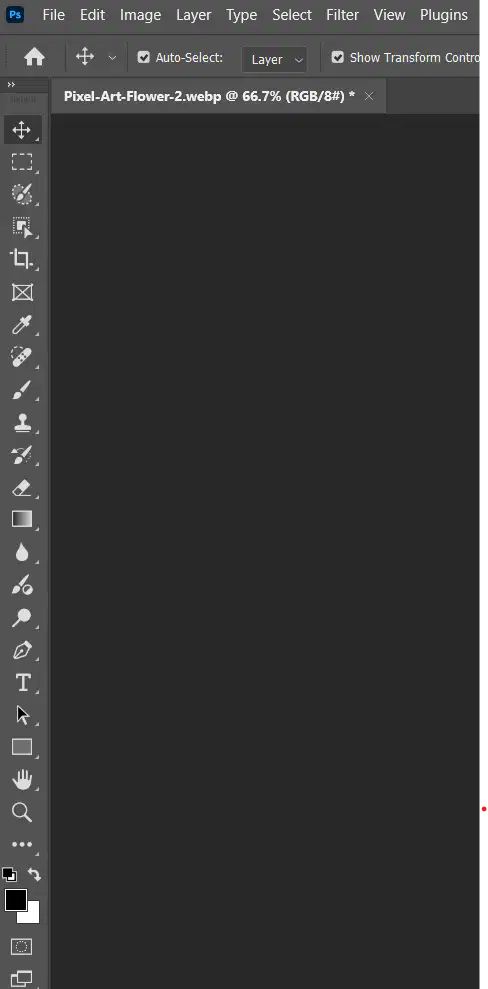
John is zoomed into a photo in PS. But he wants to move the photo around so he can see details in other areas of his photo while he's still zoomed in. What tool would he use to accomplish this? See graphic...
The Hand tool
The Crop tool
The Eye Dropper tool
The Brush tool
How would Jose fix the crooked image in the graphic?
He would choose the Crop tool and then choose the Straighen button.
He would choose the Marquee tool and then choose the Straighen button.
He would choose the Brush tool and then choose the Straighen button.
He would choose the Eye Dropper tool and then choose the Straighen button.
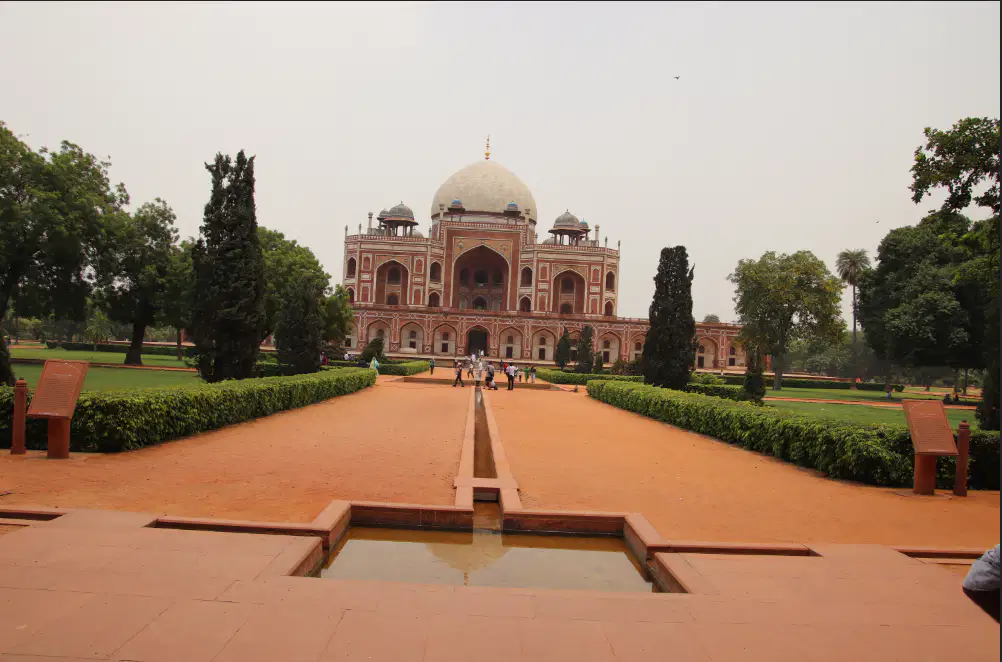
Jose is working on the Red Fort photo. How would he adjust the photo so he can remove unwanted things around the edges of the photo like the signs on both sides or the elbow of the person on the lower right side of the photo?
He would use the Crop tool.
He would use the Brush tool.
He would use the Clone Stamp tool.
He would use the Dodge tool.
Jose is editing the Red Fort photo. He wants to remove the people in the photo that is cluttering up the view of the building. How would he accomplish this?
He would use the Brush tool.
He would use the Spot Healing Brush tool.
He would use the Zoom tool.
He would use the Eraser tool.
Jose is editing the Red Fort photo and is trying to remove unwanted things. But in some parts of the photo, he's experiencing problems with the Spot Healing tool fixing his photo. What's an alternative tool he could use to fix difficult to remove things from his photo?
The Marquee tool
The Brush tool
The Clone Stamp tool
The Adjustment Brush tool
Sabastian is edting a photo. He's using the Image menu and choosing Adjustments and then choosing Brightness/Contrast. What type of action is he performing on his photo?
Destructive
Non-destructive
Diego wants to adjust his photo for Contrast, but non-destructively. How would he accomplish this?
Go to the Image menu, choose adjustments and then select Brightness/Contrast
Select the Adjustments panel and choose Brightness/Contrast
Select the Properties panel and choose Brightness/Contrast
Select the Properties menu and choose Brightness/Contrast
Elena wants to automatically adjust her Brightness. How would she accomplish this?
Go to the Image menu, choose adjustments and then select Brightness/Contrast and select Auto.
Select the Adjustments panel, choose Brightness/Contrast, and select Auto.
Select the Properties panel and choose Brightness/Contrast and select Auto.
Select the Properties menu and choose Brightness/Contrast and select Auto.
What would be the shortcut for Elena to reverse a change to a photo she made?
Ctrl-C
Ctrl-V
Ctrl-Z
Ctrl-A
Maya made some adjustments to her photo, such as Brightness and Contrast changes. How would she quickly hide those changes so she could compare the before and after states of her photo?
She would select the Brightness slider the Adjustments panel.
She would select the eye icon in the layers panel.
She would select the Contrast slider in the Adjustments panel.
She would select the Hide slider in the Adjustments panel.
Carina is saving her photo. But she wants to save it in the best format so that she can keep the maximum quality. What file type would she use?
jpg
png
psd
gif
Mylo is working with a photo where he wants to retain the transpareny in his file, but he needs it in a smaller more efficient file format for the Web. What file type should he choose?
jpg
png
psd
gif
Leo has taken a lot of photos. He's copied them to his hard drive. But he wants to see the GPS info for his files. How would you suggest he accomplish this?
Choose File and Browse in Bridge and select the photo.
Choose File and Open As and select the photo.
Choose File and Invite to Edit and select the photo.
Choose File and Export and select the photo.
Alejandro wants to quickly browse the images on his computers. What is the best way to view multiple images?
He should use the File - Open option.
He should use the File - Browse in Bridge option.
He should use the File - Open Recent option.
He should use the File - Open as Smart Object option.
If Linda is working with an image that is in a RAW file format. What does that mean?
You're working with a jpg you got from the Internet.
You're working with a png file you received from your friend.
You're working with an image from a DSLR camera.
You're working with an image from your phone.

