wayground logo

Free Printable Worksheets

Font size

S
M
L
XL
Worksheets

image proc fa1-2 (m1-3)

Total questions: 130

Worksheet time: 33hrs 30mins

Name
Class
Date
1.
It occurs when the shutter speed of the camera is too long for the speed of the object.
a)
Motion Blur
b)
Edges
c)
Noise
d)
Picture Element
2.
Motion blur may be observable when taking a photo of fast-moving objects.
a)
True
b)
False
3.

Picture elements are also known as (a)   . (type your answer in lowercase)

4.
Using image processing for automating inspection process is an example of its applications under ______________________.
a)
Industry
b)
Medicine
c)
Agriculture
d)
Law Enforcement
5.
This may be considered as reversing the damage done to an image by a known cause.
a)
Image Restoration
b)
Image Enhancement
c)
Image Classification
d)
Image Segmentation
6.
Image enhancement is under this phase of image processing.
a)
Preprocessing
b)
Representation and Description
c)
Image Acquisition
d)
Recognition and Interpretation
7.
It is represented by a two-dimensional matrix with only 1s and 0s.
a)
Binary Image
b)
Greyscale Image
c)
True Color Image
d)
Indexed Images
8.
The larger the image, the lesser the information that can be stored.
a)
False
b)
True
9.
This term refers to the number of total pixels.
a)
resolution
b)
memory
c)
intensity
d)
image size
10.
As humans, we do not perceive grey levels as they are, but rather as they differ from their surroundings.
a)
True
b)
False
11.
As humans, we can identify and classify images in an instant.
a)
True
b)
False
12.
We perform noise removal to measure or observe object without being distracted by unnecessary detail
a)
False
b)
True
13.
If a neighborhood has an even number of rows or columns or both, it may be necessary to specify which pixel in the neighborhood is the “current pixel”.
a)
True
b)
False
14.
Finding lines, circles, or shapes in an image is an example of image segmentation.
a)
True
b)
False
15.
Improving image contrast, or brightening an image is an example of image segmentation.
a)
False
b)
True
16.
This phase of image processing captures the scene that we want to process.
a)
Image Acquisition
b)
Representation and Description
c)
Recognition and Interpretation
d)
Preprocessing
17.
This phase performs a basic task to make an image suitable for the major part of image processing.
a)
Preprocessing
b)
Image Acquisition
c)
Recognition and Interpretation
d)
Representation and Description
18.
This image has a direct mapping of pixel to its colormap values.
a)
Indexed Images
b)
Greyscale Image
c)
True Color Image
d)
Binary Image
19.
Our visual system tends to undershoot or overshoot around the boundary of regions of different intensities.
a)
True
b)
False
20.
It is a way to make images appear sharper and more pleasing to the human eye. Best observed on the printed page.
a)
Image Enhancement
b)
Motion Blur Removal
c)
Noise Removal
d)
Detail Removal
21.
Inspecting and interpreting images obtained from X-rays, MRI or CAT scans, and analysis of cell images are an example of the application using image processing under ___________.
a)
Medicine
b)
Agriculture
c)
Industry
d)
Law Enforcement
22.
Noise removal is an example of image segmentation.
a)
False
b)
True
23.
The pixels surrounding a given pixel is called picture elements.
a)
False
b)
True
24.
This image is also known as 8-bit images.
a)
Greyscale Image
b)
True Color Image
c)
Indexed Images
d)
Binary Image
25.
This image contains three colormap values.
a)
True Color Image
b)
True Color Image
c)
Greyscale Image
d)
Binary Image
26.
In a 240 x 240 image, what is the file size in bytes for a binary image?
a)
7200
b)
5600
c)
3200
d)
6700
27.
The higher the resolution, the larger the image file size.
a)
True
b)
False
28.
Noise may be observable when taking a photo of fast-moving objects.
a)
False
b)
True
29.
Finding lines, circles, or shapes in an image is an example of image restoration.
a)
False
b)
True
30.
Looking into the features that differentiate the objects in an image is under this phase.
a)
Representation and Description
b)
Recognition and Interpretation
c)
Preprocessing
d)
Image Acquisition
31.
We perform detail removal to measure or observe object without being distracted by unnecessary detail.
a)
True
b)
False
32.
The given matrix below is an example of ______________.
a)
Greyscale Image
b)
Binary Image
c)
True Color Image
d)
Indexed Images
33.
We use image processing to render image more suitable for autonomous machine perception.
a)
True
b)
False
34.
Detail removal in an image is applicable for measurement or counting purposes.
a)
True
b)
False
35.

In greyscale images, the level of grey ranges from ____ to ____. (answer in integers only, format of answer is "1, 100" if it's from 1 to 100)

(a)  

36.
True color images are also called 24-bit color images.
a)
True
b)
False
37.
We use image processing to improve image information for human interpretation.
a)
True
b)
False
38.
Extracting area or portion of an image that you need is under this phase.
a)
Preprocessing
b)
Representation and Description
c)
Image Acquisition
d)
Recognition and Interpretation
39.
An index image may also refer as ______________.
a)
Channel or map
b)
Greyscale Image
c)
RGB Image
d)
Binary Image
40.
As humans, we rely on our vision to understand the world around us.
a)
True
b)
False
41.
Removing motion blur in an image is under this aspect of image processing.
a)
Image Restoration
b)
Image Segmentation
c)
Image Classification
d)
Image Enhancement
42.
RGB images are also called _____________.
a)
True Color Image
b)
Indexed Images
c)
Binary Image
d)
Greyscale Image
43.

In true-color images, the number of bits required to represent a pixel is (a)   . (answer in integer only)

44.
In a 240 x 240 image, what is the file size in bytes for a greyscale image?
a)
57600
b)
36000
c)
67500
d)
56700
45.

How many grey levels are there in an 8-bit image? (answer in integer only)

(a)  

46.
An image is captured by a hardware sensor based on the amount of light it emits.
a)
True
b)
False
47.
It refers to processing an image so that the result is more suitable for an application.
a)
Image Enhancement
b)
Image Segmentation
c)
Image Restoration
d)
Image Classification
48.
Blur is a common problem in data transmission.
a)
False
b)
True
49.
Our perception of an image as humans starts with recognizing and interpreting it with the visual cortex in our brain.
a)
False
b)
True
50.
In a 240 x 240 image, what is the file size in bytes for a true-color image?
a)
172800
b)
271800
c)
128000
d)
187200
51.
It is a random error when capturing an image.
a)
Noise
b)
Motion Blur
c)
Edges
d)
Picture Element
52.
Finding lines, circles, or shapes in an image is an example of image enhancement.
a)
False
b)
True
53.
An image can be considered as a two-dimensional function, where the function values give the brightness level of the image at any given point.
a)
True
b)
False
54.
Assigning labels to the selected features and meaning to it is what phase.
a)
Recognition and Interpretation
b)
Representation and Description
c)
Image Acquisition
d)
Preprocessing
55.
Assuming that we have the current pixel represented in yellow on the given image, what pixel in green is its ____________ neighborhood.
a)
5 x 7
b)
7 x 5
c)
3 x 5
d)
3 x 4
56.
It involves subdividing an image into constituent parts, or isolating certain aspects of an image.
a)
Image Segmentation
b)
Image Enhancement
c)
Image Classification
d)
Image Restoration
57.
This type of image consists of only black and white pixels.
a)
Binary Image
b)
Indexed Images
c)
Greyscale Image
d)
True Color Image
58.

Matlab will store the result into a default variable named (a)   .

59.
You can type all your commands in the command window.
a)
True
b)
False
60.

How do you run the following in Matlab? Filename: myscript.m Location: C:\Users\Gwapo\Desktop

(a)  

61.

This is a function name that displays the currently defined variables their data types, and their sizes.

(a)  

62.

Declare the 3 x 3 matrix below using Matlab. (Do not put unnecessary spaces in your answer)

(a)  

63.
We can use _____ to get the number of rows and columns on an image.
a)
size
b)
imshow
c)
shape
d)
pixelinfo
64.
This Matlab function converts RGB image to grayscale.
a)
rgb2gray
b)
imrgb
c)
ind2gray
d)
gray2rgb
65.

To display a matrix in double datatype, we need to divide it by (a)   .

66.
The display of the result of a command whose output is a matrix of type double can be greatly affected by a judicious choice of a scaling factor.
a)
True
b)
False
67.
We can extract the bit planes of a grayscale image by using mod.
a)
True
b)
False
68.
With Matlab, we can only analyze data but not develop our own algorithms.
a)
True
b)
False
69.
Which of the following is correct about Matlab. (i) Matlab can visualize data, (ii) Matlab can analyze data, (iii) Matlab is designed to support matrices and its operations, (iv) Matlab can create models
a)
all of the given
b)
ii, iii, and iv
c)
none of the given
d)
i, ii, and iii
70.

To display full values of a variable, what command is needed to be used.

(a)  

71.
The order of element in single indexing access in Matlab corresponds to _____________.
a)
m( i + r ( j - 1 ))
b)
m( j + r ( i - 1 ))
c)
m( i - r ( j + 1 ))
d)
m( i + j ( r - 1 ))
72.
Pixel info shows the coordinate of a pixel and its intensity value.
a)
True
b)
False
73.
An indexed image consists of an image matrix and a color map.
a)
True
b)
False
74.

Assuming image img is in double datatype, how you will convert it to uint8? (do not include unnecessary spaces, end your command with semicolon)

(a)  

75.
Matlab allows many commands in one line separated by comma.
a)
True
b)
False
76.
The lower the resolution, the pixelization increases.
a)
True
b)
False
77.
Using the order of the element in single indexing in Matlab matrices, how would you access the element with a value of 5.
a)
a(5)
b)
a[5]
c)
a(2,2)
d)
a(1,2)
78.

This operator generates a vector of values from a to b. (answer using the symbol only)

(a)  

79.

Using the single indexing, what is the 8th element of a’

(a)  

80.
This function allows you to read image in Matlab.
a)
imread
b)
imshow
c)
figure
d)
imwrite
81.

Given the output below, determine what is the grayscale value of the red channel. (Pixel info: (100, 39) [203 172 143])

(a)  

82.

Given the binary equivalent of pixel intensity, what is the least significant bit? (answer using the letter that represents the bit)

(a)  

83.
Spatial resolution pertains to the density of pixels.
a)
True
b)
False
84.

A function that displays currently defined variable names. (answer the function name only)

(a)  

85.
Matlab stores the full values any computation.
a)
True
b)
False
86.
Using the order of element in single indexing in Matlab matrices, how would you access the element in row 2 column 3? (Do not put unnecessary spaces in your answer)
a)
a(2,3)
b)
a(1,2)
c)
a{2,3}
d)
a[2,3]
87.
Which of the following is true on the command a:b (i) a should be less than or equal to b, (ii) a maybe greater than to b, (iii) b is always greater than or equal to a, (iv) b may be less than a
a)
i and iii only
b)
ii only
c)
iii only
d)
ii and iv only
88.
We can invert matrices using the ___ function.
a)
inv
b)
invert
c)
inv_matrix
d)
matrix.inv
89.
A color map is an m-by-3 matrix of class double containing values in the range [0, 1].
a)
True
b)
False
90.
Greyscale images can be transformed into a sequence of binary images by breaking them up into their bit-planes.
a)
True
b)
False
91.
As the bit plane reaches to most significant bit, the information on the image becomes clearer.
a)
True
b)
False
92.

what is the result of the command 1:2:10? (use only spaces to separate your the values in your answer)

(a)  

93.
Each row of the color map specifies the red, green, and blue components of a single color.
a)
True
b)
False
94.

Write a Matlab command that will resize an image stored in a variable named ‘x’ by half of its size. (do not include unnecessary spaces, end your command with a semicolon)

(a)  

95.

What is the value in row 1 column 1 if matrix a is flipped using rot90?

(a)  

96.

Write a Matlab command to read an image named ‘sample.png’ (do not include unnecessary spaces, use semicolon at the end of your command)

(a)  

97.
This Matlab function converts index image to grayscale.
a)
ind2gray
b)
imgray
c)
gray2int
d)
idx2gray
98.
This area allows you to write and edit your Matlab script and save it as you wish.
a)
Editor
b)
Workspace
c)
Environment
d)
Command window
99.
We can perform an arithmetic operation on two matrices with different dimensions in Matlab.
a)
False
b)
True
100.

Convert an image to grayscale. (answer in function name only)

(a)  

101.

Given the command below, determine its equivalent using impixel function. (do not include unnecessary spaces, end your command with semicolon) img(39,100,:);

(a)  
102.
Elements in matrices in Matlab may have different numeric data types.
a)
True
b)
False
103.
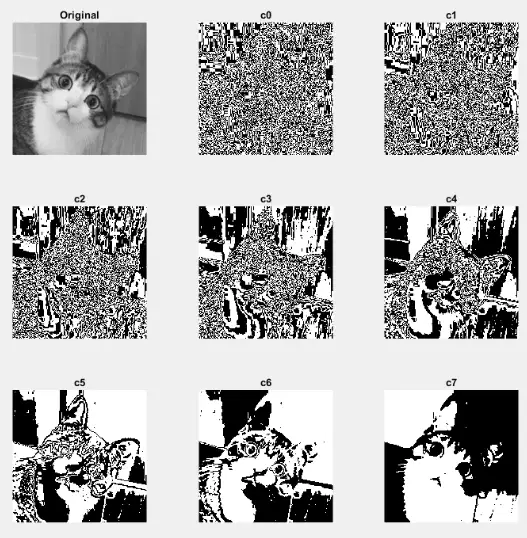
Given the bit-planes of the original grayscale image below, c7 represents the most significant bit.
a)
True
b)
False
104.

Given the output below, determine what is the grayscale value of the blue channel. (Pixel info: (100, 39) [203 172 143])

(a)  

105.
The Matlab code str2double(‘123’) is an example of ________________.
a)
function
b)
command
c)
delimiter
d)
statement
106.

What is the value in row 1 column 1 if matrix a is flipped using fliplr?

(a)  

107.

What is the value in row 2 column 2 if matrix a is reshaped using reshape(a, 2, 8)?

(a)  

108.
The right most bit represents the least significant bit.
a)
True
b)
False
109.
To get the most significant bit, which command we should use on a grayscale image img?
a)
mod(floor(img/128),2);
b)
mod(floor(img/16),2);
c)
mod(floor(img/64),2);
d)
mod(floor(img/32),2);
110.

Matlab prompt is denoted by this symbol.

(a)  

111.

Create a 3x3 matrix full of 0s. (do not include spaces)

(a)  

112.
Matlab is programming platform designed specifically for engineers and scientists.
a)
True
b)
False
113.

Create a zero matrix with 2x3 dimension. (do not include spaces)

(a)  

114.

The unint8 – restricts values to integers between ___ and ___ (format: number, number)

(a)  

115.
This window is where you enter your commands in Matlab.
a)
Command window
b)
Editor
c)
Workspace
d)
Environment
116.
The most common grayscale image datatype.
a)
uint8
b)
int8
c)
double
d)
logical
117.
Given the matrix below, how will you extract all values in the third column? (Do not put unnecessary spaces in your answer)
a)
a(:,3)
b)
a(3,:)
c)
a(:,2)
d)
a(:,:)
118.
Given the bit-planes of the original grayscale image below, c0 represents the most significant bit.
a)
False
b)
True
119.

If you want to save a Matlab script for future use, you may save it with a file extension dot (a)   . (answer the letter only)

120.

If your Matlab script is not located on the active folder, what command you should use to execute it. (answer using the function name only)

(a)  

121.
All variables used in Matlab can be observed on ____________.
a)
Workspace
b)
Command window
c)
Editor
d)
Environment
122.

Given the output below, determine what is the grayscale value of the green channel.

(a)  

123.

To obtain the values same as the indexing of pixel info, we can use (a)   . (answer in function name only)

124.

Displays the value of the pixel at the bottom of the display.

(a)  

125.

This value pertains to Mtlab’s version of infinity. (use only lowercase in your answer)

(a)  

126.

Function that allows you to display information about an image. (answer the function name only)

(a)  

127.
What is the correct way to access an element in a 4x4 matrix?
a)
M(2,3)
b)
M(1,-2)
c)
M(0,3)
d)
M(1,0)
128.

If we want to get the product of two matrices element-wise then we use what operator? (answer using the symbol only)

(a)  

129.
It creates a figure on the screen. A figure is a window in which a graphics object can be placed.
a)
figure
b)
imwrite
c)
imread
d)
imshow
130.
We can create binary data from a grayscale image using logical operators such as >, <, and ==.
a)
True
b)
False