
 Worksheets
AutoCAD Quiz
Total questions: 40
Worksheet time: 20mins
Which part of the AutoCAD interface displays the name of the current drawing and the software version?
Menu Bar
Title Bar
Status Bar
Search Bar
What is the primary area where you create and edit drawings in AutoCAD?
Menu Bar
Drawing Area
Status Bar
Quick Access Toolbar
Which interface component provides commonly used commands like "New," "Open," "Save," and "Undo"?
Quick Access Toolbar
Menu Bar
Search Bar
Status Bar
What part of the AutoCAD interface allows users to access tools and commands categorized under drop-down menus?
Status Bar
Quick Access Toolbar
Menu Bar
Title Bar
Which feature in AutoCAD helps users find commands and functions by typing keywords?
Status Bar
Search Bar
Menu Bar
Drawing Area
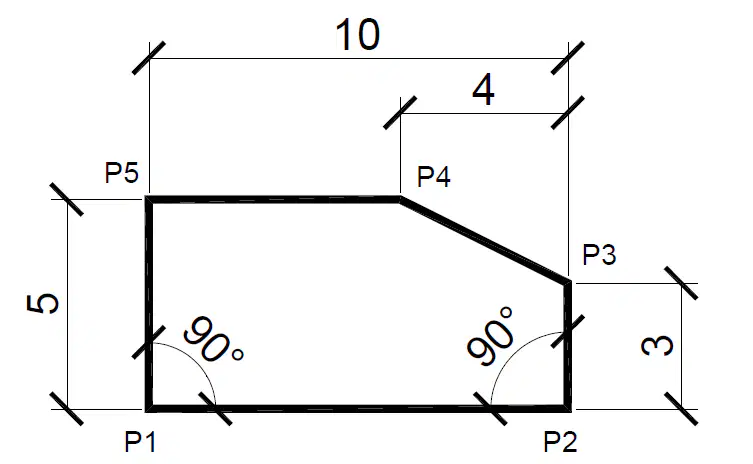
if the starting X axis is 2 and
the Y axis is 3,
P1 =
0,0
3,2
2,3
Click
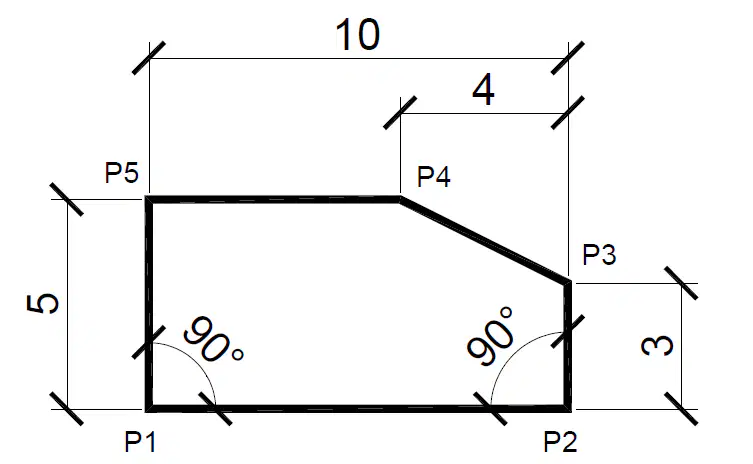
if the starting X axis is 2 and
the Y axis is 3,
what is the cartesian coordinate of P2?
@0,5
@3,2
@10,0
@0,10

if the starting X axis is 2 and
the Y axis is 3,
what is the cartesian coordinate of P3?
@0,3
@3,2
@3,0
0,3
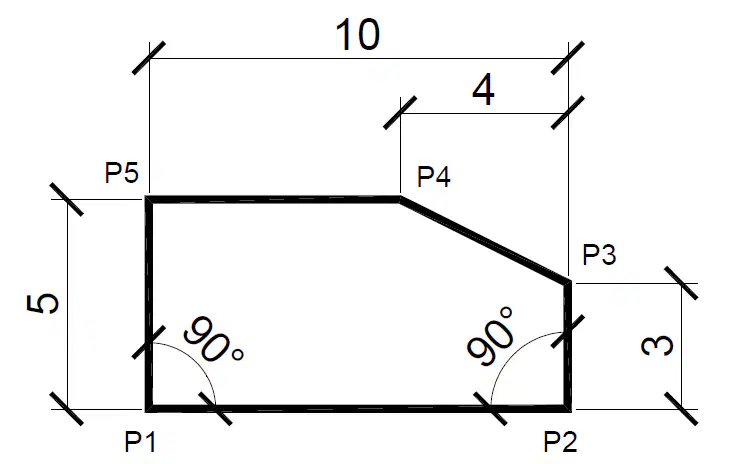
if the starting X axis is 2 and
the Y axis is 3,
what is the cartesian coordinate of P4?
@4,2
@3,2
@2,3
@-4,2
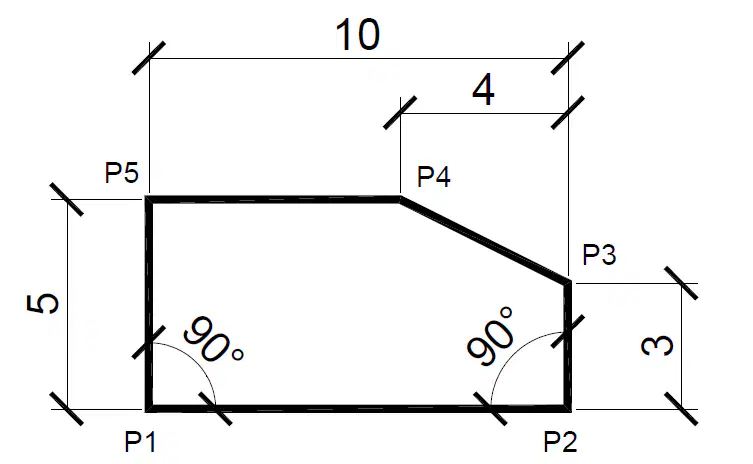
if the starting X axis is 2 and
the Y axis is 3,
what is the cartesian coordinate of P5?
@10,0
@-10,0
@0,-6
@-6,0
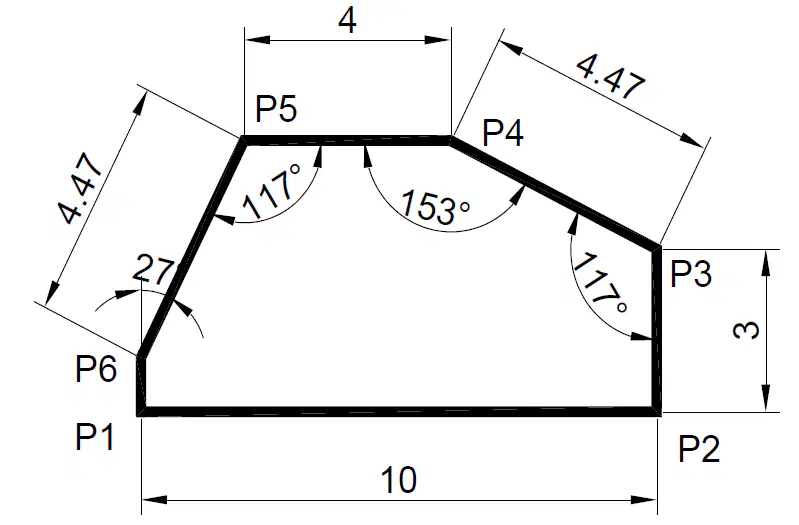
what is the polar coordinate of P2?
@10,0
@0,10
@10<0
@10<90
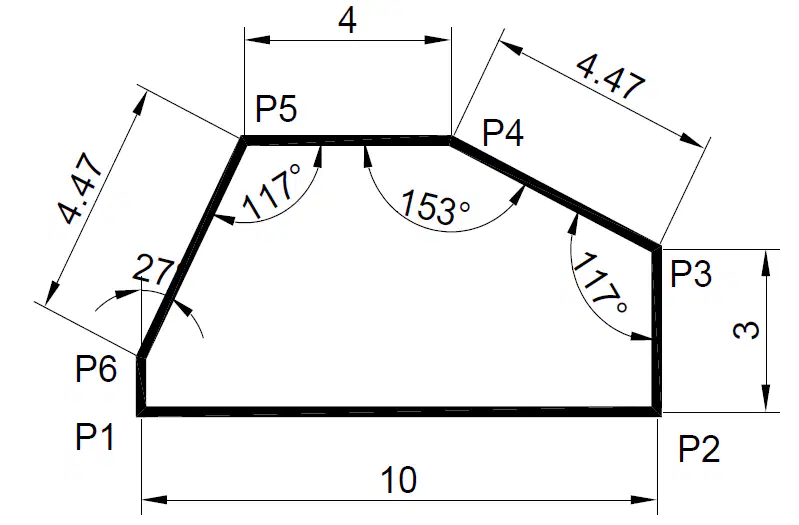
what is the polar coordinate of P3?
@0,3
@3,0
@3<0
@3<90
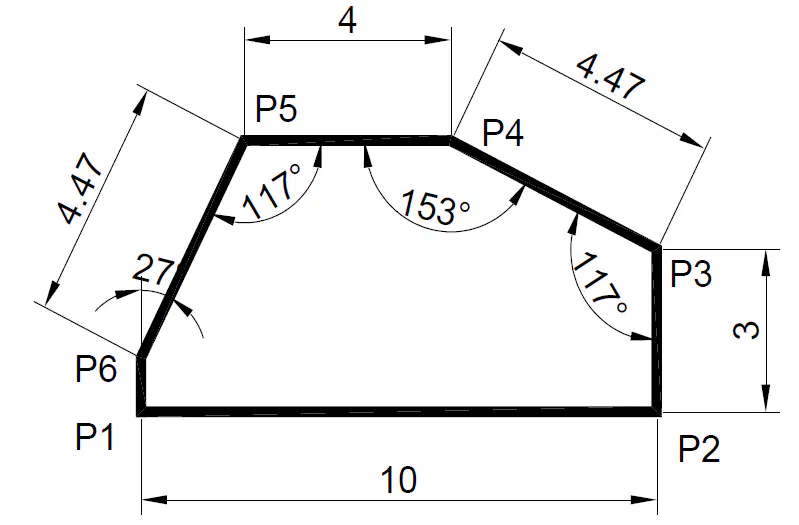
what is the polar coordinate of P4?
@4.47<117
@4.47<153
@4.47<27
@4.47<0
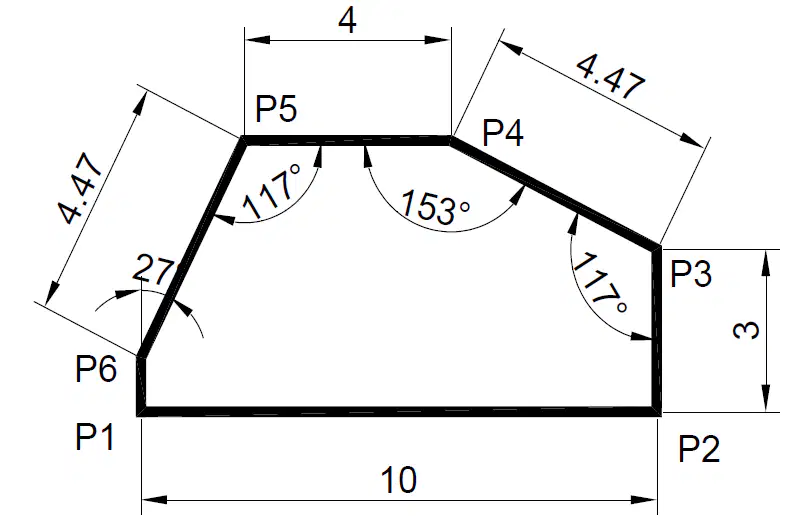
what is the polar coordinate of P5?
@4<153
@4<117
@4<180
@4<0
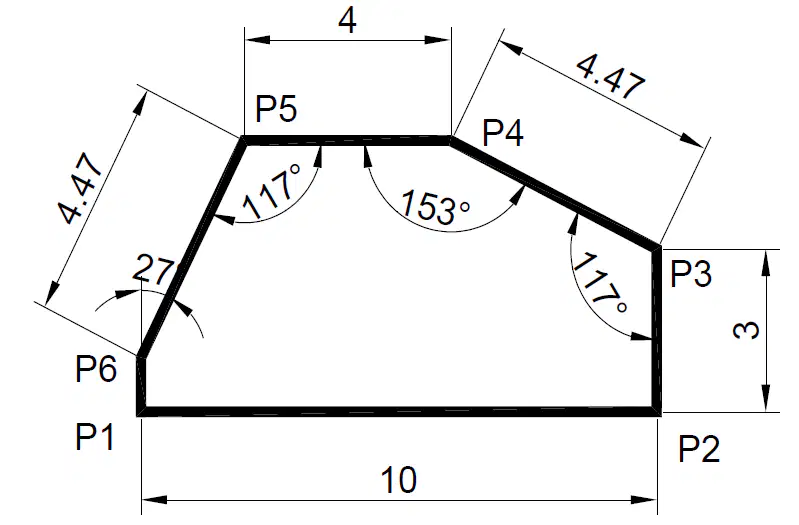
what is the polar coordinate of P6?
@4.47<117
@4.47<243
@4.47<153
@4.47<143
A line in AutoCAD can only be created using two points.
True
False
The polyline tool in AutoCAD can be used to create a sequence of connected straight lines
True
False
The polygon tool in AutoCAD is used to draw shapes with four sides only.
True
False
The arc tool in AutoCAD creates a segment of a circle, defined by a starting point, an endpoint, and a radius.
True
False
A circle in AutoCAD can only be created by specifying its center point and radius.
True
False
The rectangle tool in AutoCAD allows you to create a rectangle by defining the first corner and the opposite corner.
True
False
The hatch tool in AutoCAD is used to fill an enclosed area with a pattern or solid color.
True
False
A line in AutoCAD can be curved if the "curve" option is selected.
True
False
A polyline can contain both straight lines and curves in a single object in AutoCAD.
True
False
The polygon tool in AutoCAD can create shapes with more than four sides, such as a pentagon or hexagon.
True
False
Which of the following best describes the purpose of the "Offset" tool in AutoCAD?
To create a duplicate of an object at a specified distance
To extend the length of an object
To rotate an object at a given angle
To trim an object to a specific boundary
What is the primary difference between the "Move" and "Copy" commands in AutoCAD?
"Move" changes the object’s location, while "Copy" creates a duplicate at a different location.
"Move" increases the object's size, while "Copy" decreases the size.
"Move" rotates the object, while "Copy" mirrors it.
"Move" trims the object, while "Copy" extends it.
Which of the following tools in AutoCAD would you use to adjust the radius of a curved corner?
Offset
Scale
Fillet
Extend
When using the "Extend" tool in AutoCAD, what happens to the selected object?
It is shortened to meet another object.
It is moved to another location.
It is lengthened to intersect with another object.
It is rotated at a specified angle.
Which modifying tool in AutoCAD is best suited for creating a symmetrical reflection of an object?
Trim
Scale
Mirror
Extend
Which annotation tool in AutoCAD is primarily used to add descriptive text to a drawing?
Leader
Dimension
Table
Text
What is the purpose of the "Dimension" tool in AutoCAD?
To create a table for organizing data
To add text annotations to the drawing
To define measurements and sizes of objects
To create leader lines in the drawing
In AutoCAD, which annotation tool allows you to create a line with a text label that points to a specific object?
Text
Leader
Table
Dimension
What is the function of a table in AutoCAD annotations?
To organize text in rows and columns
To indicate measurements of objects
To add leader lines to the drawing
To add detailed descriptions to individual objects
Which of the following is true about the "Leader" tool in AutoCAD?
It is used to create a measurement between two points.
It points to specific objects with a text label or note.
It is used to insert tables into the drawing.
It organizes the text in rows and columns.
What is the primary function of the Layers command in AutoCAD?
To control the color of the drawing objects
To organize and manage drawing elements
To draw lines and shapes
To change the units of the drawing
Which of the following commands is used to create a new layer in AutoCAD?
LAYER
NEWLAYER
CREATELAYER
LAYER NEW
How can you hide a layer in AutoCAD without deleting it?
Right-click on the layer and select 'Hide'
Turn off the layer using the Layer Properties Manager
Use the 'OFF' command in the command line
Delete the layer from the drawing
Which of the following actions will prevent a layer from being printed in AutoCAD?
Change the layer's color to white
Set the layer's "Plot" property to "No"
Delete the layer
Freeze the layer
What happens when you freeze a layer in AutoCAD?
Objects on that layer are hidden in the drawing, but the layer remains editable
The objects on that layer are no longer visible, and the layer cannot be edited
The layer is deleted from the drawing permanently
The layer is moved to a different location in the drawing

