
 Worksheets
Borders and Shades in Word 2010 Quiz
Total questions: 12
Worksheet time: 7mins
What can you add to any or all four sides of selected text, paragraphs, and pages in Word 2010?
Hyperlinks
Borders
Headers
Footers
Which button do you click to display a list of options to put a border around selected text or paragraph?
Format Button
Border Button
Insert Button
Shading Button
How can you add a horizontal line between the left and right margins?
Select the Horizontal Line option
Type three asterisks and press ENTER
Use the Insert tab
Draw a line manually
What tab do you click to apply shading to a selected portion of text?
Design tab
Page Layout tab
Insert tab
Shading tab
Which section allows you to preview the expected result of borders and shading?
Format section
Layout section
Design section
Preview section
What can you customize in the border settings for a page?
Page size
Font style
Text alignment
Border color and width
Which option should you select to remove an existing border?
Clear Border option
Remove Border option
Delete Border option
No Border option
What dialog box is used to set borders and shading around a selected text or page?
Format Text dialog box
Paragraph dialog box
Border and Shading dialog box
Page Setup dialog box
Which tab in the Border and Shading dialog box allows you to set page borders?
Text Border tab
Document Border tab
Page Border tab
Layout Border tab
What can you use to disable or enable borders on specific sides of a page?
Layout section
Preview section
Design section
Format section
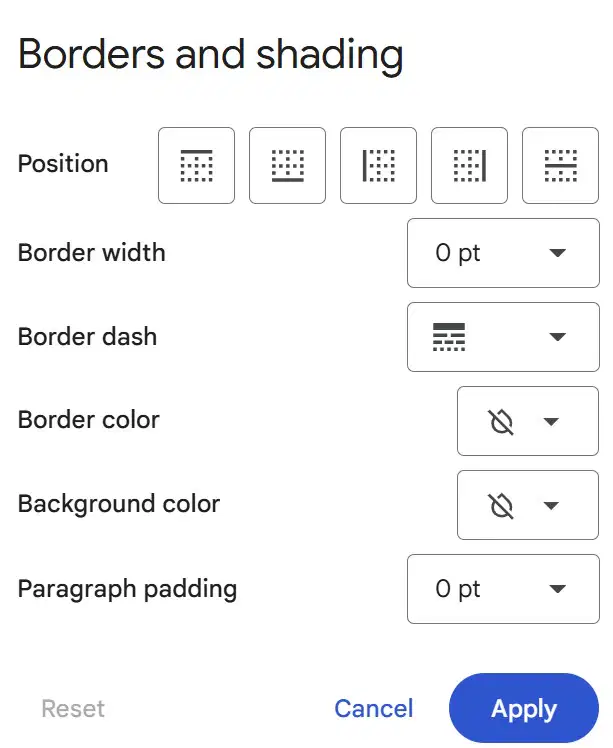
Where can you find "Borders and Shading" on Google Docs?
First, Click "Format"
Second, Click " ( ) Styles"
(a)
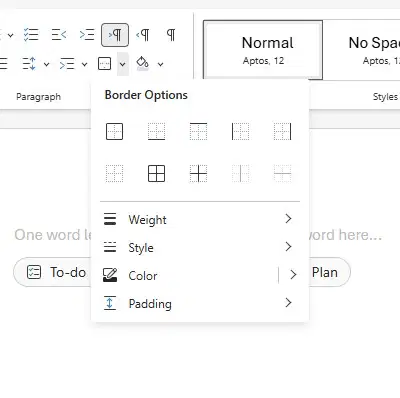
Where can you find Border Options on Microsoft Word ?
First, ( ) Tab
Second, Paragraph
(a)

