

wayground logo

Free Printable Worksheets

NEW

Font size

S
M
L
XL
Worksheets

Excel Certification

Total questions: 61

Worksheet time: 13mins
Name
Class
Date
1.
What do you call the blank boxes on a spreadsheet?
a)
cells
b)
info
c)
squares
d)
spots
2.
What would be a correct formula for sum in excel?
a)
=SUM(B3:B9)
b)
=SUMB3+B9
c)
SUM(B3:B9)
d)
=ADD(B3:B9)
3.
_____ are vertical. 
a)
Rows
b)
Columns
4.
________ are horizontal
a)
Rows
b)
Columns
5.
A combination of numbers and symbols used to express a calculation. Always begins with an = sign.
a)
Cell address
b)
Worksheet
c)
Formula
6.
Microsoft Excel is what type of software?
a)
Word Processing
b)
Spreadsheet
c)
Presentation
d)
Drawing
7.
Excel allows you to
a)
read stories
b)
work with data
c)
invent ideas
8.
Which symbol must you use to begin a formula?
a)
+
b)
=
c)
/
d)
*
9.
How do you make a cell the active cell?
a)
Click the ACTIVE button
b)
Click INSERT CELL
c)
Click on the cell
d)
Cells are always active
10.
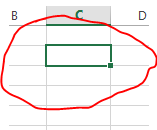
What is the name of this cell?
a)
B10
b)
5B
c)
B5
d)
A5
11.
_________ allows you to perform calculations on data entered into a spreadsheet?
a)
Formulas
b)
Data
c)
Cell
d)
Cell reference
12.
You can find the location of a cell or (cell reference) by looking at the ___________? 
a)
columns and rows next to it
b)
row point
c)
the intersection of a column and row
d)
the value
13.
True or False: Spreadsheets can be used in everyday life by analyzing sports stats, grades, and creating a budget for expenses?
a)
True
b)
False
14.
What is the Formula sign for multiply? 
a)
*
b)
-
c)
/
d)
+
15.
In Excel a Chart is a Graph.
a)
TRUE
b)
FALSE
16.
Absolute cells are identified by the _____________ symbol. 
a)
Hash tag
b)
Asterisk
c)
Dollar sign
d)
Ampersand 
17.
What would the result be if you copied this formula:  =A1+B1  DOWN to the next cell: 
a)
=A2+B2
b)
=B1+C1
c)
=B2+C2
d)
=A1+B1
18.
What would the result be if you copied this formula:  =A1+B1  to the cell on the RIGHT: 
a)
=A1+B1
b)
=B2+C2
c)
=B1+B2
d)
=B1+C1
19.
What would the result be if you copied this formula:  =$A$1+B1  to the cell on the RIGHT: 
a)
=A1+C1
b)
=$A$1+B1
c)
=$A$1+C1
d)
=$A$1+B2
20.
A cell reference in a spreadsheet application that remains constant even if the shape or size of the spreadsheet is changed
a)
Absolute Cell Reference
b)
Relative Cell Reference
c)
Cell Reference
d)
Cell Address
21.
Absolute cell references are important when referring to constant values in a spreadsheet.
a)
TRUE
b)
FALSE
22.
=$A$8
a)
The row and column would stay unchanged if copied
b)
The row would change but the column would not change if copied
c)
The row would not change but the column would change if copied
d)
The row and column would change if copied
23.
Which formula gets the biggest value of a range of cells?
a)
MAX
b)
MIN
c)
LARGE
d)
SUM
24.
Which of the following formulas is not entered correctly?
a)
=10+50
b)
=B7+B8
c)
=B7+14
d)
10+50
25.
Columns go...
a)
Across
b)
Down
26.
Rows go...
a)
Across
b)
Down
27.
You can only work in one cell at a time. The actual cell that you are working in is called what?
a)
Column
b)
Name Box
c)
Active Cell
d)
Row
28.
When entering text in Excel, it is automatically (by default):
a)
Left Justified
b)
Right Justified
c)
Center Justified
d)
Full Justified
29.
When entering numbers in  Excel, they are automatically (by default):
a)
Left Justified
b)
Right Justified
c)
Center Justified
d)
Full Justified
30.
The feature to center text across several cells is called:
a)
Wrap Text
b)
Merge and Center
c)
Shrink to Fit
d)
Number Formatting
31.
This icon is called the what?
a)
Arrow
b)
Fill handle
c)
Pointer
32.
For which of the following tasks would you use the fill handle?
a)
to apply shading 
b)
to apply a border
c)
to copy a formula from cell A2 to cell A3
33.
The first step in creating a chart is to
a)
highlight the data to appear in the chart
b)
go to Insert, Chart
c)
delete your formulas
d)
click in cell A1
34.
It is possible to have the data labels shown on a chart
a)
True
b)
False
35.
What is Microsoft Excel? 
a)
Spreadsheet Software
b)
Word Processing Software
c)
Audio Editing Software
d)
Presentation Software
36.
What is the purpose of a spreadsheet? 
a)
Store large amount of data
b)
Process and manipulate data
c)
perform calculation
d)
All of the above
37.
What do we use to identify columns? 
a)
Numbers
b)
Letters
c)
Roman Numerials
d)
Symbols
38.
What do we use to identify rows?
a)
Roman Numerials
b)
Letters
c)
Numbers
d)
Symbols
39.
What is an example of a cell reference.
a)
8B
b)
B8
c)
BB
d)
88
40.
What does a SUM function do?
a)
Work out the average
b)
Work out the largest number
c)
Add up a range of cells
d)
Work out the smallest number
41.
Why do we use a function instead of working the answer out in your head?
a)
The calculation maybe difficult
b)
Its the best way
c)
Because Miss said so
d)
It automatically updates when data is changed.
42.
An IF statement is used in Excel to check if a condition is True or False and then provides a result. 
a)
True
b)
False
43.
This Graph shows a percentage of a whole. Your total is therefore 100% and the segments are proportionally sized to represent the percentage of the total. 
a)
Pie Chart
b)
Scatter Graph
c)
Line Graph
d)
Bar Graph
44.
Luisa is creating a worksheet tracking her company’s spending on a project. However, when viewing her document, she has noticed that some of the cells contain pound signs like in the example below.


Which of the following suggestions would help Luisa?
a)
Make the cell wider
b)
Change the number formatting in the cell
c)
Change the font format in the cell
d)
Delete the data and re-type it
45.
What is an advantage, if any, to using cell references instead of just typing in values?
a)
It will automatically create a sparkline in the next cell
b)
It will allow you to format your spreadsheet quicker
c)
If the cell is changed, your formula will automatically update
d)
There is no advantage
46.
Petra placed all of her grades from her science class into a worksheet. She wants to highlight all of the failing grades with red. Which of the following is quick way for her to do this? 
a)
Conditional Formatting
b)
Page Layout
c)
Quick Format
d)
Cell Alignment
47.
Minh wanted to find the average of all of her grades, but can not get her function work. Her spreadsheet is below. What error is Min making?
a)
She has the incorrect arguments
b)
She has the wrong function name
c)
She is missing an equal sign at the beginning of her formula
d)
The colon should be replaced with a dash (-)
48.

Which of the following will pull out the lowest number?

a)

SUM

b)

MAX

c)

AVERAGE

d)

MIN

49.

Which of the following is a function?

a)

John Jones

b)

$5.00

c)

=sum(A1:A5)

d)

=A1+A5

50.

Values are aligned on which side of a cell?

a)

Left

b)

Right

51.

Which of the following will produce a number that is calculated by adding quantities together and then dividing the total by the number of quantities?

a)

SUM

b)

AVERAGE

c)

MAX

d)

MIN

52.

Which of the following is used to get the highest number?

a)

AVERAGE

b)

SUM

c)

MAX

d)

MIN

53.

Another name for a spreadsheet file is:

a)

Workbook

b)

Spreadbook

c)

Excel

d)

Worksheet

54.

Where do you look to see what is typed within a cell?

a)

Formula Box

b)

Name box

c)

Name bar

d)

Formula bar

55.

Which of the following symbols is used for multiplication?

a)

Back slash

b)

Plus

c)

Asterisk

d)

Forward slash

56.

Which of the following does a spreadsheet NOT do for a user?

a)

calculate a loan payment schedule

b)

balance a checkbook

c)

write a business letter

d)

create household budget

57.

Refers to a group or block of adjacent cells next to each other:

a)

cell group

b)

function

c)

range

d)

formula

58.

Which of the following is a value?

a)

$5.00

b)

=A1+A5

c)

=SUM(A1:A5)

d)

John Jones

59.

What function was used to find the lowest grade?

a)

average

b)

sum

c)

min

d)

max

60.

Which of the following is the correct way to refer to a range of cells?

a)

a. A1C12

b)

b. A1,C12

c)

c. A1;C12

d)

d. A1:C12

61.

A group of two or more cells in a worksheet is called a(n) __________.

a)

Formula

b)

Range

c)

Title

d)

Functions

