
Font size
 Worksheets
Tinkercad Basics
Total questions: 28
Worksheet time: 14mins

What is the shortcut for Undo on the Keyboard?
Ctrl + Z
Ctrl + U
Ctrl + V
Ctrl + y

How do you zoom in on Tinkercad?
Space bar
Use the arrows on the keyboard
Use the scroll wheel
Right Click

What is the name of the floor in Tinkercad?
The Ground
The grid
The Workplane
The square

What button do you use to join objects together?
Ungroup
Mash
Join
Group

What is the blue grid called?
lined paper
graph paper
construction paper
workplane

What is the correct name for the tube shape?
Cylinder
Box
Sphere
Circle

How do you rotate view?
Hold left mouse button.
Hold right mouse button.
Hold shift key down and move mouse.
Scroll wheel.

How do you pan the view? (move view up and down or side to side without rotating)
Hold down left mouse button.
Hold down right mouse button.
Hold down scroll wheel and move the mouse.
Scroll up/down.
How do you select more than 1 shape? (two possible answers)
Left mouse click.
Drag a box around desired shapes.
Hold shift key & select another shape.
Hold space bar & select another shape.

What tool would you use to center objects perfectly?
Group
Mirror
Align
Undo

How do you raise/lower an object?
Use the corner handles
Use the top cone
Use the rotation arrows
Right click the shape

What is the easiest way to get back to your saved designs/dashboard?
Click the TinkerCAD logo
Refresh the page
Ctrl+H
Open the program again

How do you subtract material from a shape? (i.e. make a hole).
Group two solid shapes.
Group two hole shapes.
Group a solid shape with a hole shape.
Click on a shape and highlight what you want to delete.

How can you change the size of an object?
drag the black cone
drag from the corners
use the "change-dimension" tool
first you group the object and then you can change the size

Which one of the following would you use to rotate an object in TinkerCAD?
1
2
3
Which one of the following would you use to move an object vertically (up/down) in TinkerCAD?
1
2
3
Which one of the following would you use to resize a shape in TinkerCAD?
1
2
3
In the working world, many fields are using 3D printing in some way. Which field is NOT using 3D printing?
medical field
food, baking field
architectural field
education field
all the above use 3D printing

If I have a model with arms that stand out for the sides what do I have to turn on to print it?
raft
structure
supports
fixtures
What are the 3 axis (directions) in 3D printing?
a, b, c
x, y, z
a, b, z
x, y, a
What does 3D mean?
3 Diagonals
sculptures
Three dimensional
stereoscopic

Most 3D printers will print in layers...
from bottom to top
from left to right
right to left
top to bottom

A thin threadlike material, usually plastic, that is heated in a 3D printer in order to create an object.
filament
3D print
revolve
extrude

To make or be an exact copy of.
duplicate
workplane
filament
engineer

What part of this will fail when it is printed?
The walls will be too thin
The shape will not be hollow
The inside of the B will fall out
The object will be too tall

What is wrong with the solid heart on this object's side?
It is too big
It is too thick
It isn't attached to the box
It is tilted the wrong way
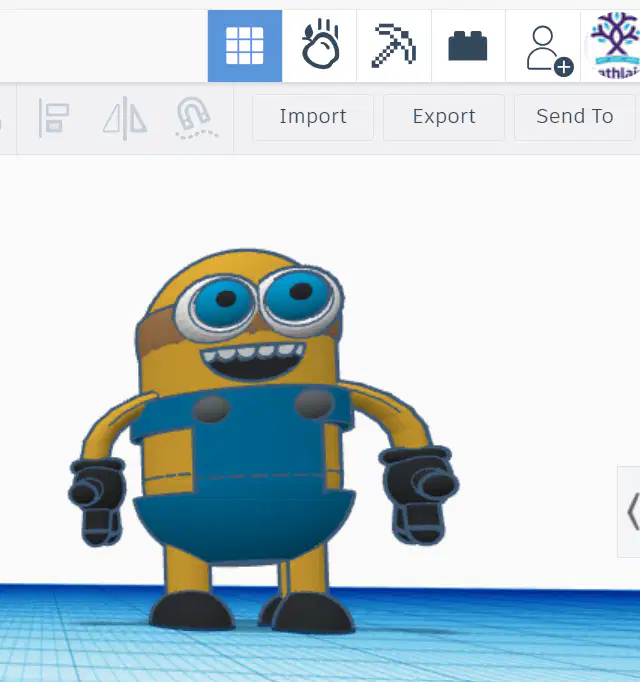
What is it called when you download a copy of your model to your computer for printing?
Send to
Import
Export
SVG
How do you feel about using Tinkercad again for 3D Designs? (not worth points)



