
 Worksheets
Spreadsheets L5 - REVISION
Total questions: 18
Worksheet time: 11mins
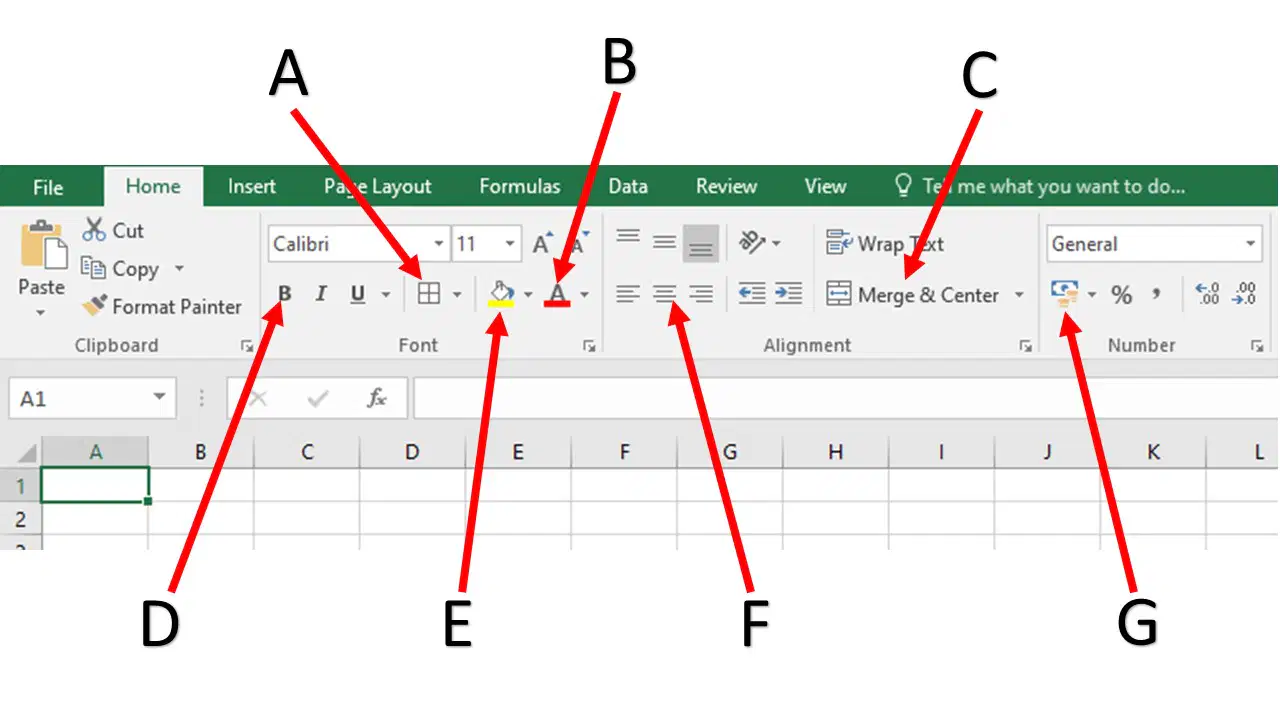
Enter the letter, which identifies merging cells
(a)
Enter the letter, which allows you to change the cell background colour (shading)
(a)
Enter the letter, which allows you to apply £ currency to cells
(a)
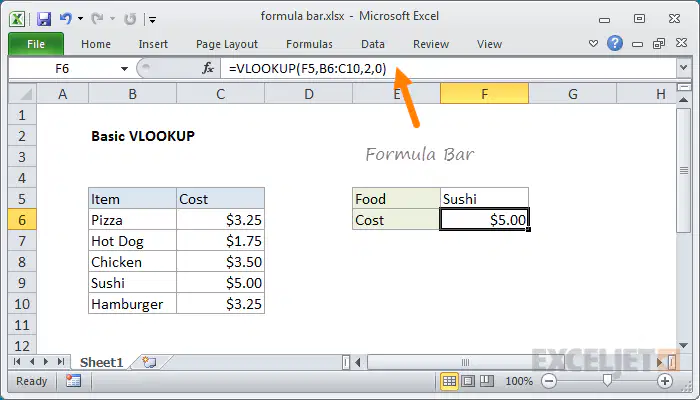
What is the orange arrow pointing at?
The formula bar - where you can see the formula/function used in a cell
Review tab in the Excel ribbon so that you can spell check the document
The shading tool, so that a colour can be applied to the cell
The worksheet that we are working on
Which of the following tasks would a spreadsheet model be best used for?
Budgeting and financial predictions

What is the cell reference for the selected cell?
(a)
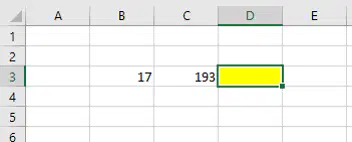
I want to ADD the cell that contains 17 to the cell that contains 193. Write out the WHOLE formula.
Remember that formulas start with =
(a)
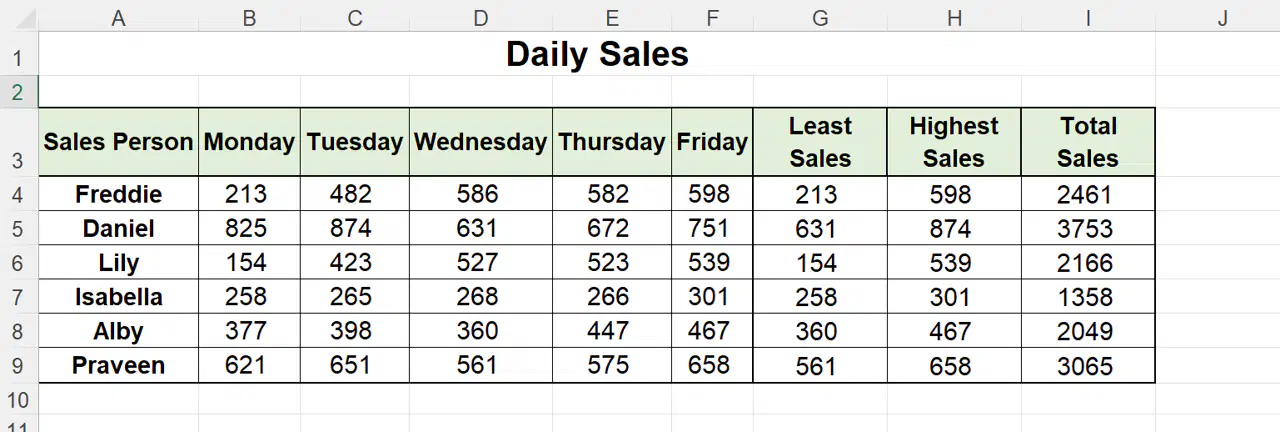
How much did Daniel sell on Wednesday?
(a)
What function word would you use to find the Total Sales for Alby in cell I9?
(a)


Select the correct formula so that E2 remains fixed (absolute cell refencing) when copied to other cells.
=B5*£E£2
=B5*E3$
=B5*$E$2
Rewrite the formula =B5*E2 so that E2 remains fixed when copied to other cells.
(a)
Which IF statement will work?
=IF (TEST, VALUE IF TRUE, VALUE IF FALSE)
=IF(A1>B1,"YES","NO")
=IF (TEST VALUE IF FALSE VALUE IF TRUE)
=IF(A1>B1NOYES)
=IF (TEST,VALUE IF TRUE, VALUE IF FALSE)
=IF(B1,"YES","NO")

If a student scores over 20 in the exam, the adjacent cell must state PASS otherwise it should say FAIL.
What value will be displayed in cell C4?
(a)
If a student scores over 20 in the exam, the adjacent cell must state PASS otherwise it should say FAIL.
Write out the TEST part only, of the function for cell C4?
(a)
If a student scores over 20 in the exam, the adjacent cell must state PASS otherwise it should say FAIL.
Select the correct formula that must be typed in cell C4.
=IF(B4>20,"PASS","FAIL")
=IF("PASS"=>20,B4,"FAIL)
=IF(<20,"PASS","FAIL")
If a student scores over 20 in the exam, the adjacent cell must state PASS otherwise it should say FAIL.
Write out the WHOLE FUNCTION that must be typed in cell C4.
(a)

