
Font size
 Worksheets
CA Internet
Total questions: 20
Worksheet time: 11mins
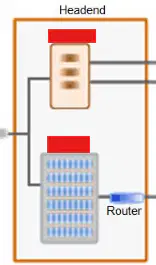
What are the parts of the Headend?
Computer & Cable Modem
CATV & CMTS
Feeder Cable & Truck Fiber
Coax Splitter & Drop Cable
We require coax cables for our modems.
What is a MAC address?
Used to identify a computer on a network, essentially like a mailing address, telling the packets of information exactly where to go.
(Media Access Control Address) The “physical address” of the modem, is a unique identifier assigned to every device that connects to a network. Think of this as the address for your home.
Address to a local office.
What is a node?
Typically issued by your ISP, anyone on the internet can see this, like your address in a phone book.
Responsible for supplying service to homes throughout a service area. If a Node is having issues, every customer associated with that Node will most likely be experiencing a disruption of service.
Typically issued by a local router or similar device, used exclusively within it's own network of connected devices.
You can use a router without a modem.
What encases a cable to protect it from external elements?
F-Type Connector
Outer Jacket
Inner conductor
Sheath
Every device on a network has a unique identifier called an , ___which is like a digital address for data to find its way to the right destination.
URL
CMTS
Node
IP Address
DNS AKA Domain Name Server is a websites IP address.
What is a PC?
Personal Cable
Personal Computer
Packet Cable
Personal Call
You can hardwire a cell phone to the internet with an ethernet cable.
When talking about internet speeds we use the term BITS.
What are the 5 Wireless Standards?
(Choose 3)
802.11ac
802.11pc
802.11a/b/g
802.11n
Setting a modem next to a glass mirror will boost the signal.
A router will have a coax port.
Our customers can buy their own modem even if they have our phone service.
Some basic TS would include?
reinstalling the internet drivers.
Power-cycling equipment
Throwing away the modem
If customer modem is ours and they do not have a router we can log into the modem while its online and change their WiFi password.
(after cx has security verified their account.)
On a modem the Security Mode: Open is the most secure
If a modem has WiFi capabilities that means it has a built in router.
If you have both 2.4g and 5g networks available, you can set a different password for each one.

