
 Worksheets
MBOT-SCRATCH block based coding Quiz
Total questions: 46
Worksheet time: 46mins

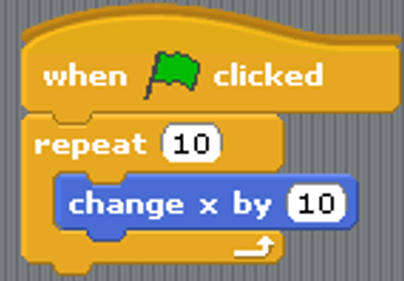
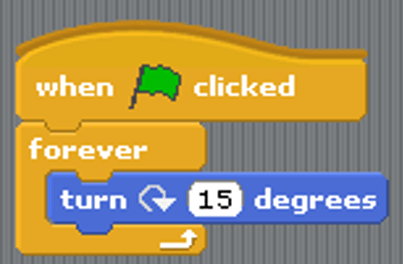
Which of these blocks can be identified as Iteration?
wait 1 second
set score to 0
forever
create clone of myself
It is possible to add Maths into Scratch, what color blocks are these?
Green
Blue
Yellow
Orange
Data can be stored in a Scratch program, what is data saved in?
Variable
Operators
Variant
Script
What color blocks allow movement/motion in Scratch?
Blue
Yellow
Red
Green

What is the value of solution?
5
19+4
23
solution
What would this code do?
Showing two numbers
19+4
Dividing two numbers
Adding two numbers

Gambar berikut adalah....
Script
Sprite
stage
A costume is...
a code block
a motion
a sound
a different way a sprite looks

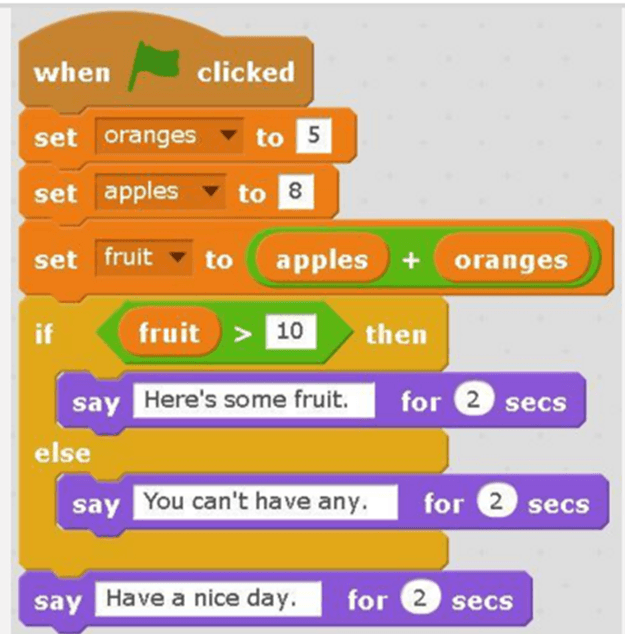
What will the cat say when this script is run?
Have a nice day. (only)
Here's some fruit. (only)
Here's some fruit. Have a nice day.
You can't have any. Have a nice day.

What is the variable in this code?
keep score
random position
edge
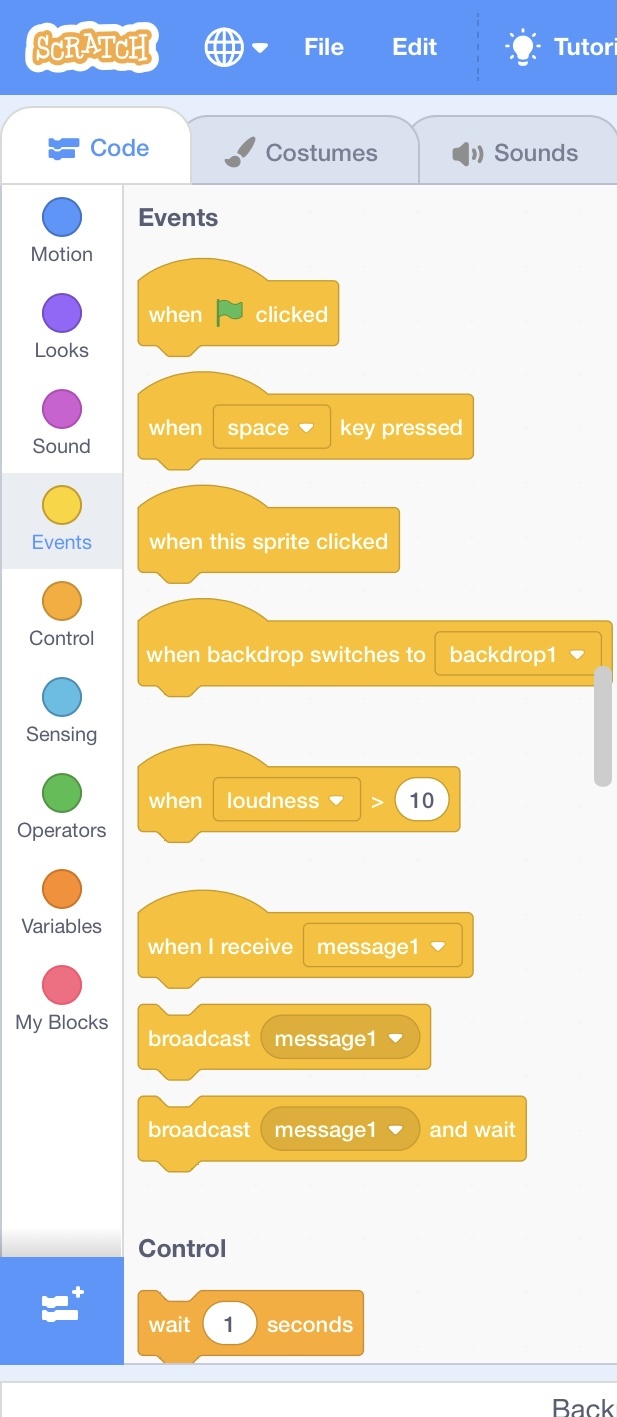
What colour blocks allow the code to start move (event)?
Blue
Green
Yellow
Red
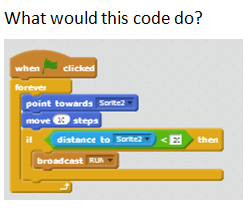
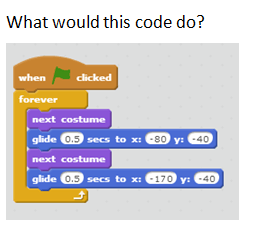

which button should to make the sprite to move?
a
space
green flag
z

What is the function of control?
To start the program
To stop the program and repeat the program
To change the background
To make the sprite move to different positions

Where is the size of the Panda?
100
200
300
400
To make the sprite move to different positions


Which block can only be used in Upload Mode?


What is the value of X and Y to put a sprite exactly at the center of the stage?
X: -180 , Y: 240
X: 100 , Y: 100
X: 1 , Y: 1
X: 0 , Y: 0

Choose all the correct output that will happen from this block of code (more than 1 answer)
LED 2 until LED 12 will light up
LEDs will alternately on and off
LED 13 will light up first
LEDs on and off interval is half a second

Based on the code in the picture, what will happen to the LED in pin 9?
It will blink
It will turn on
It will not turn on
It will turn on 1 second then off
How many wheels does our robot have?
3
2
1
4
What is mBlock related to?
Chrome
HTML
Fusion
Scratch
What kind of cable do we use to connect our robots?
USB
HDMI
DVI
Thingy

What does this program do if a LED is connected to pin 9?
The programme is not correct
The led is switched on all the time
The led is switched off all the time
The led is blinking
_______________ is the Skeleton of the mBot robot. It is the body on which all other parts are connected
Chassis
Ultrasonic sensor
DC Motor
Mcore
Line Follower
_______________ powers the mBOT
AA Batteries
AA Battery holder
DC Motor
Mcore
Line Follower
The frame of the mBOT


it helps the mBot see a path that it should follow
It helps the mBot carry out the instruction that you give it
It works by using sound waves to detect if an object is near or far away from it.
Makes the mBot move

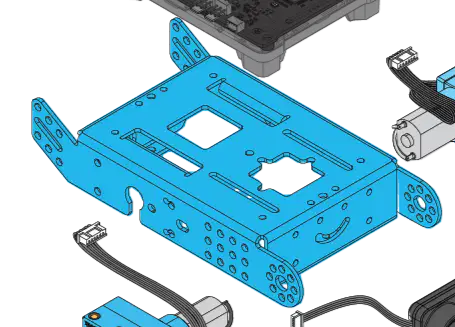
Name the Components
Chasis
Mbot2 Shield
Ultrasonic Sensor2
Encoder Motors
Wheel
Which component of the mBot2 is specifically designed for precise control of rotation, speed, and position?
CyberPi
Mbot2 Shield
Ultrasonic Sensor2
Encoder Motors
Quad RGB Sensor
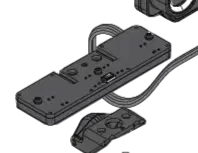
Name the Components
CyberPi
Mbot2 Shield
Ultrasonic Sensor2
Encoder Motors
Quad RGB Sensor
Identify the component used for color detection in the given maps.
CyberPi
Mbot2 Shield
Ultrasonic Sensor2
Encoder Motors
Quad RGB Sensor
It is a next-generation educational robot designed with extended capabilities
AI
Robot
Motor Car
Mbot
What component of MBOT is specifically designed for distance detection?
CyberPi
Mbot2 Shield
Ultrasonic Sensor2
Encoder Motors
Quad RGB Sensor
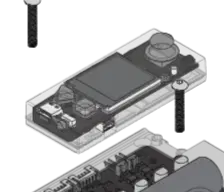
Name the Components
CyberPi
Mbot2 Shield
Ultrasonic Sensor2
Encoder Motors
Quad RGB Sensor

Which part of the Makeblock environment shows the results of your program running?


Which answer best describes what mBot will do when this code is run?
Moves in a circle until user presses the "A" button.
Moves in a straight line avoiding obstacles after user presses the "A" button.
Waits for user to press "A" and then follows a black line.
Loops forever until the user presses the "A" button.

What will this code allow mBot to do?
Follow around the race track clockwise.
Follow around the race track counter-clockwise.
Follow around the race track either clockwise or counter-clockwise.
This code contains a logic error and won't do anything for long.

