
 Worksheets
VEX Test
Total questions: 30
Worksheet time: 19mins

What does this block do?
runs code when the program is started.
turn the robot right.
moves the robot forward.
stops the robot from moving.

What part of the block do you
select to change the direction of the drive forward block?
1
2
3
4

In this project, how many times will the [Drive] block be repeated?
It will be repeated forever.
It will repeat 100 times.
It will repeat 90 times.
It will repeat once.

Which of the following best describes what the robot will do when this project is run?
The robot will drive forward for 200mm then turn right 90 degrees, four times, to drive in a square.
The robot will drive forward 200mm, then turn right 180, then drive back to its starting position.
The robot will open the ClawMotor 90 degrees, then close it 90 degrees, four times.
The robot will turn left 90 degrees four times, to rotate in a circle.

Smart Motor
Radio
Engine
Brain

Radio
Motor
Brain
Battery

Inserts
Telephone Cables
Battery Cables
Smart Cables

Battery
Brain
Motor
Radio

Smart Cable
Battery Cable
Connector Cable
Rubber Band
Explain the steps to troubleshoot a 'robot not moving as expected' issue in Vex V5 Code.
Replace the battery
Update the firmware
Check motor connections, verify motor power levels, and review the code for errors
Check the weather forecast
How can you troubleshoot a 'program not downloading' issue in Vex V5 Code?
Check USB cable connection, ensure V5 Brain is turned on, and verify correct port selection
Check the weather forecast
Restart the computer
Replace the V5 Brain with a different model
Explain the steps to troubleshoot a 'sensor not working' error in Vex V5 Code.
Check the physical connection, verify sensor configuration, test using sample code, consider replacement or seek technical support
Update the Vex V5 Code software
Unplug all sensors and restart the robot
Ignore the error and continue using the sensor
What part of the block do you
select to change the distance of the drive forward block?
1
2
3
4
Match the following components with their descriptions:
Limitswitch
A type of touch sensor, digital, on/off, 1/0
Linetracker
Analog sensor-gives a range of values
Micro USB
Connects the Brain to the Computer
Match the image to the VEX part:

Bumper
Switch

Limit
Switch
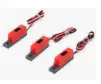
Line Tracker

LED

Battery

Bump Switch
Wheel
Sprocket Gear
Axel

Vex Cortex
Vex Wrench
Vex Allen Wrench
Vex Spur Gear

Using the picture, which part is being shown?
plastic collars
screws
spacers
shaft or lock collars

Spur Gear
Rack and Pinion
Sprocket Gear
Vex Cortex


Spur Gear
Wheel
Sprocket Gear
Axel

This category of blocks is called:
Drivetrain
Looks
Events
Control

What do we call the virtual space in VEX VR where we can see the virtual robot performing a code?
Playground
Virtual world
Virtual space
Playing field
Which of the following programming languages is used for the VEXcode VR text-based?
LUA Script Programming Language
Java Programming Language
C++ Programming Language
Python Programming Language
We will test your program by running it in the virtual playgrounds in the environment using....
VEXcode Vr
index cards and string
slides and swings
TinkerCAD

What shape would the path of a robot create if it executed the example pseudocode?
A circle
A pentagram
A square
An "A"

What is this group of structure parts called?
"L" brackets
gussets
attachments
90 degree braces

Spacers
Inserts
Pinions
Shafts

Which icon do I select if I want to change the port of a motor or sensor OR if I want to add a motor, sensor or controller?


Bumper Switch
Limit switch
Shaft encoder Optical Shaft Encoder
Potentiometers
Line Follower

