
 Worksheets
AutoCAD Certified User Practice Quiz 2
Total questions: 35
Worksheet time: 18mins
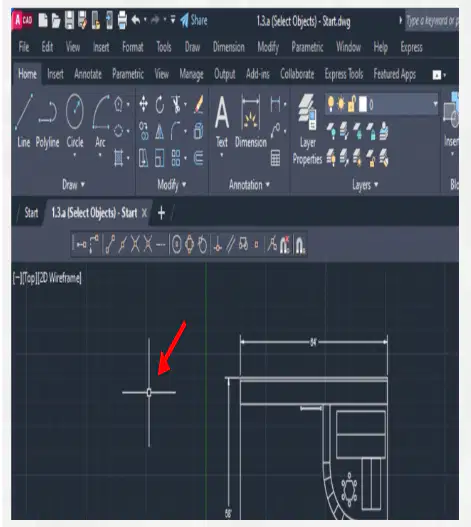
What is the square in the center of the crosshairs on the cursor called?
A selection space
An editing space
A selection box
A pickbox
What are 2 ways in which users can perform a crossing selection?
By typing crossing in the command line
By selecting and holding the Ctrl key on the keyboard
By selecting a point and dragging the cursor from right to left
By selecting a point and dragging the cursor from left to right
By typing ALL in the command line
How can users display objects on selected layers? Choose 2 answers.
By using the LAYERs command
By using the LAYWALK command
By using the QuickCalc tool
By using the Isolate tool
By using the Quick Select tool
What will happen if a user enters a scale value of 0.5 for a block?
The block will be 0.5 inches in the drawing
The block will be half the size of the original block
The block will be 0.5 feet in the drawing
The block will be twice the size of the original block
Object properties should never be altered from their assigned layers.
True
False
Modify commands use or change existing objects rather than create new ones.
True
False
What is the benefit of the Array command?
It matches the properties of one object to another object
It copies or moves an object to a new location within the graphics area
It allows for a pattern of objects to be created quickly
It sets the length of an object to a specified distance
Which statement about altering the properties of individual objects is true?
Changing object properties from their layers is sometimes necessary but should be done with care
Objects' properties should never deviate from their layers because it makes it difficult to determine which layers they belong to
There is no issue with changing an object's properties to be different from its layer, and it can be done often
Objects do not take on the properties of the layer they are assigned
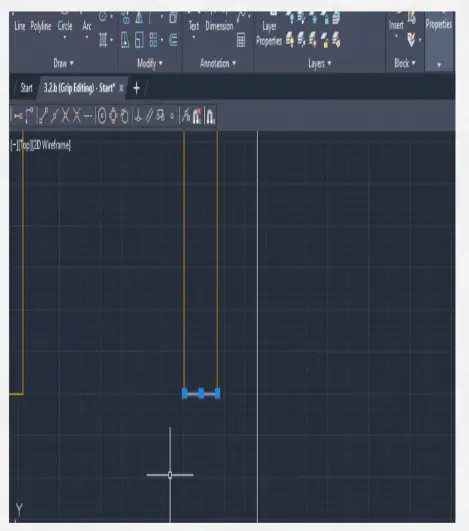
Which grip should be selected to move the horizontal line up?
Left
Right
Left & Right
Middle
Which command will set a line to a specified length?
Trim
Lengthen
Extend
Offset
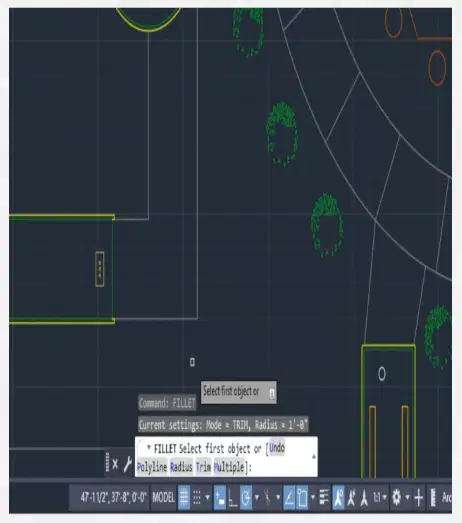
Which command line options should be selected in order to round all of the path's corner in one operation?
Polyline
Multiple
Radius
Trim
What command combines multiple single-line text into a multiline text?
TXT2TXT
TXT2MTXT
MERGETEXT
TEXTTOTEXT
What is the leader start point?
The point at the center of the leader line
The point at the center of the object described in the leader
The place where the leader's text is
The place where the leader's arrow points
Which multileader type can be used for inserting symbols into a leader?
None
Mtext
Block
Shape
What should users type into the command line to place multiple dimenions?
The letter "A"
The letter "B"
The letter "C"
The letter "D"
What is the purpose of the Hatch command?
To change how objects function in drawings
To add additional layers to drawings
To split objects in drawings
To add patterns and colors to objects in drawings
What happens when the landing gap on a leader is set to zero inches?
The text is not visible
There is no space between the leader line and the text
The leader line will not be visible, and the leader arrow and text will appear to touch each other
There is a lot of space between the leader line and the text
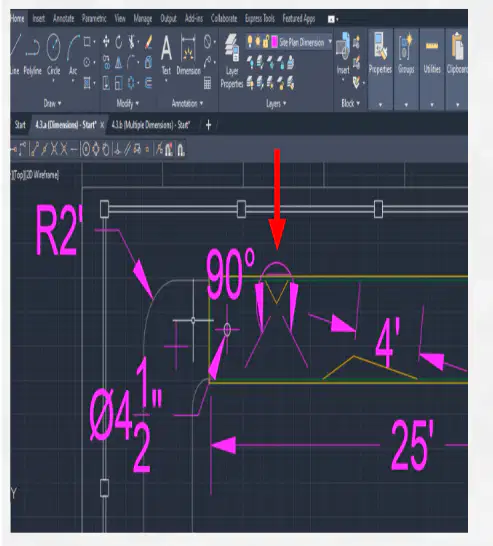
Refer to the image. What type of dimension is indicated
Linear
Diameter
Angular
Radius
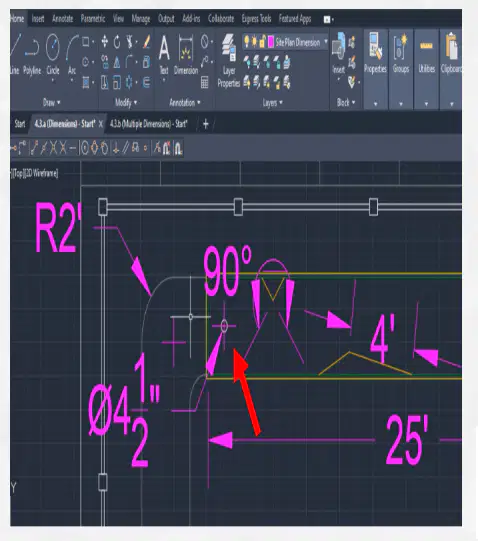
Refer to the image. What type of dimension is indicated?
Linear
Diameter
Angular
Radius
What should users type into the command line to place more than one baseline dimension?
The letter "A"
The letter "B"
The letter "C"
The letter "D"
Paper space is where most AutoCAD users spend their time.
True
False
When drawings are printed or plotted to scale, a contractor, architect, or project manager should be able to measure details on a drawing and translate their true size, distances, or lengths.
True
False
Why might a company design and develop its border and title block style?
To include annotations
Brand recognition
To save money
It is an industry requirement
To include important information
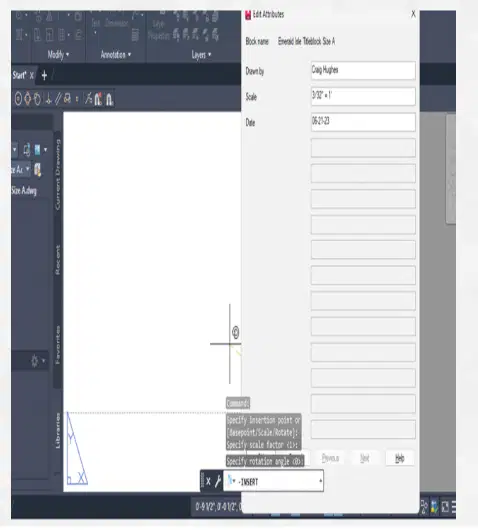
Refer to the image. How will the information in the pictured dialog box be used?
It will populate the bottom of the title block
It will be the title of the viewport
It will be annotations on a drawing sheet
It will be listed in a viewport properties palette
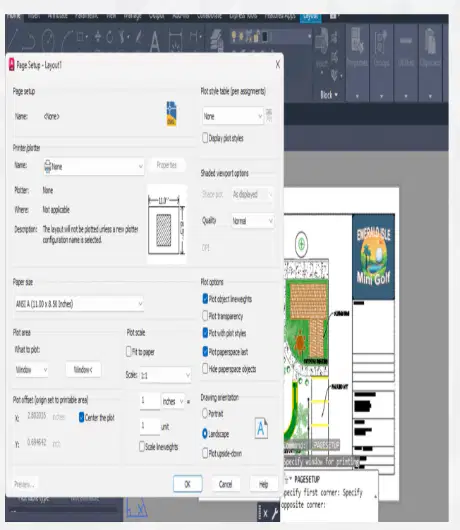
Refer to the image. Which settings indicates this is for publishing to a plotter?
Printer/plotter name
Plot style table
Quality
What to plot
Which tool allows you to select a specific snap point while ignoring others?
Object Snap Override
Midpoint Snap
Endpoint Snap
Quadrant Snap
How can you draw a line exactly between two points without drawing a reference line?
Use the "Midpoint" snap
Use the "Middle between two points" option
Use the "Quadrant" snap
Use the "Intersection" snap
How can you start an arc within a polyline without exiting the command?
By clicking a new point
By selecting the arc option on the command line
By double-clicking the segment
By pressing Esc
What tool is used to create a free-form shape without precise control?
Spline Fit
Spline with Control Vertices
Blend
Polyline
What is the purpose of the Blend tool in AutoCAD?
To create lines
To merge gaps between lines smoothly
To convert splines to polylines
To change spline types
What must be specified first when creating a center ellipse?
Rotation angle
Center point
Minor axis endpoint
Major axis endpoint
What happens to the ellipse shape as the rotation angle approaches 90 degrees?
It becomes more circular
It shrinks in one direction
It expands uniformly
It rotates clockwise
What does the rotation angle affect in an ellipse?
The color
The axis length
The ellipse's orientation
The line thickness
Which tool provides gradual control over the curve’s shape?
Spline Fit
Spline with Control Verticies
Blend
Polyine
What do you need to specify to move an object without selecting an endpoint?
Angle
Base point
Direction and distance
Color

