
 Worksheets
IGCSE ICT Chapter 1 - 3
Total questions: 50
Worksheet time: 26mins
What are the direct data entry devices?
Are devices which are created in order to recollect a specific type of information.
Used to type in instructions to choose options from menus, open software, etc.
Places where customers get cash as well as other bank activities using debit and credit cards.
Is an integrated circuit board that provides sound in the computer, they can be heard using headphones or
speakers.
What are magnetic stripe readers used for?
Converting scanned text to a computer readable text
or, digital text.
Uses radio waves to read and capture
information stored on a tag.
Reading information from a chip from a moderated
distance from the reader.
Reading information from magnetic stripes found on
the source of the information.
The card is inserted into a slot, then, a pin is
entered trough a keypad. (Which is the DDE?)
(a)

What does MICR, stands for?
Mark ink character reader
Magnetic ink character reader
Mark inkjet character reader
Mark infrared character reader
What does RFID, stands for?
(a)
Reads information written on pen or pencil, it's usually
used in questionnaires
(a)
Which one is a disadvantage of contactless card readers?
PIN can be read by someone else
Transactions have small maximun value
Worry about typing errors
If the magnetic stripe gets damaged, information will be
lost
Which one is an example of OCR?
Questionnaries
Icfes
Passports
Cheques
Which are the advantages of magnetic stripe readers?
Prevents access to restricted areas
Information can be put faster
Can be read from a long distance
Don't have to worry about typing errors
Which are the disadvantages of OMR?
It is not a fast method
The questionnarie has to be well answered
The system has to be designed correctly to have no errors
Difficulty reading handwritting
What is one advantage of using a keyboard?
Increased physical strain on hands.
Limited compatibility with software.
Slower navigation compared to a mouse.
Faster data entry.
What is one disadvantage of using a keyboard?
Enhanced gaming performance.
Repetitive strain injuries from prolonged use.
Increased typing speed for all users.
Improved accuracy in data entry.
What is one advantage of using a mouse?
Precise control and navigation of the cursor.
Faster internet connection speeds.
Increased battery life for devices.
Enhanced sound quality for audio playback.
What is one disadvantage of using a mouse?
Increased accuracy in navigation.
Repetitive strain injuries from prolonged use.
Enhanced gaming performance.
Lower cost compared to touchpads.
What is one advantage of using a touchscreen?
Requires a stylus for accurate input.
Increases battery consumption significantly.
Limited to specific applications only.
Intuitive and direct interaction with the device.
What is one disadvantage of using a touchscreen?
Less precision in selecting small items.
Increased battery life.
Better visibility in sunlight.
More durable than physical buttons.
What is one advantage of using a scanner?
It reduces the need for physical storage space.
It enhances the quality of printed images.
It enables quick digitization of documents.
It allows for easier sharing of physical documents.
What is one disadvantage of using a scanner?
Scanners can only scan black and white documents.
Scanners do not require any maintenance.
Scanners are always faster than photocopiers.
It can be time-consuming to scan large documents.
What is one advantage of using a digital pen?
Easy digitization of handwritten notes.
Enhanced durability against physical damage.
Improved handwriting recognition accuracy.
Increased battery life for devices.
What is one disadvantage of using a digital pen?
Compatible with all devices without issues.
Easy to use without any training.
Provides a tactile writing experience like paper.
Requires a charged battery or power source.
What is a general advantage of direct data entry devices?
Reduced data accuracy due to manual input.
Increased speed and efficiency of data entry.
Increased reliance on paper records.
Slower processing times for data retrieval.
What is a general disadvantage of direct data entry devices?
User input errors can compromise data accuracy.
They require no training for users.
They eliminate the need for data validation.
They are always faster than manual entry.
How does a keyboard improve typing speed?
A keyboard improves typing speed by increasing finger strength.
A keyboard has no impact on typing speed at all.
A keyboard enhances typing speed through tactile feedback and efficient key layout.
A keyboard slows down typing due to its complex layout.
Why might a touchscreen be less accurate than a mouse?
Touchscreens require a stylus for better accuracy.
A touchscreen may be less accurate than a mouse due to less precision in finger input and lack of tactile feedback.
Touchscreens are always more accurate than mice.
Mice have larger screens than touchscreens.
What is a common use for scanners in data entry?
Transferring data via USB drives.
Scanning images for artistic purposes.
Digitizing physical documents for data entry.
Creating physical copies of digital files.
What is one disadvantage of using a trackpad?
Increased precision in navigation.
Can lead to wrist strain with prolonged use.
Improves gaming performance significantly.
Offers more features than a mouse.
What is a general advantage of using a digital pen?
Allows for easy editing of digital documents.
Requires no charging or power source.
Provides a more natural writing experience.
Is always compatible with all devices.
What is one disadvantage of using voice recognition software?
It can be slower than typing for some users.
It requires no training to use effectively.
It is always more accurate than typing.
It can only be used in quiet environments.
What is one advantage of using voice recognition software?
Allows hands-free operation for users.
Requires extensive training for effective use.
Always provides accurate transcription.
Can only be used in private settings.
What is one disadvantage of using a digital pen?
It can be used without any power source.
It may not be compatible with all devices.
It provides a tactile experience similar to writing on paper.
It is always easy to use without prior experience.
What is a common use for a mouse in computer navigation?
To increase the speed of data entry.
To provide precise control over cursor movement.
To enhance audio playback quality.
To reduce the need for keyboard shortcuts.
Which device uses a diode to emit lights through liquid crystal panels in order to project an image to the user?
A plasma panel
An LCD
An LED
A CRT
You are a student with limited finances, and you want to purchase a printer for occasional use for you school assignments, Which type of printer would Best suit your needs?
A dot matrix printer
An inkjet printer
A laser printer
All
A laser printer uses __________ and _________ to seal the text and images onto paper.
ink,sprayers
carbon ribbon , pressure
ink, embossing
heat, toner
The 3D cutters recognizes the ___________ direction of an object.
x-y
x-y-z
None
Millions of tiny mirrors is functioning of ___________
LCD projector
DLP projector
Both
NOne
3D printers are used in ______
Production of car parts
Museums
Model of a product
Sweets
What does the abbreviation MICR stands for___________________
Magnetic Ink Character Reader
Manual Input Card Reader
Mark Ink Character Recognition
Magnetic Link Character Reader
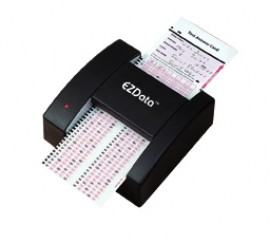
_____________ detects the position of black marks on white paper and is used to mark multiple choice examinations.
Sensors
Smart Card
MICR
Optical Mark Reader
What is the function of a scanner?
To capture images and convert them into digital format
To print documents
To read barcodes
To process data

Name the device.
Track ball
Mouse
Touch pad
Keyboard

Name the device
Light Pen
Joystick
Touch screen
Pencil

Name the input device.
Touch screen
Tablet PC
Digitizer Tablet
Mouse

Scanner
Light
Barcode scanner
Printer
List one disadvantage of using a touch screen.
Faster response time than traditional interfaces.
Easier to clean than keyboard and mouse setups.
Less accuracy for precise input tasks.
Higher durability compared to physical buttons.
What is the role of a microphone in a computer system?
To store audio files on the computer.
To amplify sound output from the speakers.
The role of a microphone in a computer system is to capture audio input.
To enhance video quality during streaming.
Why might the layout of numeric keypads be considered inconvenient?
The keys are too large
The order of the numbers can be unintuitive
The keys only support alphabetic input
They do not work with mobile phones
What is a disadvantage of numeric keypads?
They are larger than standard keyboards
They are difficult to carry
They sometimes have small keys that make input difficult
They do not allow numeric data entry
What is a common use of numeric keypads in a retail environment?
Scanning barcodes
Keying in barcode numbers manually if a barcode reader fails
Printing receipts
Processing payments

