
Font size
 Worksheets
Android ATC_Practice 4
Total questions: 45
Worksheet time: 37mins
When you build Android app, you can use Android emulator to test your app UI (User Interface) and its work flow. However, you can NOT test this app on a real android device before publishing your app on Google Play store.
True
False
Google allows websites, mobile apps, and other media to connect to its database and import it in JSON format.
True
False
An Android Geo-location plug-in is used to get the current location of the device feature.
True
False
What is Android Studio?
It is a free software used to create PHP code
It is a free software used to create a web page or more
It is a free software used to create the SQL database for web development
It is a Google’s official Integrated Development Environment (IDE) for Android app development
The prerequisite to install android studio IDE is to install java JDK and Adobe Reader.
True
False
The android virtual device AVD manager is an interface that you can launch from android studio which helps you create and manage android virtual devices (android emulators).
True
False
Only the android applications which have Google maps have an AndroidManifest.xml file.
True
False
When you are creating an android app using android studio, you will have activity_main.xml file can be opened in the design and code mode.
True
False
When you create an android using android studio, your android app icon will be a white circle logo by default.
True
False
The android app icon in the android studio consists of two layers and there are call foreground layer and background layer.
True
False
Android AlertDialog is used in an android app to display a dialog which consists of a title, message and a number of buttons.
True
False
Android notification is a message you display to the other user outside of your app’s user interface to provide the user with reminder, communication from other people or other timely information from you app.
True
False
A SeekBar is an extension of the ProgressBar with a draggable thumb. The app user can touch the thumb and drag it left or right to set the current progress level.
True
False
Android Spinner widget provides a quick way to select one value from a set of choices.
True
False
To assess the quality of your app, you need to set up a suitable hardware or emulator environment for testing.
True
False
Choose the best answer of the following options to complete the following sentence: in Firebase database, there are no tables or rows. Instead, you should store your data in documents, which are organized into ……………… . Each document contains a set of key-value pairs.
Sub-forms
Templates
Collections
Images
Fill in the blank with the best answer to complete the following sentence: The Developer Registration Fee for Google Play store is ……………
Free
750 usd for a life time
25 usd for a life time
25 usd for each app

The image of this question includes a part of android studio tools bar. Which of the following choices is correct about the name of the missing icon name (represented by question marks)?
SDK manager
AVD manager (android virtual device manager)
Insert image
SDK update

What is the following image?
The android emulator toolbar
The Firebase toolbar
The Android Firefox toolbar
The Google maps plug-in toolbar

The image in this question includes a part of android studio tools bar. Which of the following is correct about the name of the missing icon name (represented by question marks)?
Apply changes and restart activity
SDK manager
Insert image
SDK update
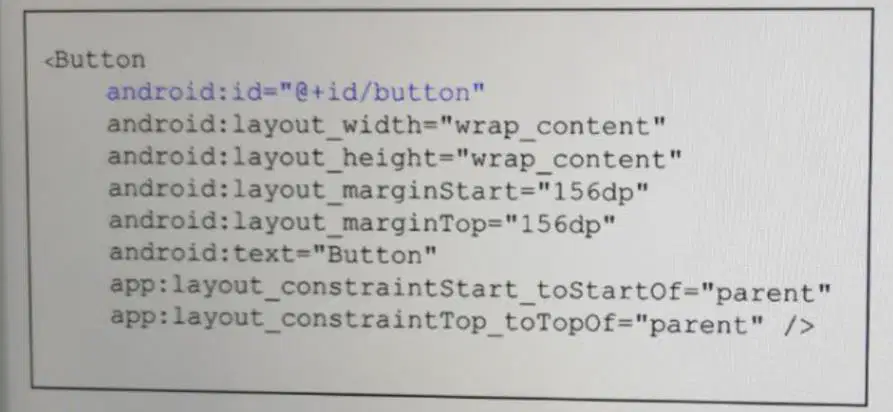
The XML code of this question is for a button widget. Which of the following choices is correct about the id of this widget?
The id must start with small letter and without numbers
This id must be unique in your application
You can’t change this id if you run your app on an android emulator
All the buttons in this app must have the same id
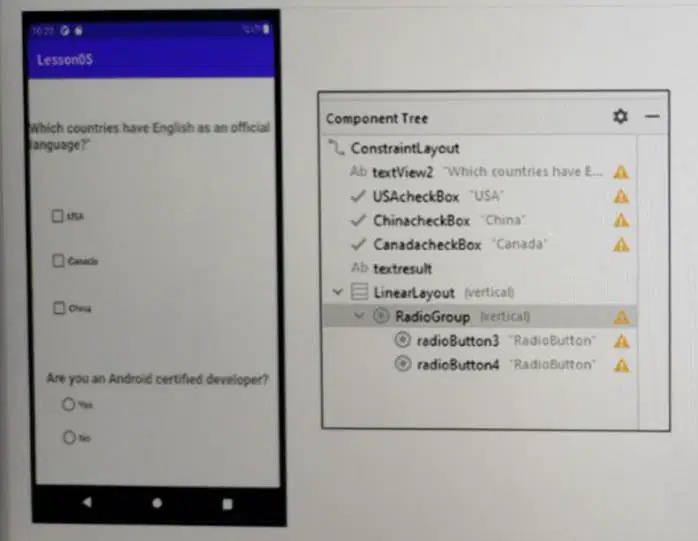
The image in this question displays the android app uses of check boxes and radio buttons. As you can in the component tree, why the android developer added the two radio buttons to a parent RadioGroup? Select the best answer of the choices below.
Because we can’t publish any android app to google play store if it includes radio buttons that do not belong to any radio button group
Because this is easier so that when android developer moves a radio button, all the other radio buttons belonging to the same radio group will move together
Because using a radio group as a parent for these radio buttons, the app user can only check one radio button from a group of radio buttons.
because this helps android developers to set all these radio buttons vertically with the same format.
The Android layout allows Android developers to specify constraints (Margins) that would decide the position of each sub element such as text, button, radio box, check box or other widgets within the Android activity layout. Which Android layout type of choices below are we talking about?
Table layout
Linear Layout
Constraint Layout
Relative Layout
Complete the following sentence using one of the choices below: To navigate from Android activity to another in an Android app, you need to configure a/an .......................... class.
Hyperlink
Browser
Intent
go2secondActivity
When you pass data from an Android activity called Activity 1 to another Android activity called Activity2 using Intent class configuration, which Intent's method do you use in Activity1 configuration? Select the best answer of the following choices.
getExtra()
sendExtra()
pushExtra()
putExtra()

As illustrated in the image below, when the app user taps the SAVE button in this android app, this user gets a message with three buttons. Which of the choices below is correct about the kotlin code of this app?
the android developer used the Notification class to display the notification box, notification title and these three buttons
the android developer used the AlertDialog subclass to display the dialog box, dialog title and these three buttons
the android developer used the pushDialog subclass to display the dialog box, dialog title and these three buttons
the android developer used the SnackBar dialog box to display the dialog box, dialog title and these three buttons

The image in this question is from an Android app. Which of the choices below creates these stars in this Android app interface?
RatingBar
SeekBar
ProgressBar
ReviewBar

If you want to show a video in your app as illustrated in the image of the question below, which one of the choices you will use?
ShowView
StreamView
VideoView
MovieView
Complete the sentence below with one of the choices below: The android RecyclerView depends in its structure on the …………….. widget or container.
ImportView
CardView
LiteItem
DateView

Select one choice of the answers below. What is the name of the part which is represented by the three question marks in this question image?
Map
Menu
Drawer
Spinner

While configuring your android app on Firebase web site, you should download the google-services.json file from Firebase web site and add it to your android app files as illustrated in the image below. What is the main role of this file for your app?
This configuration file includes the https connection settings between your android app and Firebase services
This file includes your username and password for firebase web site
The role of this file is to import the last security updates from firebase web site to the app users
This file checks if the app user’s device has internet connection each time the app user starts it
Firebase offers two cloud-base, client-accessible database solutions. Which of the following choice is a firebase database type?
MapNowRealtime database and SQL
SelectMapSQL and MySQL
Realtime database and Cloud Firestore
GoogleMapCloud Firestore and MySQL
Which of the following android widgets you should use to configure your app interface to display Google Map?
MapNow
SelectMap
MapAPI
GoogleMap
Fill in the blank with the best answer to complete the following sentence: To add a google map marker to a specific location on your app google map, you should have ……………..
The google map marker color hexadecimal code
A city name where this location exists
An image for this location
The latitude and longitude values for this location
Which of two the following answers are correct about adding a button widget to an android activity? (select two answers)
All these answers are correct
You can drag-and-drop a button widget from the palette panel in android studio to your activity interface
From the android studio, click insert menu, then select button
You can open the activity file in the code mode, then add a button by typing the XML code
Add image to your android activity, then change the attribute value to button

If you want to use a font color many times in your app design, it is a good idea to configure this color as a color tag as illustrated in this question image. Where you should add this tag to use this font color name: ATCText in the app activities? Select the best answer of the following choices:
format.xml
colors.xml
activity_main.xml
css.xml

The image in this question includes a code for an android app which consists of one activity called MainActivity. This activity includes a DatePickerDialog class (Date Picker). Which of the choices below represents the red question marks in the MainActivity code file?
send
show
get
push

An android developer has added a webview class to an android app to display an internet website inside an app activity. However, when he runs the android app, he gets the run result illustrated in this question image. If this developer asked your help, which of the choice below you will select to troubleshoot this problem?
ask the developer to disable the wifi and use mobile data for the android device or emulator to access internet connection
ask the developer to restart his app
ask the developer to add the following tag to the AndroidManifest file in this app : <uses-permission android:name=”android.permission.INTERNET” />
ask the developer to enable the GPS location

The MainActivity Kotlin file in this question is for an Android app. The run result of this app displays a rating bar. When the app user selects the number of stars then clicks the SUBMIT button, he will get the rating as value below the
SUBMIT button as illustrated in the image of this question.
Which of the choices below describes the rateText in this MainActivity file?
rateText is a class used to display the five stars in the rating bar.
rateText is the id value of the TextView widget which is used to display the rating bar value.
rateText is a method used to display the SUBMIT button.
rateText is the text value of the TextView widget which is used to display the
rating bar value.
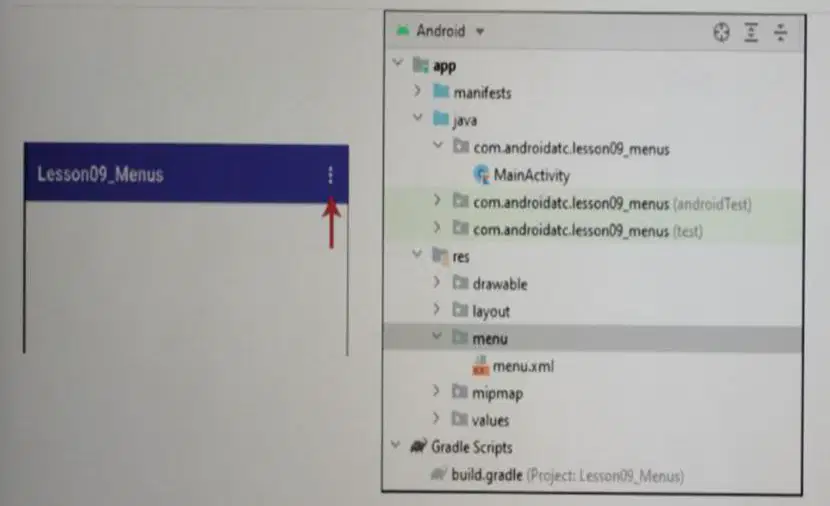
The Android project files structure in this question image is for an Android app uses a menu to navigate this app activities (interfaces). The menu.xml file includes the menu items. Which of the choices below you will use to display this menu items in your app interface?
menu(R.menu.menu, menu).show
menu.return(R.menu.menu, menu)
menuInflater.inflate(R.menu.menu, menu)
If a company asked you to create an Android app for a restaurant menu. This restaurant customers will use the menu to select their order. This menu consists of a list of items and each item includes an image, item name, and some
details about it. Also, the customer can search about the item which he/she would like to order. The customer can scroll this restaurant menu vertically. Which of the following Android widgets you will use in designing this restaurant
menu?
RecyclcerView and SearchView widgets
CardView and SearchView widgets
RecyclerView and FindView widgets
Bottom AppBar and SearchView widgets

Assume that you have generated a Google API key and enabled the Maps SDK for Android at the Google cloud platform web server as illustrated in the image below.
Where will you add your Google API key in your Android app ? Select the best answer of the choices below:
activity_main.xml
maps.xml
MainActivity
AndroidManifest.xml
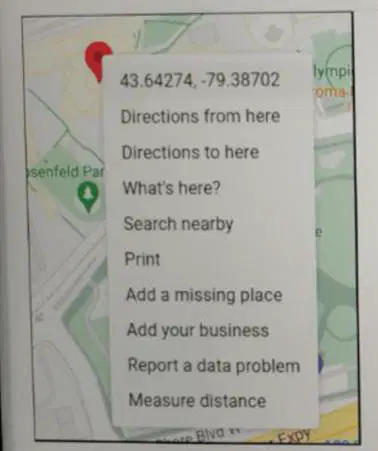
When you right click anywhere on Google map, you should get a shortcut menu similar to the image below. What do the numbers located at the top of this shortcut menu mean? Select the best answer of the choices below:
They are Google map API key and your account number
They are Google map API key and your session number
They are Google map API key and your map fragment number
They are the latitude and longitude coordinate values

The Kotlin code below is added to an Android app to display Google map. Which the choices below is the best answer?
This code will display a red Google map marker (pin) on the Google map and when the app user clicks or taps this marker, he will get a title for this marker which is: CN Tower
This code will display a red Google map marker (pin) on the Google map and this marker has an android logo shape
This code will display a red Google map marker (pin) on the Google map with a title for this marker named: CN Tower
This code will display a red Google map marker (pin) on the Google map and when the app user clicks or taps this marker, he will not see any title

The XML code in the image below must be added to your Android app to allow permissions to display the user’s app location on Google map. Where this code must be added? Select the best answer of the choices below:
maps.xml file
activity_main.xml file
AndroidManifest.xml file.
APIkeys.xml file

