
 Worksheets
Retouching Tools Quiz
Total questions: 17
Worksheet time: 9mins
Name
Class
Date
1.

Which tool would be most ideal for dealing with dark circles under the eye?
a)
Dodge
b)
Burn
c)
Sponge
d)
Sharpen
2.
Which tool allows you to replace pixels in one area by sampling from another area?
a)
Clone Stamp
b)
Lasso
c)
Eyedropper
d)
Sponge tool
3.
This tool, which can only be used destructively, can be used to replace large parts of an image; you start by creating a selection and then drag to an area that has fewer imperfections to repair it.
a)
Healing Brush
b)
Clone Stamp
c)
Patch tool
d)
Sponge tool
4.
When using the Healing Brush or Clone stamp tool, hold this button and click to define a sample source.
a)
Spacebar
b)
Shift
c)
Control
d)
Alt
5.
This tool is used to repair using a simple click, though you can click and drag around to fix larger areas. It automatically matches the texture, lighting, and shading of pixels and automatically samples (from the brush edges) from around the retouched area.
a)
Healing Brush
b)
Spot Healing Brush
c)
Patch Tool
d)
Clone Stamp
6.

Randall is trying to darken the baby's face with the Burn, but after the first click, it's already too dark. He presses Undo. What should he do differently?
a)
Use the sponge tool instead
b)
Increase the brush hardness
c)
Decrease the exposure
d)
Increase the exposure
7.
The redeye tool automatically ________________ and darkens the red area of the eye when applied.
a)
saturates
b)
desaturates
c)
levels
d)
multiplies
8.
This fill option can be used to automatically analyze a photo and fill in a selected area with similar texture and color from the rest of the image.
a)
background
b)
background replace
c)
content-aware
d)
exposure
9.
If you wish to perform a "destructive" operation on a Smart Object, you may have to ____________ the layer first.
a)
expose
b)
rasterize
c)
filter
d)
smudge
10.
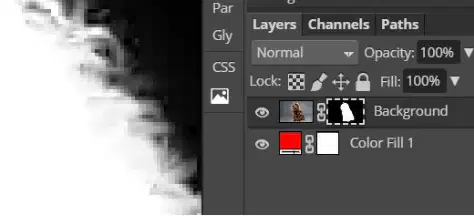
Which retouch tool would be most useful on a layer mask when working with wisps of hair?
a)
sponge
b)
dodge
c)
sharpen
d)
smudge
11.
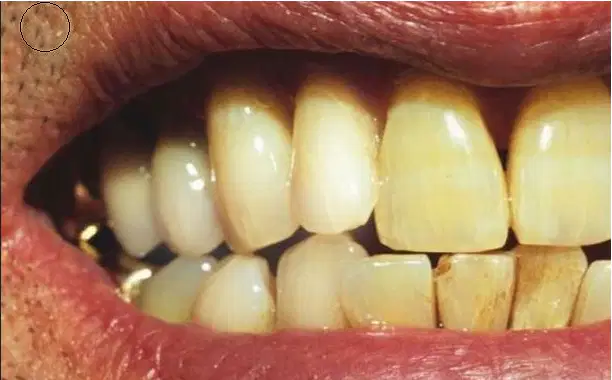
Bruce is using a retouch tool to try to whiten teeth. He just dodged the first few teeth, but it does not seem to be getting rid of the yellow tones. What tool should he use to remove the yellow tones?
a)
burn
b)
sponge- saturate
c)
sponge- desaturate
d)
patch
12.
Decrease redness in cheeks
a)
Spot Healing Brush
b)
Sponge tool
c)
Dodge tool
d)
Clone Stamp tool
e)
Redeye tool
13.
Brighten pupils of the eye
a)
Dodge tool
b)
Spot Healing Brush
c)
Sponge tool
d)
Clone Stamp tool
e)
Redeye tool
14.
Remove a bird from a clear sky
a)
Spot Healing Brush
b)
Dodge tool
c)
Sponge tool
d)
Clone Stamp tool
e)
Redeye tool
15.
Paint blur effect on specific areas of an image
a)
Blur tool
b)
Spot Healing Brush
c)
Dodge tool
d)
Sponge tool
e)
Clone Stamp tool
16.
Remove redness in eyes in a photo
a)
Redeye tool
b)
Spot Healing Brush
c)
Dodge tool
d)
Sponge tool
e)
Clone Stamp tool
17.
Remove an imperfection near the hairline
a)
Clone Stamp tool
b)
Spot Healing Brush
c)
Dodge tool
d)
Sponge tool
e)
Redeye tool
100 %

