
 Worksheets
Autodesk Maya Certification Review
Total questions: 79
Worksheet time: 50mins

What is the Translate Y value at this frame?
(a)
In Autodesk Maya, what is the difference between Forward Kinematics (FK) and Inverse Kinematics (IK)?
FK directly manipulates the end effector, while IK manipulates the joint angles.
FK calculates the end effector position based on joint angles, while IK calculates joint angles to reach a desired end effector position
FK is primarily used for animating rigid bodies, while IK is used for flexible objects.
FK provides more natural-looking motion than IK.

When navigating to
Attributes Editor > Camera Attributes > Controls dropdown
for a camera, which of these camera types would be visible within the dropdown menu?
A and C only
B, C, and E only
A, C, and D only
All of these
Fill in the blank: To open the attribute editor, you must use the keyboard shortcut ____________.
Shift + A
Ctrl + S
Ctrl + B
Ctrl + A

What is the name of the material within the Attributes Editor of this material?
Phong
"phong"
Shiny_Material
Both Phong and "phong" are the names of the material.
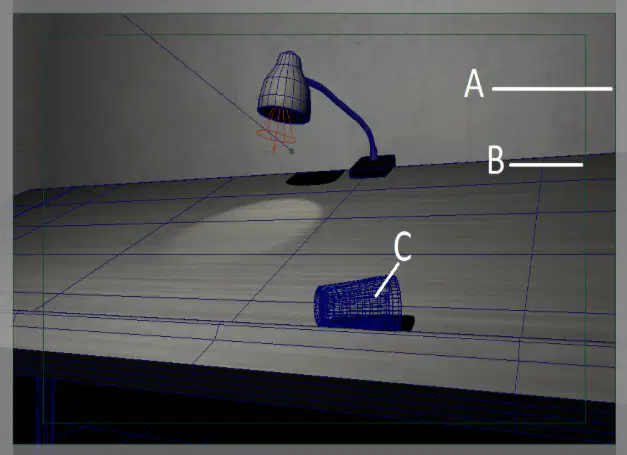
Within the screenshot on the left, which is the safe action gate?
A
B
C
None of these
You wish to set up and configure a new Maya project on a shared network drive to be used by a small team.
In Maya, what would you open to create and configure a new project?
Preferences
Set Project
Outliner
Project Window
Which file is required in your Maya project directory in order for Maya to recognize the project?
workspace.mel
MayaProject.py
Maya.exe
project.ini
Which of these file names utilize the Maya ASCII format?
Scene_1.mb
ladder.obj
TD_credits.ma
houseModel.abc
In the Viewport, you wish to change the grid so that grid lines appear every 10 units.
You can find these settings by going where?
Display > Grid (and clicking the empty box to the right)
Windows > UI Elements > Grid
Display > Show > Grid Window
Help > Grid Display (and clicking the empty box to the right)
An artist is creating an interior scene and wants to change their scene's working units from centimeters to feet.
In the Preferences window, they can find this setting in which category?
Display
Settings
Snapping
Selection

What is the Translate X value of this object?
(a)

If a 3D artist wishes to make 3 copies of a cube, each 6.5 units apart on the X-axis, what parameters might need to change when he or she navigates to Edit > Duplicate Special, and clicking on the window on the right?
Translate X: 6.5
Number of copies: 3
Translate X: 1.08
Number of copies: 3
Translate X: 6.5
Number of copies: 6
Translate X: 1.08
Number of copies: 6

You wish to unparent polySurface4 from the Lamp group node in the hierarchy shown below. With polySurface4 selected, how would you perform this unparent operation? (Choose 2)
Shift + P
Shift + I
Middle-click and drag polySurface4 out of the Lamp group
Double-click polySurface4 and press TAB
Shift + H
Fill in the blank: When changing the pivot point of a cube to its bottom face, one must press the D key and pressing the ___ key (snap to vertex) to snap the pivot point to the middle of the bottom face.
B
V
H
S
Mr. Daly encompassed his spherical model with a cube by accident (OH NO!) and can't see the sphere within the cube! What key should Mr. Daly use to enable wireframe mode to view the cube?
The 3 Key
The 5 Key
The 4 Key
The 1 Key
Under which viewport dropdown can you find the option to enable/disable shadows?
Shading
Lighting
Show
Renderer
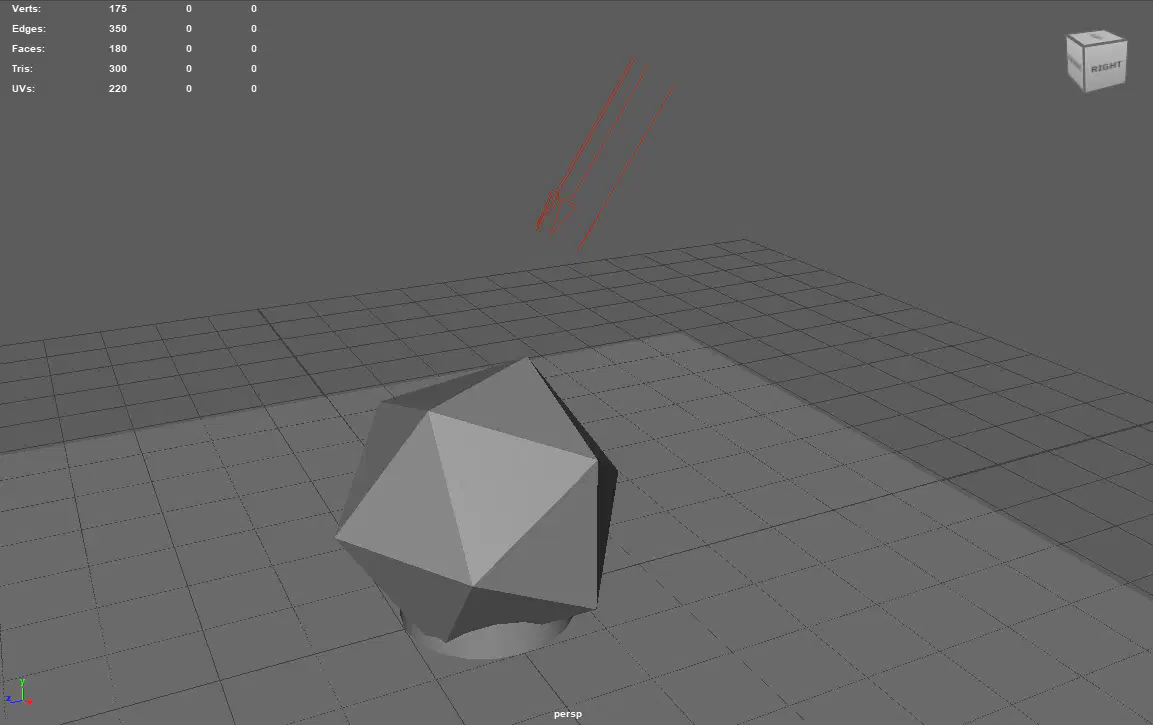
What is the total triangle count in this scene? (Hint: look at the number beside the "Tris" label.)
(a)
True or False: Interactive creation can be enabled for both polygon primitives and NURBS primitives.
True
False
True or False: To view the total polygon count in a scene, one must navigate to Display >> Heads Up Display >> Check Poly Count.
True
False
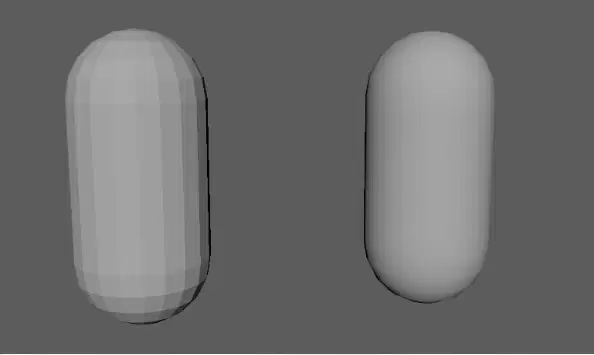
The two capsules below have identical geometry. What operation(s) must you perform on the left capsule so that it looks like the capsule on the right without increasing its geometry?
Subdivide the mesh multiple times
Change its material to Blinn
Soften the edges
Reverse the normals
You have converted a video into a sequence of .PNG image files to use as an animation reference. To create an animated image plane, you import the first image into the viewport using View >> Image plane >> Import image.
As you scrub through the animation timeline, you realize that the image plane is not updating to the matching frame of your video.
What option should you turn on in the attribute editor to enable the playback of your images?
Use Image Sequence
Fit to Film Gate
Maintain Pic Aspect Ratio
Frame Visibility
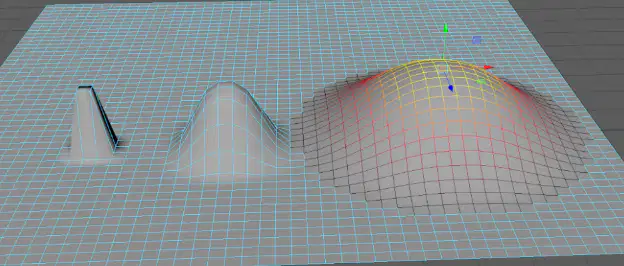
Fill in the blank: You can press the ___ key to enable/disable Soft Selection, or while holding that key down, you can click and drag to change the Falloff Radius.
Alt
B
C
TAB
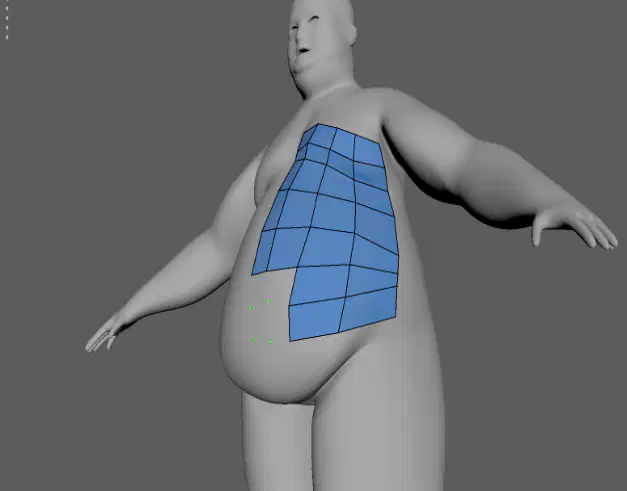
In Autodesk Maya 2024, you have imported a high-resolution character model from a sculpting program. You need to manually retopologize the model to a game-resolution poly count.
Which tool allows you to manually draw topology on top of live surfaces (pictured below)?
Quad-Draw
Multi-Cut
Target-Weld
Connect
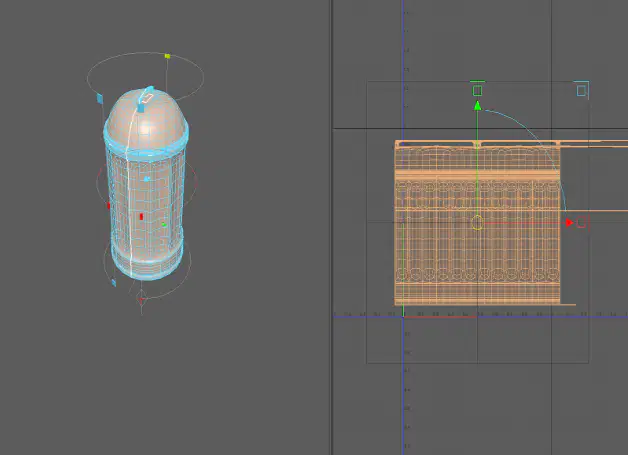
Based on the image on the left, what type of UV mapping projection is being applied to the trash can?
Planar
Cylindrical
Spherical
Automatic

What is the maximum number of projection planes you can use in an automatic mapping projection?
(a)
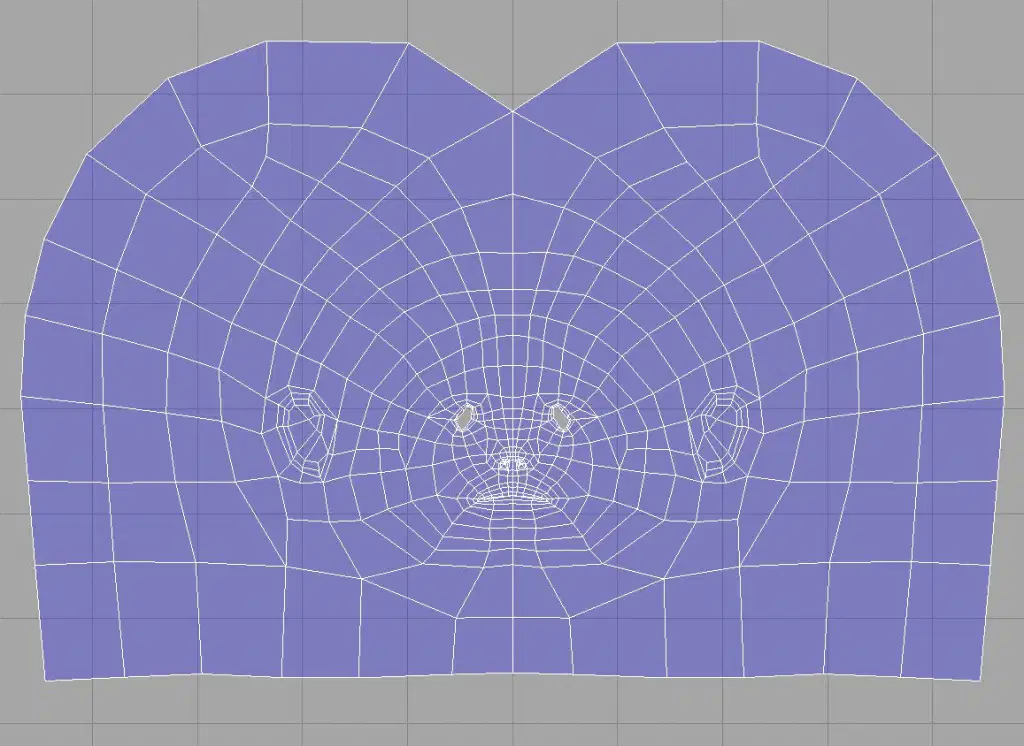
A texture designer merged these three UV planes into one. What operation did the designer use to achieve this solution?
Navigate to Cut/Sew > Sew
Navigate to Modify > Unfold
Navigate to UV > Merge > Merge UV Planes
None of the above
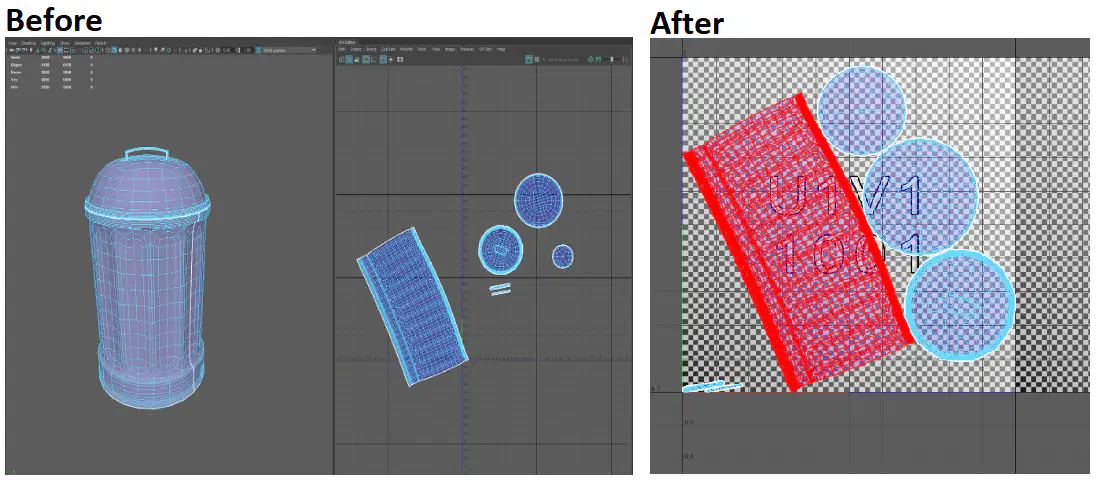
The below trash can's UVs have been adequately cut and unfolded.
After selecting all of the UV shells, which command would you perform to automatically place all of the shells within the 0 to 1 space of the first UV tile?
Move and Sew
Relax
Orient Shells
Layout
A Model has been UV unwrapped. Areas tinted in blue indicate where the UVs are what? (Hint: Areas in red indicate stretching, and areas in white indicate optimal UVs with minimal distortion.)
Stretched
Compressed
Sewn
Optimal
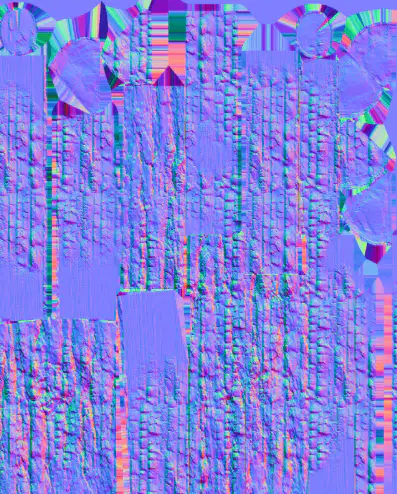
What type of texture map is shown in this image?
Ambient Occlusion
Albedo
Roughness
Normal
What is a Bind Pose?
The starting pose at the first frame of a character animation
The final pose at the last frame of a character animation
The pose that the skeleton is in when you bind skin to it
The shape of a model with a blend-shape bound to it
When rendering a video in Autodesk Arnold, motion blur quality can only be improved by increasing which type of sample count?
Camera (AA)
Diffuse
Transmission or Specular
SSS
Volume Indirect

If a user wants to orient all the left leg joints with X as the primary axis and Y as the secondary axis, what menu should that user navigate to?
Skin
Skeleton
Control
Deform
Constrain
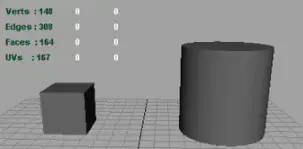
How many total faces are present in the viewport?
308
167
164
148
69
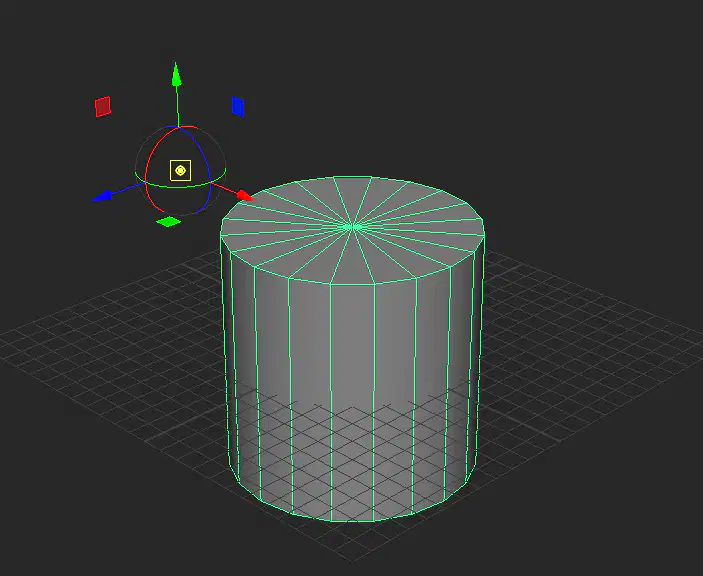
A 3D modeler realized the primitive's pivot point is not at the center of the mesh! What is the most efficient method to put the pivot point back to its center?
Navigate to Modify > Center Pivot
Navigate to Modify > Adjust Pivot
Press the D key and manually adjust the pivot point back to its center
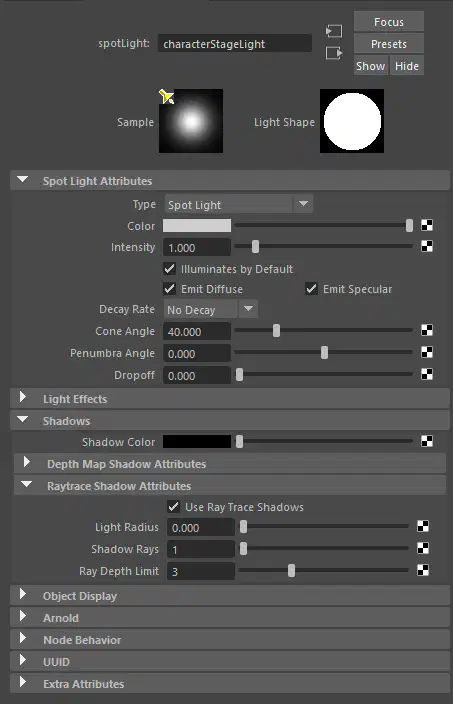
When navigating to Shadows > Raytrace Shadow Attributes in the Attributes Editor for a spotlight, what is the value for the Ray Depth Limit?
1
3
2
0
You are trying to zero out the rotation values of all of the cubes in a scene.
True or False: You cannot change attributes on multiple objects at the same time, so you must zero out the rotation of one object at a time.
True
False
Which Viewport dropdown would you use to import an image plane as the background of your current view?
View > Image Plane > Import image
Show > Planes > Import Image Plane
View > Camera Tools > Image Plane
Panels > Panel > Camera Sequencer
True or False: You can assign different materials to individual polygons on an object.
True
False
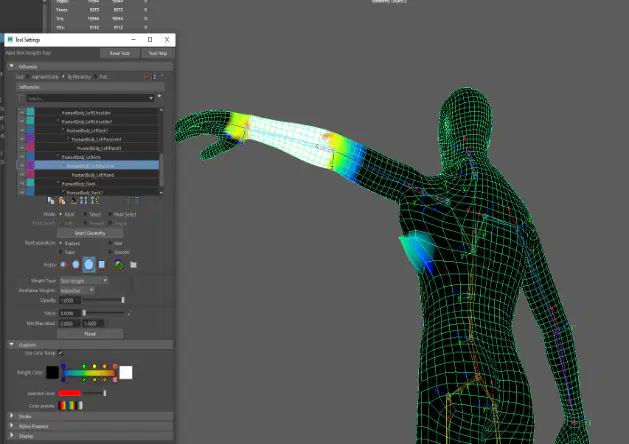
An artist is trying to paint skin weight on his rig. However, each time he finishes painting on one joint and moves to the next one, he notices that weights appear on random parts of the mesh. What practice would prevent this from happening generally?
Locking skin weights
Using a smaller brush size
Smoothing skin weights
Flooding skin weights

You are trying to playblast your animation. You have the playblast set to a high resolution and your quality setting is set to 100, but your playblast still comes out blurry. Which of the settings above is causing the playblast to be so blurry?
Render Offscreen is unchecked
Quality should actually be set to 0
Scale is set too low
Frame padding is set too high
The Attach to Motion Path tool can only be applied to curves created with which curve tool?
CV Curve Tool
EP Curve Tool
Beizer Curve Tool
Pencil Curve Tool
All of these
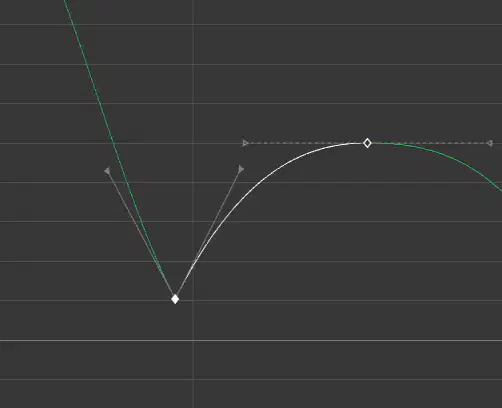
Which of these 2 keys currently has broken tangents?
The key on the left
The key in Source Filmmaker
Neither key
Both keys
The key on the right
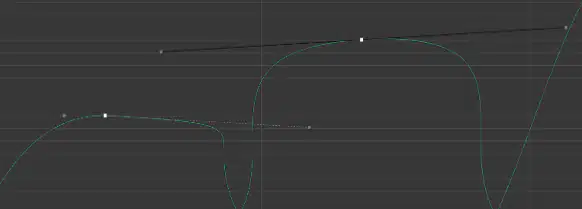
In order to be able to lock or free the length of tangents, tangents must be set to what?
Clamped
Plateau
Non-Weighted
Weighted
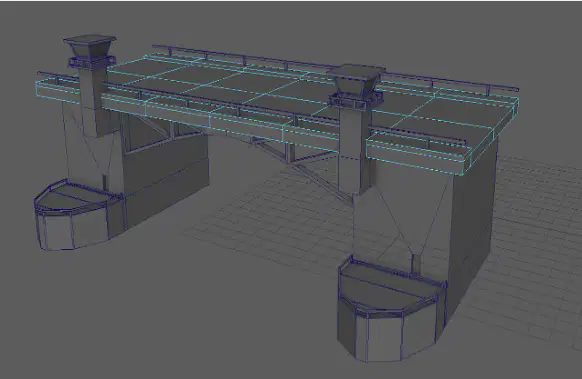
The ambient light shown above is not bright enough in the final render. Which setting can be changed on the ambient light to make the scene brighter?
Light Glow
Decay Rate
Color
Intensity
Starting with the 2017 release of Autodesk Maya, the program has this 3D rendering application included with the 3D computer animation software.


You wish to render your scene at a 1920 x 1080 resolution. Where would you go to find this setting?
Render Settings
Camera Attributes
Preferences
Render Setup
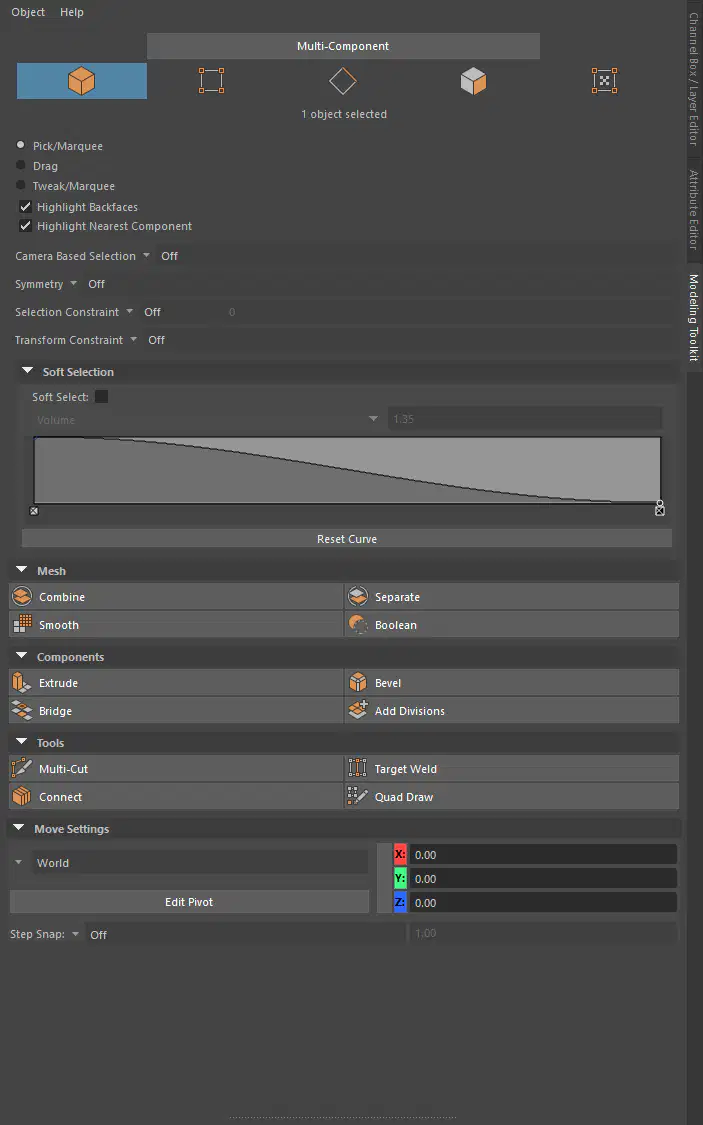
Which of these menus in the Modeling Toolkit enables symmetry editing in the object's Z-axis?
The Transform Constraint dropdown
The Symmetry dropdown
The Selection Constraint dropdown
The Camera Based Selection dropdown
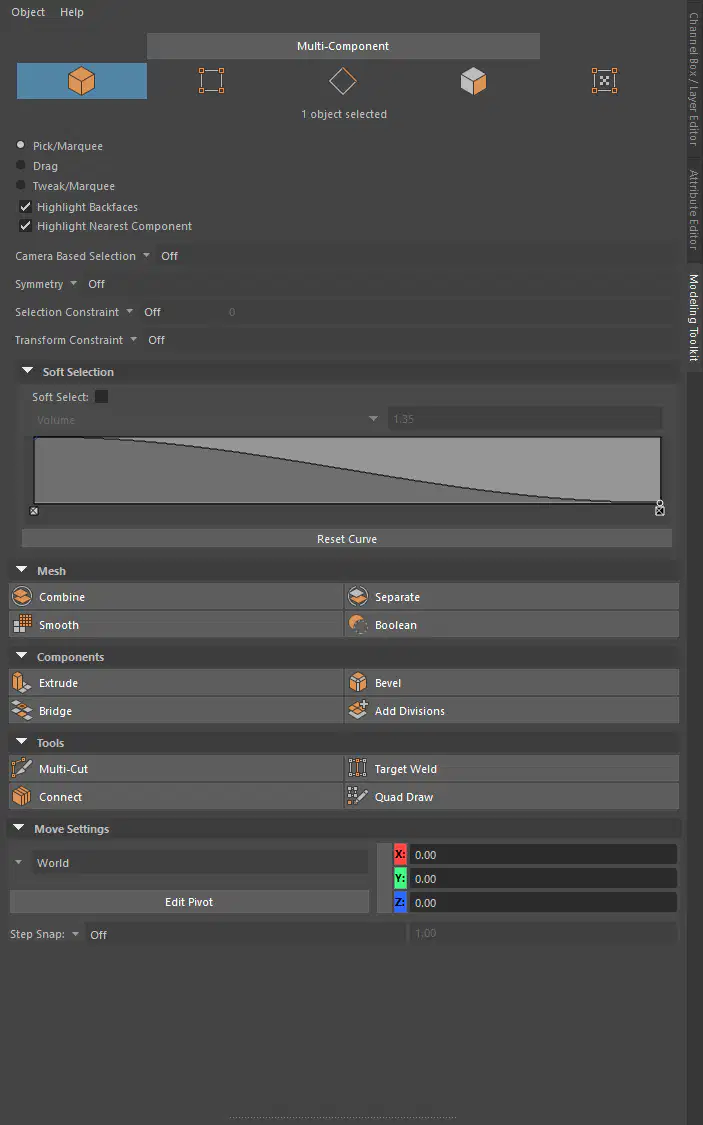
Other than extruding with the keyboard shortcut, Ctrl + E, which of these options in the Modeling Toolkit can achieve a similar solution?
Combine
Bridge
Extrude
Connect
Which of the following materials is a Lambert?


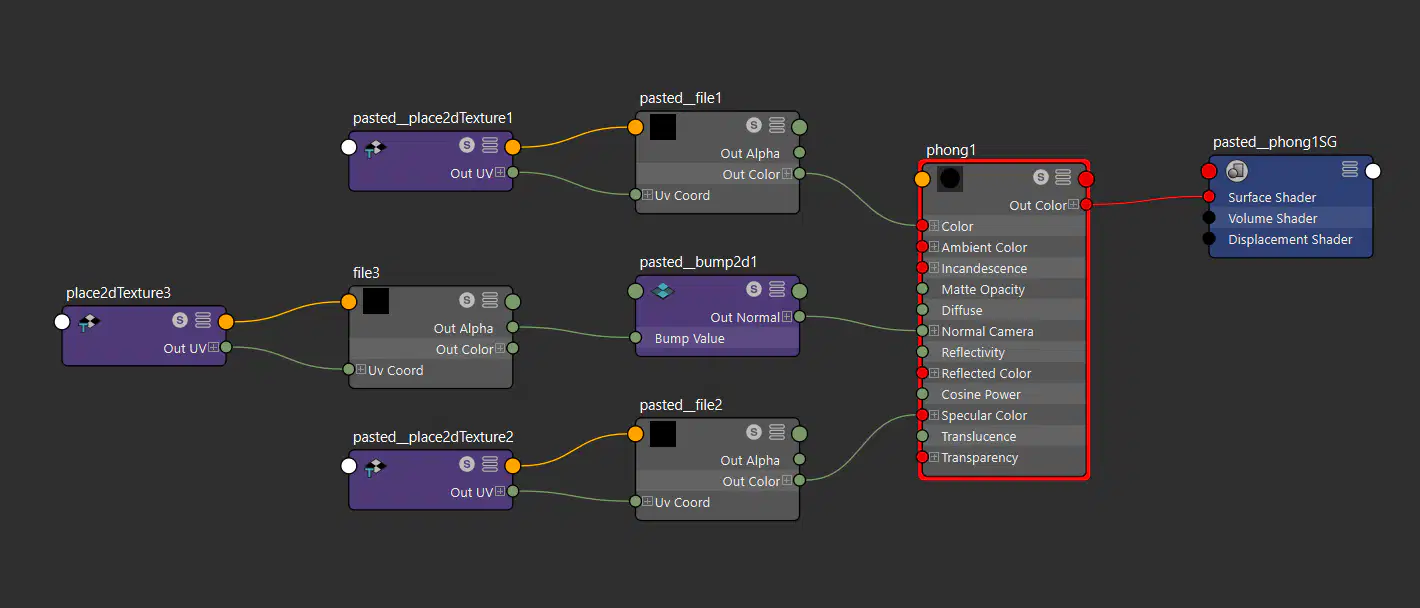
For an object that has a Phong material, an artist navigated to Graph > Input and Output Connections in the Hypershade window. What is the name of the node connected to the Normal Camera input of the material?
pasted_place2dTexture1
pasted_bump2d1
place2dTexture3
file3

Fill in the blank: To create an IK handle, one must navigate to the __________ dropdown.
Skeleton
Audio
Shading
Surfaces

What type of constraint has been applied to AffectedCube2 on Stage_2?
Aim
Parent
Point
Main
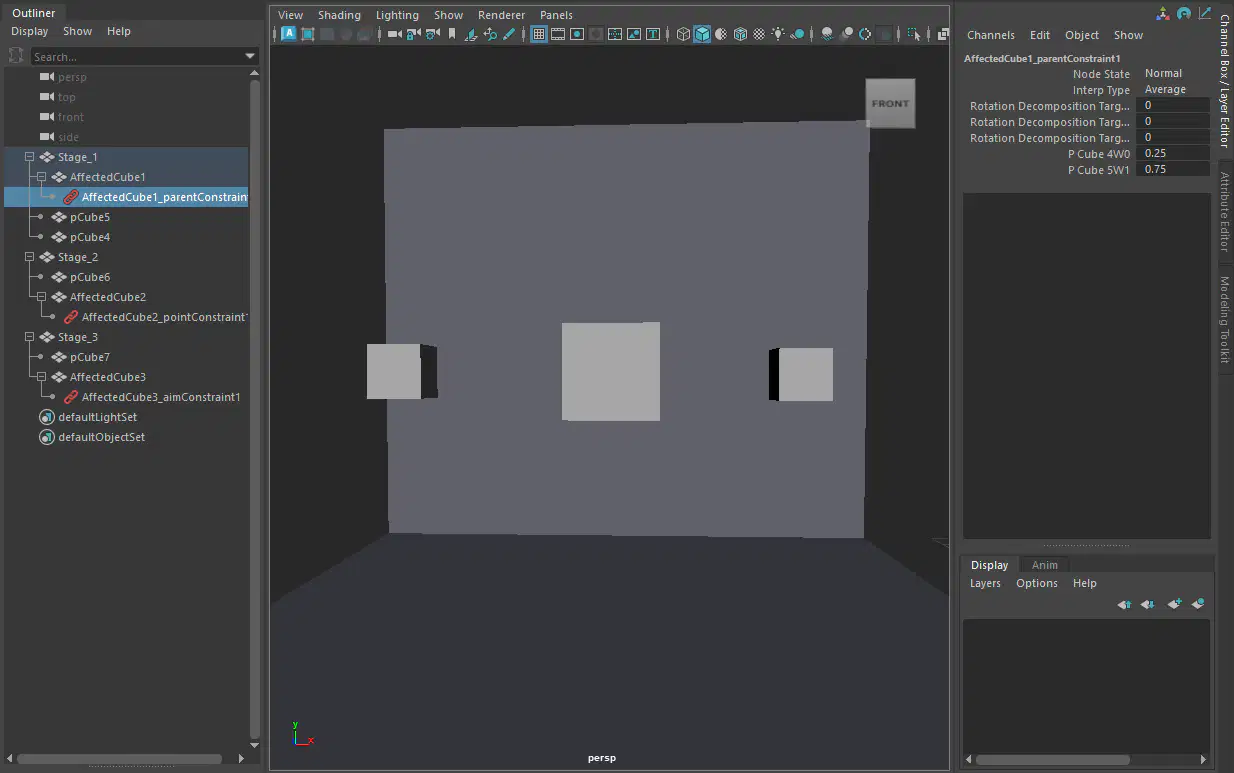
A parent constraint has been applied to AffectedCube1 on Stage_1. AffectedCube1 has been weighted more to pCube5. What is the weight value assigned to pCube5?
0.74
0.54
0.87
0.75

What is the focal length of this camera?
54.43
35.000
1.000
0.100

What animation principle does this motion graph convey?
Secondary Action
Anticipation
Exaggeration
Ease In & Ease Out
Similar to symbol modification in Adobe Animate, this mode in Autodesk Maya 2024 allows you to edit faces, edges, and vertices within that mesh.
Component Mode (F8)
Object Mode (F8)
Edit Mode (F10)
Base Layer Editing (F25)
In Source Filmmaker or in the Doom or Quake level editor, you can grab individual points of a 3D model and move them. How can you do this in Autodesk Maya?
By Pressing F9 and then the W key after selecting a group of vertices
By Pressing F10 and then the G key after selecting a group of edges
By Pressing F11 and then the S key after selecting a group of faces
By Pressing F25 and then the ESC key after selecting a group of vertices

In Toon Boom Harmony and in Adobe Animate, the feature on the left is prominent in Autodesk Maya as well. What is this feature?
The Merge Keyframes Editor
The Attributes Editor
The Hide 3D objects option
The Timeline

In Adobe Photoshop or in Adobe Illustrator, you can enable pressure sensitivity for the drawing tools in that program. In Autodesk Maya's Paint Effects tool, how can you enable pressure sensitivity?
By enabling the button that activates this feature
By changing the Pressure Map dropdown to off
By changing the Pressure Map dropdown to width
None of these

In Adobe Animate, two keyframes, the first at frame 0 and the other at frame 50, respectively, are in the timeline. When a user moves the second keyframe to frame 100, the animation is slower. is this true for animated objects on the Autodesk Maya timeline?
Yes
No
Which of the following BEST describes the Blend Shape deformer?
The Blend Shape deformer lets you change the shape of one object into the shapes of other objects
The Blend Shape deformer is a special object you use to control the deformation effects of rigid skinning
The Blend Shape deformer creates a joint system based on the topology of the surface
The Blend Shape deformer lets you manually sculpt NURBS, polygons, or Subdivision surfaces quickly with the stroke of a brush
What is the syntax to add a single-line comment in a MEL script?
//
<>
"
==
Which of the following is a way to control deformations using a Smooth Bind?
Both Add Influence and Flexors.
Projection Box.
Add Influence
Flexors.
To composite two layers together you would use-
Blend & Comp
Remap Color
Composition settings
Garbage Mask

A suitable method to have the spaceship move along the green line shown in the image is:
Animation Snapshot
Motion Path
Turntable
Animated Sweep
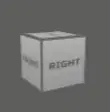
The ViewCube is an on-screen 3D navigation element that does which of the following? (Choose two.)
Provides feedback about stereo cameras and performs calculations to produce anaglyph images
Provides feedback about the current camera view in relation to the 3D scene
Enables you to quickly and easily switch between views
Creates a multicamera rig to navigate through your scene

Which of the following is true of the Specular Color Attribute in a Blinn Shader?
All, except "Controls the spread of the specular highlight."
Controls the spread of the specular highlight.
Controls the color of shiny highlights on the surface.
Has a default value of 0.5.
Which light(s) can be positioned using Look Through Selected Camera?
Spot Lights
Area Lights
Directional Lights
All of these lights
What does the nConstraint Membership Tool for nCloth allows users to do?
Add vertices to a selected dynamic constraint
Remove vertices from a selected dynamic constraint
Both of these
Neither
Which file format lets you exchange complex data between Maya and other software while preserving the data's overall behavior?


None of these
In Autodesk Maya, what does "Sampling" mean?
None of these
The number of photons that get emitted into the scene
The amount of Rendering Layers to be calculated in an image
The amount of times the software will examine different areas of a pixel
The shading network in a Normal 2DTexture Map is made up of which of the following?
One place 2DTexture node and one place 3Dtexture node
Two place 2DTexture nodes
One file texture node and a projection node that defines the texture's placement
One file texture node and the place2DTexture node that defines the texture's placement
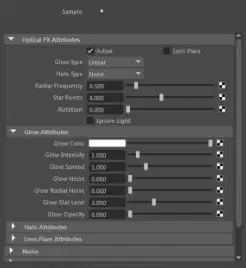
Which of the following is NOT a Glow type with the Optical FX attribute?

Exponential

Star

Linear

None
When choosing an NISC Video Image preset, in addition to image width and height, which other setting is changed?
Device Aspect Ratio
File format becomes TGA
Renderable Camera
Pixel Aspect Ratio

Which of the following is the button for displaying the Safe Action in Autodesk Maya?
Clicking on the Film Gate radio button
Unchecking Gate Mask checkbox
Checking the Safe Action checkbox
Clicking on the Resolution Gate radio button

The objects in the left are in their regular forms. Which of these Boolean operations represents a difference operation on both objects?


None of the above
What is the keyboard shortcut to bevel a cube primitive in Autodesk Maya?
Shift + B
Ctrl + B
Alt + B
Ctrl + Shift + B
What score are you getting on this certification exam?

ONE HUNDRED!!!!

idk... (you will still pass tho)

