
 Worksheets
Excel spreadsheet
Total questions: 56
Worksheet time: 31mins
What happens if we mix dates and numbers without formatting in excel?
if we don’t tell Excel, what the number means it might get confused and think it is a big number not a date
Can you guess what the symbol ( $ or AED) in front of the number means?
mathematical operations.
Money
Currency
Negative number
Date
Cell formatting help us
Doesn’t help us organ and present data clearly in a spreadsheet
Changing how a cell looks to make data clear and neat
What does date formatting show?
Making a number look like a date.
(e.g., 14/4/2004)
What does currency formatting show?
Show how to display prices with only a dollar sign ($)
Show the date as (DD/MM/YYYY)
Showing numbers with money signs.
($10 or AED 20)
What does text formatting mean?
The font style of the text. e.g italics
The color of the text. e.g. Red
Setting a cell to show words or names ( Ali, book)
Why do we use different columns and rows?
We use columns and rows in Excel to keep things neat and organised.
What is a column?
Columns go up and down (like towers). Each one has a title like Dates, Prices,
or Names.
What is a row?
Rows go side to side (like steps). Each row shows information about one thing
or person.
If you are making a list of birthday party guests:
Each row is for
Each column shows a .
Each row is for one guest.
Each column shows a type of information.
How does formatting your spreadsheet make it easier for someone else to understand your work?
It helps the data look clear and neat
It shows what each number means like date or money
It makes reading snd finding things easier
It makes it difficult to read dates and texts
What do rows and columns do in a spreadsheet?
Rows go side to side, and columns go up and down.
They help organize data
Can a computer help us find the 100th customer?
No! Computers can only find the first customer.
Yes, it can count fast.
Computers help search large data quickly
what is an inpute
Something that user does to control program
Example key press or mouse click
Something you do to organise data
Setting the date and currency neatly
Why is it good to organise data in a table?
Tables have to keep things need.
They make it easy to compare and find data.
How do we show time in a spreadsheet?
by using time format like 08:30 AM.
It helps show class or work schedules
Why do we format numbers as currency?
To hide that the numbers are money, like $5.00 or AED 10.00.
To show that the numbers are money, like written words
To show the value it's money. It adds a symbol like $ or AED
What does formatting mean?
Formatting is only about changing font size.
Changing how data is in a cell.
Example: showing a number as money or date.
What is a cell in a spreadsheet?
A small box where you enter data.
It is made by a row and column Crossing
What is the purpose of cell formatting?
To organize data for clarity
To colour the text
To hide the data
Which format should you use for displaying a price?
Text format
Date format
Currency format
How would you format the text "John" in a cell?
a) Use date formatting
b) Use currency formatting
c) Use text formatting
What is the correct date format for "April 15, 2025"?
2025/04/15
04/15/2025
15/04/2025
What is a data table used for?
Organzing information
Why is it important to organise and check data carefully?
So, you don't make mistakes
So the information is correct and easy to find
It helps others understand your work
Keep your information safe by coding it
Which of these is a categorical type of data?
5,6,7
Red, blue, green
100,200,300
10 cm , 20 cm
Why do we use column headings in a table?
To sort data by categories
Which feature would make a character unique?
Wearing rainbow glasses
Same eye color like others
Having no features
Common hair color
What is a spreadsheet
A tool to store, organize and work with data in tables.
It has rows and columns
A tool to code programms
A tool to store data in text
What is an Input?
Something the user does to control the program.
Example: key press or mouse click
What Happens to Sprite with an Input?
It moves, talks, or changes based on the input.
Inputs control the sprite's actions
Explain Scratch Blocks We Can Use:
when [key] pressed
create sprites in Scratch.
change the background in Scratch.
Starts an action
Explain Scratch Blocks We Can Use:
when this sprite clicked
change the sprite's color.
allows the sprite to move automatically.
Runs a command
Explain Scratch Blocks We Can Use:
Move 10 steps
changes the sprite's color by 10 shades.
the sprite rotates 10 degrees.
moves the sprite backward by 10 steps.
Makes the sprite move forward
Explain Scratch Blocks We Can Use:
Say [hello] for [2] seconds
Make the sprite waits for 2 seconds before displaying 'hello'.
Makes the sprite changes the color for 2 seconds.
Makes the sprite speak for a short time
Explain Scratch Blocks We Can Use:
Turn [15] degrees
changes the sprite's color by 15 shades.
moves a sprite 15 pixels to the right.
Rotates the sprite slightly
How do different inputs affect how a program works?
Different inputs make the sprite do different things.
For example, one key can make it jump, and another can make it talK
What if all inputs were the same?
The sprite would do the same thing every time.
You wouldn’t be able to control it in different ways.
What is a Code Block?
A code block is a command in Scratch
Blocks fit together like puzzle pieces
It tells the sprite what to do
Blocks do not fit together
Why Modify Code Blocks?
To change what the program does.
To fix mistakes or improve the game
To make it faster, more fun, or more useful.
To make it slower
Explain the changes in code:
Change move 10 steps to move 50 steps
The sprite will move further and slower
The sprite will move further and faster
The sprite will rotate faster
Explain the changes in code
Change sprite direction
The sprite will face a new way or turn in another direction
Explain the changes in code:
Add sounds or scores
The game becomes more exciting and gives feedback to the player
What does it mean to modify a code block?
To change the block to make the sprite do something different.
.
It helps improve or fix your program
What happens if you change move 10 steps to move 20 steps?
The sprite will move farther.
It will go faster or cover more space
How can you test if your code is working?
Run the code in a different background
Click the green flag or run the code.
Watch what the sprite does.
Check the code sprite
Press the loop block
What should you do if the program doesn’t work after a change?
.
Give one example of how you changed a code block in your Scratch
game.
changed say Hello! to say Welcome!
changed move 10 steps to move 30 stepS
changed move 10 steps to move 30 steps
Why is testing your program important?
What is a variable used for in Scratch?
It helps keep track of numbers in a game.
What happens if we don’t reset the sprite's position?
The sprite may start in the wrong place.
Define Scratch Blocks:
when green flag clicked
Stop the program when you click the green flag
Show sprite when you click the green flag
Start the program when you click the green flag
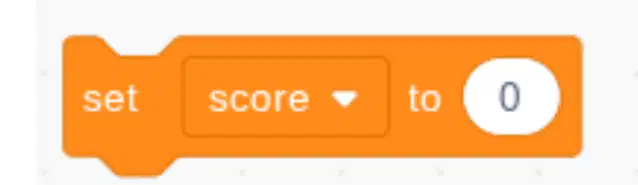
Why should we reset the score at the beginning?
What block do we use to reset a score to 0?
It clears the old score and starts at 0.
What is a variable in Scratch?
.
Why do we use go to x: (0) y: (0)?
To move the sprite to the center of the screen. So it always starts in the same place

