
 Worksheets
Quizizz: Lesson 3.5 Mid-Unit Review & Debug
Total questions: 21
Worksheet time: 11mins

Mission Checklist: I looked at all five of the Scratch Debug It projects.
True
False
Mission Checklist: I identified the cause of the errors in each project and added blocks or explained how to fix each error.
True
False
Spicy Challenges: What is the main goal of trading projects with a classmate that have at least one error?
To debug each other's work
To create new errors
To ignore the errors
To delete the projects
What are the general steps you should follow if you don't know where to start when debugging a Scratch project?
Review the existing code. 2. Try a solution. 3. Test your solution. 4. Repeat until the program works how it should.
Immediately rewrite the entire code. 2. Run the program without checking. 3. Ignore any errors.
Add random blocks to the project. 2. Hope the problem fixes itself. 3. Share the project without testing.
Delete the project. 2. Start a new one. 3. Avoid debugging altogetherがたくさんあります。
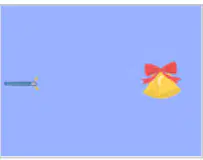
B — DEBUGGING MISSION 1 PROBLEM In this program, the bell should say, "Ting!" when the wand touches it, but nothing happens. YOUR MISSION What should you do to make the bell chime when the wand touches it?
Check if the bell and wand are touching and play the sound.
Change the color of the bell.
Move the wand away from the bell.
Delete the bell sprite.
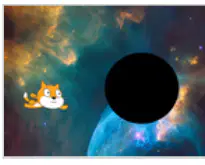
C — DEBUGGING MISSION 2
PROBLEM
The flying Scratch Cat should disappear when it reaches the black hole, but it doesn't.
YOUR MISSION
What should you do to debug the program so that Scratch Cat disappears into the black hole?
Add a 'hide' block when Scratch Cat touches the black hole.
Change the background color to black.
Increase the speed of Scratch Cat.
Add a sound effect when Scratch Cat reaches the black hole.
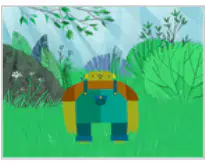
D — DEBUGGING MISSION 3
PROBLEM
Frank is supposed to say, "Correct," when we give "7" as the answer to his math question, but he just keeps saying, "Wrong." What should Frank say when the right answer is given?
Wrong.
Correct.
Try again.
Maybe.
E — DEBUGGING MISSION 4
Which of the following should you do to debug the program so that it tells us if we guessed the age correctly?
Check if the guessed age is equal to the actual age and print a message accordingly.
Remove all print statements from the code.
Change the guessed age to a random number every time.
Ignore the user's input and always print 'Incorrect'.
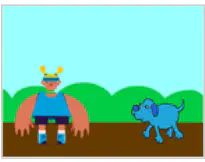
What should you do to debug the program so that the dog keeps barking when he collides with Casey?
Move the bark command inside the collision event handler.
Remove the bark command from the code.
Add a delay after the bark command.
Change the dog's sprite. friendliness to the bark command's timing
A statement which must be true or false. ______ can be used as conditions in programming.
Boolean
Integer
String
Array
A ______ is a boolean which is used to decide whether an action happens.
condition
loop
variable
function
A ______ is a statement with multiple possible outcomes which depend on a condition.
conditional statement
loop statement
assignment statement
print statement
______ are instructions for how a program will work in plain language.
Pseudocode
Algorithm
Flowchart
Source code
A ______ is a diagram which shows how a program will run by connecting the different steps with arrows.
flowchart
blueprint
timeline
spreadsheet
What is the purpose of the 'Scratch homepage' link in the PROJECT LINKS section?
To access the main Scratch website
To watch a coding walkthrough video
To learn about Boolean blocks
To debug Scratch projects
What can you find at the 'Scratch 3.5 Debug It! Studio' link in the PROJECT LINKS section?
A list of Boolean blocks
A studio for debugging Scratch projects
The main Scratch homepage
Information about sensing blocks
The 'Coding Activity Walkthrough Video' link in the PROJECT LINKS section provides:
A video guide for coding activities
The Scratch homepage
Information about control blocks
A list of sensing blocks
Which link would you use to learn about the 'forever' block in Scratch?
Scratch homepage
forever (under Control Blocks in SCRATCH WIKI LINKS)
Coding Activity Walkthrough Video
Sensing Blocks
The 'touching ()?' link under Sensing Blocks in SCRATCH WIKI LINKS helps you learn about:
Boolean blocks
The 'touching' sensing block in Scratch
Debugging Scratch projects
The Scratch homepage
A student is debugging their Scratch project and notices that a sprite is not moving as expected. What is a strategic approach they can take to identify the issue?
Randomly change blocks until the sprite moves correctly.
Check the sequence of motion blocks and ensure they are in the correct order.
Add more sprites to see if the problem persists.
Change the backdrop to see if it affects the sprite's movement.
A student is creating a Scratch project where a sprite should say "Hello" when the space key is pressed. What is a strategic way to test if this functionality works?
Press the space key and observe if the sprite says "Hello".
Change the sprite's costume and see if it affects the speech.
Add more sprites to the project and see if they also say "Hello".
Change the backdrop and see if it affects the speech.

