
 Worksheets
Extra Exercise 1: Computer Components and Functions Quiz
Total questions: 131
Worksheet time: 2hrs 30mins
The (a) processes all instructions in a computer.
The (a) is known as the brain of the computer.
(a) is used to temporarily store data currently in use.
The __________ holds the basic instructions needed to start up the computer.
RAM
motherboard
graphic card
The (a) is the main circuit board that allows communication between the CPU, memory, and other hardware components.
__________ memory retains data even when the power is turned off.
(a)The (a) processes all graphics displayed on the screen.
A (a) card enables sound output to speakers.
The (a) supplies electrical power to all internal components.
A (a) is used to store permanent data and files in the laptop.
A (a) drive stores data using flash memory with no moving parts.
(a) manages data flow between the computer's parts.
The (a) controls and manages all input/output operations.
RAM affects the (a) of programs on a computer.
A GPU stands for (a) Processing Unit.
The hard drive stores the (a) system and all files.
(a) storage is used for quick data access but is more expensive.
What term is used to describe the tangible (physical) parts of a computer system?
(a)
A computer system is a combination of hardware and (a) that processes data to produce meaningful output.

Fill in the blank: The (a) is a circuit board that connects to the main components of the computer system.

Fill in the blank: The (a) is the 'brain' of the computer. It is the device that carries out calculations to complete software instructions.

A (a) is a storage device that uses spinning discs to read and write data.
Match the following components with their functions:
Stores data.
Solid State Drive
Inputs data.
Web camera
Displays output.
Projector
Match the hardware devices listed below.

solid state drive
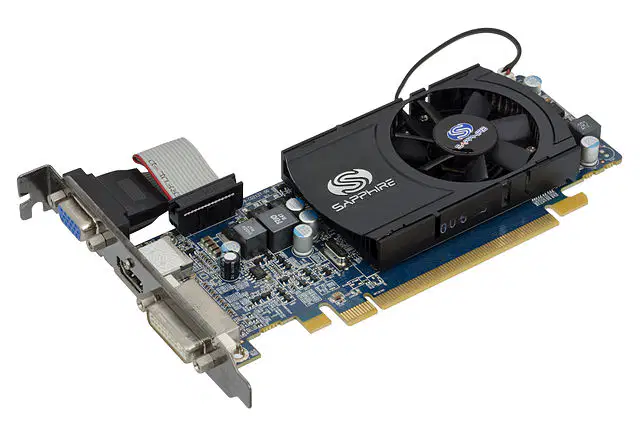
graphic card

processor

random access memory
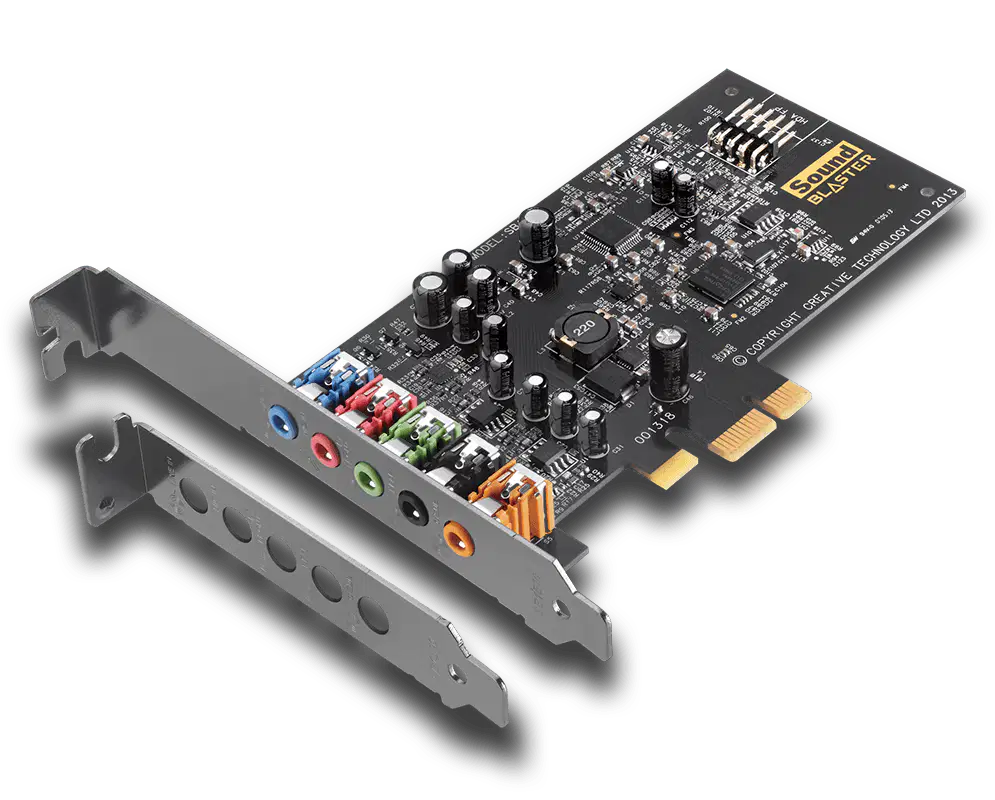
sound card

Which hard drive has NO moving parts? (a)
Organize these options into the right categories
scanner
What is software?
A platform for developing hardware components
A malicious program that compromises data security
Programs and instructions that control computer operations.
Tangible parts such as the CPU and hard drive.
Identify the type of software that manages hardware resources and provides services for application software.
Application Software
System Software
Utility Software
Firmware
Mia and Aiden are discussing the importance of different types of software. Mia says, "System software is more important than application software." Evaluate her statement.
True, because it directly interacts with hardware
False, because application software is used by end-users
True, because it includes all software types
False, because system software is not necessary
Analyze the relationship between system software and application software.
System software is dependent on application software
Application software runs independently of system software
System software provides a platform for application software to run
Both are the same and interchangeable
This is the name for the program that allows the user to interact with a computer and makes the computer run correctly.
program
operating system
BIOS
GUI
What is the primary function of application software?
To manage computer hardware
To perform specific tasks for users
To control system operations
To provide security features
Luna is preparing for her class project presentation. Apply your knowledge to identify which software she would use for creating her presentation.
Windows OS
Microsoft PowerPoint
Linux Kernel
BIOS

What type of software are these?
Application Software
Utility Software
System Software
Programming Software
Which of the following is NOT an example of application software?
Web Browser
Spreadsheet
Antivirus Program
Device Driver
Differentiate between the functions of system software and application software.
System software is for entertainment, application software is for productivity
System software manages hardware, application software performs user tasks
Both manage hardware and perform user tasks
System software is optional, application software is mandatory
Evaluate the necessity of system software in a computer system.
It is not necessary as long as application software is present
It is essential for the operation of application software
It is only needed for gaming
It is optional and can be replaced by application software
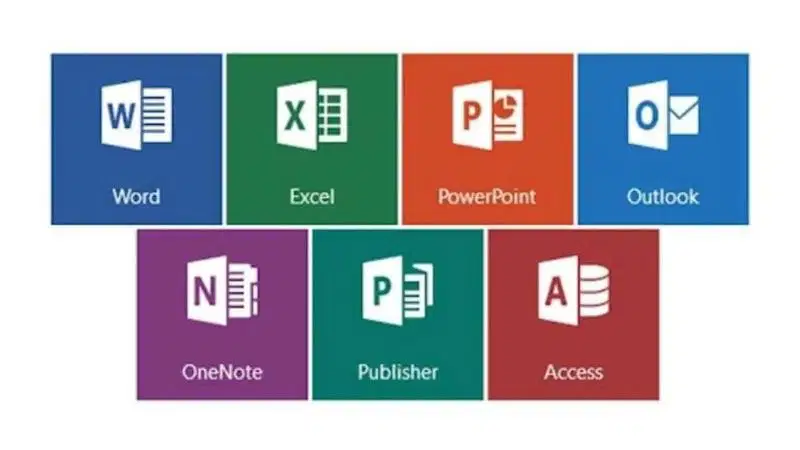
What type of software is this?
Application
Operating System
Programming
Utility Software
There are 2 major types of computer software:
Application Software
Programming Software
System Software
Driver Software
What is the primary purpose of utility software?
To entertain users
To perform maintenance tasks on the computer
To develop new software applications
To manage network connections
Which of the following best describes the difference between application software and system software?
Application software is used for system management, while system software is used for user tasks
System software is used for system management, while application software is used for user tasks
Both are used for system management
Both are used for user tasks
David is using his computer to complete various tasks. Which of the following tasks can he perform using application software?
Managing files and folders
Editing videos
Browsing the internet
All of the above
Organize these options into the right categories
operating system
utility software
spreadsheet
compiler
Name the device shown in the image.
(a)
Name the device shown in the image.
(a)

Name the device shown in the image.
(a)
Name the device shown in the image.
(a)

Name the device shown in the image.
(a)

Name the device shown in the image.
(a)

Name the device shown in the image.
(a)

Name the device shown in the image.
(a)

Name the device shown in the image.
(a)

Name the device shown in the image.
(a)
This hardware component is often referred to as the "brain" of the computer, responsible for executing instructions and processing data.
Random Access Memory (RAM)
Central Processing Unit (CPU)
Hard Drive (HDD)
Graphic Card
This component is used for temporary storage of data that the computer is currently using or processing.
Solid State Drive (SSD)
Network Card/Network Interface Card
Random Access Memory (RAM)
Optical Disk Drive
This hardware is used to store data permanently and is known for its mechanical parts.
Hard Drive (HDD)
Sound Card
Power Supply
Motherboard
This component is a newer type of storage device that uses flash memory and is faster than traditional hard drives.
Optical Disk Drive
Solid State Drive (SSD)
Graphic Card
Network Card/Network Interface Card
This is the main circuit board of the computer, connecting all the components together.
Power Supply
Motherboard
Sound Card
Central Processing Unit (CPU)
This component provides electrical power to the computer and its components.
Power Supply
Graphic Card
Network Card/Network Interface Card
Random Access Memory (RAM)
This hardware is responsible for rendering images, videos, and animations on the computer screen.
Sound Card
Graphic Card
Optical Disk Drive
Hard Drive (HDD)
This component is used to produce sound that can be heard through speakers or headphones.
Network Card/Network Interface Card
Sound Card
Central Processing Unit (CPU)
Solid State Drive (SSD)
This hardware allows a computer to connect to a network and communicate with other devices.
Network Card/Network Interface Card
Motherboard
Power Supply
Graphic Card
This device is used to read and write data from optical disks such as CDs, DVDs, and Blu-rays.
Optical Disk Drive
Hard Drive (HDD)
Random Access Memory (RAM)
Sound Card
What is software?
A platform for developing hardware components
A malicious program that compromises data security
Programs and instructions that control computer operations.
Tangible parts such as the CPU and hard drive.
Identify the type of software that manages hardware resources and provides services for application software.
Application Software
System Software
Utility Software
Firmware
Mia and Aiden are discussing the importance of different types of software. Mia says, "System software is more important than application software." Evaluate her statement.
True, because it directly interacts with hardware
False, because application software is used by end-users
True, because it includes all software types
False, because system software is not necessary
Analyze the relationship between system software and application software.
System software is dependent on application software
Application software runs independently of system software
System software provides a platform for application software to run
Both are the same and interchangeable
This is the name for the program that allows the user to interact with a computer and makes the computer run correctly.
program
operating system
BIOS
GUI
What is the primary function of application software?
To manage computer hardware
To perform specific tasks for users
To control system operations
To provide security features
Luna is preparing for her class project presentation. Apply your knowledge to identify which software she would use for creating her presentation.
Windows OS
Microsoft PowerPoint
Linux Kernel
BIOS
Which of the following is NOT an example of application software?
Web Browser
Spreadsheet
Antivirus Program
Device Driver
Differentiate between the functions of system software and application software.
System software is for entertainment, application software is for productivity
System software manages hardware, application software performs user tasks
Both manage hardware and perform user tasks
System software is optional, application software is mandatory
Evaluate the necessity of system software in a computer system.
It is not necessary as long as application software is present
It is essential for the operation of application software
It is only needed for gaming
It is optional and can be replaced by application software
What type of software is this?
Application
Operating System
Programming
Utility Software
There are 2 major types of computer software:
Application Software
Programming Software
System Software
Driver Software
What is the primary purpose of utility software?
To entertain users
To perform maintenance tasks on the computer
To develop new software applications
To manage network connections
Which of the following best describes the difference between application software and system software?
Application software is used for system management, while system software is used for user tasks
System software is used for system management, while application software is used for user tasks
Both are used for system management
Both are used for user tasks
David is using his computer to complete various tasks. Which of the following tasks can he perform using application software?
Managing files and folders
Editing videos
Browsing the internet
All of the above
Which of the following are some examples of smartphone operating systems?
Android
IOS
Mac
Microsoft Windows
Organize these options into the right categories
operating system
utility software
spreadsheet
compiler
A computer system is being designed to handle large-scale data processing for a research project. What factors should be considered to ensure the system can efficiently process and store data over an extended period?
The color of the computer case
The processing power, storage capacity, and cooling system
The brand of the keyboard and mouse
The number of USB ports
You are tasked with developing a software application that requires both high performance and security. What strategic plan would you implement to achieve these goals?
Focus solely on the user interface design
Implement efficient algorithms and robust encryption methods
Use the most expensive hardware available
Prioritize marketing over development
A school is planning to upgrade its computer lab. What extended thinking process should be used to determine the best configuration for the new systems?
Choose the cheapest available computers
Analyze the current and future needs of students and software requirements
Select computers based on their appearance
Purchase the same model for all computers without consideration
When designing a new operating system, what strategic considerations should be made to ensure compatibility with existing software?
Ignore existing software and focus on new features
Conduct thorough testing with a variety of existing applications
Only consider software from the same manufacturer
Focus on hardware compatibility only
In planning a network infrastructure for a new office building, what strategic thinking should be applied to ensure optimal performance and security?
Install the cheapest network equipment available
Design a network layout that includes redundancy and secure access controls
Focus only on the speed of the internet connection
Use outdated technology to save costs
What strategic approach should be taken when selecting internal hardware components for a high-performance gaming computer?
Choose components based on their brand popularity
Evaluate the compatibility and performance benchmarks of each component
Select the most expensive components available
Focus only on the graphics card
What is the primary function of application software in a computer system?
To manage hardware resources
To perform specific tasks for users
To connect to the internet
To provide security against malware
Which of the following is an example of system software?
Microsoft Word
Adobe Photoshop
Linux Operating System
Google Chrome
When selecting hardware for a new computer, what is a crucial factor to consider for ensuring compatibility with application software?
The color of the hardware
The brand of the hardware
The number of USB ports
The hardware's processing power and memory capacity
What is the primary function of the CPU in a computer system?
To display output on the screen
To execute instructions and process data
To store data permanently
To provide power to the system
Which of the following is an example of an input device?
Monitor
Printer
Speaker
Keyboard
What is the role of RAM in a computer system?
To cool the system components
To manage network connections
To provide temporary storage for active processes
To store data permanently
Fill in the blank: The (a) is a circuit board that connects to the main components of the computer system.
Fill in the blank: The (a) is the 'brain' of the computer. It is the device that carries out calculations to complete software instructions.
A (a) is a storage device that uses spinning discs to read and write data.
Match the following components with their functions:
Stores data.
Solid State Drive
Inputs data.
Web camera
Displays output.
Projector
Match the hardware devices listed below.
solid state drive
graphic card
processor
random access memory
sound card

I temporarily store data and instructions that the computer is currently using. I lose all data when the computer is turned off. What am I?
(a)
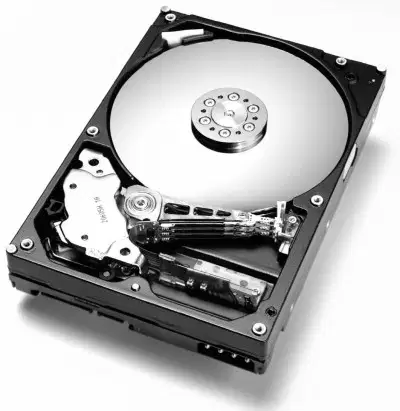
I am used for long-term storage of data and files. I am a traditional spinning disk. What am I?
(a)
Which part of the computer stores your files like photos, documents, and music?
RAM
Hard Drive
Motherboard
CPU
Nora, Aria, and Luna are having a debate. They want to know what sets of computer instructions are called. Can you help them?
pseudocode
algorithms
memory

During a fun coding session, Noah, David, and Mason are trying to display the message "Hello Year 7". How often will the message be displayed?
All the time
Once

Imagine William, Kai, and Aria are playing with a MicroBit. When will the code on their MicroBit start?
When they shake the MicroBit
When they turn on the MicroBit
When they press the A button on the MicroBit

Avery, Kai, and Aria are having a MicroBit race! When will their MicroBit code start running?
When they shake their MicroBits
When they turn on their MicroBits
When they press the A and B buttons on their MicroBits

Noah, Evelyn, and James are playing with a MicroBit. They are curious to know which part of the MicroBit is the LED Panel. Can you help them?
1
2
3
4
Ava, Rohan, and Benjamin are working on a project using a Microbit. They are wondering if they need to connect the Microbit to a battery pack when it is plugged into the computer. What do you think?
True
False

Liam, Avery, and Abigail are playing a game. They have to perform an action based on a random number. What action will they perform if the random number is 0?
Truth
Dare
Next Person

Aria, Henry, and Ethan are playing a game. They want to create a code block that will repeat their actions. Which block should they use?
On Start
Forever
On Button A
On Shake
Daniel, Anika, and Noah are having a debate. Daniel thinks the Microbit has 30 programmable LEDs, Anika believes it's 20, and Noah is sure it's 25. Who is correct?
Daniel
Anika
Noah
None of them

Grace, William, and Michael are on a treasure hunt. They found a mysterious device with red boxes. Can you help them figure out what the part within the red boxes is called?
Input buttons
Ground
CPU
Micro-usb connector
Emma, Nora and Samuel are having a debate. Emma thinks the LED lights on the Microbit are for Input , Nora thinks they are for Output, and Samuel thinks they are for Both input and output. Who is correct?
Input
Output
Both input and output

Push Button A and B
Compass
BLE Antenna
Battery Connector

Nora, Liam, and Arjun are having a debate. The editor pictured here is (a) .
If a value is true, then do some statements


Turn off all LEDs


James, Benjamin, and Arjun are exploring a microbit. They discovered various components, but (a) is not found in a microbit.
Aria, Michael, and Grace are having a debate. Aria says that the microbit has a reset button, but Michael and Grace aren't sure. Who is correct?
Aria
Michael and Grace
Imagine Michael, Avery, and Grace are on a spaceship. They come across an instrument that can measure the spaceship's acceleration and detect and measure vibrations. Can you guess the name of this instrument?
Accelerometer
Map
Magnetometer
Calculator
Imagine Olivia, Noah, and Emma are playing a computer game. They press keys, click the mouse, or even use a sensor. These actions are called (a) in computer language.
Match the following
>
Greater than
>=
Greater than or equal to
=
Equal to
Push Button A and B
Compass
BLE Antenna
Battery Connector
Select an input?
nb: This is something we have to push or touch to get data into the micro:bit


Select an output?
nb: Something that the micro:bit will output back to us


What happens here?
The program will not run
The program will output 'True'
The program will output 'False'
When will this piece of code start?
When you shake the MicroBit
When you turn on the MicroBit
When you press the A and B buttons on the MicroBit
When you press the A button and then the B button

What will be the output if I ONLY press button b
100
0
50
400

What is an algorithm?
A set of instructions to solve a problem.
A list of information.
An ordered structure of data.
A binary number.


What will happen when you press the A button?
score will go up by 1
score will go down by 1
Nothing will happen

