
 Worksheets
Service Request with Correspondence - Temp
Total questions: 12
Worksheet time: 6mins
To send an email from within an existing SR, what Parent Tab should you start in and which button should be pushed?
Email - Reply to All
Call Logging - Create Response
Correspondence - Generage
Service - Response Child Tab
Which tab do you need to select to choose who the correspondence is for?
Recipients child tab
Response child tab
Compensation child tab
Activities child tab
In the recipients tab, how do you verify, add, or change the address to which correspondence is being sent?
Click on the "Last Name" hyperlink of the recipient, then click the "Address Line" pick applet
Click the "Add" button in the Recipients tab
Click the "Response" child tab
Click the "Type" column of the recipient
What should you do if the email address does not auto populate in the To field when creating correspondence?
Leave the field blank
Enter your own email address
Manually enter the guest’s or travel partner’s email address
Use a generic company email address
If a guest called, what should the Inbound Contact Method be set to?
Letter
Phone
Fax
If only an email was sent, what should the Outbound Contact Method be?
Phone
Letter
Fax

Which button should you click to automatically send the correspondence for proofreading and move to the “Service History Remarks” child tab?
Send Email
Create Correspondence
Update Letter CC Names
Default Subject
What is the purpose of entering Service History Remarks in the Service Request?
To update the guest’s contact information
To provide a brief statement of the guests’ concerns/inquiries and actions taken
To change the status of the reservation
To attach additional documents
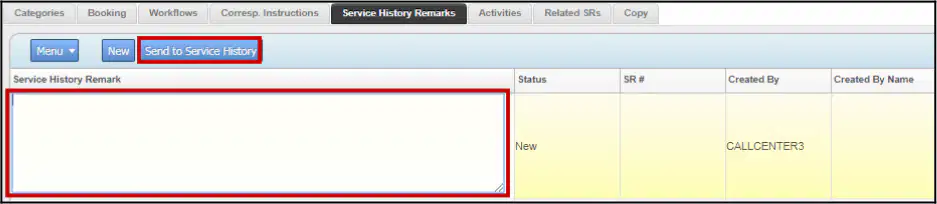
After entering Service History Remarks, which action should be taken to permanently load the remarks on the reservation?
Click “Save”
Click “Send to Service History”
Click “Update Letter CC Names”
Click “Proofread”
When looking for a record of an email that has already been sent, what should you do if the Service Request is not owned by you?
Leave the search criteria under “My Service Requests”
Choose “All Service Request for my Org” from the dropdown
Click “Send to Service History”
Click “Create Correspondence”

If trying to add an attached file to your email, what is the first step after opening the Attachments child tab?
Click "Choose File"
Select "New"
Click "Open"
Select "Audit Trail"

When an attachment is added to the SR, where will it appear?
In the Attachments section of the SR
In the Notes section of the SR
In the Compensation section of the SR
In the Recipients section of the SR

