
 Worksheets
End of Year 7 Assessment (2025)
Total questions: 110
Worksheet time: 1hrs 9mins

Who should you accept friend requests from online?
Anyone
A friend of a friend
Someone you think you've met before
Only from people you definitely know
If you post something on the internet, who may be able to see it?
Only your friends
Just yourself
Anyone
Only your family

Someone in your class has sent around an embarrassing photo of another classmate. What should you do with it?
Show your teacher and say what has happened
Forward the photo onto other people
Save it to your phone so you can embarrass them again later
Laugh at the photo with your friends
A classmate tells you that somebody has been calling him names on an online game. What should you do?
Tell your teacher or another adult
Tell him to call the person mean names back
Tell him to stop playing games for a while
Tell him to just ignore it and let it go away

Who can you share your passwords with?
Your friends
Nobody you should keep them to yourself
Your family
Your teacher
1. Why should you protect personal information online?
A) To protect yourself from strangers
B) To make new friends
C) To share with everyone
D) To be popular
2. What should you do if a stranger sends you a friend request?
A) Accept it
B) Ask them for their name
C) Ignore or decline it
D) Share your phone number
3. Why is it dangerous to share your location online?
A) Strangers may know where you are
B) It helps you find new places
C) It makes your profile look cool
D) It helps people send you gifts
4. Who should you tell before meeting an online friend?
A) Your parents or an adult
B) No one, keep it a secret
C) Your online friends
D) Your favorite celebrity
5. Before posting a photo online, what should you do?
A) Think if it’s okay for everyone to see
B) Post it as fast as you can
C) Share it with strangers first
D) Ask for likes
6. When can you share someone else’s photos or videos?
A) Anytime you want
B) If they are famous
C) Only if they say it’s okay
D) If you like the picture
7. Which password is not safe?
A) P@ssword123
B) 123456
C) MyCatLovesMe!
D) XyZ#90!blA
8. What happens if you use a weak password?
A) Strangers can guess it
B) Your account is safe
C) You will get more likes
D) Your friends will like you more
9. What should you NOT do on social media?
A) Say kind words
B) Write mean comments
C) Respect others
D) Support your friends
10. What should you do if someone is mean to you online?
A) Keep it a secret
B) Ask an adult for help
C) Be mean back
D) Ignore it forever
13. What should you do if someone asks for your home address online?
A) Give it to them if they seem nice
B) Ask your parents before sharing
C) Never share personal information online
D) Tell them your school name instead
14. What should you do if you have problems with someone online?
A) Keep it to yourself
B) Ask an adult for help
C) Try to solve it alone
D) Delete your account immediately
15. What is not a good way to stay safe online?
A) Keeping your passwords secret
B) Not accepting all friend requests
C) Not posting personal details on social media
D) Ignoring safety rules
You have the right to ask a website to remove your information.
TRUE
FALSE
Internet safety is only about protecting your computer from viruses.
TRUE
FALSE
Computational thinking is.....
Programming
Codeing
Thinking like a computer
logically solving problems.
What is....taking a complex problem and breaking it down into a series of small, more manageable problems?
Decomposition
Pattern Recognition
Abstraction
Algorithms
What is....problems looked at individually, considering how similar problems have been solved previously?
Decomposition
Pattern Recognition
Abstraction
Algorithms
What is....focusing only on the important details, while ignoring irrelevant information?
Decomposition
Pattern Recognition
Abstraction
Algorithms
What is....simple steps or rules to solve a task or problem?
Decomposition
Pattern Recognition
Abstraction
Algorithm
If a problem is not decomposed, it is much (a) to solve.
Decomposition makes problems....(pick all the correct answers)
Better to code
Easier to understand.
Harder to solve
More manageable.
Pattern recognition involves finding what 2 things among small, decomposed problems?
Patterns
Difference
Code
Similarities
The more patterns we can find means solving our problem will be...(pick all correct answers)
same
Quicker
Easier
Harder
It is always necessary to decompose a task
True
False
Which of the following is not done by abstraction?
Identifies essential details
Disregards non-essential information
Breaks the problem down into smaller tasks
Which of the following is not done by decomposition?
Allows multiple people to work on the problem together
Disregards non-essential information
Breaks the problem down into smaller tasks
When drawing a dog, which of the following characteristics is non-essential?
Dogs have 4 paws
Dogs have fur
Dogs have brown fur
When designing a building that must be accessible for wheelchairs, which of the following characteristics is non-essential?
Number of doors
Number of walls
Number of wall paintings
You could use abstraction to replace specific objects with simple shapes
True
False


Internet


What is it that joins all this hardware together?
Electricity cables
Bluetooth
Ethernet cables
Wi-Fi
Servers are usually more powerful than the client computers in a LAN.
True
False
Software licences are cheaper when using...
LANS
Stand alone
What does a WAP do?
Allows connection to a network
Allows users to edit network settings
Boosts the signal of Wifi Connection
Which allows for the fastest connection?
Cable
Wireless
Which allows for the safest connection?
Wireless
Cables

Is the image shown (monitor) a hardware or software?
hardware
software

Is the Scratch app a hardware or a software?
hardware
software
A phone or an Ipad connects to the internet through ______
Wires
Apps
Wifi
a server
Reduce the amount of space needed to save it.
A kilobyte is
1024 bits
1024 bytes
Which is the smallest form of data?
Bit
Byte
Nibble
8 Binary Digits
Convert 64 to binary
10000000
01111110
01000000
11001100
Convert 129 to binary
10000001
01111110
01000000
11001100
Convert 3 to binary
10000001
01111110
00000011
11001100
in Binary Addition Rules - What does 0 + 0 equal?
0
0 carry the 1
1
2

What is an email attachment
Is software downloaded to your computer
Is a computer file sent along with an email message
is a type of malicious software program
A piece of code
Looks for vulnerable machines within computer networks
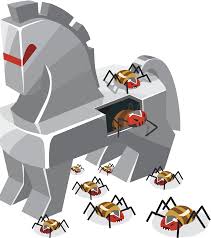
What is a Trojan virus?
A story from Greek mythology
Something that can break your computer
When you download an app and it's actually a virus
A virus only made by hackers
How can you get rid of a virus?
Take it to a computer specialist
Throw it out
Scan for the virus in the computer's settings
Smash the hard drive
How are viruses made?
By writing a computer program that breaks into a computer's way of working
In factories
They are made by Apple and Microsoft
Computer germs
Indications of a __________ being active on a device include unusual activity such as computer settings being changed unexpectedly.
Ransomware
Spyware
Malware
Trojan
They are small software programs that are designed to spread from one computer to another and to interfere with computer operation.
Virus
Anti virus
Spyware
Ransomware
Any kind of unwanted, unsolicited digital communication that gets sent out in bulk. Often spam is sent via email, but it can also be distributed via text messages, phone calls, or social media.
Chain message
Spybot
Spam
Virus
A software that scans your computer for malware and monitors your system for activity associated with viruses.
Spybot
AdAware
Built-in diagnostic tools
Anti-virus
What is a virus?
A friendly reminding email
A software to infect your computer
A new game update
A new download
What effects can a virus have on your system?
It can give you more updates
It can give you more data
It can slow down your computer
They fire artillery at your computer
How do viruses get around?
They drive cars
They fly planes
They travel through a USB
They travel through email
Why are viruses made?
People want to steal others software
People like viruses
People like making loving viruses
People think they eat your lunch
Which one of the following segments of code would be the most precise block to use to draw a blue square in Scratch?


Would this program correctly play the nursery rhyme, Hot Cross Buns?
Yes
No

What would the output of Say ‘weather’ be at the end of this program?
rain
cloudy
rain, sun, rain, cloudy
weather

What will be the output of this program when it is executed? (What will the sprite say)?
Good afternoon
How are you?
Good afternoon
How are you?
Nothing will be outputted/said
Increasing the number of the y coordinate
is difficult to do.
increases the number of the x coordinate as well.
raises the Sprite upward.
A program is
a red fruit with lots of seeds.
a collection of instructions (blocks) that a computer follows to complete a task.
a language that computers recognize.

Can we add sound to our scratch project ?
Yes
No
Changes the backgrounds of the Stage.
Script
Backdrop
Blocks Pallette
Sprites List

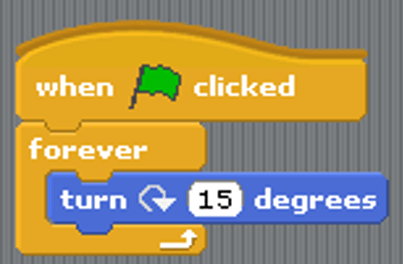

What does this block do?
Repeat the code forever
Repeat the code 2 times
Repeat the code until touching the sprite

