
 Worksheets
3RD TERM 2025 - REVISION QUESTIONS - CLASS 4
Total questions: 75
Worksheet time: 6mins
Choose from the set of computer hardware below, the group of INPUT DEVICES ONLY.
Monitor, Printer, Scanner
Microphone, Mouse, Scanner
Speakers, Monitor, Printer
Monitor, Printer, Mouse
Choose from the following, the set of computer hardware that is OUTPUT DEVICES ONLY.
Mouse, Keyboard, Projector
Monitor, Projector, Printer
Scanner, Touch pad, Barcode reader
CD Rom, Projector, Printer
Mrs. Lawson is the Home-Economics teacher at Little Angels International School. She would like to display on the screen images of ingredients to prepare jollof rice and chicken with fried plantain. Choose the best type of device that she needs to use from the following.
Input device
Output device
Processing device
Special device
Computer software are programs used by the computer to perform tasks. Choose from the following, the set of software used for Desktop Publishing.
MS Word, MS Excel, Instant Artist
MS Outlook, MS Word, MS Excel
MS Publisher, Corel draw, Instant Artist
MS Excel, MS PowerPoint, MS Word
Samuella will be 8years old next month. She would like to design a special invitation card for her guests. From the options given below, choose the best computer software that she can use for this purpose.
MS Muvizu
MS Publisher
MS Outlook
MS Scratch
Mrs. Brownson is a class teacher at Great Minds Nursery School. She would like to create an animation video to introduce her lesson to the children in her class. Choose from the options below, the best animation software that she can use for this purpose.
Canva
MS Publisher
Breadboard
Jumper wires
Gibson wants to use the Canva software to create a video. Which of the following is the best tool she can use to add text to the Canva environment?
Elements
Text
Image
Effects
Glory is in the same class as Paul where they have both learnt in ICT class that when using Canva program, all projects are automatically saved. Choose from the options below, the tool that automatically saves projects.
Effects tool
Projects tool
Apps tool
Text tool
Which of the following is a web-based software for drawing, painting, designing and creating animation videos?
Canva
MS Publisher
MS Word
Light Emitting Diode
Smart Farming is also referred to as Smart Agriculture or ________________
Farm Automation
Breadboard Circuit
Farm Videology
Traffic Light Prototype

The image displayed is called ________________
Computer
Monitor
Compact Disk
System Unit
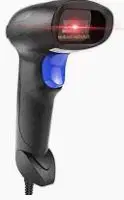
The image displayed is called ________________
Barcode Reader
Keyboard
Mouse pad
Monitor
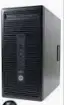
The image displayed is called _________________
Printer
Mouse
Monitor
System Unit
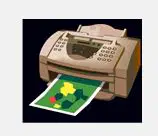
The image displayed is called _________________
Monitor
Printer
Mouse
Keyboard
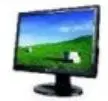
The image displayed is called _______________
Printer
Mouse
Monitor
C.P.U.
Mr. Robinson runs a Smart Farm. He inserted the Moisture sensor in the soil of his farm on Monday and the sensor showed 1020. However, on Friday, the Moisture sensor showed 403. What information can Mr. Robinson get from these figures displayed by the Moisture sensor?
There is enough moisture in the soil from Monday to Friday
There is too moisture in the soil on Monday and Friday
The soil is very dry on Monday but wet on Friday
The Moisture sensor is faulty
IoT in Smart Farming is an acronym. What does it stand for?
Input Output Processing
Internet of Time
Internet of Things
Internet Output Tab
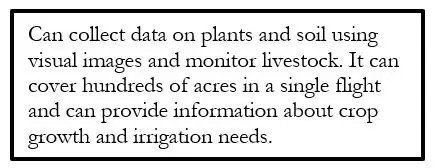
Choose the correct word from the options provided below the type of Smart Farm technology described.
Drones
Motion Graphics Animation
IoT
3D animation Technology
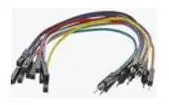
Choose the correct answer from the options given the correct name for the image displayed.
Jumper wires
Breadboard
Resistor
Microcontroller
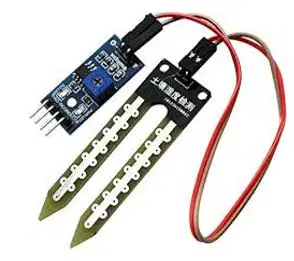
Choose the correct answer from the options given the correct name for the image displayed.
Jumper wires
Breadboard
Resistor
Soil Moisture Sensor
Paul has been taught how to use Canva software to create animation videos in ICT class. He was given an assignment to include external apps such as text to image AI and Emojis in his animation. Which of the following is the best tool he can use for this task?
Elements
Text
Downloads
Apps
Giving movement to drawings and inanimate objects using digital tools thereby creating motion is known as _________
Scripting
Storyboarding
Animation
Publishing
All the following are types of animation except ________
2DD Animation
3D Animation
2D Animation
Stop Motion Animation
Digital 2D Animation is also known as _______________
Analog 2D Animations
2D Vector/Bitmap Animation
Digital 3D Animation
Technology Animation
Kelvin just started learning about Animation in School. All the following are useful for him as a beginner except ______
Pencil 2D
Videoscribe
Muvizu
MS Excel
Amanda wants to animate objects so that they appear in a three-dimensional space. Choose the best type of animation for this purpose from the following.
2D Traditional Animation
Stop Motion Animation
3D Animation
Motion Graphics Animation
The type of animation that combines live action filmmaking with animation techniques using physical objects is known as __________
Traditional Animation
2D Vector/Bitmap Animation
Stop motion Animation
Motion Graphics Animation
Muvizu software is an interactive _______ animation package
2D
3D
4D
5D
An open area where you place graphic content when creating animated object and character in Muvizu is known as ________
Character
Object
Scene or Environment
Properties
The outline of a story written using text is known as __________
Animation
Character
Storyboard
Script
When using Muvizu software, ________ is used to tell a story using pictures.
Animation
Character
Storyboard
Script
You can get a new scene window in Muvizu software by clicking ____________ from the File menu.
New
Quit
Window
Menu
You can create a character in Muvizu software by clicking on character from the ____________ menu.
Prepare
Edit
View
Create
You can animate a character in Muvizu software to make it walk by clicking on character movement from ______________menu
Prepare
Edit
Direct
Create
______________ mouse button and movement can be used to lift object or character in Muvizu software.
Right
Left
View
Both left and right
You can save a file with a new name in Muvizu software by clicking on ____________ from the File menu.
Exit
New
Save As
Edit
To create a character when using Muvizu software, click on ____________ from the ‘Create” menu
Animations
Digital
Edit
Character
Which of the following is not a menu in Muvizu software?
Direct
Edit
Prepare
Place
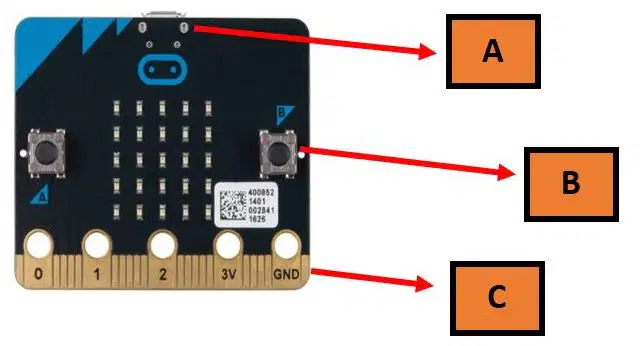
Identify the parts of a Micro:bit labelled below: The part labelled C is called ___________
LED
Edge connector
Push Button
USB Connector
In Terrapin Logo program, the command that allows the Logo turtle to move without drawing a line is the _________ command.
Pen down
Move
Pen Up
Draw
The __________ command in Terrapin logo allows the Logo turtle to move and draw a line.
Pen down
Move
Pen Up
Draw
The command that turns the Logo turtle to its right, by the number of degrees given in terrapin logo program is _________.
Left
Right
Pen down
Logo
In Terrapin logo program, the command that allows the Logo turtle to move backwards is called________
Pendown
Back
Penup
Listener
In Terrapin logo program, the command that clears the content of the graphics screen and puts the Logo turtle back in the Home position is known as ____________
Right
Left
Clearscreen
Listener
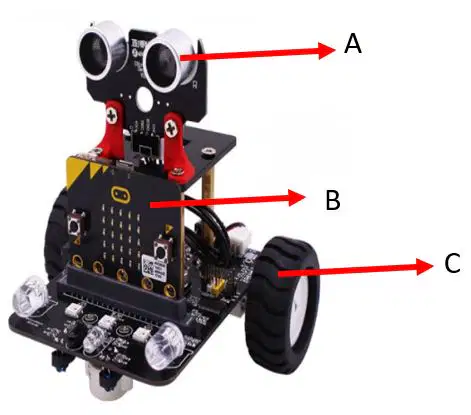
Identify the parts of the Smart car labelled below: The part labelled A is called _______________
Wheel
Battery
Ultrasonic Sensor
Micro:Bit
The command that turns the Logo turtle to its left, by the number of degrees given is ___________
Left
Right
Pen down
Logo
The command used to erase the drawing in the graphics screen but does not change the position of the Logo turtle is __________
Clean
Back
Erase
Graphics
When terrapin Logo program is loaded, the logo turtle is usually found in the middle of the graphics screen. This position is called the ________________
Main position
Right position
Home position
Graphics position
A Micro:bit is a pocket-sized ____________ that can be programmed.
Software
Program
Commands
Computer

Identify the parts of a Micro:bit labelled below: The part labelled A is called ___________
LED
Edge connector
Push Button
USB Connector
The micro:bit has ___________ red LED lights that can flash messages.
25
55
35
52
_____________ is the interface used to program micro:bit.
Terrapin Logo
Emoji
Makecode
Smart car
A _________________is a self-driving car. It uses a combination of sensors to navigate by itself.
Smartphone
Smart car
Sensonic car
Supersonic car
When using Terrapin Logo program, the ____________ command is used to instruct the Logo turtle to move forward.
Go
Back
Forward
Enter
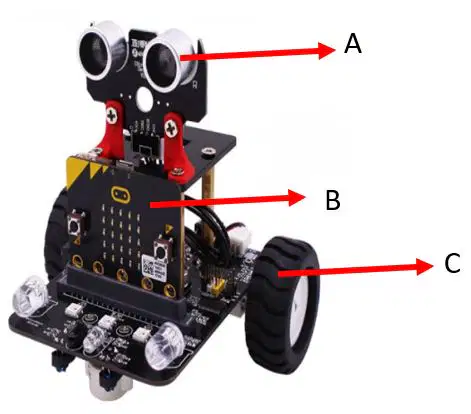
Identify the parts of the Smart car labelled below: The part labelled C is called ___________
Wheel
Battery
Ultrasonic Sensor
Micro:Bit
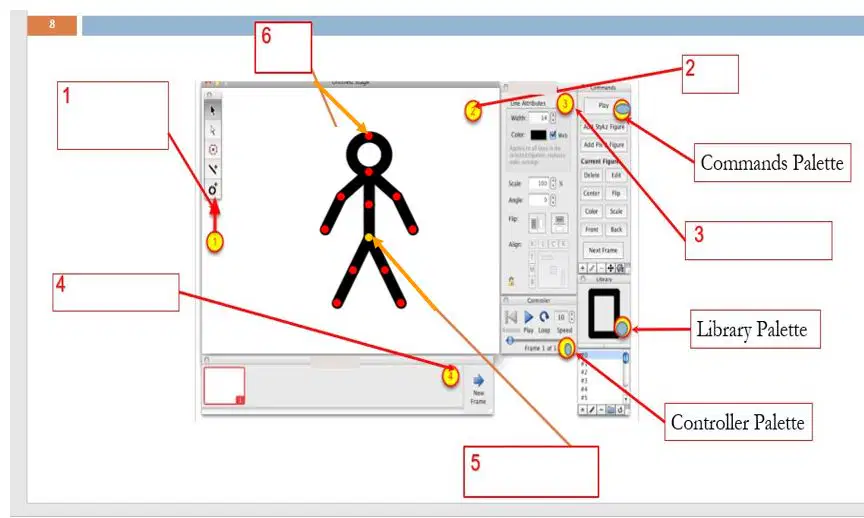
The image below shows the parts of a frame in Stykz program. The menu labelled 5 is ______________
Frame palette
Drag node
Properties palette
Stage
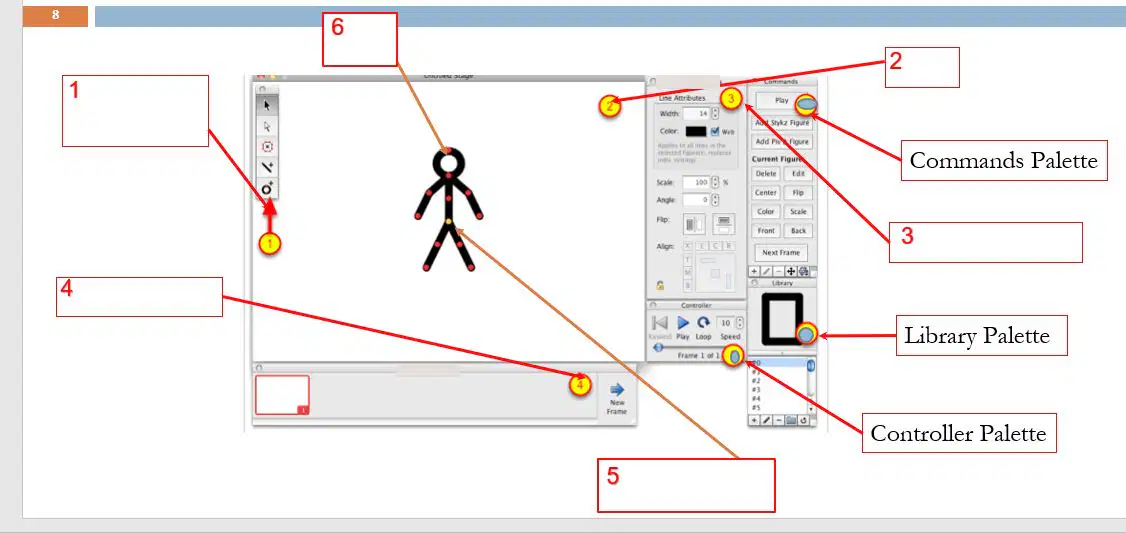
The image below shows the parts of a frame in Stykz program. The menu labelled 1 is ______________
Frame palette
Tools palette
Properties palette
Stage
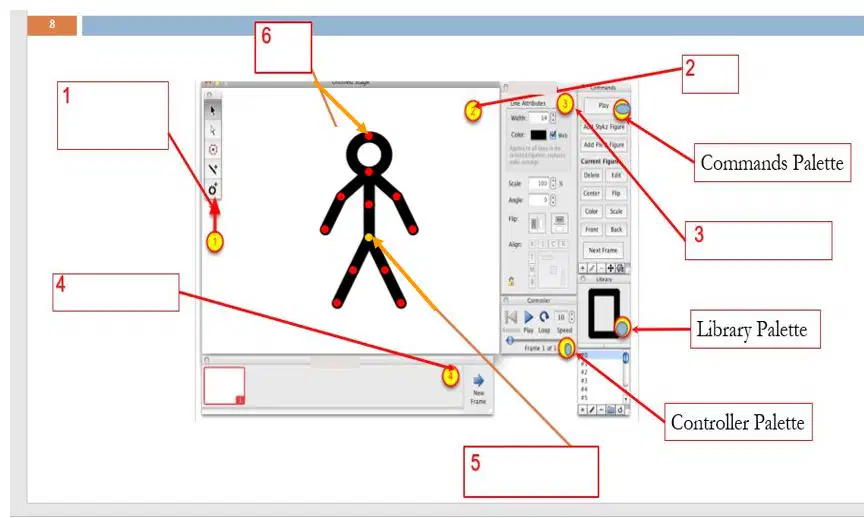
The image below shows the parts of a frame in Stykz program. The menu labelled 4 is ______________
Frames palette
Tools palette
Properties palette
Stage
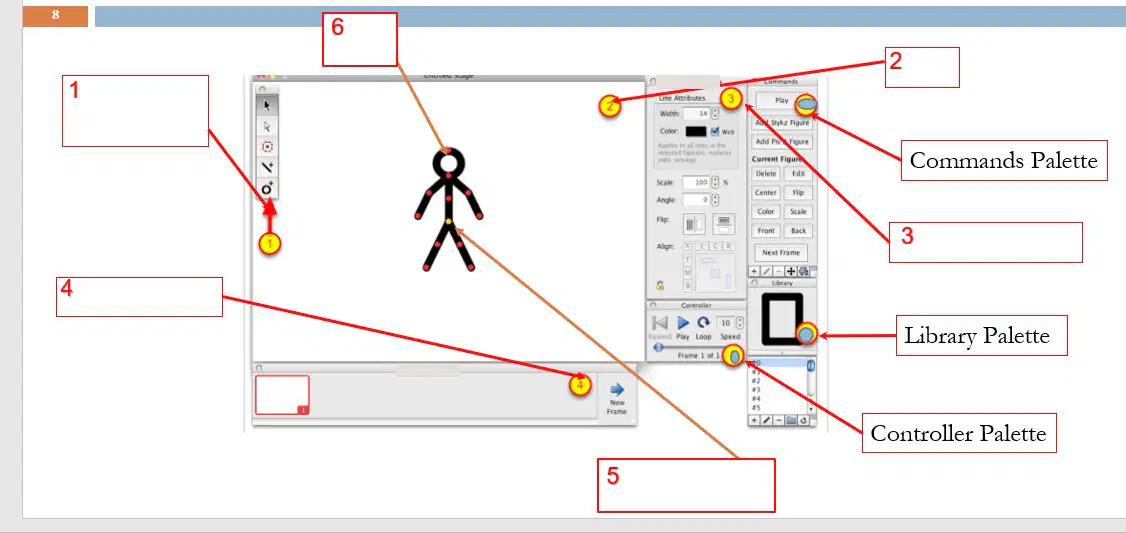
The image below shows the parts of a frame in Stykz program. The menu labelled 3 is ______________
Frame palette
Drag node
Properties palette
Stage
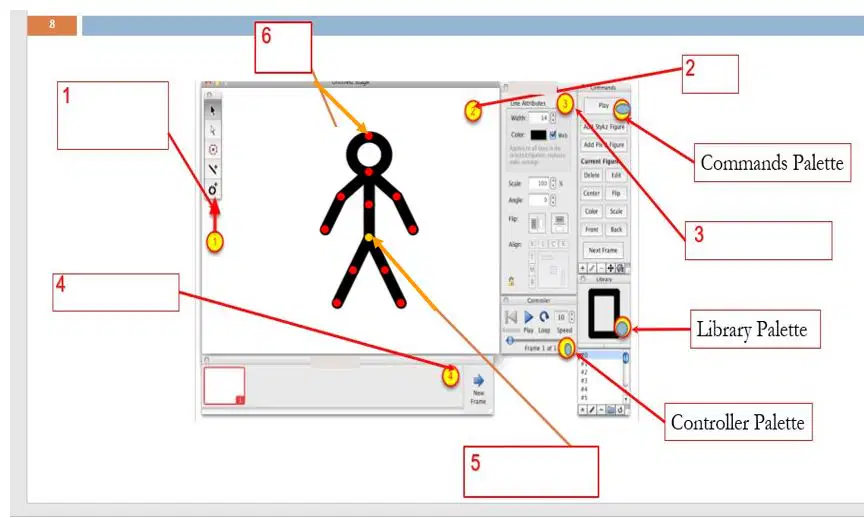
The image below shows the parts of a frame in Stykz program. The menu labelled 6 is ______________
Frame palette
Drag node
Properties palette
Pivot node
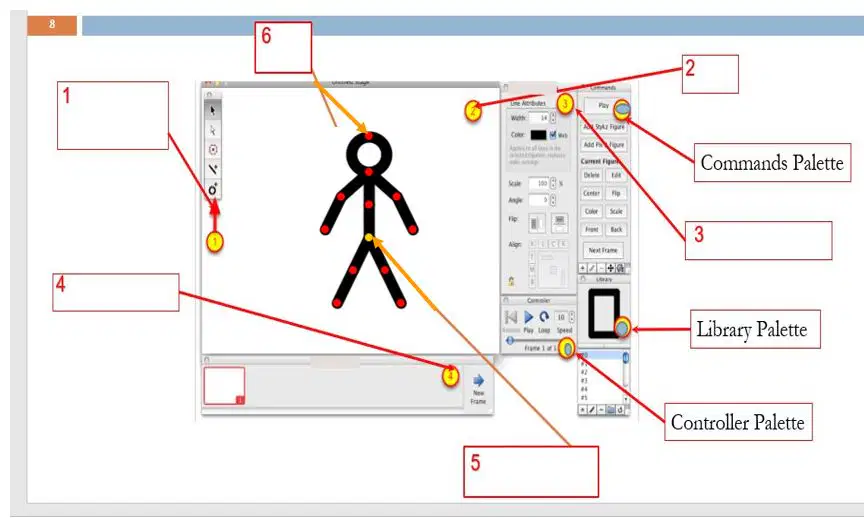
The image below shows the parts of a frame in Stykz program. The menu labelled 2 is ______________
Frame palette
Drag node
Properties palette
Stage

The image below shows the tools used in a Stykz program. The tool labelled B is ______________
Sub-select tool
Select tool
Add line tool
Polyfill tool
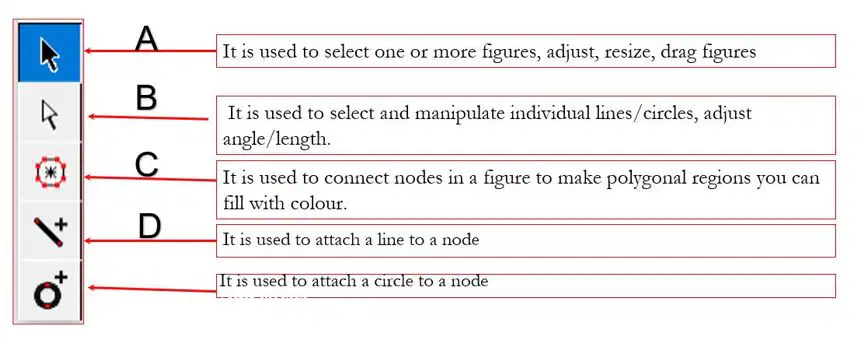
The image below shows the tools used in a Stykz program. The tool labelled D is ______________
Sub-select tool
Select tool
Add line tool
Polyfill tool
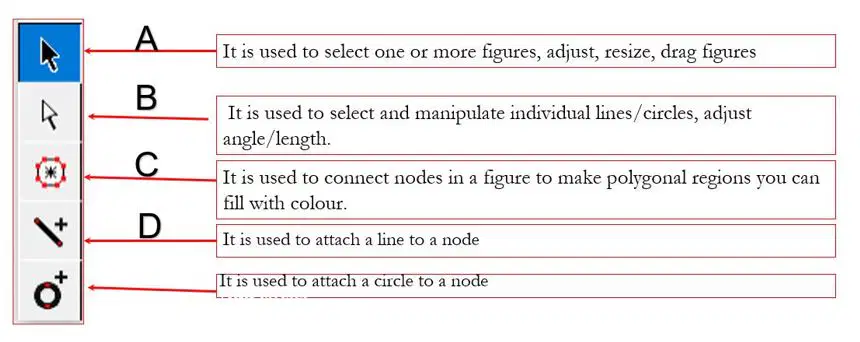
The image below shows the tools used in a Stykz program. The tool labelled A is ______________
Sub-select tool
Select tool
Add line tool
Polyfill tool

When using KODU Game lab. software, this image represents the tool used to _____________
Play your game
Rotate the camera
Exit the program
Send a character to the printer to be printed

When using KODU Game lab. software, use this icon to _____________
Add/edit objects
Rotate the camera
Exit the program
Go back to the main menu

When using KODU Game lab. software, use this icon to _____________
Add/edit objects
Paint, add/ delete ground
Exit the program
Add/edit paths
Kodu is a _______________ environment for building games.
Word processing
Hardware
Programming
Commercial
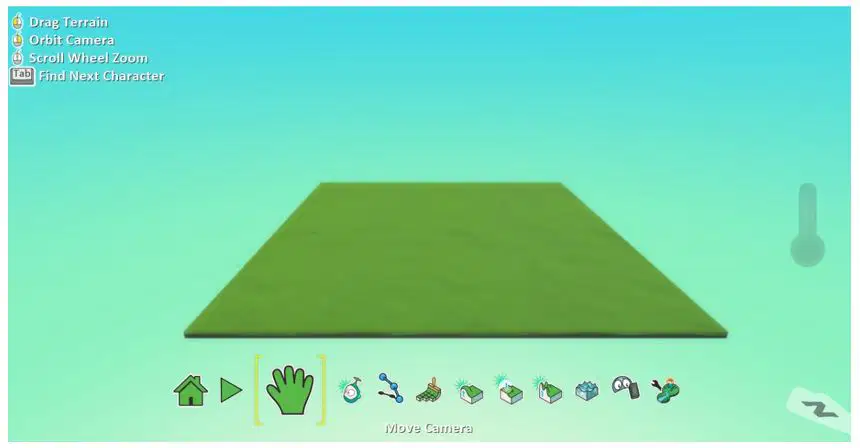
The image displayed is the _______________ interface.
Micro:bit
Stykz interface
Terrapin Logo interface
KODU Game lab. interface
Gafardeen learnt in I.C.T. class that the field of computer science that focuses on creating intelligent machines that can perform tasks that normally require human intelligence is called AI?. What does AI stand for?
Artificial Inflation
Armed Intellectuals
Artificial Intelligence
Artifacts Inclusion
One of the uses of AI in _______________ industry is to create advanced machines that can recognize cancer cells and detect diseases.
Education
Healthcare
Transportation
Entertainment
________________ is one of the applications of AI by smartphones to store the owner's face in their memory.
Facial recognition
Ability to walk
Ability to identify types of shapes
Ability to identify personal properties
In ________________, AI is used by Apps like Snapchat and Instagram to detect a human face and apply cool filters to them.
Healthcare
Education
Transportation
Social media
One of the advantages of AI in ________________ is the use of Apps such as UBER, Google Maps, and Bolt to help us find our way around. They assist us in determining our exact location and recommend locations based on previous searches.
Healthcare
Education
Farming
Navigation
The image displayed is called _______________
Printer
Mouse
Monitor
C.P.U.

