
 Worksheets
Computer Systems Recap
Total questions: 98
Worksheet time: 49mins
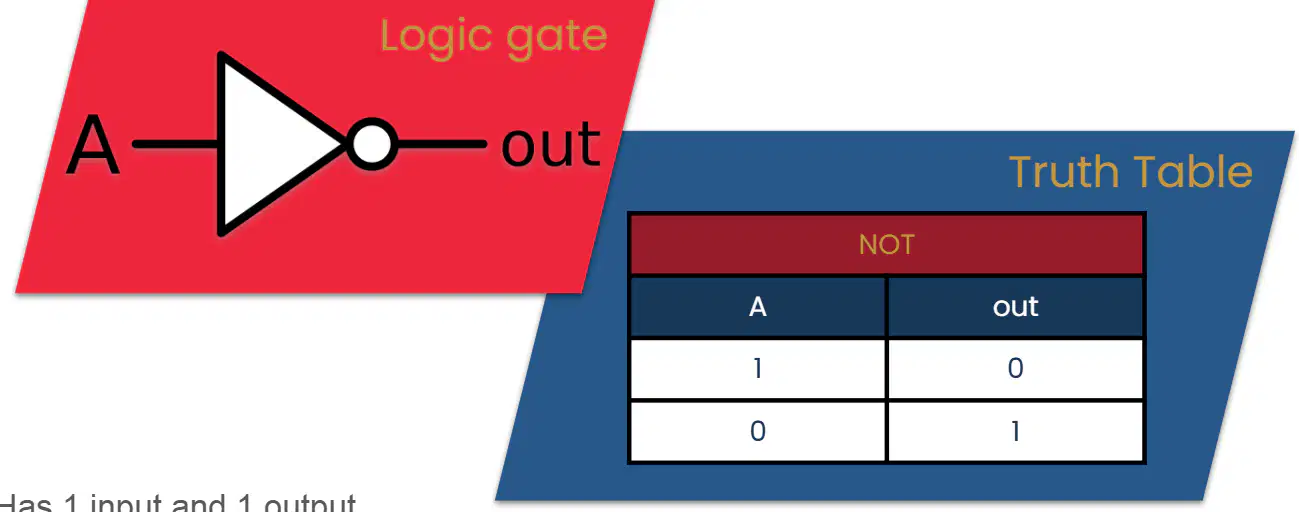
What is the main function of a NOT gate in digital logic?
It outputs the same value as the input.
It outputs the opposite value of the input.
It adds two input values.
It multiplies two input values.
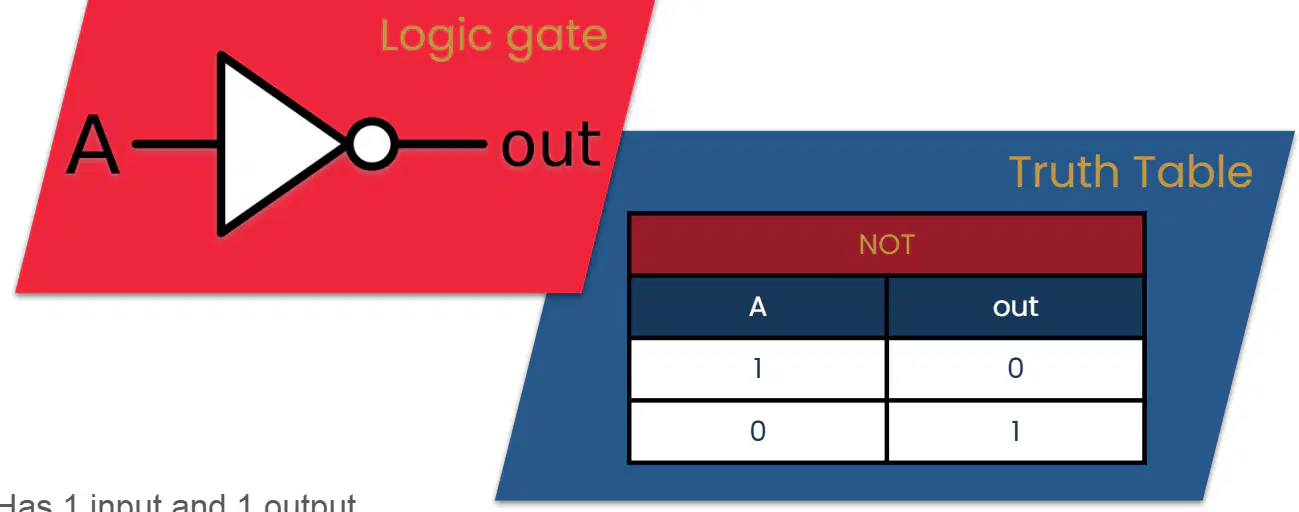
How many inputs and outputs does a NOT gate have?
2 inputs and 1 output
1 input and 2 outputs
1 input and 1 output
2 inputs and 2 outputs
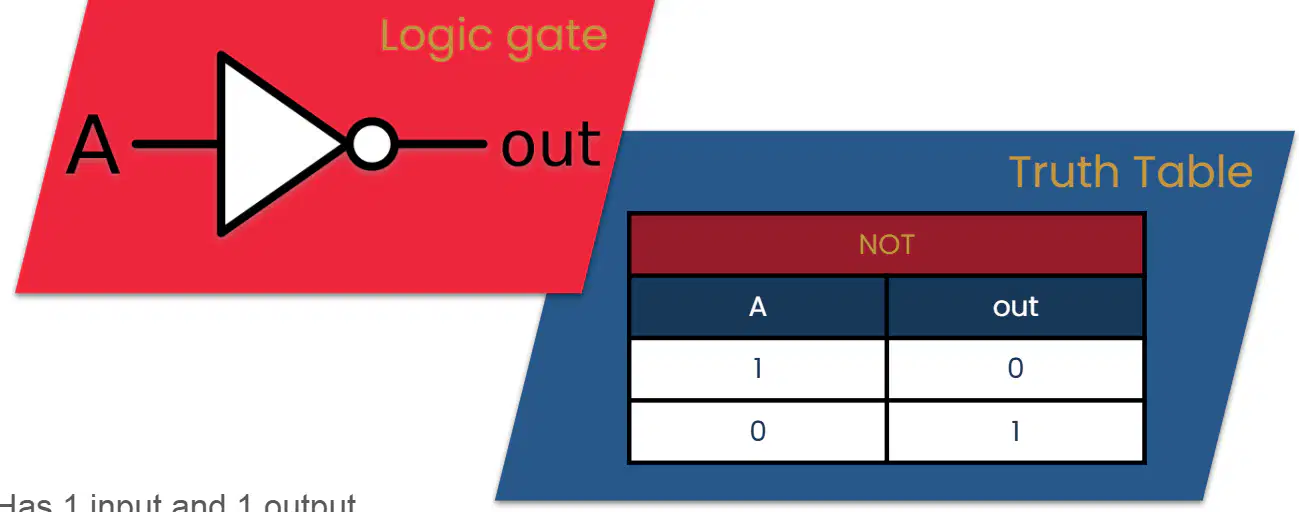
According to the truth table for a NOT gate, what is the output if the input (A) is 1?
1
0
2
Cannot be determined
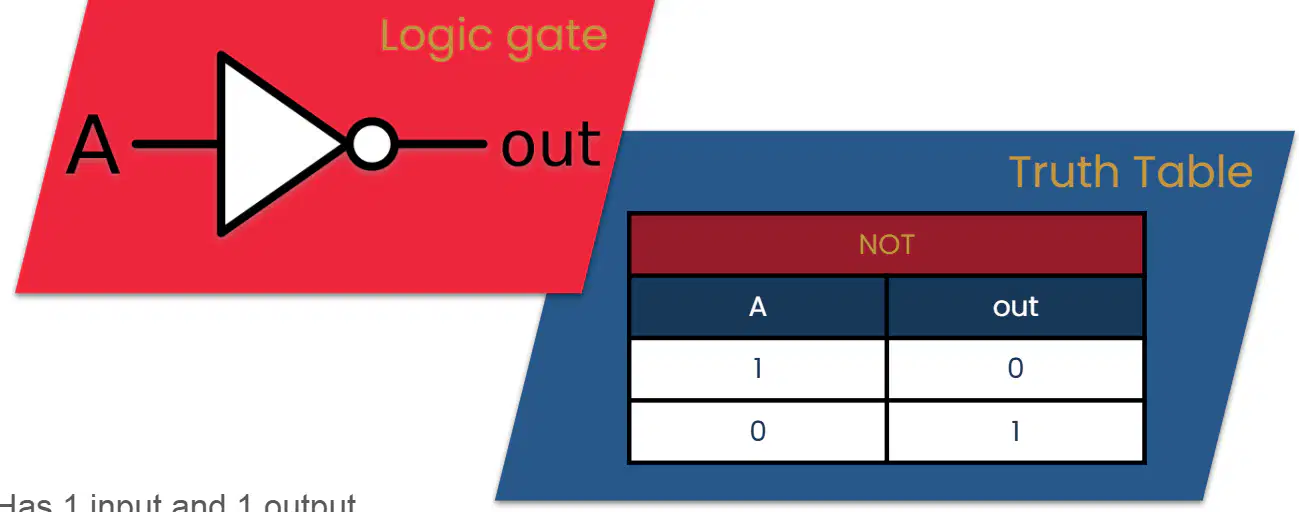
If the output of a NOT gate is 1, what must the input be?
1
0
2
Cannot be determined

A student claims that a NOT gate can be used to invert a digital signal. Using the information from the truth table, explain if this claim is correct.
Yes, because the output is always the same as the input.
No, because the output is always 1.
Yes, because the output is always the opposite of the input.
No, because the output is always 0.

What is the minimum number of inputs required for an AND gate?
1
2
3
4
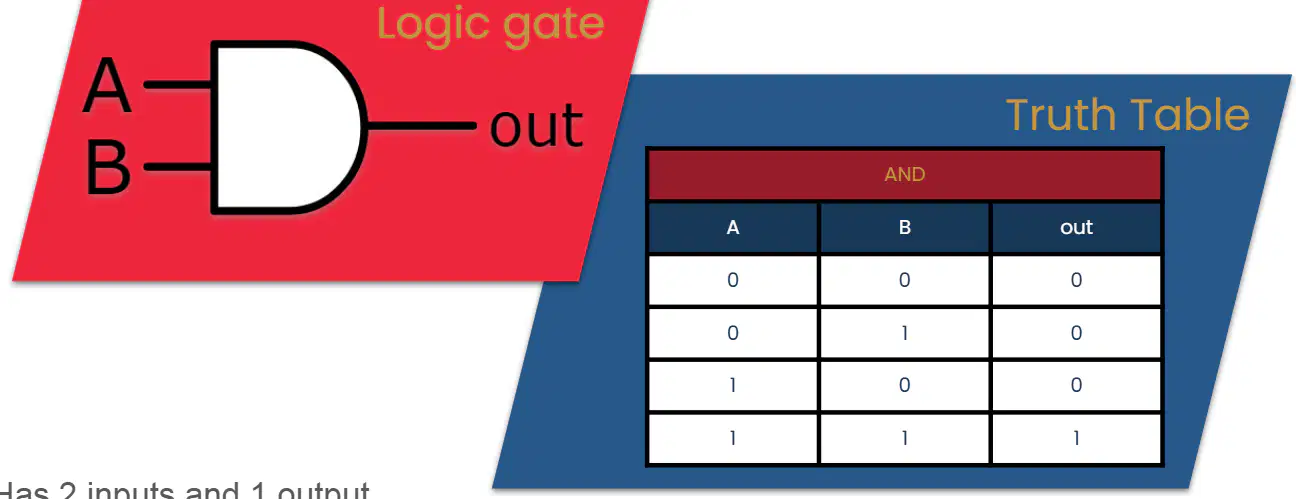
According to the truth table for an AND gate, what will be the output if input A is 1 and input B is 0?
1
0
2
Cannot be determined
Which statement best describes the function of an AND gate?
It outputs true if at least one input is true.
It outputs true only if both inputs are true.
It outputs true if both inputs are false.
It outputs true if any input is false.
If you want an output of 1 from an AND gate, what must be the values of both inputs?
Both inputs must be 0
One input must be 1 and the other 0
Both inputs must be 1
Any value of inputs will work
A student claims that an AND gate will output 1 if either input A or input B is 1. Use the truth table to explain if this claim is correct or incorrect.
Correct, because the output is 1 if either input is 1
Incorrect, because the output is 1 only if both inputs are 1
Correct, because the output is always 1
Incorrect, because the output is always 0
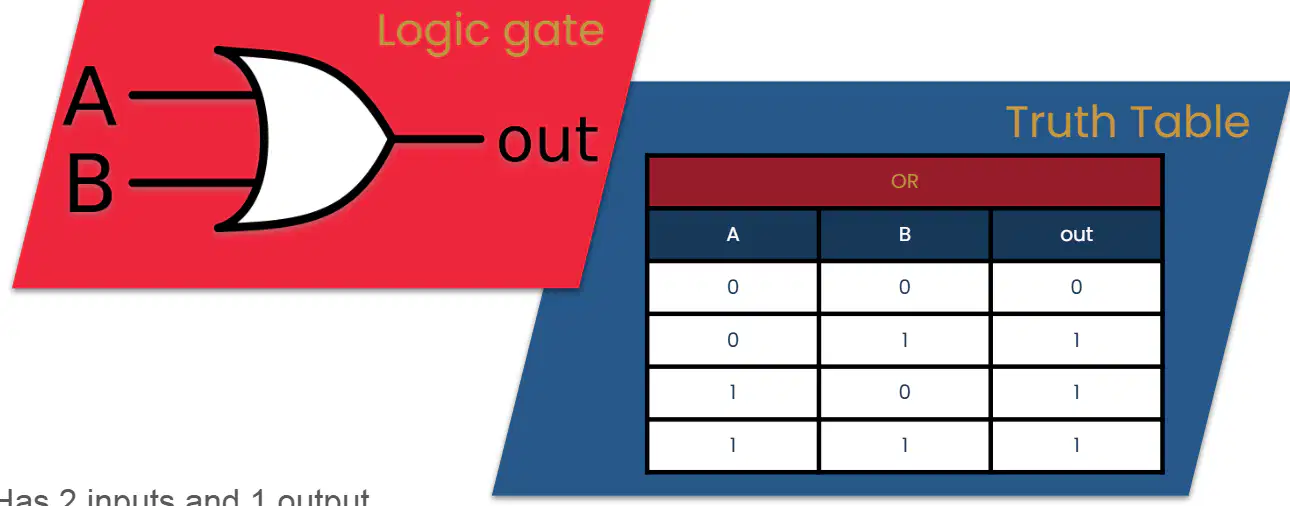
What is the minimum number of inputs required for an OR gate to produce an output?
1 input
2 inputs
3 inputs
4 inputs
According to the truth table for an OR gate, what will the output be if both inputs A and B are 0?
1
0
2
Cannot be determined
Which statement best describes the function of an OR gate?
The output is true only if both inputs are false.
The output is true if one or both inputs are true.
The output is always false.
The output is true only if both inputs are true.
If input A is 1 and input B is 0 in an OR gate, what will the output be?
0
1
2
Cannot be determined
Using the truth table, explain why the output of an OR gate is 1 when both inputs are 1.
Because the OR gate only outputs 0 when both inputs are 1.
Because the OR gate outputs 1 if at least one input is 1.
Because the OR gate ignores the inputs.
Because the OR gate always outputs 0.

What does the XOR gate do when both of its inputs are the same?
Outputs true (1)
Outputs false (0)
Outputs both true and false
Does not output anything
How many inputs and outputs does an XOR gate have?
1 input and 2 outputs
2 inputs and 1 output
2 inputs and 2 outputs
1 input and 1 output
According to the truth table, what is the output of an XOR gate if input A is 1 and input B is 0?
0
1
2
Cannot be determined
Why is the XOR gate called "EXCLUSIVELY OR"?
It outputs true only if both inputs are true.
It outputs true only if both inputs are false.
It outputs true only if the inputs do not match.
It outputs true for all input combinations.
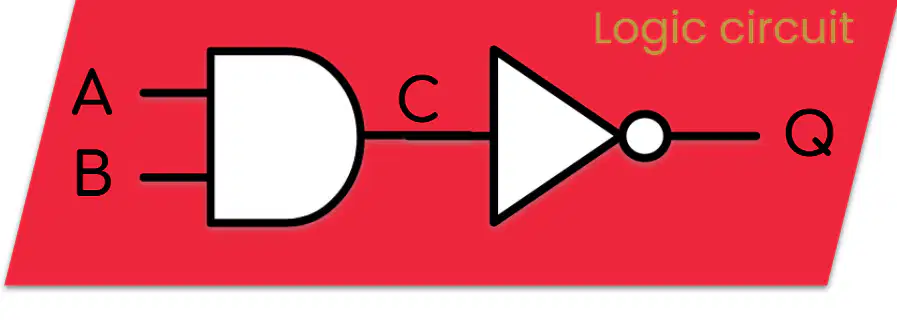
Which two types of logic gates are used in the given logic circuit?
AND gate and OR gate
OR gate and NOT gate
AND gate and NOT gate
OR gate and XOR gate
What is the output of the AND gate in the circuit described as?
A OR B
A AND B
A NOT B
A XOR B
What happens to the output of the AND gate in this logic circuit?
It is used as the input to another AND gate.
It is used as the input to a NOT gate.
It is used as the input to an OR gate.
It is used as the input to an XOR gate.
How could you describe the product (output Q) of the whole circuit?
The output is true only if both A and B are true.
The output is the opposite of A AND B.
The output is true if either A or B is true.
The output is the same as the input A.
What is the first step in the Fetch-Decode-Execute cycle?
Decode
Execute
Fetch
Store
What happens during the "Decode" stage of the Fetch-Decode-Execute cycle?
The instruction is carried out.
The CPU works out what the instruction is.
The next instruction is brought to the CPU from memory.
The instruction is stored in memory.
Which stage of the Fetch-Decode-Execute cycle involves carrying out the instruction?
Fetch
Decode
Execute
Store
Arrange the following steps of the Fetch-Decode-Execute cycle in the correct order: Execute, Fetch, Decode.
Fetch, Decode, Execute
Decode, Fetch, Execute
Execute, Fetch, Decode
Fetch, Execute, Decode
Why is the Fetch-Decode-Execute cycle important for a CPU?
It helps the CPU to store data permanently.
It allows the CPU to process and carry out instructions step by step.
It increases the size of the CPU.
It connects the CPU to the internet.
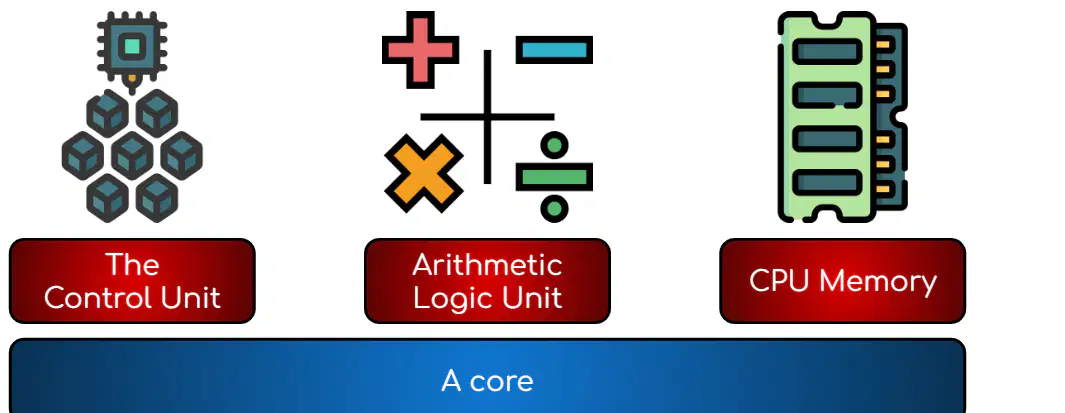
Which of the following is NOT one of the four key components of a CPU?
A core
The Control Unit
Arithmetic Logic Unit
CPU Memory
Which component of the CPU is responsible for performing mathematical and logical operations?
Arithmetic Logic Unit
The Clock
CPU Memory
The Control Unit
List the four key components of a CPU.
The Control Unit, Arithmetic Logic Unit, CPU Memory, The Clock
The Control Unit, Arithmetic Logic Unit, CPU Memory, A core
The Control Unit, Arithmetic Logic Unit, The Clock, A core
The Control Unit, Arithmetic Logic Unit, CPU Memory, Hard Drive
Why is it important for a CPU to have both a Control Unit and an Arithmetic Logic Unit? (Choose the best answer)
The Control Unit manages instructions, while the Arithmetic Logic Unit performs calculations.
Both units store data for the CPU.
Both units are used only for displaying graphics.
The Control Unit and Arithmetic Logic Unit are the same thing.
What is the main function of the Control Unit in the CPU?
It stores data permanently.
It coordinates all of the other components in the CPU.
It increases the speed of the CPU.
It provides power to the CPU.
Which of the following actions is performed by the Control Unit?
Printing documents
Fetching and decoding instructions from memory
Creating graphics
Storing files
After the Control Unit decodes instructions, what does it do next?
Deletes the instructions
Tells other components in the CPU how to execute the instructions
Sends the instructions to the printer
Stores the instructions in a file
How can the Control Unit interact with devices outside the CPU?
By issuing instructions to other connected devices
By storing data on them
By displaying images on them
By charging them
Why is the process of fetching and decoding instructions important for the CPU?
It allows the CPU to store more data.
It ensures that the CPU can understand and carry out tasks correctly.
It helps the CPU to connect to the internet.
It increases the size of the CPU.
What does the acronym ALU stand for in computer science?
Arithmetic Logic Unit
Advanced Learning Unit
Automated Logic Utility
Arithmetic Learning Utility
Which of the following is NOT an arithmetic operation performed by the ALU?
Addition
Subtraction
Comparing data
Multiplication
What type of operation is being performed when the ALU checks if 14 > 3?
Arithmetic operation
Logical operation
Storage operation
Input operation
The ALU is a part of which component in a computer?
Hard drive
CPU
Monitor
Keyboard
Why is the ALU important for a computer’s functioning?
It stores all the data in the computer.
It performs mathematical and logical operations necessary for processing data.
It displays images on the screen.
It connects the computer to the internet.
What are the two types of high-speed memory located directly on the CPU chip?
Registers and Cache
RAM and ROM
Hard Drive and SSD
Flash and EEPROM
Why can data be fetched more quickly from CPU memory than from RAM?
Because CPU memory is located directly on the chip
Because RAM is faster than CPU memory
Because CPU memory is larger than RAM
Because RAM is located on the motherboard
Which statement best explains why only small amounts of registers and cache are used in a CPU?
They are very expensive
They are very slow
They are not needed
They are located outside the CPU
A student claims that RAM is faster than the CPU's registers and cache. Use evidence from the material to support or refute this claim.
The claim is incorrect because CPU registers and cache are described as "super quick" and data can be fetched much quicker than from RAM.
The claim is correct because RAM is always the fastest memory.
The claim is correct because RAM is located on the CPU chip.
The claim is incorrect because RAM is more expensive than registers and cache.
What components make up a CPU core?
Control Unit, Arithmetic Logic Unit, and CPU Memory
Hard Drive, Monitor, and Keyboard
Graphics Card, Sound Card, and RAM
Power Supply, Fan, and Case
How many cores does a Quad-Core processor have on the chip?
2
4
6
8
Why can a CPU with multiple cores run more quickly?
Each core can execute instructions independently
It uses less electricity
It has a larger screen
It has more storage space
If a software does not support multiple cores, what is the likely impact on CPU performance?
The CPU will not run more quickly, even with multiple cores
The CPU will use less memory
The CPU will overheat
The CPU will display better graphics
What does the clock control in a CPU?
The timing of the whole CPU
The amount of memory
The size of the hard drive
The color of the screen
What is the purpose of the clock signals sent to the CPU cores?
To synchronize when instructions are executed
To increase the computer's temperature
To change the screen resolution
To store more data
What is the term for the number of times the clock "ticks" in one second?
Clock speed
Memory size
Data rate
Voltage
In what unit is clock speed measured?
Hertz
Volts
Amperes
Bytes
If a clock ticks 1000 times per second, what is its speed?
1 KHz
1 Hz
100 Hz
10 KHz
Which of the following best describes computer memory?
It is non-volatile and stores data permanently.
It is volatile and stores data currently in use.
It is used only for storing music files.
It can hold data even when the computer is off.

Which of the following is an example of storage?
RAM
CPU memory
Hard Drive
Cache memory
What is the main difference between memory and storage in a computer?
Memory is non-volatile, storage is volatile.
Memory stores data permanently, storage is temporary.
Memory holds data only when the computer has power, storage holds data even without power.
Memory is used for backup, storage is used for processing.
Why is RAM considered volatile?
It loses data when the computer is turned off.
It stores data permanently.
It is used for long-term storage.
It can be used as a USB stick.
Which of the following devices is NOT an example of storage?
ROM
USB stick
RAM
Hard Drive
What is the main function of a storage device?
To read/write the data.
To display images.
To process information.
To connect to the internet.
Which of the following best describes storage media?
It is what the data is stored on.
It is used to print documents.
It is used to display videos.
It is used to connect devices.
Which type of secondary storage uses lasers to read and write data?
Optical
Magnetic
Solid-State
Mechanical
What technology does solid-state storage use to store data?
Specialised logic circuits
Magnetic tapes
Lasers
Rotating disks
If you need to store data using magnetic technologies, which type of secondary storage would you use?
Magnetic
Optical
Solid-State
Cloud
Which of the following is NOT a type of secondary storage mentioned in the material?
Cloud storage
Magnetic
Optical
Solid-State
Why might someone choose solid-state storage over magnetic or optical storage?
Because it uses specialised logic circuits, making it faster and more reliable.
Because it uses lasers to read/write data.
Because it is the oldest technology.
Because it is the cheapest option.
Which of the following is an example of magnetic storage?
Hard Disk Drive
USB Flash Drive
CD-ROM
SD Card
What technology does magnetic storage use to represent binary data?
Light reflection
Magnetic polarisation (+ or - charge)
Electrical resistance
Laser etching
Which of the following is an advantage of magnetic storage?
High capacity
No moving parts
Immune to magnetic fields
Very fast read/write speeds
Which of the following is a disadvantage of magnetic storage?
High cost
Vulnerable to magnetic fields
No moving parts
Very small storage capacity
A company needs to store large amounts of data at a low cost, but speed is not a priority. Which storage type from the list would be most suitable?
Magnetic storage
Optical storage
Solid-state storage
Cloud storage
Explain why moving parts in magnetic storage devices can be a disadvantage.
They make the device heavier
They increase the risk of damage and failure
They improve the speed of the device
They reduce the storage capacity
What is the main function of the read/write head in a hard disk drive?
To move over the platter and read or write data
To spin the platters
To divide the platters into sectors
To arrange data in clusters
What are the platters in a hard disk drive divided into?
Sectors
Blocks
Clusters
Tracks
What is the purpose of polarising a block in a hard disk drive?
To represent 1 or 0
To spin the platter faster
To align the read/write head
To divide the platter into tracks
How is data arranged on a hard disk drive?
In circles called tracks
In straight lines
In random patterns
In squares called grids
Which of the following best describes the process of reading or writing data on a hard disk drive? (DoK Level 2)
The read/write head aligns with the correct track and reads/writes one block at a time as it passes the head
The platter stops spinning and the data is accessed directly
The data is read all at once from the entire platter
The read/write head writes data to all tracks simultaneously
Why is it important for the read/write head to be aligned with the correct track on a hard disk drive? (DoK Level 2)
So it can accurately read or write data to the correct location
So the platter can spin faster
So the sectors can be divided evenly
So the data can be polarised
Suppose a hard disk drive spins at 10,000 rpm. How might this speed affect the performance of the drive? (DoK Level 3)
It allows data to be accessed more quickly
It makes the drive more likely to break
It reduces the number of tracks on the platter
It increases the size of each block
Which of the following is an example of application software?
Microsoft Word
Computer Mouse
Printer Cable
Hard Disk Drive
What is the main purpose of application software?
To help users perform specific tasks
To control hardware directly
To manage computer memory
To connect computers to the internet
Which of the following is NOT an example of application software?
Google Chrome
Adobe Photoshop
Windows Operating System
Spotify
Imagine you need to write a report for school. Which application software would you most likely use?
Microsoft Word
Calculator
Disk Defragmenter
Device Driver
What is the main purpose of application software?
To allow a user to complete a specific task
To control hardware directly
To manage computer memory
To provide internet connectivity
Which of the following is an example of application software?
Word Processors
Operating System
Device Drivers
BIOS
Which type of software would you use to create a presentation for your class project?
Presentation software
Database systems
Web Browsers
Email clients
If you want to listen to music on your computer, which application software would you most likely use?
Media Players
Spreadsheets
Graphic Design software
Database systems
A student needs to organize and analyze data for a science experiment. Which application software should they use?
Spreadsheets
Games
Music Creators
Email clients
Why are application software programs categorized into different types?
Because they perform similar tasks
Because they are all made by the same company
Because they use the same programming language
Because they are all free to use
What is the main purpose of system software?
To help run, maintain, and configure a computer
To create documents and presentations
To play games on a computer
To design websites
Which of the following is included in system software?
Utilities and Operating Systems
Web browsers and email clients
Word processors and spreadsheets
Video editing software
Why is system software important for a computer?
It helps the computer run smoothly and be properly configured
It allows users to browse the internet
It is used for drawing and painting
It is only needed for playing music
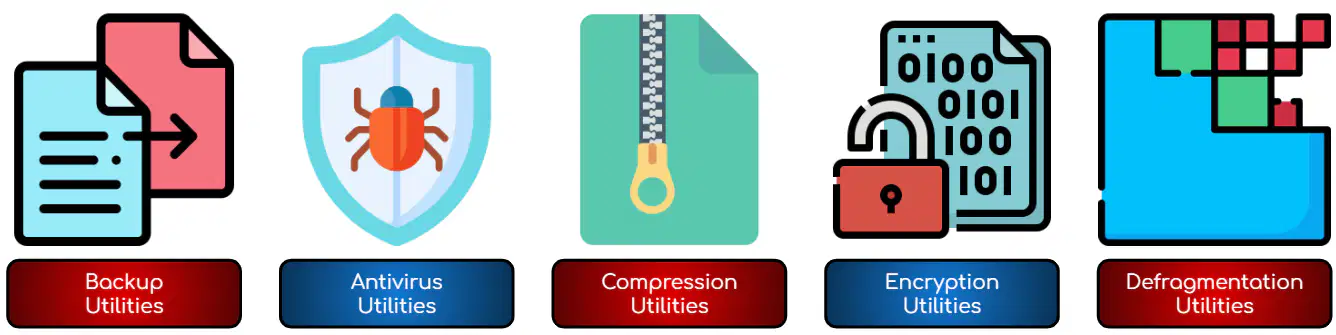
Which of the following is NOT a type of utility software mentioned in the material?
Backup Utilities
Antivirus Utilities
Word Processing Utilities
Compression Utilities
What is the main purpose of utility software?
To create documents
To perform specific tasks to help keep the computer system running efficiently
To play games
To browse the internet
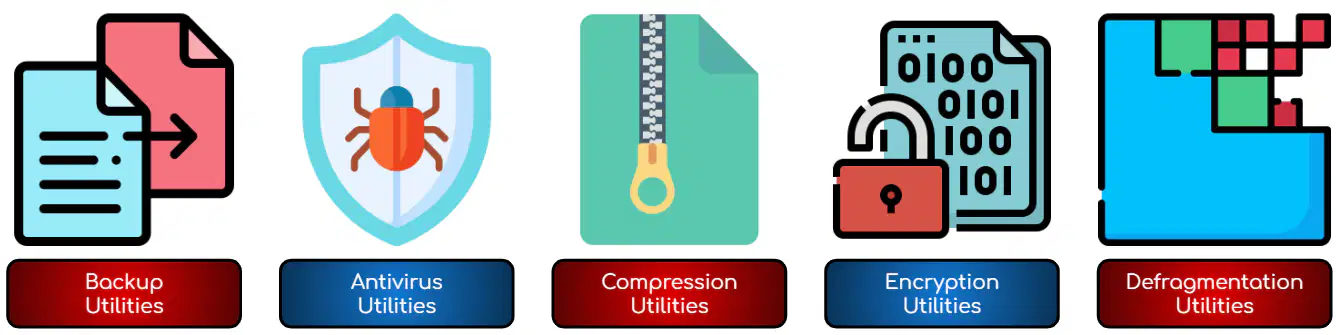
Which utility software would you use to protect your computer from viruses?
Backup Utilities
Compression Utilities
Antivirus Utilities
Defragmentation Utilities
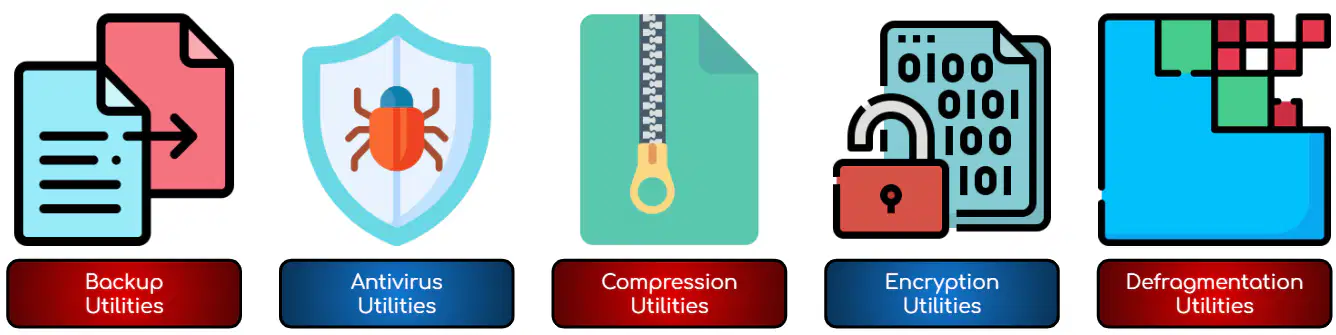
If you want to reduce the size of a file to save storage space, which type of utility software should you use?
Compression Utilities
Encryption Utilities
Backup Utilities
Defragmentation Utilities
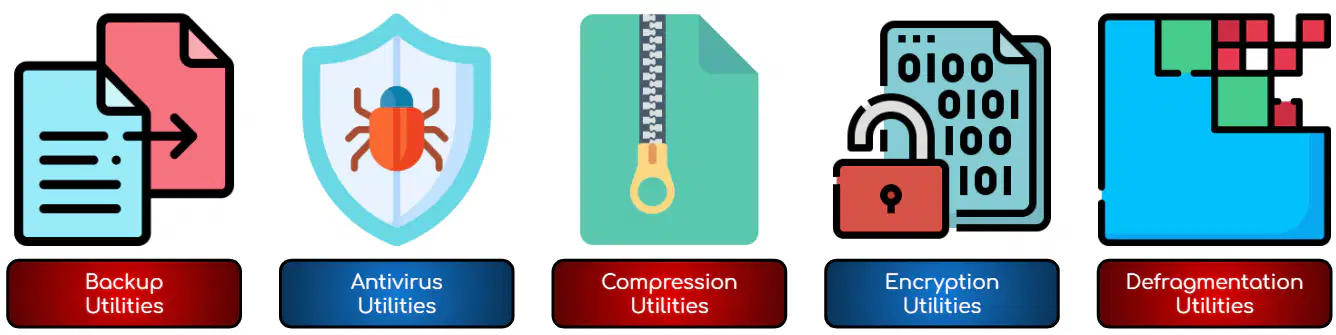
Explain how using defragmentation utilities can help improve the performance of a computer system.
By organizing files and making data access faster
By deleting unnecessary files
By protecting against viruses
By creating backup copies of files

