
 Worksheets
M.4 Microsoft Office
Total questions: 65
Worksheet time: 33mins
Which of the following is the best way to back up your files?
Google Maps
Google Drive
Google Calendar
Google Sites
To which Google Apps service should you submit your projects and communicate with your subject teachers?
Google Photos
Google Slides
Google Drive
Google Classroom
Google Sites was introduced in 2008 using __________ technology.
HotSpot
NotSpot
JotSpot
PotSpot
Which among the following is NOT an advantage of using Google Sites?
You need to pay to build, host and maintain Google Sites.
Your website can be more visible to search engines.
You can collaborate and allow multiple user to work on the same website.
You do not need HTML or CSS coding to work well with Google Sites.
Which part of Google Sites displays the name of your website?
Preview
Editors
Link
Site Title
This permits you to add other people to make changes to your site.
Header
Link
Editors
Panel
Panel is composed of three tabs, except:
Insert
Themes
Pages
More
Which header type is default and recommended?
Cover
Banner
Large Banner
Title Only
You can add _____ to show scrolling images on your site.
Image Carousel
Social Links
Collapsible Group
Section Layout
You can add _____ to insert text and images.
Button
Placeholder
Content Blocks
Links
You can use _____ to add your social media links.
Images
Banner
Social Links
Column
Preview can give you options to see layouts displayed from the following, except:
Phone
Tablet
Large Screen
Printer
With custom design themes, you can:
Remove editors.
Share site to the public.
Add images, videos, and audio.
Change the color of your menu text and background.
To make a copy of your site: In the top right, click More , then click _____.
Delete
Make a copy
Reproduce
Google Sites are saved as files in _____.
Google Mail
Google Slides
Google Drive
Google Share
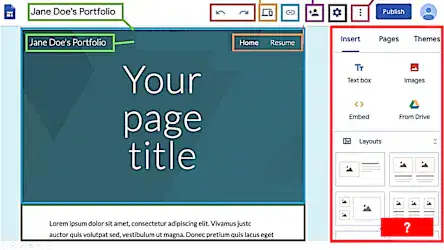
Identify the part of Google Site interface, as shown in the image.
Panel
Preview
Links
Site Title
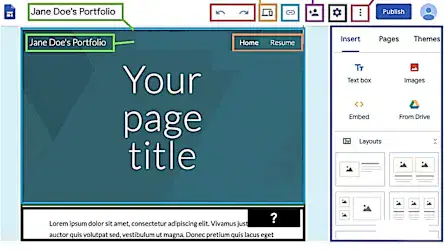
Identify the part of Google Site interface, as shown in the image.
Body
Undo/Redo
Navigation
Panel
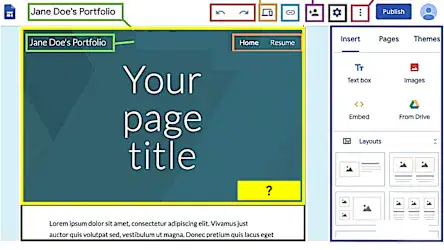
Identify the part of Google Site interface, as shown in the image.
Header
More
Editors
Settings
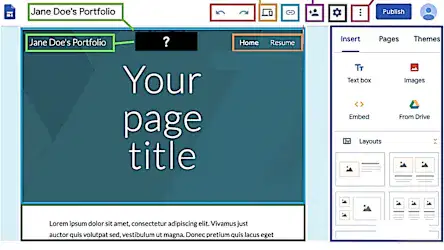
Identify the part of Google Site interface, as shown in the image.
Site Title
Page Name
Body
Header
Which of the following is the best password for a Gmail account?
123456
P@ssw0rd
myname2024
RedFox#2025
Student B needs to send a report with multiple files to the teacher. What is the best way to do this using Gmail?
Write the report in the body of the email.
Use Gmail’s attachment feature or share via Google Drive.
Send one email per file.
Print and hand it in.
Student D uses public Wi-Fi to log in to Gmail on a shared computer. Which of the following is the most secure behavior?
Save password for faster login.
Stay logged in for convenience.
Always log out and avoid entering sensitive data.
Use Gmail in incognito mode only.
A teacher asked students to create an environmental report using Google Sites. Student A used a very dark background and red text in a very small font, making it hard to read. What should the student improve?
Add more videos.
Make all text italic to look stylish.
Change to a simple theme and use better contrast colors.
Reduce the amount of content.
In a group website project, Student B wants to make sure others cannot edit the “Contact Us” page. What should they do?
Work separately on different websites.
Don’t share the link with anyone.
Set editing permissions for specific pages.
Lock the website with a password.
After publishing the website, a classmate saw that some images overflow the screen on mobile devices. What should the student do?
Check image file sizes.
Use the “Preview” mode and check the mobile layout.
Replace all images with videos.
Delete the images.
What is the main advantage of using Google Sites for student group projects?
It doesn’t require internet.
It works only in Google Chrome.
It supports real-time collaboration.
It only supports static images.
After publishing a site, a student finds incorrect information on one page. What should the student do?
Leave it as is.
Delete the entire website.
Edit the content and republish.
Block visitors from accessing the site.
How can you let others collaborate on editing your Google Site?
Share a “View only” link.
Send via LINE.
Click “Share with others” and give Editor access.
Copy and send HTML code.
Which of the following best describes the main purpose of using Google Sites?
To create presentation slides.
To create surveys.
To make spreadsheets.
To easily create websites for sharing information.
This is the space between the text and the edge of the document.
Size
Margin
Orientation
Column
When you open a new blank document, what is the default margin in MS Word?
Normal
Wide
Narrow
Mirrored
Student A needs to print this calendar in landscape position. Which command should he choose to change the setting?
Margin
Orientation
Size
Columns
Student B needs to print a homework in legal size paper. Which command should he choose to change the setting?
Margin
Size
Orientation
Columns
Student C needs to add a vertical division of a text or page. Which command should he choose to change the setting?
Margin
Size
Orientation
Columns
What is the default line spacing in MS Word?
3.0
1.0
2.0
1.15
To insert an image, which of the following commands should you click?
Screenshot
SmartArt
Shapes
Pictures
This is a section of the document that appears in the top margin.
Header
Center
Footer
Page Number
This is a section of the document that appears in the bottom margin.
Header
Center
Footer
Page Number
Student D needs to print the title page of his research paper. What should you click to hide the first-page header and footer?
Show document text.
Different first page.
Different odd and even pages.
Go to footer.
Which of the following is the best way to add your header and/or footer?
Go to Insert tab --> Header & Footer
Double click the bottom margin.
Double click the top margin.
All of the choices are correct.
This is just like the list of chapters at the beginning of a book where document and the page number where that section begins.
References
Index
Citations
Table of Contents
When creating Table of Contents, which of the following is the first thing to remember?
Update as needed.
Insert the Table of Contents.
Apply heading styles.
None of the above.
These are important for academic papers or formal reports that is used to list the sources used to find the information for a paper or work.
References
Index
Citations
Table of Contents
When writing your references, the following elements are crucial about the source being cited, except:
Author
Date
Title
Pages
Which reference style guide is used in educational papers?
MLA
Chicago
APA
Turabian
These are used within the text of a paper to give credit to sources that have been used in a work.
References
Citations
Index
Table of Contents
This is a list of the terms and topics discussed in a document, along with the pages that they appear on.
References
Citations
Index
Table of Contents
Student E needs to add an index for his biology homework. What should he do first to create an index?
Select the text that you’d like to use as an index entry.
Go to References --> Mark Entry.
Select the Mark Index Entry.
Go to References --> Insert Index.
If you define more entries after creating your index, what should you do next?
Update the index.
Redo the index.
Delete the index.
Copy the index.
Student A needs to make a design showing warm tones. Which of the following is the most appropriate color to choose?
Blue Green
Yellow
Blue
Blue-Purple
Which of the following represents a WARM color?
Red
Yellow-Green
Green
Blue
Which of the following represents a COOL color?
Purple
Purple-Red
Red
Red-Orange
Student B needs to create a slideshow with cool tones. Which of the following is the most appropriate color to use?
Green
Orange-Yellow
Orange
Yellow
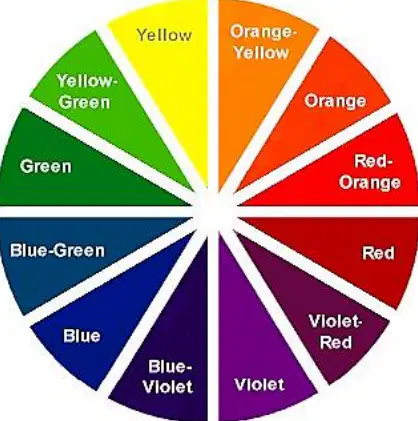
When creating slide designs USING OPPOSITE COLORS, which of the following is best to complement with green?
Violet-Red
Red
Red-Orange
Orange
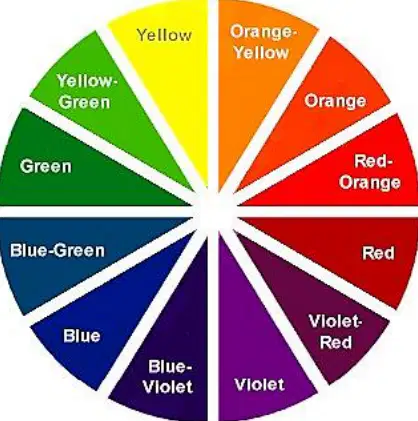
When creating slide designs USING OPPOSITE COLORS, which of the following is best to complement with yellow?
Blue
Violet
Blue-Violet
Violet-Red
If you equally combine red and blue, which of the following color is created?
Orange
Green
Purple
Black
Which of the following is NOT a color in color wheel?
Blue-Purple
Green-Silver
Red-Orange
Yellow-Green
Which of the following is applied between each slide to add special effects?
Animations
Transitions
Themes
Hyperlinks
Which of the following is applied to text and objects, such as clip art, shapes and pictures, to animate and add movement?
Animations
Transitions
Themes
Hyperlinks
If you want to link files and others slides within a presentation to your current slide, what is best to use?
Animations
Transitions
Hyperlinks
Themes
What is the shortcut key for "copy text"?
Ctrl + C
Ctrl + F
Ctrl + V
Ctrl + A
What is the shortcut key for "select all content"?
Ctrl + B
Ctrl + C
Ctrl + V
Ctrl + A
What is the shortcut key for "paste"?
What is the shortcut key for "find" and shows the Navigation Pane in MS Word?
Ctrl + F
Ctrl + C
Ctrl + V
Ctrl + A
What is the shortcut key for "bold text"?
Ctrl + C
Ctrl + I
Ctrl + V
Ctrl + B

