
 Worksheets
Q1 - Computer Systems Servicing12 2025-2026
Total questions: 50
Worksheet time: 24mins
This tag tells the computer this is a document written in HTML.
<p>
<!DOCTYPE html>
<h1>
<html>
This tag indicates the beginning of your code written in HTML.
<li>
<!DOCTYPE html>
<html>
</html>
This tag contains information about your webpage, also called the metadata.
<head>
<header>
<title>
<body>
This tag contains all the main contents of your webpage.
<body>
<head>
<contents>
<p>
This tag defines a heading at the smallest size.
<h6>
<h2>
<h7>
<h1>
This tag defines a heading at the largest size.
<h1>
<h20>
<h3>
<h2>
This file name is used for the main page of your website.
main.html
index.html
start.html
mysite.html
Which of the following is not a heading tag?
<h7>
<h1>
<h2>
<h4>
A piece of a website, marked by a start tag and often closed with an end tag.
HTML Element
HTML Object
HTML Piece
HTML Tag
Match the correct end tag...
<body>
</body>
<\body>
</BODY>
<body/>
This tag can be used to break line of text (move to a new line) inside a paragraph.
<br>
<break>
<bl>
<nl>
This tag defines an element of a list.
<li>
<el>
<ol>
<ul>
This tag contains an ordered list.
<ol>
<li>
<ul>
<ord>
This tag represents and unordered list.
<ol>
<li>
<ul>
<un>
What tag starts and ends an unordered list?
<p> </p>
<ol> </ol>
<ul> </ul>
<h1> </h1>
What is the biggest heading tags?
<p> </p>
<h6> </h6>
<ul> </ul>
<h1> </h1>
What tags start and end a paragraph tag?
<p> </p>
<h6> </h6>
<ul> </ul>
<h1> </h1>
What is the correct tag for a hyperlink?
<a href="code.org">Code.org</a>
<a href="code.org">"Code.org"</a>
<href="code.org">Code.org</href>
<a href="code.org"><Code.org</a>
What tag starts and ends a list?
<p> </p>
<ol> </ol>
<ul> </ul>
<li> </li>
What tag starts and ends an ordered list?
<p> </p>
<ol> </ol>
<ul> </ul>
<h1> </h1>
What is the correct tag for an image?
<img src="image1.jpg" alt="Image1">
<image src="image1.jpg" alt=Image1/>
<img scr="image1.jpg">alt="Image1">
<image scr="image1.jpg alt="Image1"/>
When you want to disable the application you don’t use, after opening task manager, what’s the next tab you need to click?
Msconfig
Regedit
Startup
Cleanup System Files
What is the keyboard shortcut for run command window?
Alt + R
Ctrl + R
Shift + R
Windows Button + R
What is the keyboard shortcut for permanently deleting all the files?
Alt + Del
Ctrl + Del
Shift + Del
Windows Button + Del
When you want to Hide All Microsoft Services, what do you need to type in Run command window?
Msconfig
Regedit
Startup
Cleanup System Files
When you want to optimize the drives, what’s the next command after clicking Tools?
Msconfig
Optimize
Services
Startup
When you want to delete temp files, what do you need to type in run command window?
temp
Msconfig
Regedit
%Temp%
When you want to delete %temp% files, what do you need to type in run command window?
temp
Msconfig
Regedit
%Temp%
When you want to go to registry editor, what do you need to type in run command window?
Msconfig
Regedit
Startup
Cleanup System Files
When you want to perform a disk cleanup, what’s the command you need to click before checking recycle bin and temporary files?
Msconfig
Regedit
Startup
Cleanup System Files
When you want to Hide All Microsoft Services, what’s the next command you need to click after typing msconfig?
Msconfig
Optimize
Services
Startup
These fonts have small
decorative edges at the ends
of the letters.
Serif
San Serif
Scripts
None of the selection.
capture motion, so if you’re using an animated element, such as a moving logo or a bouncing icon, this file type would be ideal.
PSD
JPEG
PNG
GIF
is a graphic design tool that makes
creating custom graphics easy. It's easily
accessible by phone or tablet and is user
friendly.
Photoshop
Canva
Remini
Lightroom
These are the building blocks of design and add
texture, depth, and organization to your design.
Grids
Colors
Shapes
Frames
These colors are dark, medium,
and light versions of the same color.
Monochromatic
Analogous
Complementary
Color Wheel
Use ______ for any project design that will be physically printed, not viewed on a screen.
RGB
CMYK
are ideal for RGB files because they’re a nice middle- ground between file size and quality, and they’re readable almost anywhere.
PSD
JPEG
PNG
GIF
support transparency and are better for graphics that need to be superimposed over others. Consider this file type for interface elements like buttons, icons or banners.
PSD
JPEG
PNG
GIF
If I want to add a shape, which button do I click?


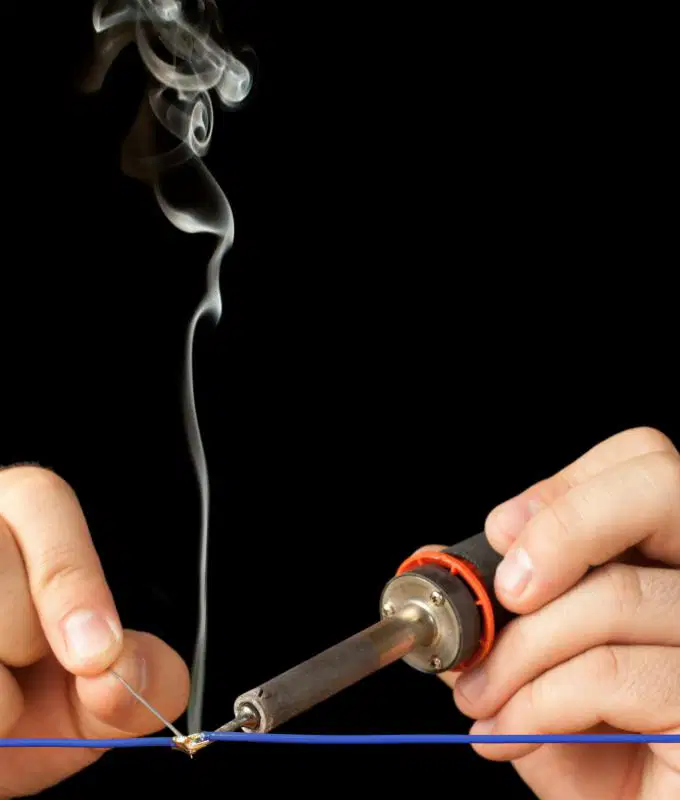
Name this tool.
Anti-static Mat
Brush
Magnifying Glass
Soldering Pencil
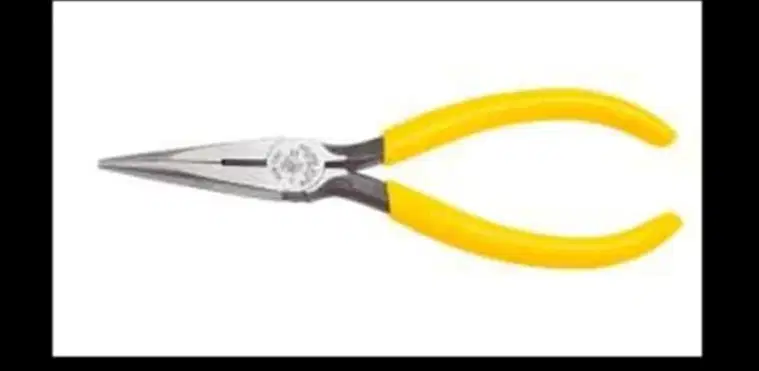
Name this tool.
Tweezers
Wire cutter
Torx screwdriver
Needle nose pliers
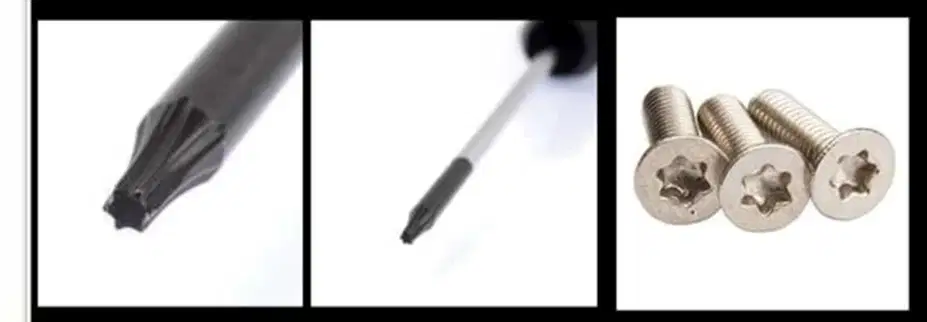
Name this tool.
Tweezers
Wire cutter
Torx screwdriver
Needle nose pliers

Name this tool.
Hex Driver
Philips screw driver
Flathead screw driver
Anti-static Wrist Strap
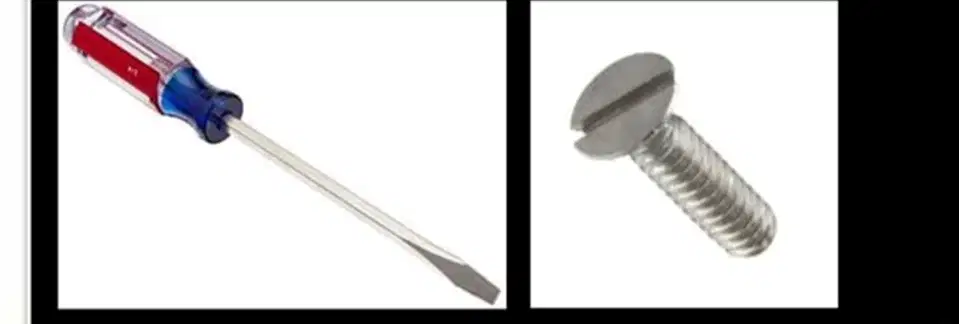
Name this tool.
Hex Driver
Philips screw driver
Flathead screw driver
Anti-static Wrist Strap

Name this tool.
Hex Driver
Philips screw driver
Flathead screw driver
Anti-static Wrist Strap

Name this tool.
Hex Driver
Philips screw driver
Flathead screw driver
Anti-static Wrist Strap

Name this tool.
Anti-static Mat
Brush
Magnifying Glass
Soldering Pencil

Name this tool.
Anti-static Mat
Brush
Magnifying Glass
Soldering Pencil
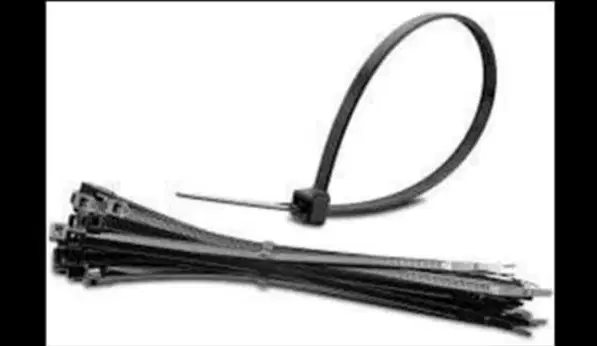
Name this tool.
Cable Ties
Multimeter
Part Organizer
Loopback Adapter

