
 Worksheets
Beginning of School Assessment
Total questions: 48
Worksheet time: 24mins
One or more commands of algorithm(s) designed to be carried out by a computer.
event
program
code
function
A way of representing information using only two options.
binary
event
run program
conditionals
Statements that can only run under certain conditions or situations.
conditionals
variable
abstractions
binary
A placeholder for a piece of information that can change.
digital citizen
code
binary
variable
What is a sequence?
A super fun game
The tiny shiny things sewn onto clothes for fancy effect
A popular dance move
The order of events that the computer will execute - exactly in the order that they are written
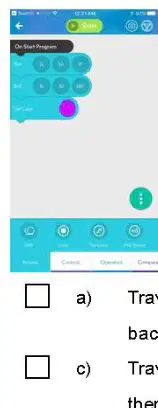
Which answer describes the code pictured?
Travels forward, then backwards, then turns purple.
Travels forward, then left, then turns purple.
Travels left, then backwards, then turns blue.
This robot does not move.

Which algorithm will get the bird to the pig?
Forward Turn Left Forward Turn Right Forward
Forward Forward Turn Left Forward Forward
Forward Turn Right Forward Turn Left Forward
Turn Left Forward Forward Turn Right
What does a For Loop do in coding?
It how you tie your shoes
Tells you where the bugs are in your code
Runs code over and over again for a set number of times
It's how you write code when you're hungry
You should always tell your parents if you see something online that makes you uncomfortable.
True
False
I should keep passwords to myself and not share them with others.
Hide under your bed
Tell your friend
Tell a trusted adult
Cry
What should you do if someone messages you but you don't know who they are?
Tell your best friend
Tell a trusted adult
delete it
respond back
If a person online says they are the same age as you they must be telling the truth
True
False
You join a website with lots of cool games on it, but first you need to fill in a form giving your name, phone number and home address.
Fill in with some fake details
Fill it in
Don't fill in and ask an adult for advice
You are on a website when a page pops up saying you have won a prize and it asks you to click on it.
Click on it
Don't click on it as it could be a nasty virus
Ask your friend
You have joined a site that requires a profile picture.
Refuse to join
Use a cartoon image/avatar of yourself
Put a comic of someone else
Talking to a stranger online is ok
No
Yes
Which of the following would make the strongest password?
1999
Dog
Sally77
C4liff0rN14

You receive a message or pop-up saying that you've won the big prize! What should you do?
Click on it to collect your money.
Turn off the computer.
Send the message to all your friends so they can win too.
Carefully X out of the pop up or delete the message.

Which of these is an example of being a safe and kind digital citizen?
Using kind words and keeping private information to yourself.
Sharing a password with a friend so they can play too.
Making silly or rude comments on other people's posts to be a joker.
Emailing someone and telling that person what other people have been saying about them.
You can help prevent cyberbullying by
ignoring it
sticking up for other students
posting mean things yourself
no using social media at all
Where are documents that you place on Google Drive stored?
On your school network
On a flash drive
Somewhere in California
In the cloud

Name this Google application.
Google Graphics
Google Geometry
Google Drawings
Google Art
Microsoft Word is to Google Docs as Microsoft Excel is to
Google Docs
Google Classroom
Google Calendar
Google Sheets
What Google app should be used as a word processor?
Sheets
Slides
Docs
Drive
You can share a Google Doc by doing all except...
Emailing someone
Sharing a link
Posting to Google Classroom
Downloading from your computers desktop
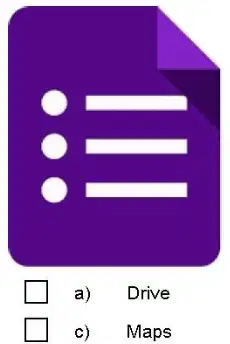
Which Google app is shown in the image?
Drive
Forms
Maps
Sheets

What is the name of the Google app shown in the image?
Forms
Docs
Hangouts
Drive
Why do we have access to Google Apps for Education?
to store and access assignments
to collaborate with other students
to communicate with teachers
All of these

What does the "Back Arrow" (circled in red) do?
Takes you back to the last page you visited.
Takes you back to the desktop.
Takes you back in time.
Takes you back to the classroom.
A piece of data used by a browser to allow the user to return quickly to a previously visited site.
history
browser
bookmark
URL
This is what you use to locate a webpage:
cite
web-address (URL)
title
source
What does a search engine use to find results?
Key words
autocorrect
What are the most important words that you use in a search called?
Passwords
Crosswords
Keywords
Pick out the "key words" in this sentence: How many hot dogs do Americans eat a year?
a) How, Many, Hot Dogs
b) Hot dogs, Do, Eat, A
c) Hot Dogs, Americans, Eat, Year
d) How, Hot Dogs, Americans, Year
If you want to narrow down the results of an Internet search, what's your best course of action?
Add more relevant words to your search.
Remove the quotes from around the term you're searching for.
Try using a more powerful search engine.
Log off the Internet and go to the library.
Domain names are part of the URL. Domain name includes a suffix such as .org, .edu, .com.
True
False
Web pages near the top of the search results are generally the most:
Recently updated
Relevant to your search
1. Chrome, Firefox, Safari, Explorer
Operating System Software
Hardware
Browser
Search Engine
The CPU is the...... of the computer
Brain
Body
Heart
Knee
A type of bar code that you can scan an image, video or website is called
QR Code
Wi-Fi
Hot Spot
Bar Code
The blinking line on the computer screen is the......
Cursor
Mouse
Typing line
I have no idea.....
What is NOT a general rule in the lab?
Use care and caution around equipment
Use YouTube as much as you want
No food, gum or drinks in the lab
Use appropriate websites only
A mouse command in which you place the pointer "over" an object on the screen
printer
hover
clipart
desktop
The row of keys on the computer keyboard your fingers rest on when not typing.
Home Row
Keyboard
Mouse
Speaker
Which button would you use to indent a paragraph?
Tab Key
Enter Key
Delete Key
Spacebar
What is the shortcut key for Paste?
Ctrl + P
Ctrl + V
Ctrl + X
Ctrl + C
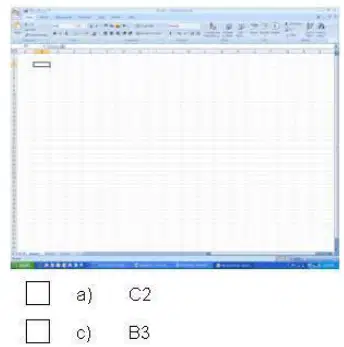
Identify this cell (highlighted)
C2
A5
B3
E1
Which button do you click to make the screen go away without closing it?
Minimize
Maximize
Home screen
Refresh

