
 Worksheets
Activity 1.2 Quiz
Total questions: 27
Worksheet time: 14mins
What is the key to success in the classroom according to the document?
Individual effort
Collaboration
Competition
Memorization
What happens if one person in the group does all the work?
Everyone learns equally
The person learns to work with others
No one learns
The project is more successful
Which task involves identifying inputs and outputs?
Painting a picture.
Identifying the inputs and outputs through a system.
Writing a poem.
Building a model airplane.
What is the name for a sequence of instructions written to perform a specific task?
Event Blocks
Code
Autonomous
Input
What is one of the design requirements for the all-terrain vehicle prototype?
Has two wheels.
Moves autonomously.
Flies in the air.
Includes backward movement.
Which of the following is NOT a requirement for the vehicle prototype?
Has four wheels.
Moves autonomously.
Includes forward movement.
Has a sunroof.
What does it mean for a vehicle to move "autonomously"?
It requires a driver.
It moves on its own without human intervention.
It can only move backward.
It needs to be pushed manually.
What is the primary function of a motor in a system?
To generate motion
To provide light
To store energy
To cool the system
What is the first step in completing your build according to the document?
Assemble the parts
Gather the parts necessary
Test the build
Paint the parts
What should you collect from the shelf according to the pro tips?
A hammer
Your table’s toolbox
A screwdriver
A measuring tape
Why should your parts remain in your BIN while building?
To keep them organized
To make them look nice
For easy clean-up at the end of the block
To prevent them from getting lost
What is the first step in connecting a motor to the VEX Brain using a VEX Smart Cable?
Insert the cable into Smart Port 2
Push both ends of the cable into the sockets
Take a picture of the gear train
Connect the motor to a battery
What is a system in the context of a self-driving vehicle?
A single component that functions independently
A group of elements or parts that function together to accomplish a goal
A random collection of unrelated parts
A device that only outputs information
What is the role of sensors in a self-driving vehicle system?
To process information
To provide output
To collect information (input)
To control the vehicle's speed
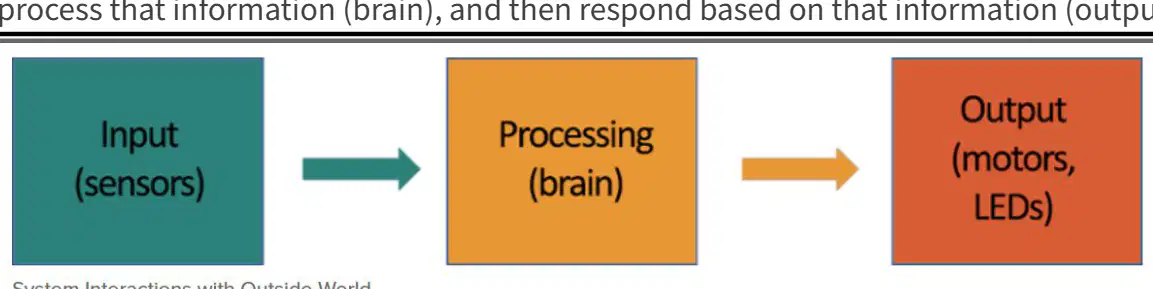
How does a self-driving vehicle decide when to stop?
It randomly stops at intervals
It follows a pre-set schedule
It processes information from the road and traffic signals
It stops only when the driver commands
What are devices that produce a result called?
Input devices
Output devices
Processors
Sensors
What is the primary function of the VEX Brain in the VEX Robotics system?
To power the motors and LEDs
To receive and process information from input devices
To store the robot's physical components
To charge the robot's battery
Which step involves connecting the VEX Brain to a Chromebook?
Step 3
Step 4
Step 5
Step 6
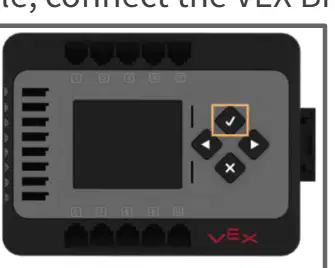
What should you do if the VEX Brain does not turn on?
Replace the battery
Check the USB connection
Push the button on the battery to check its level
Restart the Chromebook
What is the website you need to visit to code your physical robots?
codeexp.vex.com
vexcode.com
robotcode.com
codevex.com
In VEXcode, which icon should you select to check if the firmware is updated?
SLOT icon
BRAIN icon
CODE icon
ROBOT icon
What should you do if the brain information is not green in VEXcode?
Ignore it
Reconnect the brain or update the firmware
Restart the computer
Change the program name
What is the correct format to save your program name in VEXcode?
1.2_MotorTest_
MotorTest_1.2_
1.2_
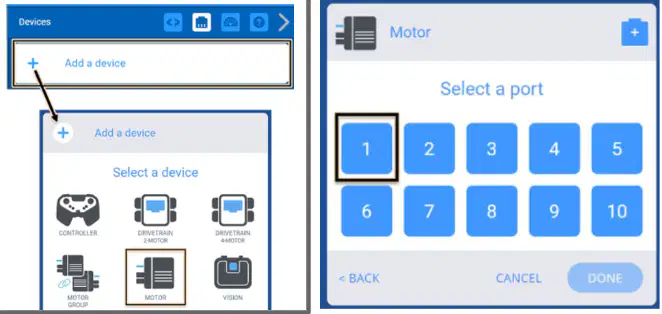
What is the first step to open the Devices panel in VEXcode?
Select the Devices icon
Click on the File menu
Press the Start button
Open the Settings menu
Which option should you choose after selecting 'Add a Device' in VEXcode?
SENSOR
MOTOR
CONTROLLER
VISION
Design a robot to assist in daily household chores. What are the key considerations you must plan for to ensure the robot can navigate a typical home environment effectively?
Color of the robot
Battery life
Ability to navigate stairs and uneven surfaces
The robot's ability to play music
You are tasked with programming a robot to pick up objects of varying weights and sort them into corresponding bins. The robot's program should include a decision-making process based on the weight of each object. What programming concept is essential for implementing this task?
Data types
Sensors input
Control structures
Error handling

