
 Worksheets
Data representation
Total questions: 98
Worksheet time: 49mins
Convert the denary number 165 into binary.
10100101
10011011
11010101
11100101
Convert the denary number 165 into hexadecimal.
A5
B4
9F
7D
Convert the following binary number into denary: 0 1 1 1 0 1 1 0
118
102
110
124
Convert the following hexadecimal number into denary: 5F
95
75
85
105
Convert the following binary number into hexadecimal: 1 0 1 0 1 1 0 0 0 1 0 0
AC4
B24
A84
BC4
Convert the following hexadecimal number into binary: 3ED
0011 1110 1101
1110 1111 1011
0011 1011 1101
1101 1110 0011
How many mebibytes (MiB) of storage would be needed to store 800 photographs each of which are 16 MiB in size?
12,800 MiB
1,280 MiB
800 MiB
16,000 MiB
Write your answer from part a in gibibytes (GiB).
12.5 GiB
1.25 GiB
125 GiB
0.125 GiB
The ASCII code for 'A' is 65 and for 'a' is 97. Write these denary values in 8-bit binary: i 65 Write your answer below.
01000001
01100001
00100001
11000001
The ASCII code for 'A' is 65 and for 'a' is 97. Write these denary values in 8-bit binary: ii 97 Write your answer below.
01100001
01100101
01000001
01101001
State the denary ASCII code for 'V' and 'v'.
86
118
65
120
State the denary ASCII code for 'V' and 'v'.
118
86 and 118
86
120
Write the two denary values in part b in 8-bit binary format: i 'V'
The answer depends on the denary value from part b for 'V'. If the denary value is 86, the 8-bit binary is 01010110.
The answer depends on the denary value from part b for 'V'. If the denary value is 86, the 8-bit binary is 11010110.
The answer depends on the denary value from part b for 'V'. If the denary value is 86, the 8-bit binary is 01101010.
The answer depends on the denary value from part b for 'V'. If the denary value is 86, the 8-bit binary is 01011010.
Write the two denary values in part b in 8-bit binary format: ii 'v'
The answer depends on the denary value from part b for 'v'. If the denary value is 118, the 8-bit binary is 01110110.
The answer depends on the denary value from part b for 'v'. If the denary value is 118, the 8-bit binary is 11011100.
The answer depends on the denary value from part b for 'v'. If the denary value is 118, the 8-bit binary is 00111011.
The answer depends on the denary value from part b for 'v'. If the denary value is 118, the 8-bit binary is 10101010.
An easy way of finding the ASCII binary code for a lower-case letter (for example, 'm') if the ASCII code for the upper-case letter (for example, 'M') is known is to:
Add 32 to the ASCII code of the upper-case letter.
Subtract 32 from the ASCII code of the upper-case letter.
Multiply the ASCII code of the upper-case letter by 2.
Divide the ASCII code of the upper-case letter by 2.
A computer system uses binary codes for letters of the alphabet as follows: A = 10, B = 11, C = 12, ..., X = 33, Y = 34, Z = 35 Write the denary value for 'X' in binary using an 8-bit register:
00100001
00110001
00100011
00110011
To convert the binary code for 'X' to the binary code for 'x', all the bits in the 8-bit register in part a undergo a logic shift two places to the left. Write down the contents of the 8-bit register after the bits, representing 'X', have been moved two places to the left:
10000100
00010001
11000000
01000010
Convert the binary value in part b i into denary.
The denary value of the binary in part b i is 13.
The denary value of the binary in part b i is 10.
The denary value of the binary in part b i is 7.
The denary value of the binary in part b i is 21.
State the denary values for the following two letters using the method described in part b.
i r:
i: 105, r: 114
i: 100, r: 120
i: 110, r: 117
i: 101, r: 112
State the denary values for the following two letters using the method described in part b.
The denary values are 65 and 66.
The denary values are 70 and 71.
The denary values are 60 and 61.
The denary values are 75 and 76.
Convert the denary number 4 4 8 0 1 into hexadecimal.
AE21 (44801 in hexadecimal is AE21)
B001 (44801 in hexadecimal is B001)
A1F0 (44801 in hexadecimal is A1F0)
C3D2 (44801 in hexadecimal is C3D2)
Convert the hexadecimal number in part a into a 16-bit binary number.
1010 1110 0010 0001 (AE21 in 16-bit binary)
1101 1110 0010 0001 (DE21 in 16-bit binary)
1010 1111 0010 0001 (AF21 in 16-bit binary)
1010 1110 0011 0001 (AE31 in 16-bit binary)
State three uses of the hexadecimal system.
1. Memory addresses in computers 2. Color codes in web design (HTML/CSS) 3. Machine code representation
1. Calculating interest rates 2. Writing novels 3. Cooking recipes
1. Weather forecasting 2. Animal classification 3. Plant growth measurement
1. Musical notation 2. Sports scoring 3. Fashion design
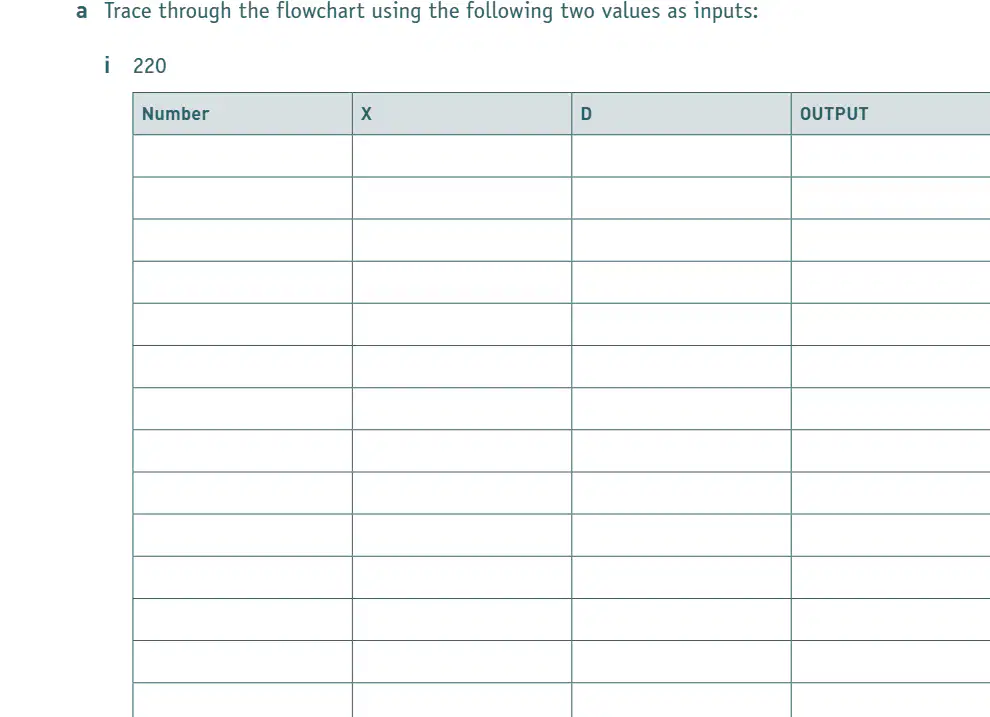
Trace through the flowchart using the following value as input: 220. Fill in the table with the values for Number, X, D, and OUTPUT as you trace through the flowchart.
Cannot be determined from the image as the flowchart is not provided.
The output is always 0 for any input value.
The table will have only one row for any input value.
The flowchart will result in an infinite loop for input 220.
The function of the flowchart in part a is:
to visually represent the sequence of steps in a process
to provide a list of materials needed for an experiment
to display the results of a survey in a table
to describe the historical background of a topic
Convert 0 1 0 1 1 1 1 0 into denary.
94
86
88
90
Convert 0 0 1 1 1 1 0 1 into denary.
61
57
53
65
Add together 0 1 0 1 1 1 1 0 and 0 0 1 1 1 1 0 1, giving your answer in binary.
1 0 1 1 1 1 1 1
1 0 0 1 1 1 1 1
1 1 1 1 1 1 1 1
0 1 1 1 1 1 1 1
Convert your answer in part b i to denary.
191
128
255
100
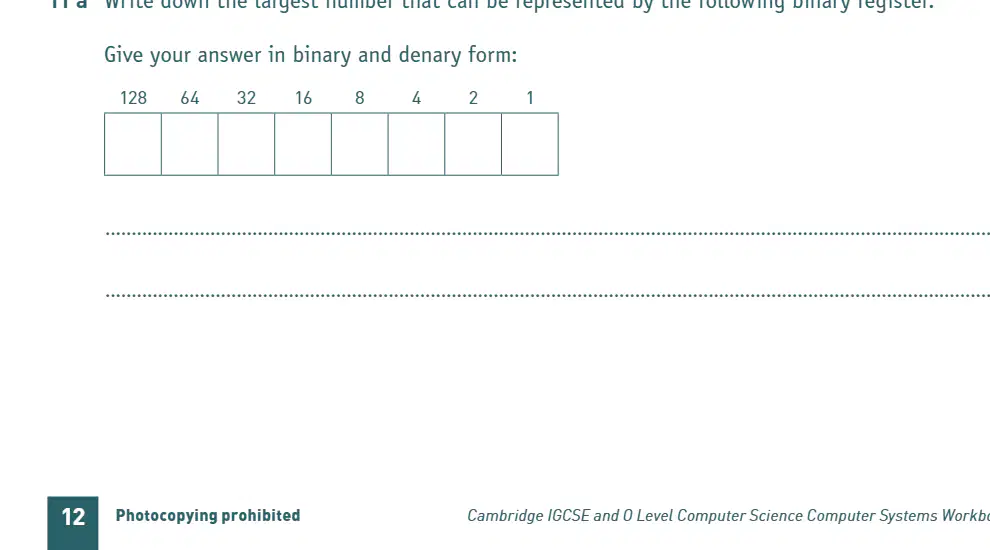
Write down the largest number that can be represented by the following binary register. Give your answer in binary and denary form:
Binary: 11111111, Denary: 255
Binary: 11111110, Denary: 254
Binary: 10000000, Denary: 128
Binary: 11110000, Denary: 240
Add together 0 1 1 1 0 1 1 1 and 1 0 0 1 1 1 0 1, giving your answer as an 8-bit binary number.
1 0 0 0 1 0 1 0
1 1 1 0 0 0 0 0
0 1 1 0 1 0 1 0
1 0 1 1 1 0 0 0
Comment on your answer to part b i.
It provides a justification or explanation for the answer given in part b i.
It repeats the question from part b i without any explanation.
It introduces a new topic unrelated to part b i.
It ignores the answer given in part b i.

An 8-bit binary register contains the following value: 0 0 1 1 1 1 0 0. Write down the denary value of the register.
60
56
48
62

The contents of the register undergo a logical shift one place to the right. Show the result of this right shift:
0 0 0 1 1 1 1 0
0 1 1 1 1 0 0 0
1 0 0 1 1 1 1 0
0 0 1 1 1 1 0 0
Write down the denary value of your answer to part b i.
30
25
15
45
The register in part b i now undergoes a further logical shift two places to the right. What is the result of this operation?
The two rightmost bits are lost and two zeros are added to the left.
The two leftmost bits are lost and two ones are added to the right.
The register remains unchanged.
All bits are inverted.

Show the contents of the register after this left shift operation. (The content of the original register, shown in part a, now undergoes a logical shift two places to the left.)
The answer depends on the original register contents from part a, but the left shift will move all bits two places to the left, introducing two zeros on the right.
The left shift will move all bits two places to the right, introducing two ones on the left.
The left shift will move all bits one place to the left, introducing one zero on the right.
The left shift will move all bits two places to the left, introducing two ones on the right.
State, with reasons, the effect of a logical shift two places to the left on the denary value of a register's content.
The denary value is multiplied by 4 because each left shift doubles the value.
The denary value is divided by 2 because each left shift halves the value.
The denary value remains unchanged because shifting does not affect value.
The denary value is multiplied by 2 because each left shift doubles the value.
Convert the denary number 37 into an 8-bit binary number: 37: ____________
00100101
00110101
00010101
00101101
Convert the denary number 19 into an 8-bit binary number: 19: ____________
00010011
00011001
00100110
00010110
Add together the two binary numbers in part a, and give your answer in binary.
00111000
01010101
00011100
01100010
Carry out a logical shift, two places to the left, on your result from part b. Comment on your answer.
A logical shift two places to the left multiplies the number by 4.
A logical shift two places to the left divides the number by 4.
A logical shift two places to the left adds 2 to the number.
A logical shift two places to the left subtracts 2 from the number.
A logical shift, four places to the right, is carried out on your result from part b. What is the outcome?
The result is divided by 16, with zeros filled in from the left.
The result is multiplied by 16, with ones filled in from the right.
The result is divided by 4, with ones filled in from the left.
The result is multiplied by 4, with zeros filled in from the right.
A computer system uses two’s complement notation. Complete the headings for an 8-bit binary number which uses two’s complement: 64 32 16 8 4 2 1 ____________________________
128
256
512
100
A computer system uses two’s complement notation. Write down i) the most negative and ii) the most positive numbers that can be stored in an 8-bit register which uses two’s complement. Give your answers in both denary and binary format.
i) most negative: 10000000, denary value: -128; ii) most positive: 01111111, denary value: 127
i) most negative: 11111111, denary value: -255; ii) most positive: 00000000, denary value: 0
i) most negative: 00000000, denary value: 0; ii) most positive: 11111111, denary value: 255
i) most negative: 10000001, denary value: -127; ii) most positive: 01111110, denary value: 126
What is the most positive value that can be represented in 8-bit two's complement binary?
Binary: 01111111, Denary: 127
Binary: 11111111, Denary: 255
Binary: 01111110, Denary: 126
Binary: 10000000, Denary: 128
Convert the following denary number into an 8-bit binary number using the two's complement format: +47
00101111
11010001
11101111
00011111
Convert the following denary number into an 8-bit binary number using the two's complement format: -59
11000101
10111001
11100101
10011011
Convert the following 8-bit binary number, written in two's complement format, into denary: 11001110
-50
78
-34
110
Convert the following 8-bit binary number, written in two's complement format, into denary: 11111110
-2
2
-1
126
Convert the denary number +45 into binary, using the two's complement format.
00101101
11010011
11111111
00010101
Convert the denary number -45 into binary, using the two's complement format.
11010011
00101101
10101100
11101011
Add together the binary numbers found in parts e i and e ii, leaving your answer in binary. Comment on the result.
The sum of the binary numbers in parts e i and e ii is 1100. The result shows binary addition.
The sum of the binary numbers in parts e i and e ii is 1010. The result shows binary subtraction.
The sum of the binary numbers in parts e i and e ii is 1001. The result shows binary multiplication.
The sum of the binary numbers in parts e i and e ii is 1111. The result shows binary division.
A camera detector has an array of 4096 by 2048 pixels and uses a colour depth of 16. Calculate the size of an image taken by this camera; give your answer in MiB.
16 MiB
8 MiB
32 MiB
2 MiB
An audio CD uses 40960 samples per second, with 16 bits being used per sample. The music being sampled uses two channels to allow for stereo recordings. What is the file size for a 1024 second recording? Give your answer in MiB.
160 MiB
128 MiB
80 MiB
320 MiB
Give three reasons why it is often necessary to reduce the size of a file.
1. To save storage space 2. To reduce transmission time over networks 3. To decrease upload/download times
1. To increase file corruption 2. To make files harder to access 3. To reduce file compatibility
1. To increase the risk of data loss 2. To make files unreadable 3. To slow down processing speed
1. To complicate file management 2. To increase software requirements 3. To limit user access
Lossy and lossless file compression differ in how they handle data during compression and decompression.
Lossy compression removes some data permanently, while lossless compression retains all original data.
Lossy compression retains all original data, while lossless compression removes some data permanently.
Both lossy and lossless compression remove some data permanently.
Both lossy and lossless compression retain all original data.
One example of the use of lossy file compression is:
Compressing a JPEG image
Saving a text file as .txt
Archiving files with ZIP (lossless)
Storing data in a CSV file
One example of the use of lossless file compression is:
Compressing text files for storage
Reducing the quality of images
Converting videos to lower resolutions
Removing audio tracks from movies
Colour depth in bitmap images refers to:
The number of bits used to represent the colour of a single pixel.
The number of pixels in an image.
The size of the image file in kilobytes.
The resolution of the image.
Image resolution in terms of representing bitmap images refers to:
The number of pixels in an image, usually measured in width x height.
The number of colors used in an image.
The size of each pixel in an image.
The file format used to save the image.
The main difference between ASCII code and Unicode is:
ASCII uses 7 or 8 bits and supports fewer characters, while Unicode uses more bits and supports a much larger range of characters.
ASCII supports all world languages, while Unicode supports only English.
ASCII and Unicode both use the same number of bits and support the same characters.
ASCII is used only for images, while Unicode is used for text.
Which one of the following is not a correct hexadecimal number?
CODE
AX1S
1DEA
FACE
The number of bits used to represent a sound sample is known as:
the sampling rate
amplitude value
loudness of a sound sample
sampling resolution
The MP3 format removes redundant sound from a file. Which one of the following best describes the type of file reduction being used by the MP3 format?
A lossy files compression
B sound file damping
C image file compression
D lossless file compression
Temporary files produced by a camera where no compression has been applied, are called:
jpeg files
png files
gif files
raw bitmap files
Lossless file compression, which reduces the size of a string of adjacent, identical data, is called:
A jpeg
B run-length encoding
C sampling resolution
D audio compression
Run-length encoding (RLE) is:
a data compression technique that replaces sequences of the same data value with a single value and count
a method for encrypting data using a key
a way to increase the resolution of an image
a process for sorting data in ascending order
What is the sampling rate?
The sampling rate is the number of samples taken per second when converting an analog signal to a digital signal.
The sampling rate is the maximum frequency of an analog signal.
The sampling rate is the amplitude of a digital signal.
The sampling rate is the number of bits used to represent each sample.
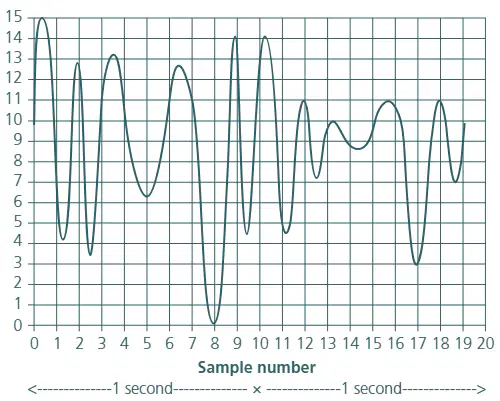
From the graph, what is the sampling resolution?
4 bits
2 bits
6 bits
8 bits
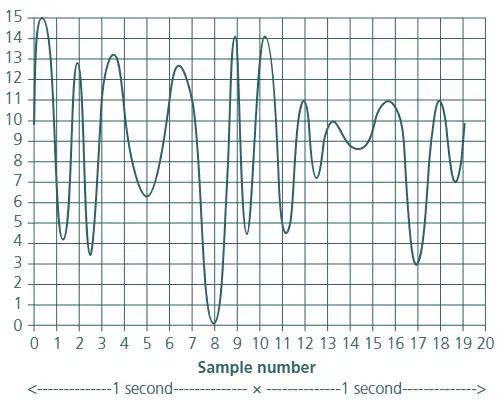
From the graph, what is the sampling rate?
The sampling rate is 10 samples per second (since 20 samples are taken over 2 seconds).
The sampling rate is 5 samples per second (since 10 samples are taken over 2 seconds).
The sampling rate is 20 samples per second (since 40 samples are taken over 2 seconds).
The sampling rate is 2 samples per second (since 4 samples are taken over 2 seconds).
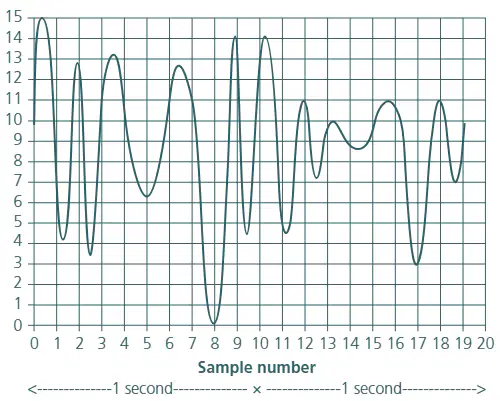
Look at the sound wave below that has been sampled: Using the x-axis, locate points 9 and 18 on the graph. Write down the 4-bit binary values corresponding to the y-axis values of these two points.
point 9: 1100 (y-axis value 12) point 18: 1000 (y-axis value 8)
point 9: 1010 (y-axis value 10) point 18: 0110 (y-axis value 6)
point 9: 1111 (y-axis value 15) point 18: 0001 (y-axis value 1)
point 9: 1001 (y-axis value 9) point 18: 1100 (y-axis value 12)
Increasing the sampling rate and sampling resolution when representing sound in an electronic (binary) format results in which of the following?
Higher sound quality but increased file size and processing requirements.
Lower sound quality and reduced file size.
No change in sound quality or file size.
Higher sound quality and reduced file size.
Which of the following is the correct series of steps to convert a denary number into a hexadecimal number?
Divide the denary number by 16, record the remainder, repeat with the quotient until it is 0, then write the remainders in reverse order.
Multiply the denary number by 16, record the product, repeat with the new number until it is 0, then write the products in order.
Add 16 to the denary number repeatedly until you reach 0, then write the numbers in reverse order.
Subtract 16 from the denary number repeatedly until you reach 0, then write the subtracted values in order.
A bit is defined as:
The smallest unit of data in computing, representing a 0 or 1.
A type of computer memory.
A programming language command.
A large storage device.
Computers use binary numbers rather than decimal numbers because:
Binary is easier for electronic circuits to process and less prone to errors.
Decimal numbers are faster for computers to process than binary.
Binary numbers require more complex hardware than decimal.
Decimal numbers are more reliable for data storage than binary.
The hexadecimal number system is used by computer technicians and programmers because:
it is easier to read and write large binary values using hexadecimal.
it is the only number system computers can understand.
it is more accurate than binary or decimal systems.
it is used for all mathematical calculations in computers.
A data packet is:
a unit of data transmitted over a network
a type of computer virus
a physical storage device
a programming language
Data packets contain a header. Name three components that you would expect to find in a header.
1. Source address 2. Destination address 3. Packet number
1. File size 2. Encryption key 3. Username
1. Font type 2. Background color 3. Image resolution
1. Printer model 2. Paper size 3. Ink level
Data packets also have a payload and a trailer. What do these two terms refer to?
The payload is the actual data being transmitted, and the trailer contains error-checking information.
The payload is the address of the sender, and the trailer is the address of the receiver.
The payload is the encryption key, and the trailer is the decryption key.
The payload is the header, and the trailer is the footer.
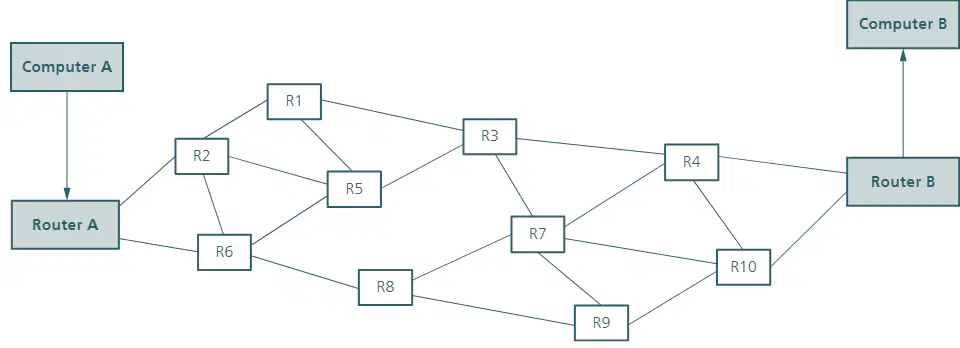
Packet switching works in the following way when sending a 500 KiB file from computer 'A' to computer 'B':
The file is broken into smaller packets, each sent independently through the network and reassembled at computer 'B'.
The entire file is sent as a single large packet directly from 'A' to 'B'.
Packets are sent only after the previous packet is acknowledged by computer 'B'.
The file is compressed and sent as a single stream without division into packets.
Data packets need to be reassembled at computer 'B' because:
They may arrive out of order and need to be put back together to form the original message.
They are always received in the correct order.
Computer 'A' cannot send complete messages.
Packets are not used in data transmission.
Which of the following are benefits of using packet switching to send packets of data over a network?
Efficient use of network resources, reduced transmission delays, and improved fault tolerance
Requires dedicated communication lines, fixed path for data, and high cost
Data is sent in a continuous stream, no need for addressing, and no error checking
Only suitable for voice communication, not for data, and limited scalability
Which of the following are disadvantages of using packet switching?
Packets may arrive out of order, there can be variable delays, and data can be lost or corrupted.
It guarantees a fixed path for all packets, ensures no data loss, and provides constant speed.
It requires dedicated circuits, uses more bandwidth, and is always slower than circuit switching.
It is only suitable for voice communication, cannot handle large files, and is not scalable.
3. (No specific question text is provided, only space for an answer. Please refer to the worksheet for the context of this question.)
This question cannot be converted due to lack of context.
The answer is provided in the worksheet.
Refer to the worksheet for the answer.
No information is given.
Problems caused by data packets 'bouncing' include:
Increased network congestion and delays
Improved data transmission speed
Enhanced security of data packets
Reduced need for error checking
Data transmission depends on data direction and how many bits of data can be sent at a time. Complete the table below to show what type of data transmission is being described in each case. Tick (✓) two boxes for each description. Description of transmission taking place: 1. Data sent one bit at a time down a single wire in one direction only 2. Data sent 16 bits at a time down 16 wires in both directions, but not at the same time 3. Data sent 16 bits at a time down 16 wires in both directions simultaneously 4. Data sent 8 bits at a time down 8 wires in one direction only 5. Data sent one bit at a time down a single wire in both directions simultaneously 6. Data sent one bit at a time down a single wire in both directions, but not at the same time
1. Simplex, Serial 2. Half-duplex, Parallel 3. Full-duplex, Parallel 4. Simplex, Parallel 5. Full-duplex, Serial 6. Half-duplex, Serial
1. Full-duplex, Serial 2. Simplex, Parallel 3. Half-duplex, Serial 4. Full-duplex, Parallel 5. Simplex, Serial 6. Full-duplex, Parallel
1. Half-duplex, Parallel 2. Full-duplex, Serial 3. Simplex, Serial 4. Half-duplex, Serial 5. Simplex, Parallel 6. Full-duplex, Serial
1. Full-duplex, Parallel 2. Simplex, Serial 3. Half-duplex, Parallel 4. Full-duplex, Serial 5. Half-duplex, Serial 6. Simplex, Parallel
Five statements about serial and parallel data transmission are made in the table below. By placing a tick (✓) in the appropriate column, select which statements refer to serial transmission and which statements refer to parallel transmission. Statements: 1. Transmission method used by the memory bus inside a computer 2. Data can be skewed (out of synch) when travelling over long distances 3. Least expensive of the two types due to fewer hardware requirements 4. Most appropriate if data is time-sensitive; for example, when live streaming where faster transmission rate is essential 5. Suffers from less risk of external interference For each statement, select Serial or Parallel. Which of the following options correctly matches the statements to Serial or Parallel transmission?
1. Parallel 2. Parallel 3. Serial 4. Parallel 5. Serial
1. Serial 2. Serial 3. Parallel 4. Serial 5. Parallel
1. Serial 2. Parallel 3. Serial 4. Serial 5. Parallel
1. Parallel 2. Serial 3. Parallel 4. Parallel 5. Serial
When a device is plugged into a computer using one of the USB ports, what happens?
The computer detects the device and may install necessary drivers.
The device automatically charges and disconnects from the computer.
The computer shuts down immediately.
The device erases all data on the computer.
USB uses a protocol that allows for error-free data transmission between device and computer.
True
False
USB can support any cable length between device and computer.
True
False
USB uses serial data transfer.
True
False
USB connections can transfer data using half-duplex or full-duplex.
True
False
It is difficult to add more USB ports to a computer using USB hubs.
True
False
USB data transfer rates are much faster than, for example, Ethernet connections.
True
False
There is no need for devices to have a power source because USB cable supplies 5V of power.
True
False
A system uses even parity. Indicate whether the following byte would fail or pass an even parity check: 1 1 0 0 0 0 1 1
Pass (there are 4 ones, which is even)
Fail (there are 3 ones, which is odd)
Pass (there are 2 ones, which is even)
Fail (there are 5 ones, which is odd)
A system uses even parity. Indicate whether the following byte would fail or pass an even parity check: 1 0 1 1 0 1 1 0
Fail (there are 5 ones, which is odd)
Pass (there are 6 ones, which is even)
Fail (there are 4 ones, which is even)
Pass (there are 5 ones, which is odd)

