
 Worksheets
Unit 5 Part 1 Assessment: Introduction to Word Processing
Total questions: 20
Worksheet time: 15mins
Abigail needs to prepare a report for her class project. She wants to create, edit, share, and print the document easily. Which type of software should Abigail use?
Create, edit, share, and print documents
Create and print documents
Share and print documents
Create and edit documents
Abigail is working on a project using word processing software. She wants to know which of the following tasks she can NOT accomplish with this software.
Grouping, moving, and rotating text
Drawing, resizing, and rotating shapes
Inserting, formatting, and changing charts and graphs
Creating slide shows with transitions
Anika needs to write a report for her class. She is considering using different software options to type and format her document. Which of the following is an example of word processing software she could use?
Pages
Google Docs
Microsoft Word
All of the above
Lily has been assigned to create a detailed report for her company, which includes many images and graphs. Which word processing software might be the best choice for her?
Google Docs
Microsoft Word
Pages
None of the above
Scarlett is preparing for a job interview and needs to create a document that will introduce her to a prospective employer. What is the purpose of this document?
To call attention to a specific topic or issue
To cover a variety of topics
To introduce you to a prospective employer
To build relationships with customers
Part 2: True or False? William is preparing a report for his business meeting and uses a word processing application because it is the most commonly used computer application in business. Select T if the statement is true or F if the statement is false.
True
False
Part 2: True or False? Grace is comparing different word processing applications for her school project. She notices that all of them allow her to perform the same basic tasks, like typing, saving, and printing documents. All word processing applications give users the ability to perform the same basic tasks.
True
False
Samuel is writing a report and tells his friend that Pages is a word processing software developed by Microsoft Office Suite. Is Samuel correct?
True
False
Mia wants to finish her school assignments quickly and with few mistakes. Practicing touch typing techniques will allow her to create documents efficiently and accurately.
True
False
Maya is preparing her resume. She decides to focus mainly on her awards and achievements, rather than her education or work experience. Is this the usual approach for a resume?
True
False
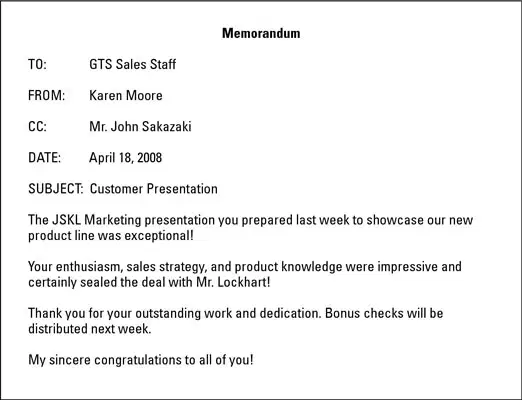
Aiden just started working at a new company and is learning about different types of business documents. In the space provided, use the word bank to match each of the document names to the images below.
MLA Style Report
News Release
Business Report
Newsletter
Memo

Mason is organizing a company meeting and needs to identify different types of documents for the agenda. In the space provided, use the word bank to match each of the document names to the images below.
MLA Style Report
News Release
Business Report
Newsletter
Memo

Avery works in the communications department at a company. One day, Avery receives a document labeled '13. News Release' that looks like the one shown in the image. What type of business document is this?
Newsletter
News Release
MLA Style Report
Memo
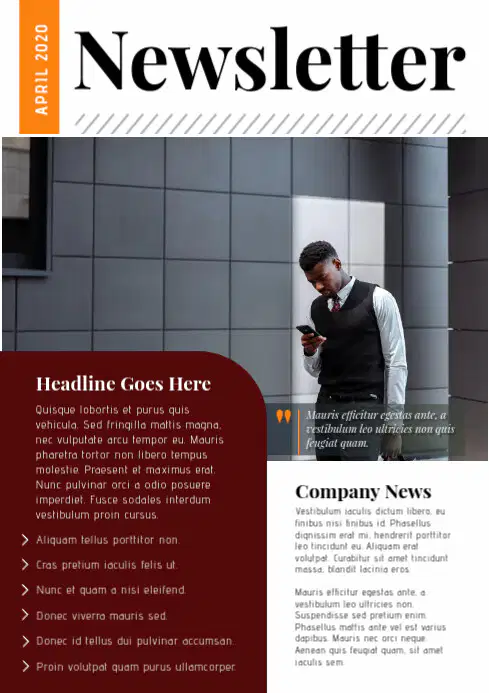
Harper is reviewing a document at work that looks like the one shown in the image labeled '14. Newsletter'. What type of business document is this?
Newsletter
News Release
MLA Style Report
Memo
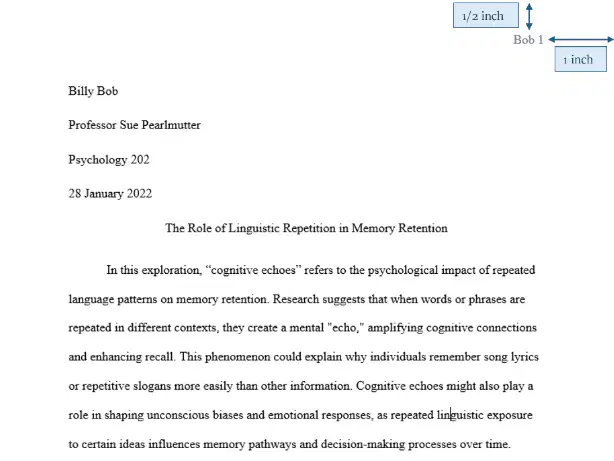
Rohan is preparing a formal document for his college psychology class, following specific formatting guidelines as shown in the image labeled '15. MLA Style Report'. What type of business document is Rohan creating?
Newsletter
News Release
MLA Style Report
Memo
Grace is preparing documents for her company's upcoming meeting using word processing software. She needs to create several types of business documents. Which of the following is NOT a type of business document she would commonly create with word processing software?
Memo
Newsletter
Invoice
MLA Style Report
Ethan is writing a report for his class using word processing software. He wants to make sure there are no spelling or grammar mistakes in his document. Which feature should Ethan use to help him check for spelling and grammar errors?
Spell Check
Mail Merge
Table of Contents
Track Changes
Grace is working on a report for her class using word processing software. She wants to make her document more engaging by adding images and tables. True or False? Grace can insert images and tables into her document using word processing software.
False
True
Charlotte is preparing a memo to share some updates with her colleagues at work. True or False? A memo is typically used for internal communication within a business.
False
True
Grace is a manager at her company and needs to let all employees know about a new company policy. Which document should she use to communicate this information?
Newsletter
Memo
Resume
MLA Style Report

