
Font size
 Worksheets
G9Bi Rev
Total questions: 45
Worksheet time: 29mins
Allows the user to interact with a computer using pictures or symbols
(a)
The general term used for the programs that control the computer.
(a)
The general term used for the physical components that make up the computer
(a)
Requires a user to type instructions to open software
(a)
Stands for Basic input/ Basic output.
(a)
a machine or application that carries out a task that requires some degree of intelligence
(a)
The ability to take the user out of the real-world environment into a virtual digital environment.
(a)
Usually refers to a general-purpose computer that is made up of a separate monitor, keyboard, mouse, and processor unit
Desktop Computer
Laptop
The user has to type in every instruction.
CLI
GUI
The user does not need to learn any of the instructions.
CLI
GUI
Each instruction has to be typed correctly.
CLI
GUI
The user uses icons and menus.
CLI
GUI
It loses its data when the computer is switched off.
RAM
ROM
HDD
It stores the start-up instructions of the computer.
RAM
ROM
HDD
It is classed as backing storage.
RAM
ROM
HDD
It temporarily stores the current work of the
current user.
RAM
ROM
HDD
Give the four categories of mobile computers
Laptops
Tablets
Phablets
Smartphone
Mouse
It temporarily stores the current work of the
current user.
Virtual reality (VR)
Augmented reality (AR)
Mixed reality (MR)
Fix Reality (FR)
examples of internal hardware devices
Motherboard
Keyboard
VR
examples of internal hardware devices
Motherboard
Keyboard
CPU
Click on the most appropriate type of the following devices
Numeric Keypads
Input
DDE
output
Click on the most appropriate type of the following devices
Touchpad
Input
DDE
output
Click on the most appropriate type of the following devices
Tracker ball
Input
DDE
output
Click on the most appropriate type of the following devices
Joysticks
Input
DDE
output
Click on the most appropriate type of the following devices
Driving wheels
Input
DDE
output
Click on the most appropriate type of the following devices
Touch screens
Input
DDE
output
Click on the most appropriate type of the following devices
Microphone
Input
DDE
output
Click on the most appropriate type of the following devices
Sensors
Input
DDE
output
Click on the most appropriate type of the following devices
Light Pens
Input
DDE
output
Click on the most appropriate type of the following devices
Magnetic Stripe reader
Input
DDE
output
Click on the most appropriate type of the following devices
Chip and PIN readers
Input
DDE
output
Click on the most appropriate type of the following devices
RFID
Input
DDE
output
Click on the most appropriate type of the following devices
OMR
Input
DDE
output
Click on the most appropriate type of the following devices
OCR
Input
DDE
output
Click on the most appropriate type of the following devices
QR
Input
DDE
output
Click on the most appropriate type of the following devices
Barcode readers
Input
DDE
output
Click on the most appropriate type of the following devices
CRT Monitor
Input
DDE
output
Click on the most appropriate type of the following devices
LED and LCD screens
Input
DDE
output
Click on the most appropriate type of the following devices
Multimedia projectors
Input
DDE
output
Click on the most appropriate type of the following devices
Dot Matrix printers
Input
DDE
output
Click on the most appropriate type of the following devices
Plotters
Input
DDE
output
Click on the most appropriate type of the following devices
3D printers
Input
DDE
output
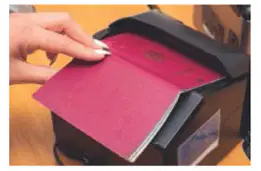
Write the name of following device
(a)
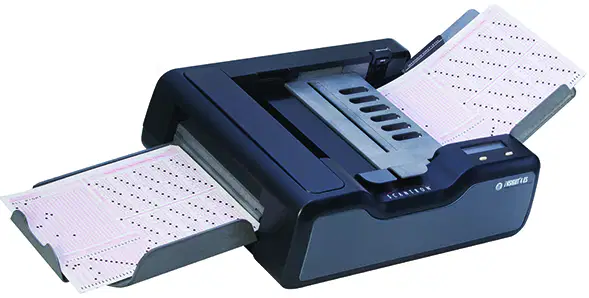
Write the name of following device
(a)
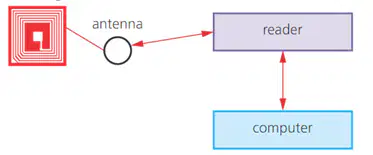
Write the name of following device
(a)

