
 Worksheets
INTRO TO CAD UNIT 1 ASSESSMENT
Total questions: 14
Worksheet time: 17mins
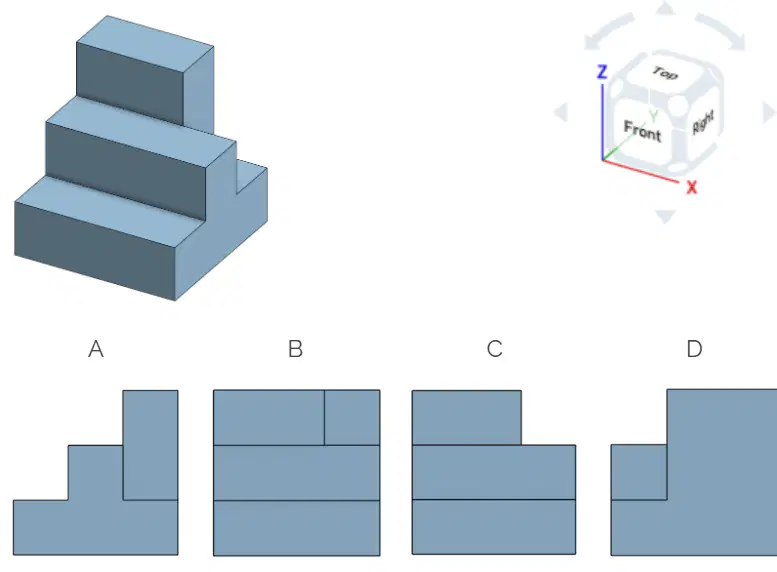
Choose the FRONT view of this object, assuming it is currently displayed in its default orientation according to the view cube.
A
B
C
D
What are the three typical orthographic views of a drawing?
Back, Right, Top
Front, Right, Orthographic
Top, Bottom, Right
Front, Right, Top
Left-clicking on the Onshape logo at the top left, (1 pt.)
Refreshes the page.
Creates a new document.
Opens a chat window with Onshape tech support.
Takes you back to your documents.
What does it mean to “pan” when viewing models in Onshape? (1 pt.)
Turn the model
Zoom into the model
Move the model without turning it
Cook the model on the stove
What does it mean to view something “normal?” (1 pt.)
Straight on at 90 degrees to the face
Parallel to the face
At an angle that shows three sides equally
With two eyes open instead of just one
How can you collaborate within an Onshape document? (1 pt.)
Use text comments
Use picture or markup comments
Use a tag to identify parts
All of the above
What does right-clicking and dragging around do to the model in Onshape? (1 pt.)
Pan
Rotate
Zoom
Flip
What is the shortcut key to deselect everything?
Esc
Space Bar
Ctrl-Z
Ctrl-V

Identify the features that could be used to model these parts. (a) (b) (c) (d)
What are the advantages of using a CAD platform like Onshape when designing a bicycle?

What is the purpose of making drawings like the drawing pictured at right?
To provide detailed specifications for manufacturing
To create artistic representations of objects
To simplify complex designs for children
To replace 3D models with 2D sketches
Where are the tabs located in an Onshape document? (1 pt.)
Top of the screen
In the toolbar at the top
Along the bottom of the window
In the panel to the right
Describe the difference between an assembly and a part studio. (3 pts.)
Use the picture to LABEL in the answers. (8 pts.)
Part Studio tab
Working model
Document name
Your account settings
Assembly tab
Click here to go to your documents
Feature List
View cube

