
 Worksheets
UNIT 2 Operating Systems and Networking Basics Quiz
Total questions: 44
Worksheet time: 22mins
What is an operating system?
A software that manages how hardware and software work together and communicate
A hardware component that stores data
A program used to create documents
A device that connects computers to the internet
Which of the following is NOT a function of an operating system?
Scheduling tasks
Running applications
Controlling input and output devices
Designing websites
What does a file extension do?
It compresses files to save space
It tells the computer what type of program is needed to open, view, print, or edit a file
It renames files automatically
It organizes files into folders
Which of the following is the correct file extension for an audio file?
.mp3
.mp4
.jpg
.xlsx
Why is it important to organize files?
To make files look neat
To find files quickly and efficiently
To increase the size of the files
To delete unnecessary files
What is the File Explorer used for?
Browsing the internet
Managing and organizing files
Editing images
Running applications
What is a network?
A group of computers connected together to share resources and information
A single computer used for personal tasks
A program that creates documents
A device that stores data
What is a server?
A computer dedicated to providing services and managing resources
A workstation connected to a network
A device used to store files
A program for editing documents
What are clients in a network?
The workstations connected to a network
The central computer managing the network
The software used to browse the internet
The devices used to store data
Client-server networks can handle large amounts of information. True or False?
True
False
What is a peer-to-peer network?
Computers that share resources but have a central server controlling them
Computers that share resources but also share equal control over resources
A network where only one computer is used
A network that only connects printers
Peer-to-peer networks are often used to connect two or more computers to a shared device like a _______ or a _______.
Printer, scanner
Monitor, keyboard
Router, modem
Speaker, microphone
What does LAN stand for?
Local area network
Large area network
Limited access network
Linked area network
What is an example of a LAN?
School computers, home computers
The Internet
A city-wide network
A satellite network
What does WAN stand for?
Wide area network
Wireless area network
World access network
Web area network
What is the difference between a LAN and a WAN?
A LAN covers a small area like a building, while a WAN covers a larger area like a city or state
A LAN is wireless, while a WAN is wired
A LAN is slower than a WAN
A LAN is used for personal use, while a WAN is used for businesses
What is the largest WAN in the world?
The Internet
A satellite network
A city-wide network
A school network
What is the device called that serves as a gateway to transfer data between networks?
A router
A printer
A scanner
A modem
Which of the following lists three ways computers can be networked together?
Wired, Wi-Fi, 3G/4G
Bluetooth, Infrared, Satellite
Ethernet, USB, NFC
Fiber, Bluetooth, GPS
What does IP address stand for, and what does it do?
Internet protocol address - helps a computer on a network find other computers on a network
Internal protocol address - identifies the computer's hardware
Internet provider address - connects to the Internet
International protocol address - secures the network
What is a domain name used for?
To represent an IP address
To connect to the Internet
To identify a computer's hardware
To secure a network
69.147.76.15 is an example of what?
An IP address
A domain name
A router
A network protocol
Lynnandperry.com is an example of what?
A domain name
An IP address
A router
A network protocol
What does 'Public Wi-Fi' refer to?
A private network that restricts access using passwords
A network that can be accessed by the general population, mainly using Wi-Fi
A device that transfers data between networks
A company that offers services for accessing the Internet
What does 'Wi-Fi' stand for and how does it work?
Wireless Fidelity; uses radio waves to pass information between two points
Wired Fidelity; uses cables to transfer data
Wireless Fidelity; uses satellites to transmit data
Wired Fidelity; uses radio waves to pass information between two points
Which device is responsible for transferring data between networks?
Modem
Router
Firewall
ISP
What is a 'Private Network'?
A network that can be accessed by the general population
A business or home network that restricts access using private passwords
A device that transfers data between networks
A company that offers services for accessing the Internet
What does ISP stand for?
Internet Service Provider
Internal Security Protocol
Internet Sharing Program
Information Service Platform
What is the function of a modem?
Protects your computer from hackers
Converts digital data over analog utility lines
Transfers data between networks
Encrypts data to prevent hacking
What is encryption used for?
To convert data into unreadable code to prevent unauthorized access
To share files and printers between computers
To transfer data between networks
To protect your computer from hackers
What is firmware?
Software embedded in hardware
A device that transfers data between networks
A network that can be accessed by the general population
Security software that protects your computer from hackers
What does HTTPS indicate about a web page?
The page is using encryption
The page is a private network
The page is a public Wi-Fi network
The page is a router
What is the purpose of a computer firewall?
To protect your computer from hackers
To convert data into unreadable code
To transfer data between networks
To share files and printers between computers
What does 'File and Printer Sharing' allow?
Allows one computer to share its files and printer with another computer
Protects your computer from hackers
Converts data into unreadable code
Transfers data between networks
How is accessing the Internet through a home network different from accessing it through public Wi-Fi?
Public Wi-Fi requires you to set up the local network.
Home networks are easier to access than public Wi-Fi.
Public Wi-Fi is already set up for you, while home networks require setup.
Home networks do not require passwords, unlike public Wi-Fi.
What is required to access a public Wi-Fi network using your computer or smart device?
A home router.
Being within range of the public Wi-Fi signal.
A wired connection to the modem.
A password provided by the ISP.
What is one advantage of using a private home network for accessing the Internet?
It is more convenient than public Wi-Fi.
It allows you to set up tight security on the router.
It is free to use and does not require setup.
It is accessible to everyone in the area.
What is one disadvantage of using a private home network for accessing the Internet?
It is less secure than public Wi-Fi.
It is not as convenient as public Wi-Fi.
It does not allow you to purchase custom Internet speeds.
It is always slower than public Wi-Fi.
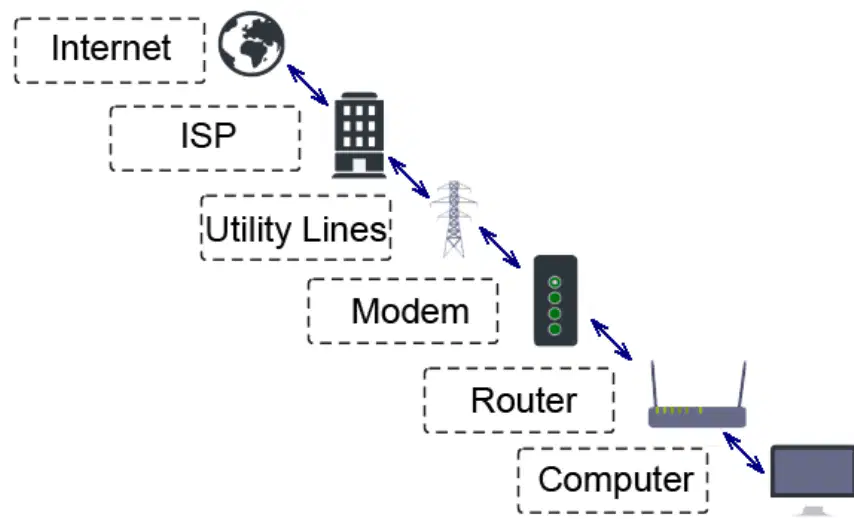
Label each item in the diagram provided.
Internet, ISP, Utility Lines, Modem, Router, Computer.
ISP, Modem, Router, Computer, Utility Lines, Internet.
Router, Computer, Internet, ISP, Modem, Utility Lines.
Modem, Router, ISP, Internet, Utility Lines, Computer.
What are five risks that should be avoided when using a home router?
Using the default password and router name, using the wrong encryption option, using outdated firmware, using an old router or a router supplied by your ISP, and using Internet accessible services.
Using a strong password, enabling encryption, updating firmware, using a new router, and disabling Internet accessible services.
Using a default password, enabling encryption, updating firmware, and using a router supplied by your ISP.
Using a strong password, disabling encryption, using outdated firmware, and using a new router.
What are some precautions you can take with your router to reduce the risks associated with accessing the Internet?
Change the default password and name, use the best encryption option available, install the latest firmware updates, replace an old router or one supplied by your ISP, and disable Internet accessible services on your router.
Use the default password, disable encryption, avoid firmware updates, and use an old router.
Change the default password, disable encryption, and avoid replacing your router.
Use the best encryption option, avoid firmware updates, and use a router supplied by your ISP.
What are the pros and cons of using public Wi-Fi to access the Internet?
Pros: Convenient when not at home and Free access. Cons: Can be slower and less reliable, more advertising, and less secure.
Pros: Secure and fast. Cons: Expensive and difficult to access.
Pros: Free access and secure. Cons: Slower and more reliable.
Pros: Convenient and fast. Cons: Less advertising and more secure.
What are four risks of using a public Wi-Fi network?
Harmful software attacks, snooping, Man-in-the-Middle Attacks, and rogue Public Wi-Fi.
Secure connections, fast speeds, and reliable access.
Free access, encrypted connections, and no risks.
No advertising, secure connections, and fast speeds.
What are some of the dos and don’ts of using public Wi-Fi?
Don’t: Enter personal information or auto-connect to public Wi-Fi networks. Do: Only visit encrypted sites, sign-off when done, install the latest software updates, use a firewall, and turn off file and printer sharing.
Don’t: Use encrypted sites or sign-off when done. Do: Enter personal information and auto-connect to public Wi-Fi networks.
Don’t: Install software updates or use a firewall. Do: Share files and printers on public Wi-Fi.
Don’t: Use a firewall or encrypted sites. Do: Auto-connect to public Wi-Fi networks.

