
NEW
Font size
 Worksheets
Background - Computer Laboratory Care and Maintenance
Total questions: 72
Worksheet time: 12mins
Which of the following is NOT mentioned as a challenge in the use of ICTs in the background text?
A) Computers malfunction
B) Laptops break down
C) Printers run out of ink
D) Servers go offline
According to the background, regularly scheduled preventive maintenance activities can help to ________ problems such as computers slowing down and networks becoming unavailable.
minimise
increase
ignore
cause
It is important for every user to have an idea on basic preventive maintenance because:
It helps prevent equipment breakdowns and ensures smooth operation.
It allows users to avoid all repairs forever.
It makes equipment more expensive to maintain.
It eliminates the need for professional technicians.
According to the learning outcomes, the learner should be able to:
Take care of computer systems
Maintain (service) computer systems
Troubleshoot malfunctioning computer systems
All of the above
The booting process of a computer system involves:
Loading the operating system into memory
Shutting down the computer
Running application software directly
Formatting the hard drive
Computer literacy means:
Having the knowledge and ability to use computers and technology efficiently.
Being able to write computer programs in any language.
Owning the latest computer hardware and software.
Using computers only for playing games.
System startup is:
the process of turning on a computer and loading the operating system
the process of shutting down a computer
the process of installing new software
the process of connecting to the internet
Application programs on a computer are opened by:
Clicking on their icons or selecting them from the Start menu
Turning off the computer
Unplugging the monitor
Pressing the Caps Lock key
What is booting?
The process of shutting down a computer
The process of starting or restarting a computer
The process of installing software
The process of updating a computer
Booting is a series of operations that start and set a computer for _____
use
storage
shutdown
printing
Why should users be conscious of the booting process as outlined in the previous topic on computer management?
To care for computers and maintain them in good working conditions.
To increase the speed of internet connection.
To improve the graphics quality of the monitor.
To reduce the size of computer files.
Improper shutdown of the computer can cause it to fail to boot successfully next time it is switched on.
True
False
Fill in the blank: Computer literacy is the ability to use _______ and related technology efficiently.
computers
books
vehicles
musical instruments
Fill in the blank: To be considered computer literate, one needs to possess skills such as _______ on the computer and log in, opening and creating folders and files.
turning
painting
cooking
dancing
Fill in the blank: To be considered computer literate, one needs to possess skills such as word _______.
processing
painting
singing
dancing
Fill in the blank: To be considered computer literate, one needs to possess skills such as _______ skills (used for calculations and data organization).
spreadsheets
presentation
graphics
word processing
Fill in the blank: To be considered computer literate, one needs to possess skills such as browser basics, including Internet and _______.
Television
Microwave
Refrigerator
Fill in the blank: To be considered computer literate, one needs to possess skills such as basic hardware _______.
terminology
installation
design
maintenance
Fill in the blank: To be considered computer literate, one needs to possess skills such as virus and _______ awareness.
security
gaming
design
animation
Fill in the blank: The ability to use programs such as Word Processors can aid one to make money or get hired for a higher-level job when other candidates do not have the skills. This is an example of _________.
Profitable Skills
Basic Needs
Physical Fitness
Personal Interests
Fill in the blank: Computer literacy skills may get one promoted to a higher position within your workplace or be put in a leadership position in which you teach others how to use computers or certain computer programs. This is an example of _________?
Leadership and Promotions
Technical Malfunction
Financial Planning
Physical Fitness
Fill in the blank: Knowing how to use a computer often allows you to get work done in a more organized, efficient and timely manner. This is an example of _________.
Work Performance
Physical Fitness
Social Interaction
Artistic Ability
Fill in the blank: Knowledge of how to access the Internet on a computer opens up different possibilities for you to communicate with coworkers or supervisors. This is an example of _________.
Communication
Mathematics
Cooking
Exercise
Fill in the blank: Computer technology is advancing faster, so if you are familiar well with computer skills now this will makes you ready for bright future. This is an example of _________
Being prepared For the Future
Ignoring technology
Living in the past
Avoiding computer skills
Not caring about the future
What is one advantage of computer literacy related to media usage?
Ability to use New Media; traditional media like newspapers and television are being replaced by computer based media such as social media, and online blogs which require computer literacy skills to use.
Improved handwriting skills for writing letters to newspapers.
Enhanced ability to repair television sets manually.
Increased access to printed magazines without internet.
Why are there more job opportunities for people with computer literacy skills?
Since almost all workplaces use computers, the need for people having computer skills is really in great demand.
Because computer skills are not needed in any workplace.
Because computers are rarely used in modern offices.
Because computer literacy is only important for students.
What does the term 'Digital divide' mean?
Digital divide is the inequality with regard to access to information and communication technologies (ICT).
Digital divide refers to the difference in digital device manufacturing processes.
Digital divide is the gap between different types of software applications.
Digital divide means the separation of analog and digital signals.
The lack of opportunities experienced by those with limited accessibility to technology, especially the Internet, is known as:
Computer literacy
Digital divide
New media
Job opportunities
Explain how the digital divide can result from differences in computer literacy levels between societies.
It can be a result of having some societies with very high levels of computer literacy and others lagging far behind.
It can be a result of all societies having the same level of computer literacy.
It can be a result of societies not using computers at all.
It can be a result of computer literacy being irrelevant to the digital divide.
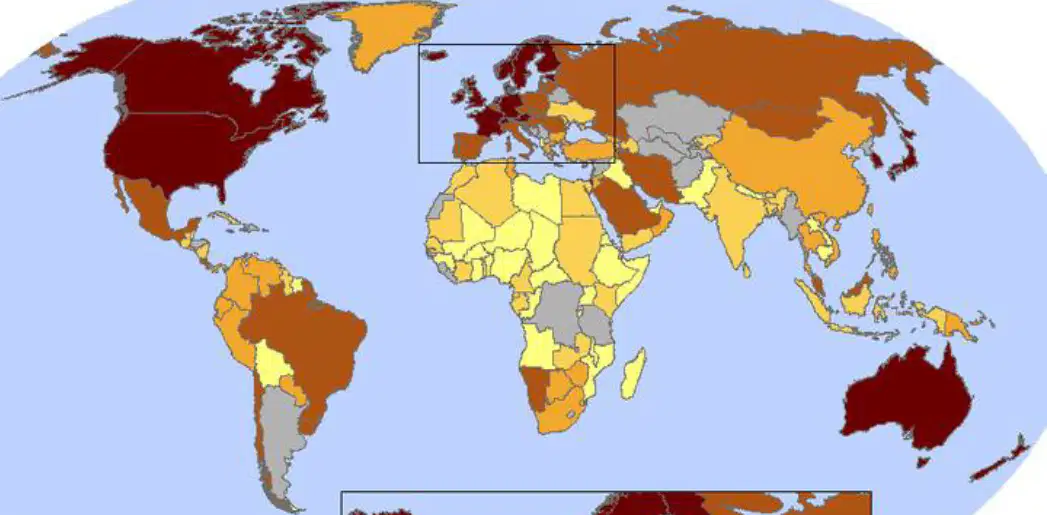
Refer to the map showing the global distribution of computers per 100 people. Which region has the highest number of computers per 100 people?
A) Africa
B) Western Europe
C) South America
D) Southeast Asia
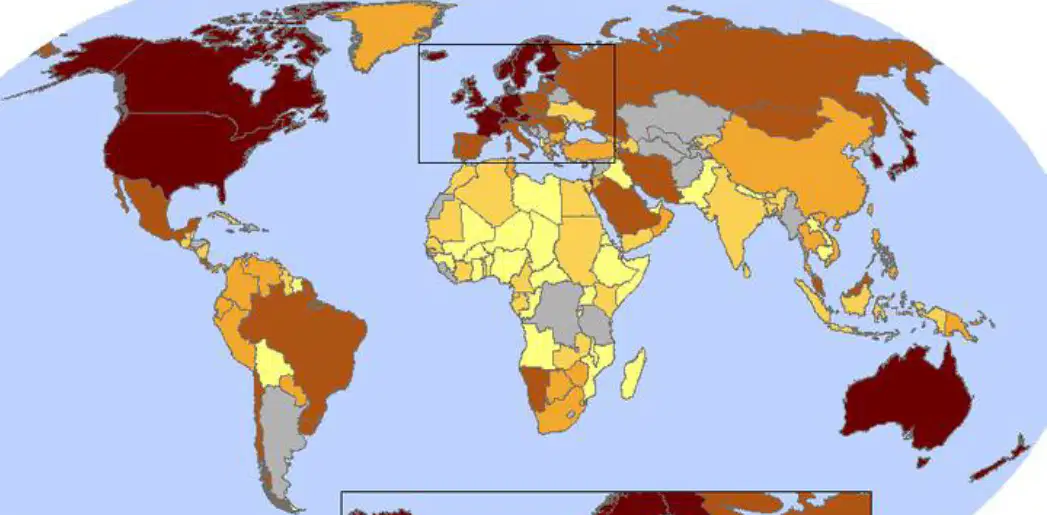
According to the map legend, what is the range of computers per 100 people for countries shown in dark brown?
49.74+
0-10
20-30
30-40
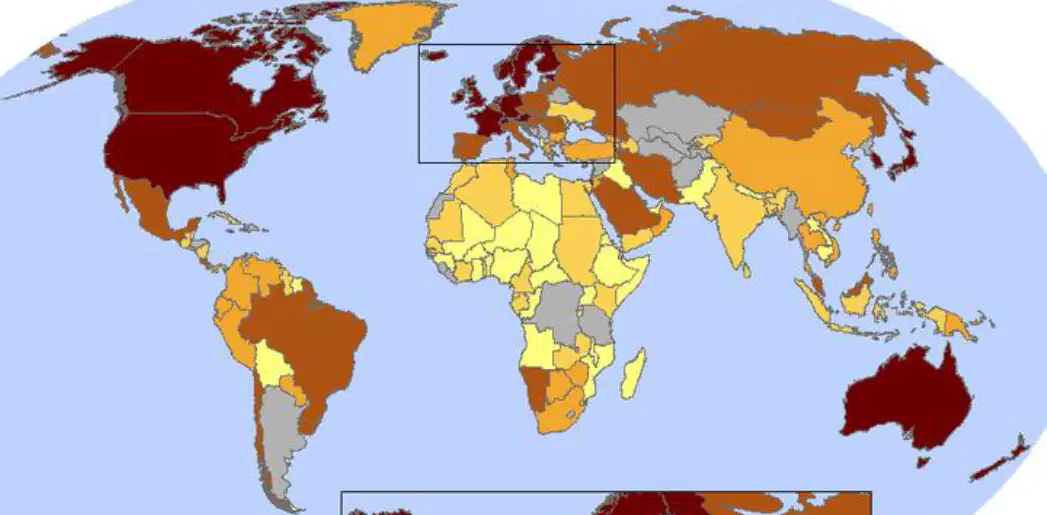
The map is an illustration of the digital divide at the country level.
True
False
On system startup, what may the operating system verify to ensure the person attempting to use the computer is a legitimate user?
Username
Password
Email address
Security question
After the user logs on, what is displayed on the screen?
BIOS settings
Desktop and icons
Command prompt
Task Manager
The operating system executes programs in the ______ folder, which contains a list of programs that open automatically when you boot the computer.
Startup
Documents
Downloads
System32
Microsoft Windows users can see each of the programs that startup each time their computer boots by using which utility?
Task Manager
Control Panel
msconfig utility
Device Manager
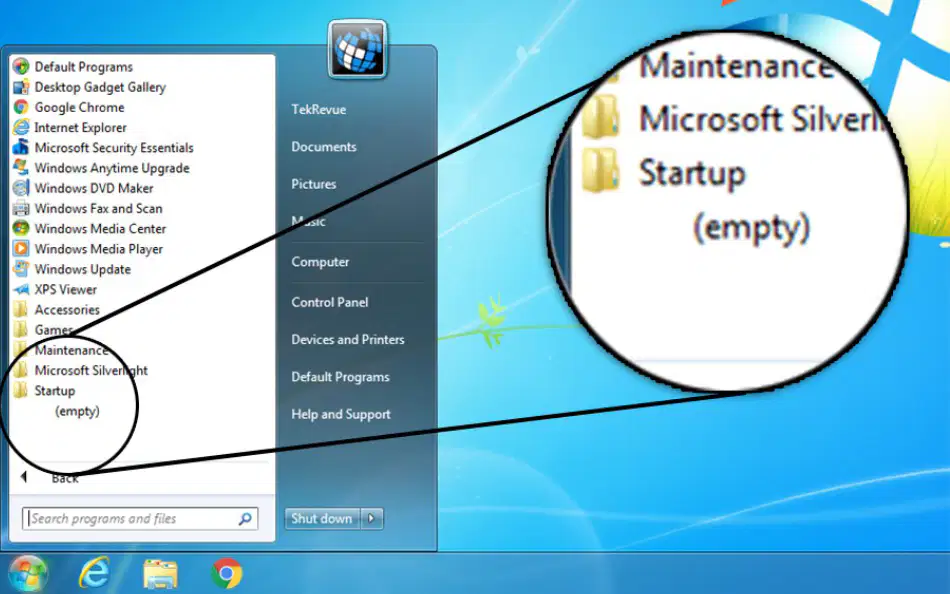
What does the Startup folder on Windows OS contain?
System files
Shortcuts of applications that start when Windows starts
User documents
Internet history

On Windows 7, you could easily access the startup folder from _________?
Start Menu > Startup
Control Panel > System
My Computer > C Drive
Taskbar > Properties
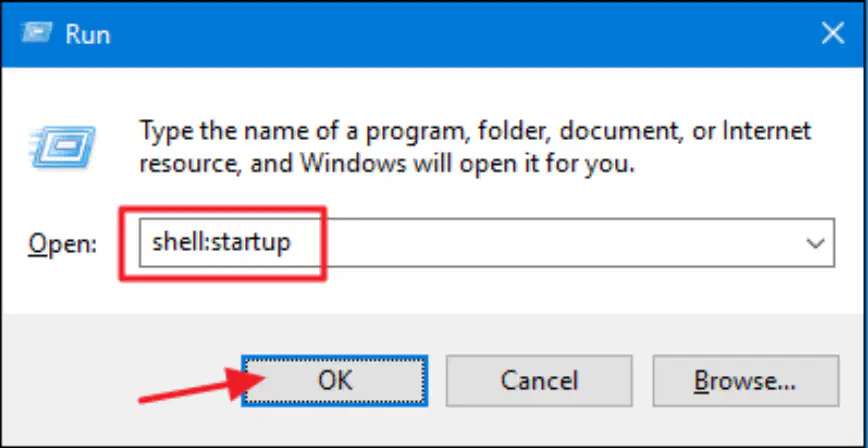
To open the 'Startup' folder the easy way, what command do you type in the 'Run' box after pressing Windows+R?
shell:startup
startup:folder
open:startup
run:startup
To manage all startup programs, including those not listed in the startup folder, what command do you type in the 'Run' box after pressing Windows+R?
msconfig
services.msc
taskmgr
regedit
What is an application?
An application is a computer program designed to help people perform a certain type of work.
An application is a hardware device used for networking.
An application is a type of operating system.
An application is a programming language.
Which of the following is NOT an example of an application?
Word processing program
Spreadsheet
Media player
Printer
Which of the following is a method to open or launch a program?
Double-click a program shortcut icon on the desktop
Click an item on the taskbar
Choose Start→All Programs and click the program name
All of the above
You can use the Start menu’s search feature to launch a program.
True
False

On Windows 7, what key combination can you use to quickly launch the corresponding application pinned to your taskbar?
Ctrl + number
Alt + number
Windows key + number
Shift + number

For example, WinKey+1 launches the ______ application pinned to your taskbar.
first
last
second
third
You can use the ______ feature in the Start menu to launch a program with just a few key presses.
search
shutdown
settings
help
According to the instructions, how can you assign a custom keyboard shortcut to an application?
By right-clicking the application shortcut and selecting Properties
By double-clicking the application
By dragging the application to the taskbar
By renaming the application
What is the keyboard shortcut to open the Run dialog to quickly launch applications?
WinKey+R
Ctrl+R
Alt+F4
WinKey+E
In the Run dialog, what should you type to launch a program?
The name of the program’s .exe file
The program’s folder name
The program’s shortcut key
The program’s installation date
What is one area of laboratory security mentioned in the objectives? Fill in the blank: ________ security.
physical
chemical
digital
biological
Which of the following is used to monitor activities in a laboratory?
First aid boxes
Security cameras
Fire extinguisher
Air conditioning
Fill in the blank: A ________ is used in the laboratory to provide medical assistance in case of injuries.
first aid box
test tube
bunsen burner
measuring cylinder
Which of the following is important for electric power security in a laboratory?
Fire extinguisher
Security cameras
Proper wiring and circuit breakers
Air conditioning
Fill in the blank: A ________ is used to put out small fires in the laboratory.
fire extinguisher
test tube
bunsen burner
beaker
Which of the following is NOT mentioned as an area of laboratory security?
Physical security
Electric power security
Laboratory animals
Air conditioning
What is the objective 3.2.2 about?
Safe use of the computer laboratory.
History of computers.
Types of programming languages.
Famous computer scientists.
What is the objective 3.2.3 about?
Preparing laboratory rules and regulations.
Conducting chemical experiments.
Analyzing scientific data.
Writing laboratory reports.
Fill in the blank: A computer laboratory is a room that is specially designed and prepared to provide a safe and ______ environment for using computer systems.
conducive
hostile
chaotic
dangerous

What is shown in the image?
A library
A computer lab
A cafeteria
A gymnasium
Fill in the blank: One factor to consider when setting up a computer laboratory is the security of computers, programs, and other resources from _______.
theft
dust
heat
noise
Fill in the blank: When setting up a computer laboratory, it is important to consider the reliability and stability of the _______ source.
power
internet
water
food
Fill in the blank: The number of computers to be installed and the available _______ space is a factor to consider when setting up a computer laboratory.
floor
wall
ceiling
desk
Fill in the blank: The maximum number of _______ that the computer laboratory can accommodate is an important consideration.
users
computers
tables
chairs
Fill in the blank: Safety of users, such as eye strains, emissions, and _______ problems, should be considered when setting up a computer laboratory.
back
hair
vision
hearing
Fill in the blank: Temperature ranges in the area and _______ in the atmosphere are factors to consider when setting up a computer laboratory.
Humidity
Pressure
Wind Speed
Sunlight
Fill in the blank: The amount of _______ in the environment should be considered when setting up a computer laboratory.
dust
light
noise
humidity
Fill in the blank: Protection against _______ and fire outbreaks is a factor to consider when setting up a computer laboratory.
lightening
dust
noise
humidity
Organizations, libraries, and schools running public computer labs face a variety of complex computer security challenges. What is the main purpose of taking security measures in these institutions?
To ensure the safety of the equipment, software, data, and users
To increase the number of computers
To reduce electricity usage
To improve internet speed
Which of the following is a physical security measure for a computer laboratory?
Installing antivirus software
Burglar proofing to avoid unauthorized access to the computer room
Updating operating systems
Backing up data
Fit strong locks on doors, windows, and other entry points. Security should be good around the computer laboratory to avoid _______.
thefts
dust
noise
heat

What is the purpose of these physical security measures in a computer laboratory?
To protect equipment and data from theft or unauthorized access
To improve internet speed in the laboratory
To increase the number of computers in the laboratory
To enhance the laboratory's aesthetic appearance

