
 Worksheets
NAVIGATING MS WORD 365
Total questions: 10
Worksheet time: 5mins
Arjun and Aria are working on a project in Microsoft Word. Can you help them by telling what is the shortcut key to make text bold?
Ctrl + I
Ctrl + B
Ctrl + U
Ctrl + Z
Samuel and Isla are working on a project in Microsoft Word. Can you help them figure out which tab they should use to change the page orientation?
Home
Insert
Page Layout
Review
Hey there! Abigail, Mia, and Aria are working on a document. Can you help them out? Which option would you use to add a header to your document?
Home tab
Insert tab
Page Layout tab
References tab
Luna and Grace are working on a school project. They need to change the margins of their document. Which option should they use?
Home tab
Insert tab
Page Layout tab
References tab

File
The icon that looks like a eraser
A list of commands
A collection of related data stored on a lasting medium such as a hard disk, a CD, or a diskette.
Collective data
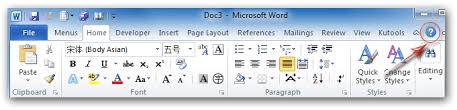
The Ribbon
The process of creating a file of what currently is in the computer to use commands
Designed to help you quickly find the commands that you need to complete a task. A horizontal bar below the title bar that contains the names of tabs and drop down menus.
Determines if the next word will fit on the end of the current line or if it must go on the next line.
located at the top of the Word document

Rulers
Located at the top and left side of the document window and contains markers used for formatting text.
Symbols that do not appear on paper when printed.
Used to scroll a document going up, down and side to side.
Icons

Used to scroll a document screen up, down, and side to side
File
Scroll bars
Menu
Title bar
ICON
AN INTERACTIVE TOOL THAT ACTIVATES ITS FEATURES WHEN CLICKED.
ALLOW YOU TO SELECT A COMMAND FROM A LIST OF OPTIONS.
ON SCREEN READING OR PRINTING.
INDICATES THE POSITION ON THE PAGE WHERE TEXT AND OCNTENT ARE PLACED.
QUICK ACCESS TOOLBAR
ALLOWS USERS TO AUTOMATICALLY SAVE
GROUPS OF RELATED TOOLS WITH A TAB SET
COMMONLY USED COMMANDS
ALLOW YOU TO REVIEW RESPONDING COMMENTS

